


 視頻轉換大師
 屏幕錄影大師
 影片修復
影片修復
 安全下載
安全下載如何在計算機上將MP4轉換為VOB的指南
MP4 is a multimedia format for storing audio and video files, which is being widely used for video downloading and streaming. Many of us may tend to watch MP4 videos on DVD. However, MP4 files can’t be played on DVD. Thus, you need to convert the MP4 video to VOB, known as a DVD video format, for burning a playable DVD disc. Thus, a MP4 to VOB converter program is needed. This article will explain what an MP4 or VOB video file is, and how to convert MP4 to VOB for better playback on your devices.

第1部分。什麼是MP4和VOB
擴展名為.mp4的文件是MPEG-4 Video文件的縮寫。 MPEG-4 Part 12最初於2001年開發,它基於QuickTime文件格式(.MOV)。當前版本是MPEG-4 Part 14,於2003年發布。MP4是一種數字多媒體容器格式,可以包含一堆數據,包括視頻,音頻和字幕。
VOB被稱為視頻對象文件,用於播放DVD光盤中的視頻。通常在擴展名為.vob的VIDEO_TS文件夾中找到該文件。 VOB格式是DVD視頻媒體中的容器格式,可以將數字視頻和音頻,字幕,DVD菜單和其他導航內容一起存儲為流形式。
第2部分。使用免費的在線應用程序
The FVC Free Online Video Converter is a very handy program that you can use to convert your MP4 files to VOB, as well as to a variety of other formats with high quality for free online. And it also provides multiple options to customize your video file before converting. You can adjust the video bitrate, choose the frame rate, as well as upscale the resolution without any hassle.
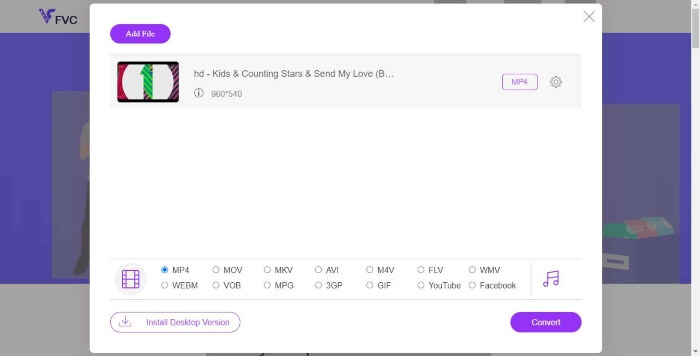
Step 1. Visit https://www.free-videoconverter.net/free-online-video-converter/. Click the Add Files to Convert button to download and install the launcher. Once activating the launcher, upload your MP4 files you want to convert.
Download the Desktop Version to convert files in batch.

Step 2. After adding your MP4 videos to the program, choose the VOB format from the video output format section.
Step 3. Then, click the Convert button to convert MP4 files to VOB format
第3部分。使用免費和專業的桌面轉換器
您可以做的其他事情是使用台式機轉換器將MP4文件轉換為VOB,這將使轉換過程更加平滑,而不必擔心Internet連接問題。在這裡,我們想與您分享兩個免費的視頻轉換器,以幫助您有效地將MP4文件轉換為VOB。
選項1.使用免費視頻轉換器將MP4轉換為VOB
Free Video Converter是最好的免費MP4到VOB轉換器,使您可以在簡單的步驟中將MP4轉換為VOB。它支持批量轉換以節省您的時間,您還可以在輕鬆轉換之前使用它來編輯視頻。讓我們按照以下步驟將MP4轉換為VOB。
Free DownloadFor Windows 7 or laterSecure Download
Free DownloadFor MacOS 10.7 or laterSecure Download
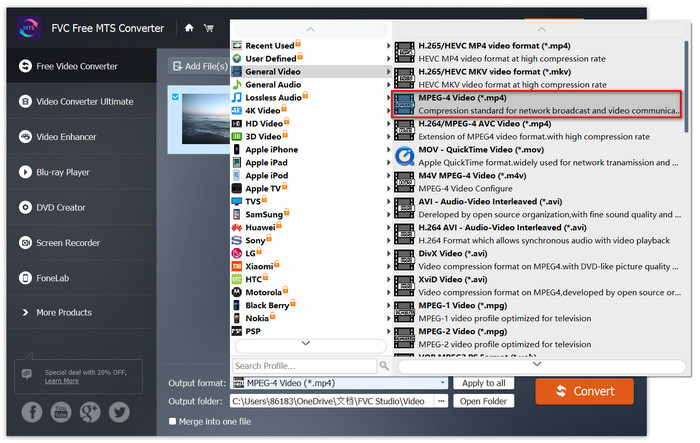
Step 1. Click the download button above to quickly install and launch this Free MP4 to VOB Converter on your Windows PC. On the main interface, click the Add File button from the menu bar to load the MP4 file. You are allowed to convert several MP4 files simultaneously.

Step 2. After uploading, click Profile and choose VOB as the target output format. Then, choose a destination folder by clicking Browse.
Step 3. At last, click the Convert button to convert MP4 to DVD VOB file.
選項2.使用HandBrake將MP4轉換為VOB
HandBrake是一個免費工具,可將視頻從幾乎任何格式轉換為各種流行的視頻或音頻格式。它具有輕鬆將MP4轉換為DVD VOB的功能。您可以按照以下步驟將MP4更改為VOB。
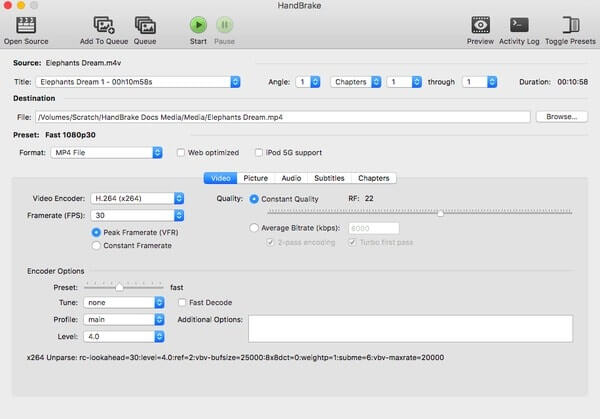
Step 1. Free download and install HandBrake for your Windows or Mac and then launch it.
Step 2. After launching the program, click Open Source on the top left corner and then choose the MP4 file from your computer.
Step 3. Go to the Format option, and select VOB as the output format. You can also adjust output video quality, frame rate, video encoder, and other options.
Step 4. Next, click the Start to change MP4 video to VOB for free.
MP4 與 VOB
第4部分。MP4到VOB轉換的常見問題解答
在Windows上播放VOB文件是什麼?
可以通過大多數現代媒體播放器在計算機上打開VOB文件。例如,VLC Media Player和Windows Media Player 12或更高版本可以播放VOB文件。
如何打開MP4文件?
由於MP4是視頻的標准文件格式,因此幾乎所有視頻播放器都支持播放MP4文件。 Android,iPhone,Windows和Mac本身就支持MP4播放,而無需安裝任何第三方軟件。
什麼是最好的MP4播放器?
Here’s a review of top software for MP4 video playing: Top MP4 Player Software
如何從MP4文件中提取音頻?
You can use Free MP3 Converter to help you extract audio track from a MP4 video. This tool is totally free and you don’t even to download any software to your computer.
結論
要將MP4文件轉換為VOB格式,可以使用在線轉換器輕鬆進行轉換。但是,由於Internet問題,轉換速度可能會受到一些限制。因此,如果您要快速轉換大型MP4文件,則更穩定的桌面視頻轉換器將是您的理想選擇。
-
 在Windows / Mac /在線上將VOB文件轉換為MP4的3種免費方法
 本文介紹了3個免費的VOB到MP4轉換器以及相關的教程。您可以輕鬆地在Windows / Mac /在線上免費免費將VOB轉換為MP4文件。
-
 如何在Windows / Mac /在線上免費將AVCHD轉換為MP4視頻
 有5種簡單的方法可以將AVCHD轉換為計算機上的MP4視頻。您可以在這里通過任何轉換器將AVCHD視頻批量轉換為MP4,而不會損失質量。
-
 在Windows / Mac / Online上將MPEG 1/2/4轉換為MP4格式的3種方法
 閱讀並獲取3種免費方法,將MPEG轉換為計算機上的MP4文件。您可以使用在線和桌面視頻轉換器輕鬆地將MPEG轉換為MP4格式。

