


 視頻轉換大師
 屏幕錄影大師
 影片修復
影片修復如何在 Mac 上免費在線和離線將 MOV 轉換為 MKV
Are you having a hard time playing MOV files on VLC Media Player? VLC Media Player hardly recognizes MOV files. Therefore, you need to convert your MOV file that VLC Media Player can play natively, which is the MKV file. Fortunately, we found the best and easiest converters to convert your MOV file to MKV file format. If you want to know more about converting MOV to MKV for free, read this article for more details.

第 1 部分。在 Mac 上使用 FVC Video Converter Ultimate 將 MOV 轉換為 MKV
FVC Video Converter Ultimate is an offline converter available on mac. This file converter is one of the top-notching converters available on the web. It allows you to convert numerous file-formats, including MOV, MKV, AVI, MP4, M4V, WMV, VOB, and 1000+ more. And if you want to make a 3D video, this converter has that feature. Moreover, this tool offers an ultra-fast conversion that can convert MOV to MKV on mac as quickly as lightning.
Here are the steps on converting your MOV file to MKV using FVC Video Converter Ultimate:
Step 1. On your Mac device, download the FVC Video Converter Ultimate by clicking the Download button below for macOS. And then open the application.
Step 2. After opening the application, click the Add Files button or the + sign button. Then your computer files will appear, where you will select your MOV file. And then, your file will be uploaded on the software's main interface.
下載桌面版以批次轉換檔案。
Step 3. After uploading your MOV file, click the Convert All to button to select your output format. Then click the MKV format.
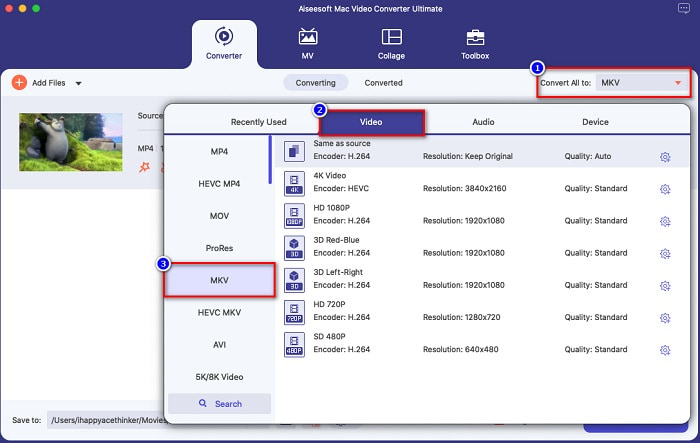
Step 4. To finish, click the Convert All button, so that your MOV to MKV file will start to convert. Then wait for a few seconds, and that's it!
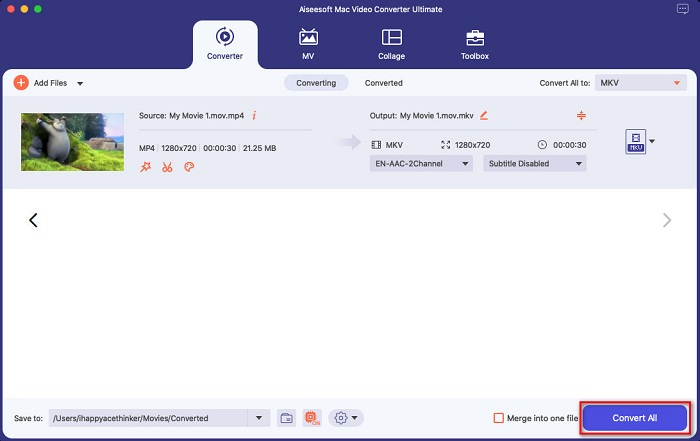
按照這些簡單易行的步驟,您可以在 Mac 上毫不費力地將 MOV 轉換為 MKV。
優點
- 可以轉換 4K、1080P 和 720P 視頻格式。
- 提供批量轉換以將多個文件合併為一個,
- 支持網絡上可用的 1000 多種文件格式。
- 它具有編輯、增強和壓縮文件的功能。
缺點
- 要使用它的特殊功能,您必須先購買它。
第 2 部分。使用在線和免費軟件工具將 MOV 轉換為 MKV
使用 FVC 免費在線視頻轉換器 [在線]
When you search MOV to MKV converters on your browser, you will see a list of online converters on your Search Result Page. Here we introduce you to the best MOV to MKV converter free, FVC Free Online Video Converter. This online converter can convert many standard file formats available on the internet. It is also easy to use so that beginners will not have a hard time using it. However, because it is an internet-reliant tool, you may sometimes experience a slow conversion process. Nevertheless, it is proven to be one of the best online and convenient converters found on the web.
How to use FVC Free Online Video Converter:
Step 1. Search FVC Free Online Video Converter on your browser, or click this link to go directly to its web page.
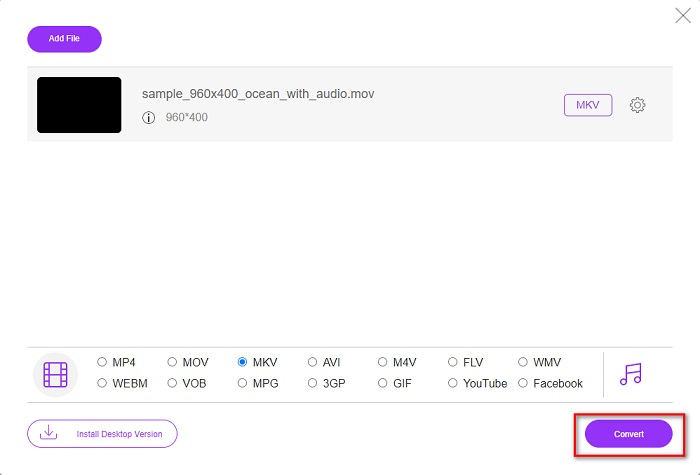
Step 2. Launch the software application, then click the Add Files to Convert button. And then, your desktop folders will appear, where you will select your MOV file.
下載桌面版以批次轉換檔案。
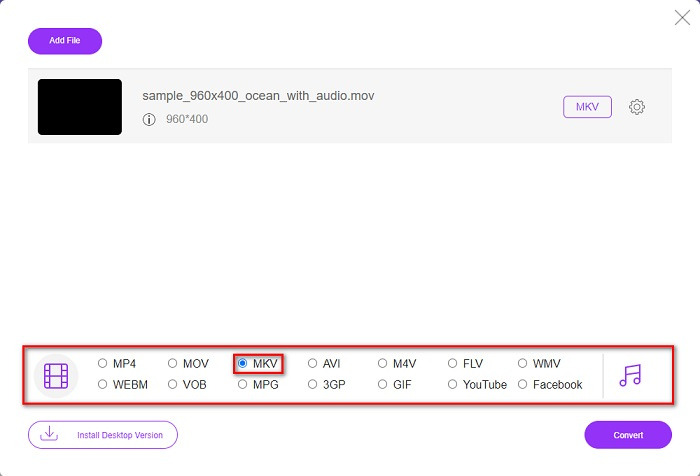
Step 3. After your file is uploaded, choose your output format located below the software’s second interface. Click the MKV file format.
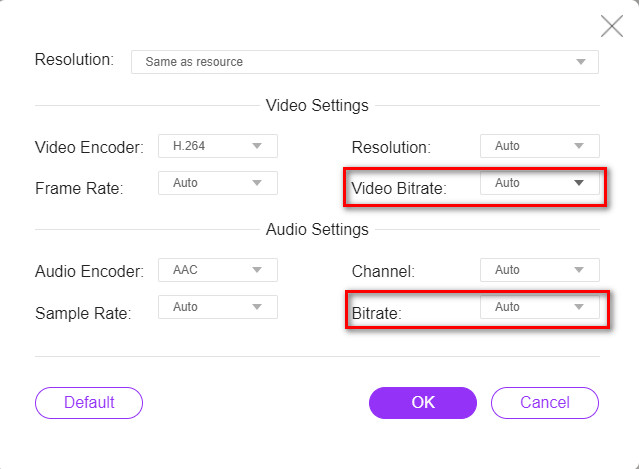
Optional. If you want to change your file's video and audio bitrate, click the Setting button beside the output file format box. Then change your video or audio bitrate into what you want. Then click the OK button to save changes.
Step 4. To start converting your MOV to an MKV file, click the Convert button. And then wait for your conversion process to finish.
使用手剎 [免費軟件]
If you want to convert MOV to MKV using freeware, this tool might be the solution for you. HandBrake is a freeware converter that allows you to convert almost all standard file formats to MKV, MP4, and WebM. This converter's amazing because you can do a batch scan of your MOV files. However, it has a hard-to-use interface, so you may have to spend a little time identifying its controls and features.
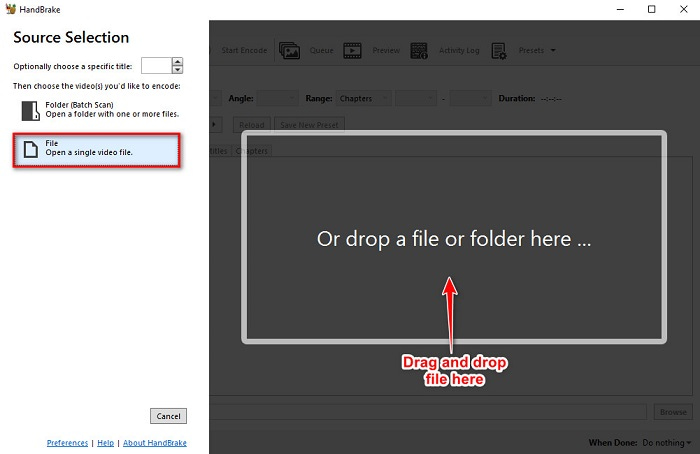
Step 1. Download HandBrake free by searching it on your browser, and then open the app. Click the File button to upload your MOV file. Or you can drag and drop your file on the rectangular box.
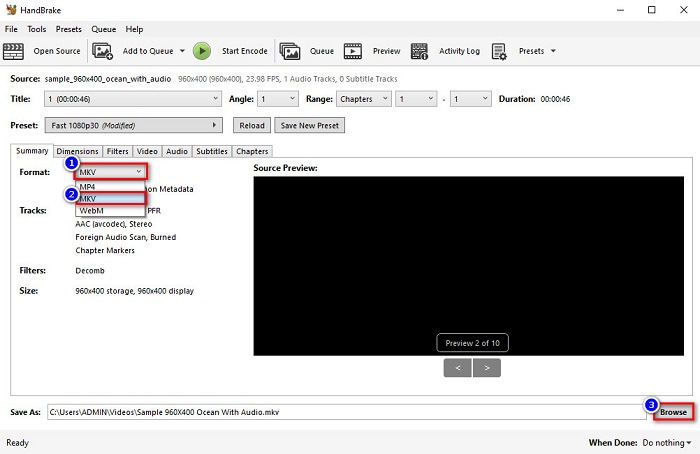
Step 2. Then, select your MOV file as your output format on the drop-down button. And then, click the Browse button to choose your output file location.
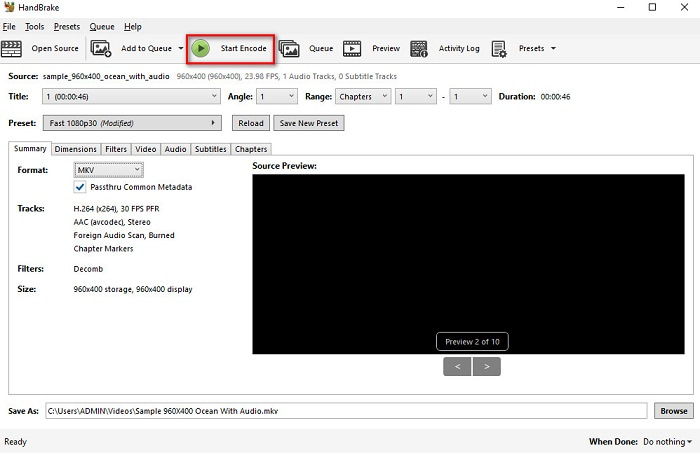
Step 3. And finally, click the Start Encode button so that your MOV file will be changed to MKV.
這就是您如何使用在線和免費軟件轉換器將 MOV 轉換為 MKV。
第 3 部分。 MOV 和 MKV 之間的差異
MOV file is a multimedia format developed by Apple and is one of the most common file formats found on every Apple device or software. Moreover, this file can store movies, short video clips, and even TV shows. The QuickTime media player widely supports this type of file format. Furthermore, this file has one of the highest quality in file size. If your QuickTime player can't open MOV videos, click here to find solutions.
另一方面,MKV 文件或 Matroska 文件是存儲音頻、視頻和字幕軌道數據的多媒體文件容器。這種類型的文件不會過時,因為它是面向未來的。此外,這種格式可以處理多種語言的多個字幕流和音軌。
MOV 與 MKV
第 4 部分。有關將 MOV 轉換為 MKV 的常見問題解答
您可以使用 QuickTime 播放器播放 MKV 文件嗎?
Unfortunately, you cannot play an MKV file in QuickTime media players because QuickTime does not support MKV files. But if you want to play an MKV file on your Mac, you can convert MKV to MOV. Click this link to know more about converting MKV to MOV.
您可以無損地將 MOV 轉換為 MKV 嗎?
Definitely yes. Using FVC Video Converter Ultimate can convert your MOV to MKV file losslessly.
MOV比MKV好嗎?
如果您是 mac 用戶,您會發現 MOV 比 MKV 文件更好,因為 MOV 是 macOS 廣泛支持的文件。但是,如果您是 Windows 用戶,MKV 文件可能是您更好的選擇。
結論
因此,如果您想將 MOV 文件轉換為 MKV,請使用上述方法。所有 MOV 到 MKV 的免費轉換器都具有彼此不同的特點。此外,如果您正在尋找具有許多出色功能的轉換器,可以進行批量轉換、編輯您的 MOV 視頻以及其他轉換器無法提供的許多令人驚嘆的功能,請使用 FVC Video Converter Ultimate。立即免費下載。
-
 2 在 Windows/Mac 上將 MOV 文件轉換為 FLV 的簡單方法
 如何免費將 MOV 轉換為 FLV?這裡有最好的桌面和在線視頻轉換器,可在幾秒鐘內將您的 MOV 文件轉換為 FLV,而無需支付一分錢。
-
 MOV 轉 GIF – 如何在 Mac、PC 和在線免費將 MOV 轉換為動畫 GIF
 什麼是 GIF?如何將視頻轉換為 GIF?如何在線將 MOV 更改為動畫 GIF?這篇文章講述了在 Mac/PC 上在線將 MOV 轉換為 GIF 的 3 種方法。
-
 在 PC 和 Mac 上將 MOV 轉換為 AVI 的 4 種有效方法 [2021]
 您想知道網絡上最好的 MOV 到 AVI 轉換器是什麼嗎?以及為什麼 FVC Ultimate Video Converter 可能適合您。

