視頻轉換大師 大盒

多合一視訊工具箱,能夠以超快的速度將視訊/音訊轉換為 1000 多種格式。

免費下載

Login Security安全下載

免費下載

Login Security安全下載

如何以最簡單的方式在桌面上編輯 MKV 元數據的教程

MKV is an extension that is very popular for the Matroska multimedia container formats. What makes the MKV popular over other formats? Many users thought that the MKV is a video compression used on audio and video, which isn't. This format became popular because of its flexibility in adapting codecs for audio, video, and subtitle while storing them on a single file. With these features, the format became future-proof, which implies that the file format will never be outdated, even the metadata stored here. So, if you want to add, remove, or edit the metadata on your MKV file, you must continue reading this article and learn how to edit MKV metadata more quickly.

更改 MKV 文件的標題

第 1 部分。 如何使用桌面上的 3 個最佳軟件編輯 MKV 文件的元數據

FVC Video Converter Ultimate – Windows 和 Mac 上最強大的 MKV 標籤編輯器

FVC Video Converter Ultimate is the best MKV metadata editor you can download on both operating systems to finish the job like a pro. The ultimate software can handle the MKV file easily and open them to change their metadata if you want it to be changed. With its wide video and audio format support, uploading any media format like the MKV has never been a pain in the butt. While using the software, you will experience easy progress on learning how to grasp the whole idea of using it. Do you want to use the tool but don't have any tutorial you can depend on? Fortunately, the information we provided below will help you take the task like a pro; read the details below to know how to change the title of the MKV file in less than a minute.

Step 1. Firstly, clicking the download button will immediately download the software on your desktop and choose which software you are currently using. Then, install it on your desktop and launch it to add the metadata on your MKV files.

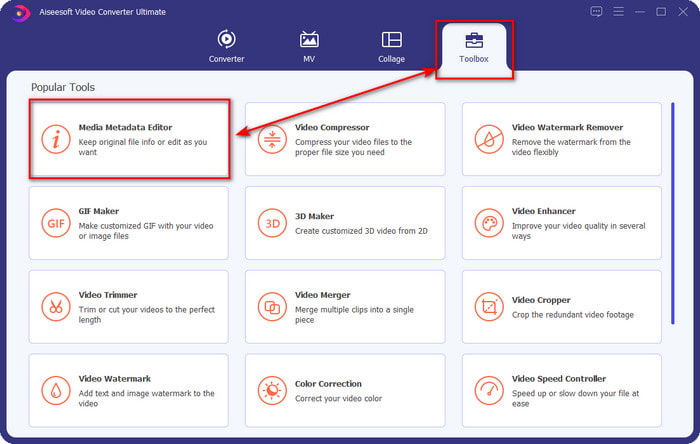
Step 2. Now that you've launched the tool, you must go to the Toolbox section and look for the Media Metadata Editor on the setlist below.

添加 MKV 文件

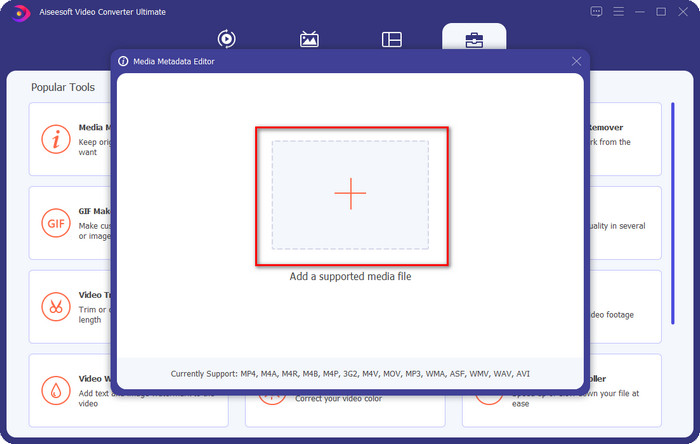
Step 3. To add the MKV file, click the + button that will show on your screen, find the .mkv file on the folder and click Open to proceed to the next step.

啟動元數據編輯器

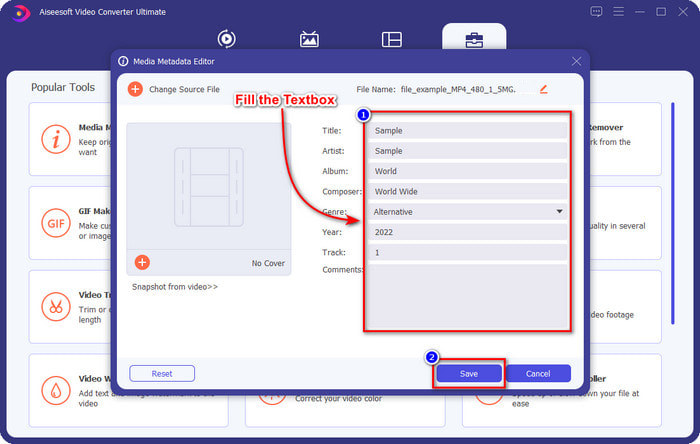
Step 4. In this part, you can now add the metadata you need on your MKV, fill them in according to your wants, and click Save if you've done it all and are ready to apply this. With that, you have added the tags on your MKV file to determine what's in the file quickly.

類型元數據

VLC 媒體播放器 – 免費 MKV 元數據編輯器

元數據編輯器

VLC Media Player can play and edit the tags of your MKV easily. This tool is open-source, so there is no need to worry if you download the software on your desktop because you can avail of the tool's full potential for free, but you can donate if you want. Although the tool is not as good as the other metadata editor on this list, it is still considered a dependable tool you can use on your device. In addition to that, you are free to add the basic information on your MKV file, whether the author's name, title, artist, album, etc. Follow the steps and learn how to edit MKV metadata using the media player as a metadata editor.

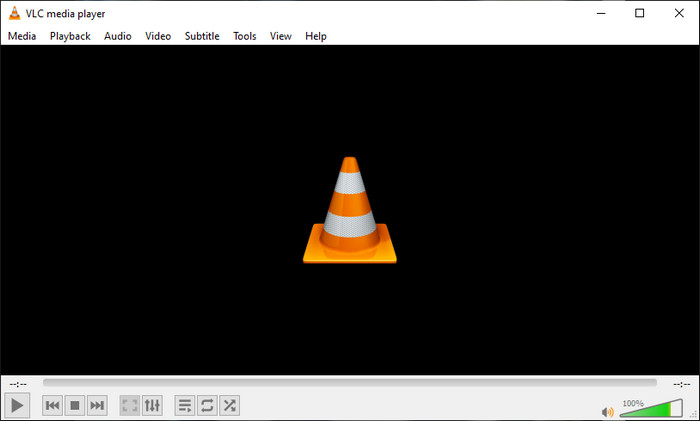
Step 1. Download, then open the VLC on your desktop.

Step 2. Go to Tools and click Media Information. If you want an easier way, you can use a hotkey instead by pressing CTRL + I. No matter what way you choose, their functions are the same.

Step 3. Type the information you need, and click Close to save the metadata automatically.

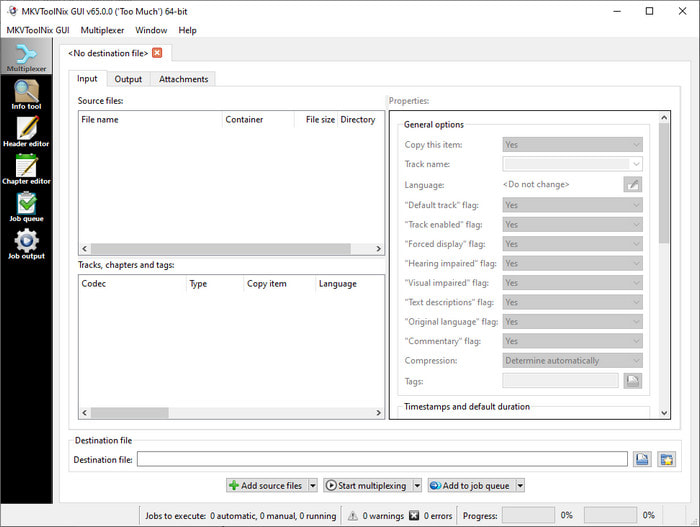
MKVToolNix GUI – 專用 MKV 標籤編輯器

MKV 工具 NX

MKVToolNix GUI is a dedicated MKV file solution; although you can upload other formats, the software will change its format to MKV. The tool became known as a one-stop solution regarding MKV as it supports a toolset, which means you can have functions other than metadata editing. With its straightforward GUI, there isn't much to learn on how to use it; basically, you can learn how to use it within a few minutes. Even though the tool is straightforward, some users who already use an on-point metadata editor compared its GUI to others and said that the tool is not intuitive enough for them. After everything they said, it is still no doubt that the tool can teach us how to change the title of the MKV file.

Step 1. Download the software on your desktop, open it, click Add Source File, and locate the MKV file on the folder.

Step 2. Press Output and change the metadata here.

Step 3. If you've done all of these, you may now save it by clicking the Start Multiplexing.

第 2 部分。關於 MKV 元數據編輯器的常見問題解答

我可以將 VOB 轉換為 MKV 嗎?

You can easily convert VOB to MKV by clicking this link, and a new tab will be opened that will directly help you convert VOB to MKV. If you want more information about the VOB and MKV, this is the right article for you.

為什麼我的 MKV 文件具有更大的文件大小?

The reason why your MKV files are big is that the format contains not only video and audio. It also contains multiple elements such as subtitles, metadata, variable bit rate, and many more. So what should you do if you want to compress the MKV file to make it smaller without destroying the quality? There aren't many reliable video compressors, and because of that, we did some research to help you compress MKV without losing the quality at ease.

MKV 格式的缺點是什麼?

即使文件格式已知,由於編解碼器和元素問題,一些媒體播放器和編輯器仍然可以處理該格式。此外,該格式體積龐大,並非所有軟件都支持上傳大文件,因為導入和導出會耗費大量時間。文件大小也會增加,因為它是文件的一部分,與您添加元數據的其他格式相同。即使它有它的弱點,它在存儲媒體文件和保證它們的安全以備將來使用方面仍然具有競爭力。

結論

是不是很神奇?這三款桌面軟件能為您提供什麼?另一個是媒體播放器,另一個是 MKV 的專用編輯器,但你應該使用哪個工具呢?如果您想要最好的,我們很樂意為您帶來終極工具。學習如何使用 FVC Video Converter Ultimate 編輯 MKV 元數據變得簡單而有效。你還在等什麼?讓該工具觸手可及,只需單擊幾下即可像專業人士一樣使用它來修復 MKV 文件上的元數據。

優秀的

Rating: 4.1 / 5 (based on 113 votes)