


 視頻轉換大師
 屏幕錄影大師
 影片修復
影片修復
 安全下載
安全下載發現我的 iPhone 照片採用 HEIC 格式的原因 [已解決]
當你在裝置上拍攝照片後,你會注意到影像格式是 HEIC。由於 Apple Inc. 為我們提供了最新的裝置可供使用,他們也針對目前大量用手機拍照的使用者提供了解決方案,就是將新裝置的標準圖片格式改為 HEIC。隨著 HEIC 成為新的標準圖片格式並取代 JPEG 或 JPG,許多使用者開始對 HEIC 產生疑問,其中一個最常被提出的問題就是:為什麼我的 iPhone 照片是 HEIC 格式?若你也在尋找這個問題的答案,就請繼續閱讀本文,我們會向你說明它的用途。

第 1 部分。 為什麼我的 iPhone 照片在 HEIC 上
許多重要因素使 Apple 選擇 HEIC 作為每個更新的 iOS 和 Mac 設備上的默認圖像格式。為了讓您更容易理解,我們將製作一個子彈形式,說明為什麼我的照片是 HEIC。
使 HEIC 格式優於其他圖像格式的 4 個主要原因:
◆ 該格式使用了相當不錯的現代化壓縮,尤其是在您要編輯 HEIC 圖像時。即使您多次編輯它,HEIC 的質量也會因為它的壓縮而保持不變。
◆ 採用現代化的壓縮方式,對存儲也很友好,這意味著如果您擁有的圖像採用這種格式,您可以節省大量存儲空間。圖像文件使用有損壓縮,可以將圖像壓縮到幾乎是 JPEG 大小的一半,同時保持相同的質量。
◆ 儘管該格式像JPEG 一樣使用有損壓縮,但該格式可以為您提供比JPEG 更準確的圖像細節。與 JPEG 相比,色彩動態更廣,這種格式的圖像細節豐富,輸出質量高。
◆ 與JPEG 不同,HEIC 使用1 色透明度,這意味著如果您想擁有高質量的圖像背景或使用HEIC 文件作為徽標,您不會遇到問題。
該格式成為標準圖像格式並取代 JPEG 的原因有很多。所以如果你還在想,為什麼我的照片是 HEIC 而不是 JPG,那麼這就是你的答案。
第 2 部分。如何將設置更改回 JPEG 而不是 HEIC
選擇 HEIC 而不是 JPEG 的原因有很多,但也有一些原因使 JPEG 比 HEIC 更好,其中之一就是兼容性。使用 JPEG,您可以輕鬆地在任何其他設備上傳輸文件,因為它甚至受到軟件和社交媒體網站的原生支持。因此,如果您想停止以 HEIC 格式拍攝快照並將格式恢復為 JPEG,請按照以下步驟操作,我們將教您如何操作。
步驟 1. 打開 iOS 裝置上的設定。
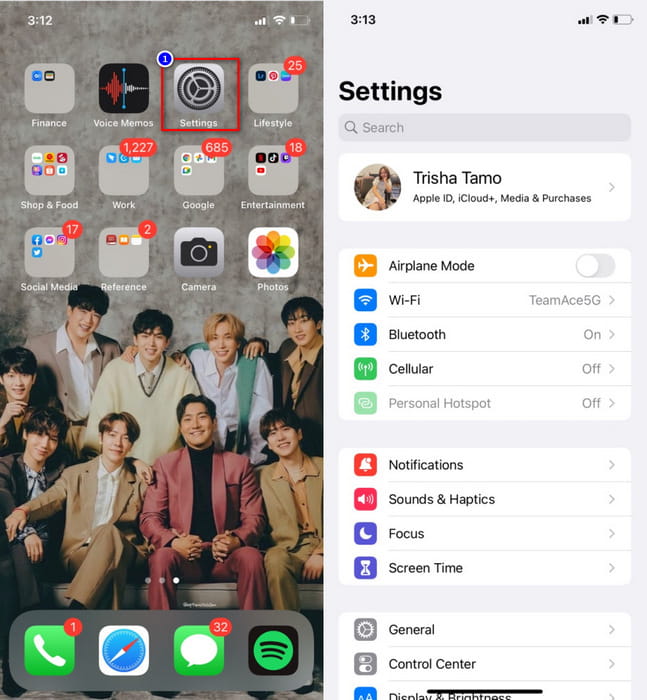
步驟 2. 在設定中找到相機,然後點選格式。
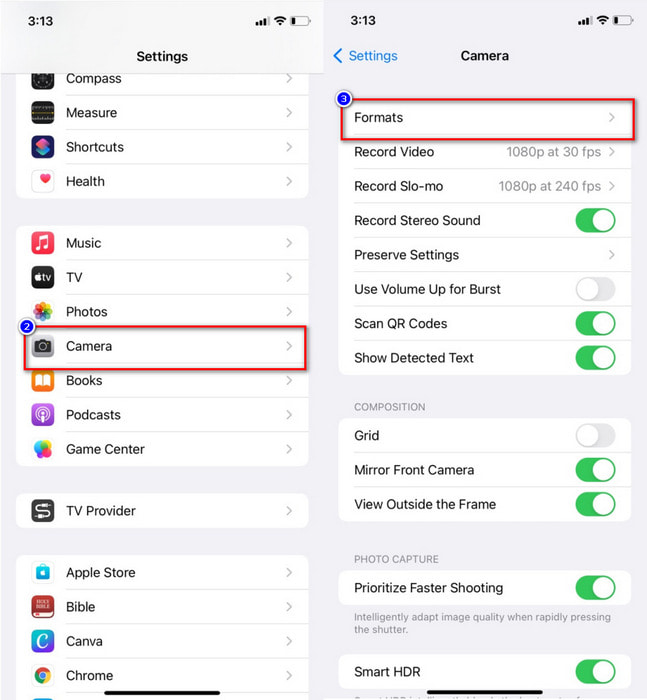
步驟 3. 點進去後,在「相機擷取」區段下,點選最相容,之後拍攝的照片就會以 JPEG 格式儲存。
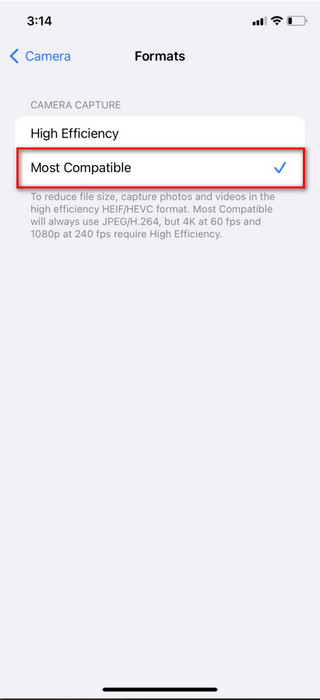
更改此設置後,您無需再次詢問為什麼我的照片保存為 HEIC,因為今天,您拍攝的圖像將保存為 JPEG。但是,您之前拍攝的快照將保留為 HEIC 文件,因為您的更改不會將格式轉換為 JPEG。但是如果可以將 HEIC 文件轉換為 JPG 或 PNG 格式,您可以閱讀第二部分。
第 3 部分。我可以輕鬆地將 HEIC 更改為 JPG/PNG 嗎?
使用 Aiseesoft HEIC Converter,你可以輕鬆將 HEIC 轉成 JPEG/JPG 或 PNG,而不需耗費太多心力。這款工具操作非常直覺,幾乎不需要學習就能上手,即使是第一次使用也沒問題。除了好用之外,你還可以在此一次上傳多個 HEIC 檔案,並將它們全部轉換成你所選擇的格式,如 JPEG 或 PNG。
在您在這裡上傳多個文件後,該軟件將同時開始將它們全部轉換,這可以為您節省大量轉換時間。這個工具可以做這樣的事情不是很好嗎?如果您認為這是將您擁有的文件轉換為 JPG 或 PNG 的正確軟件,那麼您必須閱讀下面的教程,然後再按照它進行操作。
步驟 1. 你必須先在桌上型電腦上下載該軟體,選擇你目前使用的作業系統後點選下載按鈕。下載完成後依照安裝步驟進行安裝,接著啟動工具以便繼續操作。
步驟 2. 透過拖曳檔案到此處上傳;你也可以改點選新增按鈕,若想從資料夾中尋找檔案,點選開啟即可將檔案上傳到工具中。
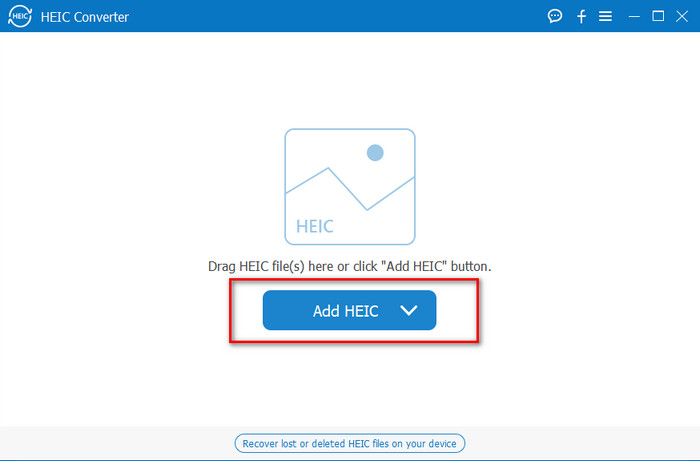
步驟 3. 點選下拉按鈕並選擇你想使用的格式。JPEG 格式非常適合保存高品質影像,因此若你將 HEIC 檔案轉成 JPEG,也可以期待獲得高品質的輸出。但若你想在維持高品質的同時保留透明背景,那就選擇 PNG。
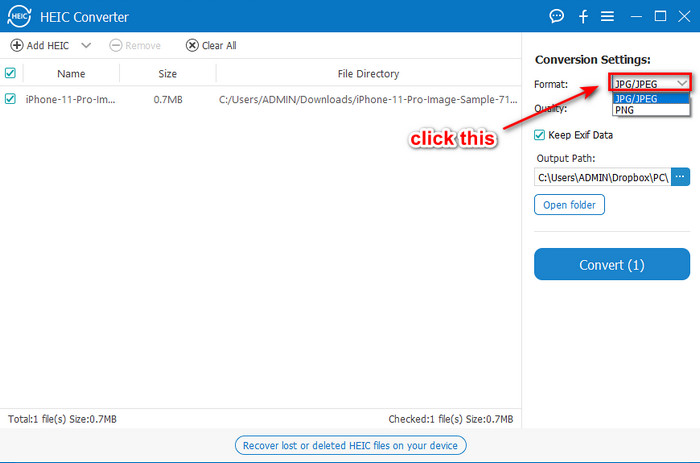
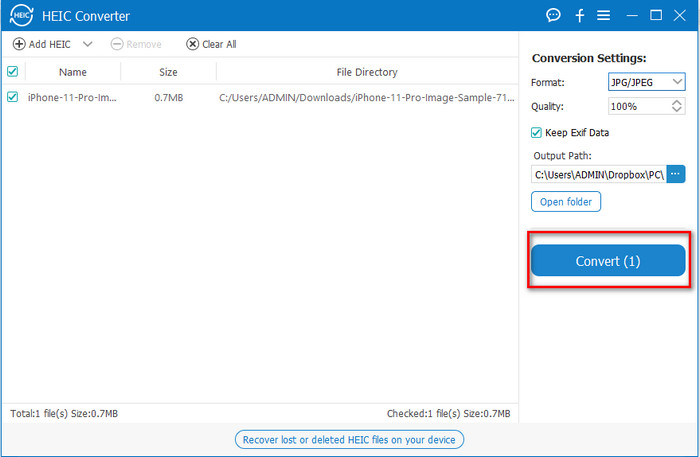
步驟 4. 選好你想要作為最終輸出的格式後,點選轉換以開始處理。是不是很簡單?如此一來,你就輕鬆地將 HEIC 檔案轉成 JPEG 或 PNG 了。
相關閱讀:
第 4 部分。 為什麼我的 iPhone 照片是 HEIC 的常見問題解答
使用 HEIC 的缺點是什麼?
除了兼容性之外,HEIC沒有任何缺陷。似乎圖像格式讓我們知道為什麼我們應該選擇 HEIC 而不是其他圖像格式。所以,如果您想知道它何時會與其他設備兼容,我們會回答它,它遲早會出現。
將 HEIC 更改為 JPG 或 PNG 會減小尺寸嗎?
可悲的是,在將圖像轉換為 JPG 或 PNG 後,文件大小會變大兩倍,因為我們將原始 HEIC 與轉換後的 JPG 和 PNG 進行比較。文件大小會增加,因為 JPG 和 PNG 不支持現代有損壓縮,這使得 HEIC 體積更小,同時質量更高。
我可以編輯 HEIC 文件嗎?
是的,您可以編輯 HEIC 圖像,而無需擔心編輯後的質量。與 JPEG 不同,以這種格式編輯圖像後,質量會略微低於原始圖像。但是使用這種格式,您不會遇到與 JPEG 相同的命運。
結論
很神奇吧?蘋果選擇 HEIC 作為新的標準格式,所以沒有必要問為什麼我的 iPhone 照片是 HEIC 格式的問題,因為答案就在這裡。如果您想以較小的文件大小拍攝高質量的照片,HEIC 是您的首選圖像格式。但是,HEIC 並不兼容所有設備,因此我們介紹了一個可以幫助您的轉換器。在第三部分中,我們介紹了一種將格式更改為 JPEG 或 PNG 的方法,借助您可以在 Windows 和 Mac 上使用的 Aiseesoft HEIC 轉換器。因此,如果您想更改格式,如上所述,沒有其他工具表現最佳。
-
 使用 6 種有效的離線和在線方式將 HEIC 轉換為 JPG
 您想知道如何將 HEIC 轉換為 JPG 嗎?在這種情況下,我們添加了 6 種在線和離線方式,您可以使用它們來完全完成和處理此任務。
-
 什麼是 HEIC 文件:了解圖像格式等
 你的 iOS 上有 HEIC 文件嗎?你有沒有想過這個文件是關於什麼的?如果是這樣,這篇文章可以幫助您;閱讀本文以了解什麼是 HEIC 文件。
-
 使用 2022 年的前 4 種改進方法將 HEIC 轉換為 PDF
 要了解有關最佳 HEIC 到 PDF 轉換器的更多信息,您可以下載此 2022。您可以閱讀本文,因為我們提供了對它們的評論。
