


 視頻轉換大師
 屏幕錄影大師
 影片修復
影片修復
 安全下載
安全下載如何輕鬆地將 HEIC 轉換為 RAW
HEIC 檔案是一種在維持高畫質的同時,又不會占用太多裝置空間的檔案格式。不過,如果你想在 Adobe Photoshop、Microsoft Windows 相片、Canva 等編輯軟體中編輯 HEIC 圖片,就需要先將 HEIC 檔案轉換成 RAW 檔案,因為大多數編輯軟體並不支援 HEIC 檔案。因此,請閱讀本文至最後,了解如何將 HEIC 轉換為 RAW,以及HEIC 與 RAW 的比較。

第 1 部分。 HEIC 和 RAW 文件之間的差異
HEIC 檔案是由 Apple 開發的檔案格式。這是一種在保持極佳畫質的同時,又能維持小檔案大小的圖片檔格式。此外,HEIC 檔案採用進階壓縮技術,與其他圖片檔案格式相比,檔案大小可縮小約 50%。而且,你可以在 Apple 裝置上輕鬆開啟 HEIC 檔案。相較之下,RAW 檔案是一種用於在各種應用程式之間傳輸影像的圖片檔格式。顧名思義,RAW 檔案是不經壓縮與處理的原始圖片檔。這種檔案的缺點是會占用裝置上大量的儲存空間。儘管如此,它可以被其他編輯軟體與媒體平台檢視並相容使用。
如果您還在猶豫是否要將 HEIC 轉換為 RAW 文件,那麼在這一部分中,我們將為您提供這兩個文件之間的更多見解。這部分將比較 HEIC 和 RAW 文件的特性和最佳功能。
| HEIC | 生的 | |
| 壓縮/未壓縮 | 壓縮 | 未壓縮 |
| 可用性 | 適用於所有 Apple 設備 | 適用於幾乎所有跨媒體平台和圖像編輯應用程序。 |
| 畫面質量 | 高畫質 | 畫質一般 |
| 處理/未處理 | 處理 | 未加工 |
| 最適合用於 | 用於拍攝美麗的風景,並生成高質量的圖像。 | 用於使用圖像編輯應用程序編輯圖像文件。 |
第 2 部分。 如何在線將 HEIC 轉換為 RAW
只有少數工具可以幫助您將 HEIC 轉換為 RAW。在這種情況下,我們尋找最好的 HEIC 到 RAW 轉換器,這些轉換器易於使用,可以立即將您的 HEIC 文件轉換為 RAW。因此,請全面閱讀此部分,以在線將您的 HEIC 文件轉換為 RAW。
轉換 365
Convert 365 是一個在線 HEIC 到 RAW 文件轉換器。它可以幫助您通過其快速的轉換過程立即將 HEIC 轉換為 RAW。此外,它是一個用戶友好的工具,因為它具有簡單的用戶界面。該工具還支持各種圖像文件格式,如 HEIC、RAW、ARW、DNG、JPG 等。但是,它包含可能會讓您感到不安的廣告。然而,許多人將此作為 HEIC 到 RAW 在線轉換器的首選。
步驟 1。 在瀏覽器上搜尋 Convert 365。接著在該軟體的主介面上,點擊新增檔案按鈕。電腦資料夾會跳出,然後選取你的 HEIC 檔案以上傳。

步驟 2。 接下來,點擊下拉選單按鈕,選擇你想要的輸出格式,即 RAW 格式。
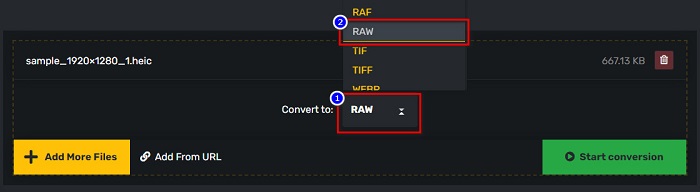
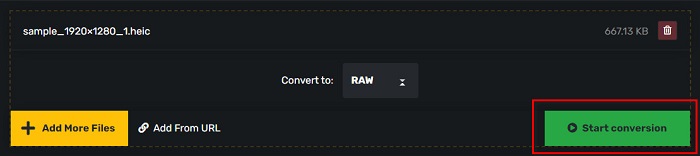
步驟 3。 最後,點擊開始轉換按鈕,將你的 HEIC 檔案轉換為 RAW 檔案。
優點
- 它有一個簡單的用戶界面。
- 它支持多種圖像文件格式,如 HEIC、RAW、ARW、DNG、JPG、GIF 等等。
- 幾乎所有網絡瀏覽器都可以訪問它,包括 Google、Firefox 和 Safari。
缺點
- 當您的互聯網連接速度較慢時,您可能會遇到轉換過程緩慢的情況。
PDF商城
另一個可以幫助您將 HEIC 轉換為 RAW 的工具是 PDFMall。此在線轉換器免費使用且易於使用。它還支持標準圖像格式。但是,一些用戶會看到一個防病毒威脅保護彈出窗口,而人們懷疑這個在線轉換器是否可以安全使用。此外,它包含可能會打擾您的廣告。
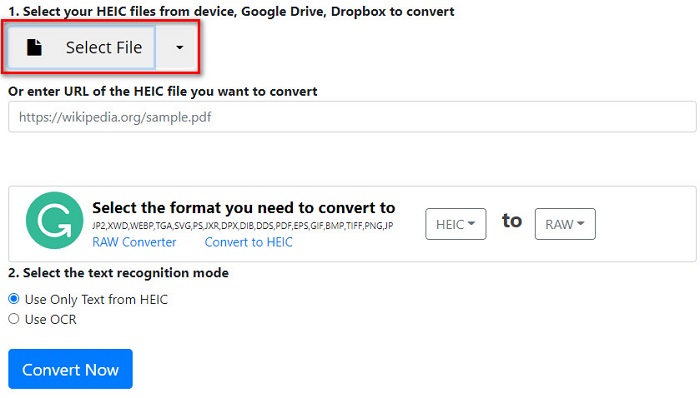
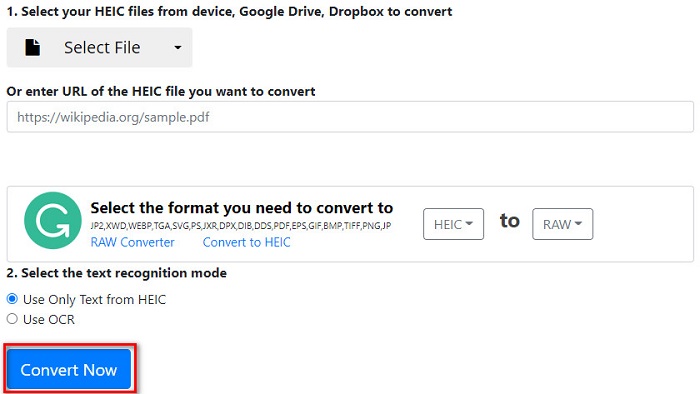
步驟 1。 在瀏覽器上搜尋 PDFMall,然後在搜尋結果頁面中點擊 PDFMall。接著在該軟體的主介面上,點擊選擇檔案按鈕,上傳你的 HEIC 檔案。
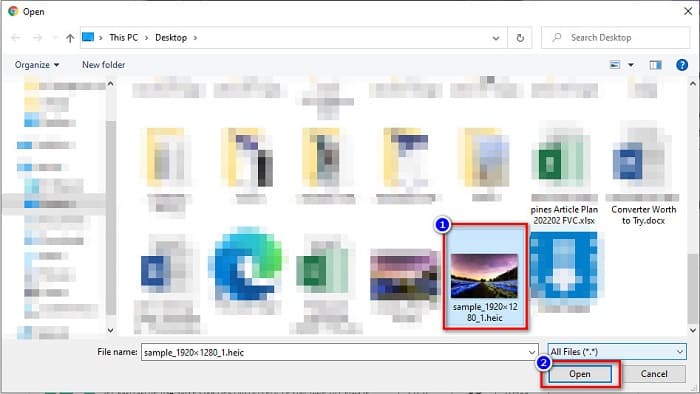
步驟 2。 接著,你的電腦檔案視窗會跳出。找到你的 HEIC 檔案,然後點擊開啟,將 HEIC 檔案上傳到軟體介面。
步驟 3。 最後,點擊立即轉換按鈕,將 HEIC 檔案轉換為 RAW 檔案。只需等待幾秒鐘,你的檔案就可以下載了。
優點
- 它可以免費使用。
- 它支持其他文件格式。
- 它有一個易於使用的軟件界面。
缺點
- 它包含其他 HEIC 到 RAW 轉換器沒有的廣告。
- 這可能是對您設備的病毒威脅。
第 3 部分。推薦:轉換 HEIC 文件的終極 HEIC 轉換器
不可否認,使用離線 HEIC 轉換器是一種更有效的工具,因為您不會遇到緩慢的轉換過程。如果您想將 HEIC 文件批量轉換為其他標准文件格式,這款轉換器最適合您。此外,即使您將 HEIC 文件轉換為不同的文件格式,它也可以保留 EXIF 數據並調整圖像輸出的質量。更重要的是,它具有一項功能,您可以在設備上恢復丟失或刪除的 HEIC 文件。因此,如果您有興趣使用此轉換器,請閱讀以下說明。
Aiseesoft HEIC 轉換器的特點:
- 這是一個用戶友好的軟件應用程序,因為它有一個簡單的用戶界面。
- 它可讓你批次將 HEIC 檔案轉換為 JPG 或 PNG 檔案格式。
- 它可以保留您的 HEIC 文件的 EXIF 數據。
- 它沒有文件大小限制。
- 適用於所有媒體平台,包括 Windows 和 Mac。
第 4 部分。關於 HEIC 和 RAW 的常見問題解答
RAW文件是無損的嗎?
是的。儘管 RAW 文件未經處理和壓縮,但 RAW 文件使用無損數據壓縮。
將 HEIC 轉換為 RAW 會影響圖像的文件大小嗎?
是的。當您將 HEIC 轉換為 RAW 文件時,它的文件大小會更大,因為您的 HEIC 在轉換為 RAW 文件後將被解壓縮。
您可以在 Mac 設備上查看 RAW 文件嗎?
絕對地!由於 Mac 支持 RAW 文件圖像格式,因此您可以在 Mac 設備上本地查看您的 RAW 文件。
結論
使用上述所有 HEIC 到 RAW 轉換器,將 HEIC 轉換為 RAW 文件格式非常容易。此外,這兩個在線轉換器顯示出可喜的結果,並且在將 HEIC 文件轉換為 RAW 文件格式時,您可能會在互聯網上找到它們。因此,如果您想使用可以將 HEIC 轉換為其他常見文件格式(如 JPG 和 PNG)的轉換器,Aiseesoft HEIC 轉換器是您的最佳工具。
-
 如何在 Windows、Mac 和在線上打開 HEIC 文件
 您是否正在尋找一種如何打開 HEIC 文件的方法?本文為您提供在 Windows、Mac 和 Online 上打開 HEIC 文件的最佳解決方案。
-
 如何在 Mac、iPhone 和在線上將 HEIC 批量轉換為 PNG
 尋找如何將 HEIC 轉換為 PNG 的方法?本文為您提供了在線和離線輕鬆將 HEIC 更改為 PNG 的最佳方法。
-
 適用於 PC 和 Mac 的最佳 9 HEIC 到 PNG 轉換器 [在線和離線]
 在這裡找到最好的在線和離線轉換器。我們向您展示適用於 Windows 和 Mac 的頂級免費 HEIC 到 PNG 轉換器。
