


 視頻轉換大師
 屏幕錄影大師
 影片修復
影片修復
 安全下載
安全下載強大的視頻速度控制器 - DaVinci Resolve Speed Editor
If you want to use a powerful video speed editor, you probably want to use this tool. DaVinci Resolve Speed Editor is a video speed changer tool that uses a USB keyboard. This speed editor provides custom hardware control that allows you to edit your video speed easily. So, if you are wondering what this tool can do more, read this article to know more about the DaVinci Resolve Speed Editor.

第 1 部分。DaVinci Resolve Speed Editor 的基本信息、特性、功能和價格
Many professional editors use DaVinci Resolve Speed Editor to change the speed of their video. And if you are new to using DaVinci Resolve Speed Editor, you probably want to know the information, functions, and price of this tool. In this part, you will know the basic information, functions, and the price of this speed editor.
基本信息
DaVinci Resolve 是一款 USB 型鍵盤,可讓您編輯文件。如果您想要一個可以改變視頻速度的工具,那麼這個工具最適合您。 DaVinci Resolve 提供了一種更快、更簡單的視頻編輯方式。它不僅僅是一個鍵盤,因為它具有許多您可以使用的編輯功能,包括視頻速度編輯器、搜索撥號控制、添加/刪除效果、同步箱多相機選擇等等。除此之外,這個速度編輯器工具還有一個無線版本。
當您購買 DaVinci Resolve 鍵盤時,您會看到一根 USB 數據線和一個電池電量指示燈。從設備背面拔下 USB 數據線後,藍牙將自動嘗試在您的設備上配對。
此外,如果您要求使用此工具的速度編輯器,您可以使用鍵盤上的滾輪控件、播放控件以及編輯和修剪控件。
特點和功能
如果您想知道 DaVinci Resolve 的特點和功能是什麼,我們將在下面介紹該工具最常見的特點和功能。
Speed Editor
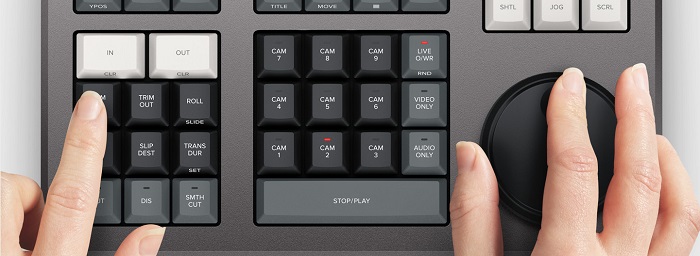
DaVinci Resolve Speed Editor is made for professional editors who want to better transition effects on their video. By using this video speed controller, you can slow down or speed up the fps of your video, highlighting the best scene of your video. There are many ways to use DaVinci Resolve to speed up a clip.
◆ Use the In and Out points by just scrolling on the search dial and placing the in and out points on your video timeline, then going to edit functions to edit your video.
◆ Use the Trim in and Trim out buttons by simply holding the trim buttons and rotating the search dial. The smart indicator on the timeline allows you to see which part you are trimming.
Add and Remove Effects
Using the DaVinci Resolve speed editor, you can also add and remove effects on your video. The smart indicator on the timeline is the determinator of which editing point you are working on. Press the CUT key to remove an effect on the edit point. And if you want to dissolve the edit point on your timeline, press the DIS (dissolve) key. In addition, if you want a smooth cut transition on the edit point, press the SMTH CUT (smooth cut).



Color
此功能允許您更改對比度、溫度、中間色調、飽和度等。彩頁是DaVinci Resolve最受歡迎的功能之一,初學者也能輕鬆上手。
Sync Bin
The sync bin is a function where you can find videos or shots synced in on the editing timeline. And then, you can use the camera keys to select an alternative shot and edit it on your timeline.
Audio Level and Mark
DaVinci Resolve can also adjust the audio of your video. To set the audio levels on your clip, hold the key and adjust the audio level using the search dial. If you double press the audio level key, it will add a marker. And if you double press the key and hold it, it allows you to set the color of the markers.
Full-Screen Viewer and Review
此鍵允許您將查看器變為全屏。它具有紅色,因此您可以輕鬆找到它。如果您雙擊此鍵,它將從您最近的編輯開始祈禱。
Add Transitions
Using the Transition key will add a custom transition to your video. It is almost similar to the cut and smooth cut buttons.
Snapper and Viewer
Pressing the Snap key enables snapping on your timeline. And if you press and hold the Snap key, it will adjust the viewer size.
Ripple Delete
波紋刪除允許您刪除播放點中的剪輯;它會在時間線上產生漣漪,以消除兩個剪輯之間的間隙。波紋刪除是減少視頻時間線持續時間的好方法。
價錢
您可以購買適用於 $395 的 DaVinci Resolve Speed Editor。如果您正在尋找此工具的軟件版本,您可以在 Windows、Mac 和 Linux 上免費下載。但是,該工具的軟件版本使用起來很複雜。
DaVinci Resolve 視頻速度編輯器的替代品
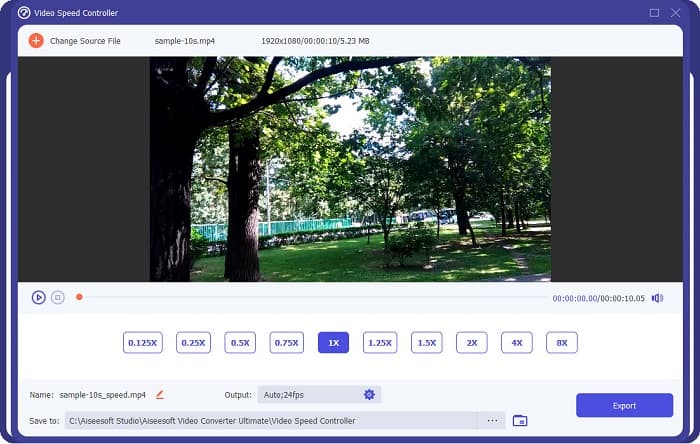
If you want an easier way to edit your video’s speed, use FVC Video Converter Ultimate. This software application allows you to speed up or slow down your video easily. With its fast operating process, you will not consume much time editing the speed of your video. In addition to that, there are many speed presets you can choose from for your video. And if you are wondering what else it can do, this tool has many editing features, including an audio compressor, video compressor, video metadata editor, and more. It also supports numerous file formats, like MP4, MKV, MOV, AVI, FLV, WMV, and 1000+ formats. To know more about this software application, read the descriptions below.
Advantages of using FVC Video Converter Ultimate:
1.它有一個直觀的用戶界面。
2. 它允許您從 0.125x、0.50x、0.75x、1.25x、1.5x、2x、4x 和 8x 速度預設更改您的視頻速度。
3. 它有許多高級編輯功能可供使用,如視頻修剪器、視頻合併、3D 製作器等。
4. 適用於所有媒體平台,包括 Windows、Mac 和 Linux。
第 2 部分。有關 DaVinci Resolve 視頻速度編輯器的常見問題解答
DaVinci Resolve Video Speed Editor值得嗎?
憑藉其價格,這款視頻速度編輯器工具值得使用,因為它可以產生高質量的輸出並具有許多可供使用的編輯功能。
DaVinci Video Speed Editor 是否兼容任何格式?
它不支持所有文件格式。但是,它可以支持多種文件格式,包括 MOV、MXF、DNG、DCP、ARI、MTS 等。
DaVinci Resolve Video Speed Editor 有免費版本嗎?
DaVinci Resolve Video Speed Editor 提供限時免費試用版。要終身使用,請購買 $395 的工具。
結論
All your queries about DaVinci Resolve Video Speed Editor are now answered. With the tool meant for video speed editor, you can easily slow down or speed up your video and create beautiful transitions with this tool. But, if you are searching for a more convenient tool and easier to use, try FVC Video Converter Ultimate for free!
-
 如何在 iPhone 上快進視頻 - 調整視頻速度
 如何在 iPhone 上快進視頻?如何使用 iMovie 快進 iPhone 上的視頻?了解在 iPhone 和 iPad 設備上加快視頻速度的 3 種方法。
-
 如何在 Premiere Pro 及其替代方案中加速視頻
 您想知道如何使用 Premiere Pro 來加速視頻嗎?那麼您是在正確的文章中,因為我們提供了步驟和其他負擔得起的替代品。
-
 關於如何在 TikTok 上加速視頻的 2 種輕鬆方法
 你想知道抖音視頻加速的秘訣嗎?然後閱讀這篇文章,了解如何做到這一點,並了解其他 2 個可以幫助您的工具。
