


 視頻轉換大師
 屏幕錄影大師
 影片修復
影片修復
 安全下載
安全下載如何輕鬆去除畢業照片中的水印
每當您在任何照片中看到水印時,水印都是令人眼花繚亂的,它們會破壞照片的質量。只要創作者不希望他的作品被盜,您就會在照片上看到水印。如果您是學生,您可能會在畢業照上看到水印,標明工作室的名稱或拍攝照片的攝影師。
如果你想去除畢業照上的浮水印,你需要能幫助你移除浮水印的工具。本文列出了目前最常使用的三款浮水印去除工具,你也將學到如何去除畢業照上的浮水印的具體步驟。

第 1 部分。 如何從在線畢業圖片中刪除水印
您會在互聯網上看到許多水印去除工具。然而,並不是所有的都是免費且易於使用的。此外,在這一部分中,您將了解如何方便有效地去除水印。
FVC Free Watermark Remover 是一款線上浮水印去除工具,可讓你輕鬆移除畢業照上的浮水印。這個線上工具之所以受歡迎,是因為你在使用前完全不需要下載任何程式。此外,它支援最常見的圖片格式,例如 PNG、JPG、JPEG、BMP 等。即使你已經去除了圖片上的浮水印,當你下載圖片時,它仍會保持原本的圖片格式。
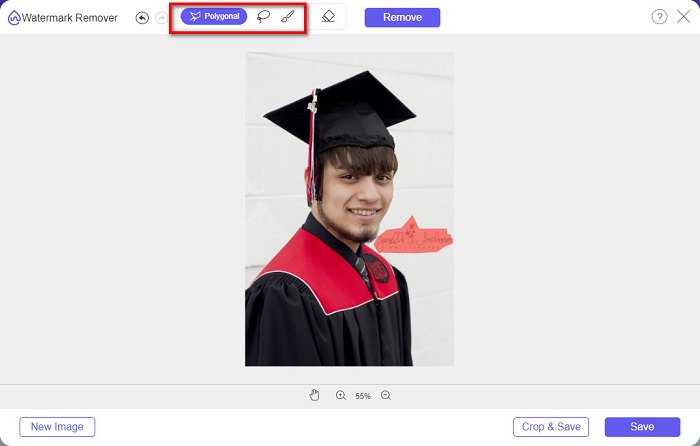
使用此水印去除器,您可以在選擇水印區域時從去除器預設中進行選擇。您可以在多邊形、套索或畫筆之間進行選擇。此外,您可以使用此工具擦除圖像上其他不必要的東西。
優點
- 它有一個快速的操作軟件界面。
- 使用安全。
- 100%免費使用。
- 適用於所有網絡瀏覽器,包括 Google、Firefox 和 Safari。
缺點
- 它依賴於互聯網。
如何使用 FVC Free Watermark Remover 去除畢業照片上的水印:
步驟一: 在你使用的瀏覽器中搜尋 FVC Free Watermark Remover。你也可以點擊這個連結直接前往其網頁。
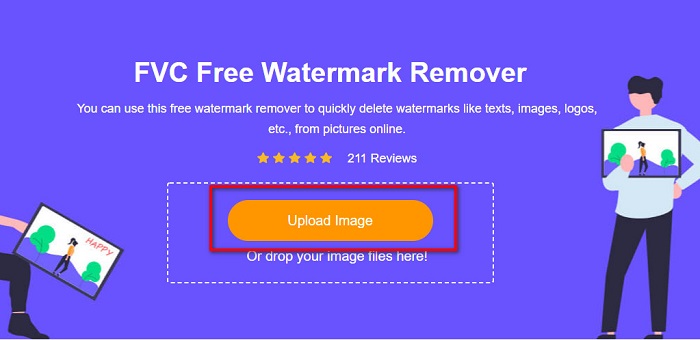
步驟二: 在該軟體的主介面上,點擊 Upload Image 按鈕。電腦資料夾會跳出,然後選擇你的畢業照並上傳。
步驟三: 接著,選擇你想用來去除浮水印的工具,在 Polygonal、Lasso 或 Brush 之間挑選。然後框選你想要去除的浮水印區域。
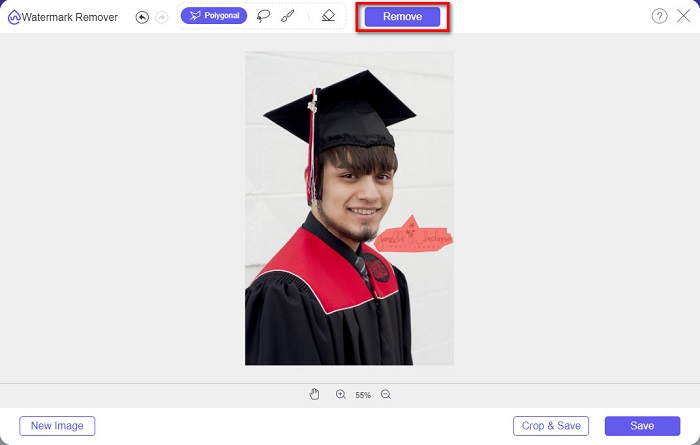
步驟四: 選好浮水印區域後,點擊 Remove 按鈕來清除浮水印。
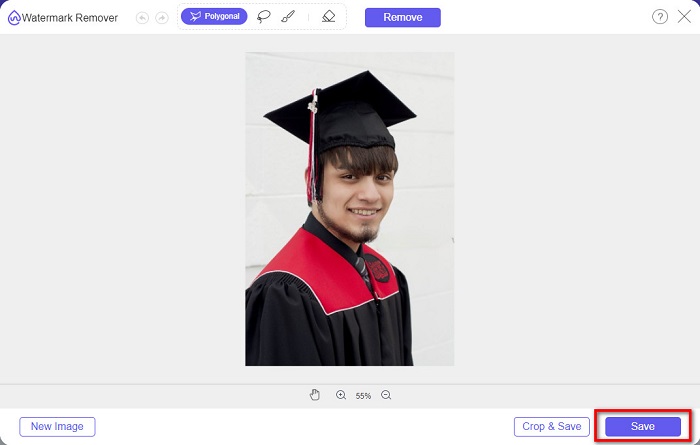
步驟五: 你會看到浮水印已被移除。點擊 Save 按鈕將圖片下載到你的裝置上。此外,這款線上浮水印去除工具同時也是一款Photobucket 浮水印去除工具。
第 2 部分。如何使用 Inpaint 從畢業圖片中刪除水印
人們有時會修飾水印以使照片恢復原始外觀。但是他們是怎麼做到的呢?專業人士使用照片編輯器並逐像素繪製標籤,從而需要幾個工作時間。但是,還有另一種工具可以幫助您輕鬆生活。在這一部分中,您將學習如何使用 Inpaint 及其優勢。
Inpaint 是另一款線上浮水印去除工具,也能幫助你移除畢業照上的浮水印。這款線上軟體同時提供可下載版本,支援 Windows 和 Mac。此外,它還可以移除照片中不想要的元素,如商標、文字、物件等。更令人驚訝的是,它具備修復舊照片的功能,能將老照片恢復到接近原始的品質。它也提供多種去除工具,方便你選取要去除的浮水印區域。
優點
- 它有一個易於使用的軟件界面。
- 它允許您進行數字面部修飾。
- 它使您能夠填充全景圖的黑色區域。
- 幾乎可以在所有網絡瀏覽器上訪問,例如 Google 和 Firefox。
缺點
- 它依賴於互聯網。
如何使用 Inpaint 從畢業照片中去除水印:
步驟一: 在瀏覽器中搜尋 Inpaint,接著前往其官方網頁。然後在軟體的主介面上,點擊 Upload Image 按鈕,上傳你的畢業照。
步驟二: 接下來,選擇你要用來框選浮水印區域的去除工具,可在 marker tool、lasso tool 和 polygonal lasso tool 之間選擇。
步驟三: 然後使用你選擇的工具,框選你想要移除的浮水印區域。
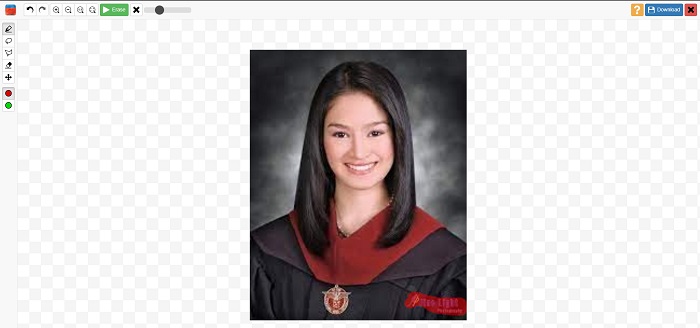
步驟四: 最後,點擊 Erase 按鈕,將畢業照上的浮水印去除。接著點擊 Download 按鈕下載圖片。
第 3 部分。 如何使用 Photoshop 從畢業圖片中刪除水印
Adobe Photoshop 是許多專業人士使用的最著名的編輯軟件。但很多用戶不知道的是,它不僅僅是一個編輯軟件;它還可以刪除照片上不需要的水印。要了解如何從照片中刪除水印,請全面閱讀此部分。
Adobe Photoshop 是最受歡迎的專業相片編輯軟體之一,具備多種強大的編輯功能。許多專業人士使用這款編輯程式,因為你可以用各種專業方式來修圖。它內建許多工具,讓你得以對影像進行細緻加工。此外,它輸出的成品畫質極佳,適合分享到各大社群媒體平台。
優點
- 它有許多高級編輯功能可供使用。
- 它包含許多用於編輯的工具。
- 它產生高質量的輸出。
- 它使您能夠編輯和創建打印和網絡圖像。
缺點
- 它有一個難以使用的軟件界面。
- 您需要購買應用程序才能下載它。
如何使用 Adobe Photoshop 去除照片上的水印:
步驟一: 在你的裝置上下載 Adobe Photoshop,並啟動程式。在主介面中,將圖片匯入 Photoshop。
步驟二: 選取浮水印所在的區域。你可以使用 鋼筆工具(Pen tool)、快速選取工具(Quick Selection tool) 或 魔術棒工具(Magic Wand tool)。
步驟三: 前往 Select > Modify > Expand,以納入更多背景像素。
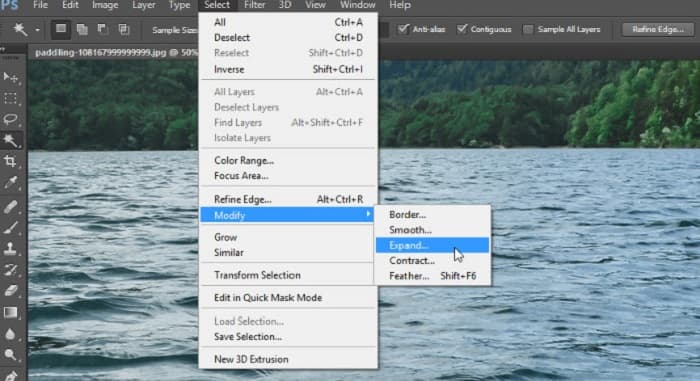
步驟四: 前往 Edit > Fill,然後在 Contents 區域選擇 Content-Aware。
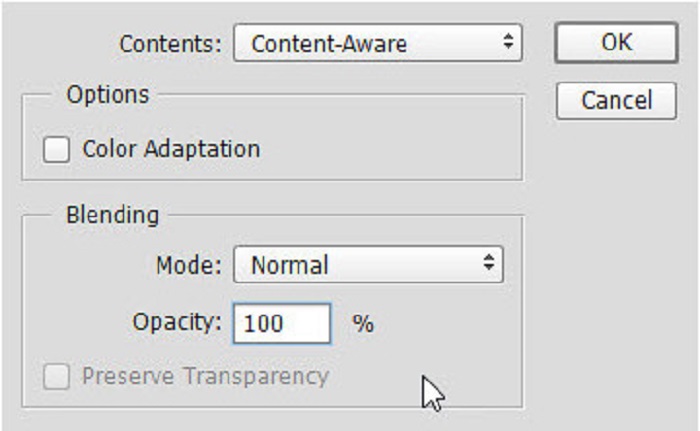
步驟五: 接著按下 CTRL+D。你會看到浮水印區域已被背景填補。然後使用 Clone Stamp Tool 來去除浮水印的邊緣痕跡。
步驟六: 按住 Alt 鍵,沿著浮水印的外輪廓進行描繪。當你完成所有痕跡的修補後,就會發現浮水印已被完全去除。
第 4 部分。關於從畢業圖像中去除水印的常見問題解答
從畢業照片中去除水印會破壞質量嗎?
從畢業照片中去除水印不一定會破壞質量。但是,當您刪除水印時,某些工具仍然會留下痕跡。
Canva 上的水印可以去除嗎?
是的。 Canva 有一項功能,您可以免費去除水印。只需單擊“刪除水印”按鈕即可。
你能去除PDF上的水印嗎?
利用上述這些工具,你還可以去除 PDF 檔案中的任何浮水印。
結論
既然你已經學會如何去除畢業照上的浮水印,現在就可以親自動手嘗試以上介紹的工具。使用浮水印去除工具能大幅簡化整個去除過程。不過,許多人特別推薦使用 FVC Free Watermark Remover,因為它既方便又容易上手。
-
 如何輕鬆刪除 Windows 和 Mac 上的 Lumion 水印
 需要刪除 Lumion 水印以進行專業展示嗎?好吧,您可以使用一些工具來幫助您擺脫它留下的水印。
-
 如何輕鬆去除視頻和圖片上的微博水印
 在導出的視頻和圖像上刪除微博水印時遇到問題?在這種情況下,您必須使用我們在下面列出的可以幫助您的水印去除器。
-
 了解如何免費刪除 Movavi 水印 $91;必須擁有!$93;
 在 Movavi 上導出視頻或圖像會留下水印,但是否可以將其刪除?要教如何免費刪除水印,請閱讀此內容。
