


 視頻轉換大師
 屏幕錄影大師
 影片修復
影片修復
 安全下載
安全下載如何使用 2 種可能的方式在 SmartDraw 中刪除水印
如果你需要一個簡單又功能強大的工具來製作圖表、繪圖和地圖,並以企業級品質呈現它們,那就使用 SmartDraw。你可以發揮想像力,在 SmartDraw 的協助下把構想變成現實。這個工具是免費的嗎?你可以使用其提供的 7 天免費試用來免費使用該工具,但匯出的檔案上會帶有浮水印,而在匯出檔案上處理浮水印可能會讓你感到困擾。在這裡,我們透過這篇文章向你介紹市面上移除浮水印效果最佳的工具。請繼續閱讀下文的資訊,以兩種有效方式學習如何移除 SmartDraw 上的浮水印。

部分 1. 如何通過購買許可證密鑰去除 Smart Draw 中的水印 [官方版]
如何從 SmartDraw 中刪除水印?這是我們將向您介紹的第一種方式,即購買此工具的許可證密鑰。該平台為您提供不同類型的計劃,您可以獲得這將有利於您的最終目的。此外,您無法購買此工具的一個月訪問權限,因此如果您計劃購買其許可證密鑰,您將按月計費,但您將支付的總金額為其年度版本。如果您欣賞此工具的性能並想購買它,您可以按照我們在下面添加的步驟進行操作。
如何使用許可證密鑰在 SmartDraw 中刪除水印的步驟:
步驟 1. 開啟 SmartDraw 官方網站,並確認你進入的是正確的網站,以確保交易安全。
步驟 2. 在網站上點擊 購買(Buy),即可查看可用的方案。
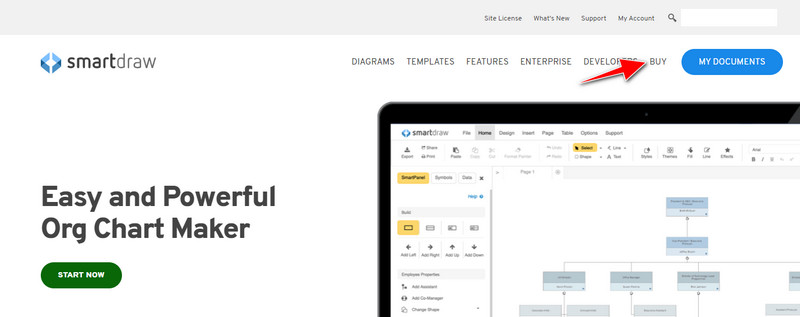
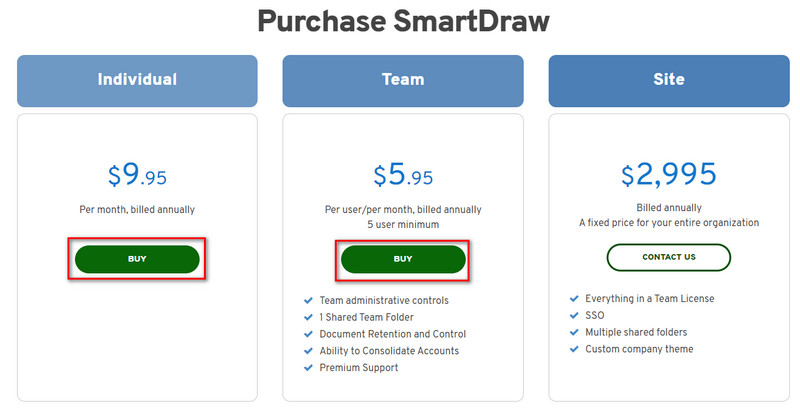
步驟 3. 你可以選擇以個人版(Individual)、團隊版(Team)或全站版(Site)的方式購買 SmartDraw。如果要購買個人版或團隊版,請點擊「Buy Now」。
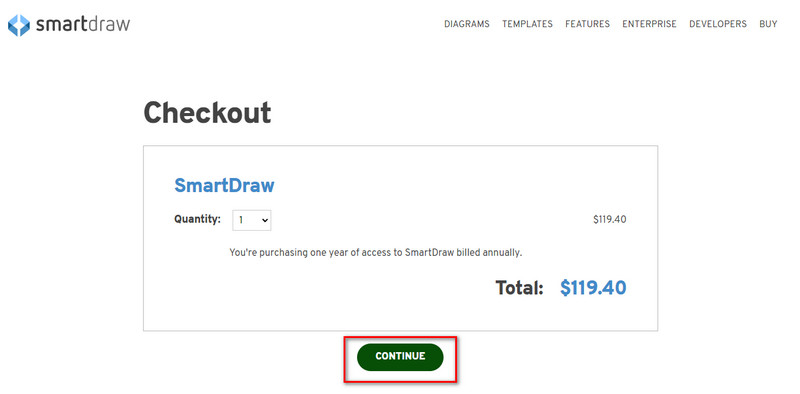
步驟 4. 在右側你會看到按年計算後的工具總金額;點擊繼續(Continue)以繼續流程。
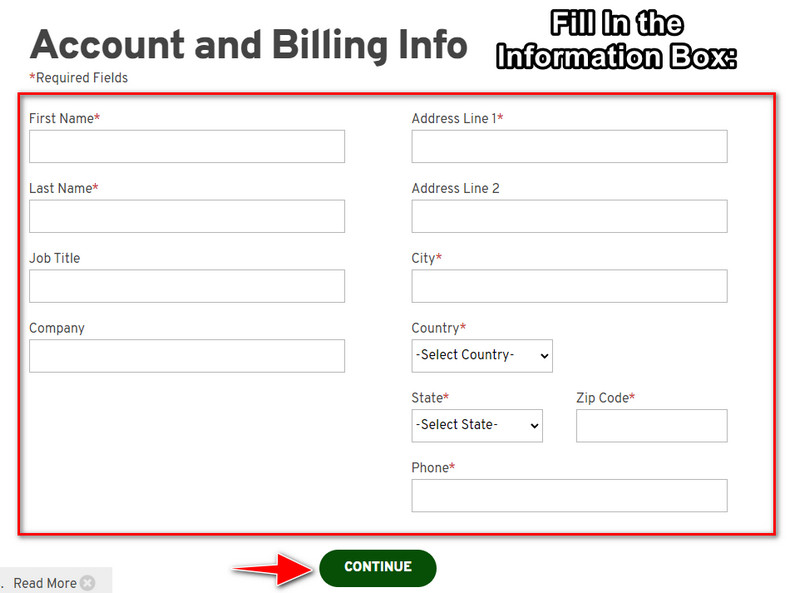
步驟 5. 填寫所需的帳戶與帳單資訊,然後按下繼續(Continue)來取得授權金鑰。
部分 2. 如何使用 Web 服務免費去除 Smart Draw 中的水印 [免費]
要在不購買的情況下移除 SmartDraw 試用版上的浮水印該怎麼做?你將需要使用 FVC 免費線上浮水印去除工具。這款浮水印去除工具隨時可供你使用,你無需具備專業技能也能將圖片上的浮水印去除,操作起來一點也不麻煩。即使你是專業人士,也同樣可以利用這款軟體移除圖片中多餘的浮水印或物件。有了這款浮水印去除工具的幫助,你的圖片上將不會有它無法清除的污漬或痕跡。想改用這款軟體,而不是購買授權金鑰嗎?如果是的話,就按照下面我們提供的教學,來有效去除圖片上的浮水印。
如何免費去除圖形或圖表上 SmartDraw 水印的步驟:
步驟 1. 與其在瀏覽器上搜尋這個網頁工具,你可以直接點擊這個連結開啟,它會在你的搜尋引擎中開啟新的分頁。
步驟 2. 使用滑鼠拖曳並放開(drag and drop)你在 SmartDraw 中建立的圖片、圖表或示意圖,以上傳檔案。
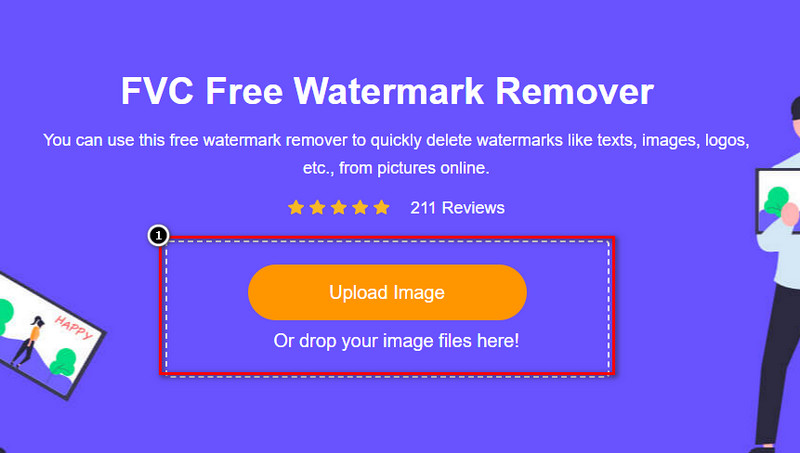
步驟 3. 啟動線上浮水印去除工具後,選擇你想用來在圖片上標示浮水印區域的工具。
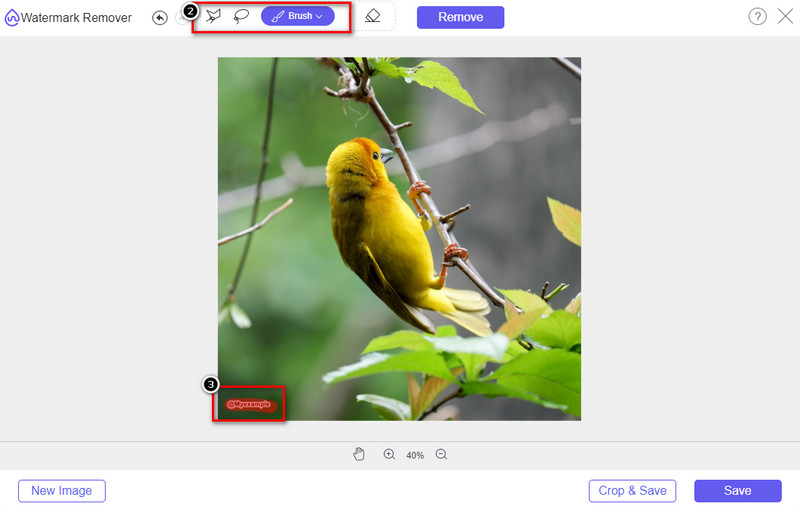
步驟 4. 在上傳的圖片上標示出浮水印或標誌後,按下Remove。
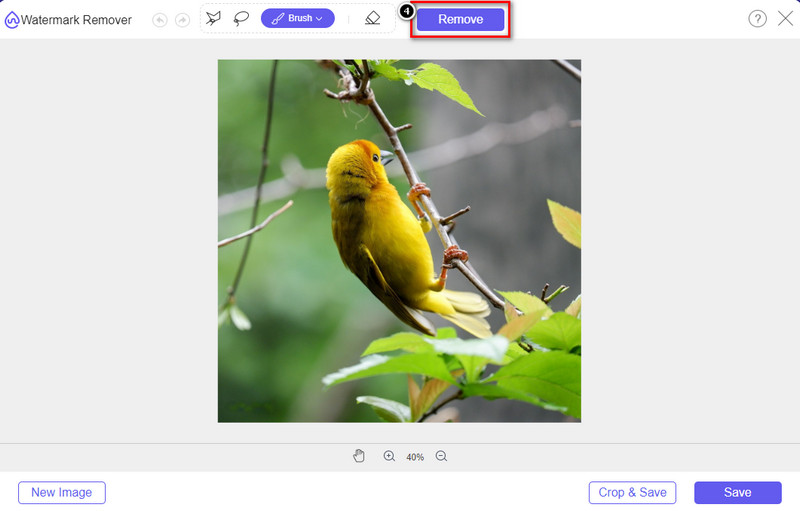
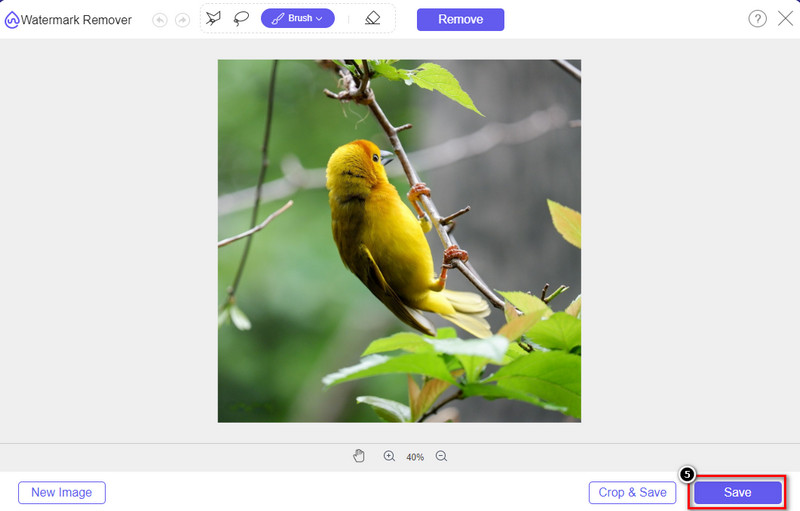
步驟 5. 等待系統處理並移除浮水印,接著點擊Save下載你上傳的圖表或示意圖。畫面上會顯示資料夾視窗,現在就可以檢視你所建立、已無浮水印的圖表或示意圖版本。
使用 FVC 免費線上浮水印去除工具的優點:
◆ 無需下載該應用程序,因為它可以在網絡上獲得。
◆ 支持圖片範圍廣,可有效去除水印。
◆ 它是一種專用的水印去除器,可產生高質量的輸出。
◆ 導出後不加水印。
◆ 不限制使用次數和文件大小。
第 3 部分。附加部分 - 如何在 SmartDraw 上製作圖表、圖形或圖表,並提供詳細步驟
前面的部分教你如何去除 SmartDraw 水印。在這一部分,我們將教你如何在 SmartDraw 的幫助下製作圖表、圖形和圖表;您可以按照我們在下面添加的步驟來了解如何操作。
步驟 1. 前往其官方網站以建立圖表、圖形或流程圖。
步驟 2. 開啟官方網站後,點擊立即開始(Start Now)並登入你的帳戶。
步驟 3. 在左側選擇你想建立或使用的範本類型。
步驟 4. 在每個流程圖中加入相關資訊,網站左側還會提供額外可用的選項。
步驟 5. 點擊匯出(Export)按鈕,選擇你想要的輸出格式,然後點擊以開始匯出流程。如果你使用的是免費版本,匯出檔案上會有浮水印,你可以參考第 2 部分的步驟來移除浮水印。
延伸閱讀:
第 4 部分。有關如何刪除 SmartDraw 水印的常見問題解答
SmartDraw 可以導出 PNG 圖像嗎?
是的,您可以擁有 PNG 格式的透明圖表。但是,如果您使用免費版本,它將添加水印。您可以購買正式版,因此導出的圖像上會有水印。
SmartDraw 的價格是多少?
如果您要在 SmartDraw 上購買計劃,您可以從 $ 5.95 開始購買計劃。您可以在官方網站上查看它提供的其他價格。
購買高級版 SmartDraw 有什麼好處?
您可以獲得團隊管理員控制、團隊文件夾、高級支持以及為個人計劃導出無水印圖像。對於其他高級優勢,您可以獲得,訪問官方網站,看看您可以獲得哪些特性和功能。
結論
現在您已經知道如何使用我們添加的兩種方式來保存沒有水印的 SmartDraw。您要么購買它,要么使用工具去除導出文件上的水印。如果您不喜歡購買該工具,則必須使用它,因為它是消除水印的最有效的網絡工具。如果您認為這篇文章確實幫助您解決了問題,那麼您給我們評分 5 星。
-
 從 GIF 中刪除水印的 4 種最佳方法 [在線和離線]
 需要從 GIF 中刪除水印?使用本文中的工具,您將了解平台上可用的不同水印去除器的不同風格。
-
 刪除任何媒體文件中元數據的 5 種最簡單方法
 如何刪除元數據?很難做到嗎?我需要購買或使用免費工具來刪除標籤嗎?所有這些問題在本文中都有答案。
-
 優秀的Photobucket水印去除器在線和離線
 了解如何使用這些神奇的 Photobucket 水印去除器從您的照片中去除 Photobucket 水印。閱讀本文以了解方法。
