


 視頻轉換大師
 屏幕錄影大師
 影片修復
影片修復
 安全下載
安全下載如何為 Facebook 調整照片大小的簡單步驟
許多千禧世代與成年人都把 Facebook 當作最常使用的社群媒體平台。Facebook 是一款可以上傳圖片並分享或傳送給朋友的應用程式。而許多人都希望能在 Facebook 上傳高品質的圖片。如果你也想上傳高解析度、高品質的照片,我們有工具可以幫助你。幸運的是,我們在 iPhone、Android 與線上都找到了可以快速又有效率調整圖片尺寸的應用程式。所以請坐穩,因為在這篇文章中,你將很快學會如何為 Facebook 調整照片尺寸。

第 1 部分。 如何在 iPhone 上為 Facebook 調整照片大小
如果您使用的是 iPhone 設備,可以在您的 AppStore 上下載應用程序來幫助您調整照片大小。此外,您還可以在 iPhone 設備上使用免費應用程序。但是,並非所有應用程序都能產生高質量的輸出。這就是為什麼我們尋找最好的應用程序來立即調整圖像大小。
Remini 是你可以在 iPhone 上下載的最熱門照片調整尺寸應用程式。這款應用程式擁有使用者友善的介面,因為它的功能相當直覺。此外,Remini 能利用其 AI(人工智慧)增強功能來提升你的圖片品質,它會自動調整圖片尺寸並將畫質提升到最佳狀態。不僅如此,透過這款應用程式,你也可以使用影片增強功能來改善影片。此外,它支援所有常見的圖片格式,例如 JPEG、JPG 和 PNG。這款應用程式更棒的一點是,你可以在 App Store 免費下載。所以,如果你想使用這款應用程式來調整 Facebook 封面照片的尺寸,請按照下面的步驟操作。
如何使用 Remini 應用調整圖像大小:
步驟 1. 打開 App Store,搜尋 Remini 應用程式,並將它下載到你的裝置。安裝完成後,開啟該應用程式。
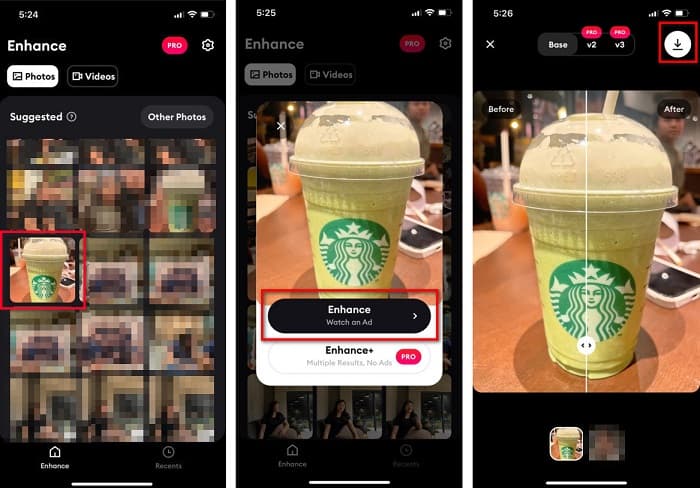
步驟 2. 開啟應用程式後,你會看到你的照片,選擇你想要增強的圖片。接著,點選Enhance(增強)按鈕進入下一個介面。
步驟 3. 在進入下一個介面前,你必須先觀看一則廣告。之後,你會看到圖片的前後對比。點選螢幕右上角的下載圖示。
第 2 部分。 如何在 Android 上為 Facebook 調整照片大小
你是安卓用戶嗎?不用擔心;我們還將展示一個可用於調整圖像大小的應用程序。儘管您可以從 PlayStore 下載許多應用程序,但我們選擇了其中最好的應用程序來展示給您。閱讀下文,了解如何在 Android 上調整 Facebook 的圖像大小。
AI Photo Enhancer & PixelLeap 是另一款能幫助你提升圖片品質、調整尺寸的出色應用程式。這款照片調整工具可在 Play 商店免費下載,且使用安全。另外,如果你想要增強或修復舊照片,也可以使用 AI Photo Enhancer & PixelLeap。憑藉其 AI 技術,只要上傳你想調整尺寸的圖片,應用程式就會自動幫你增強畫質。此外,它擁有簡潔的使用者介面,非常適合初學者使用。而且它還提供其他編輯功能,例如校正、上色、動畫化、表情化與提亮圖片。不過,這款應用程式的缺點是包含許多廣告,需要花時間觀看,且輸出檔案會留下浮水印。儘管如此,如果你想在不裁切的情況下為 Facebook 調整照片尺寸,這款應用程式仍是解決方案。
如何使用 AI Photo Enhancer & PixelLeap 調整圖像大小:
步驟 1. 在你的 Android 裝置上安裝 AI Photo Enhancer & PixelLeap。
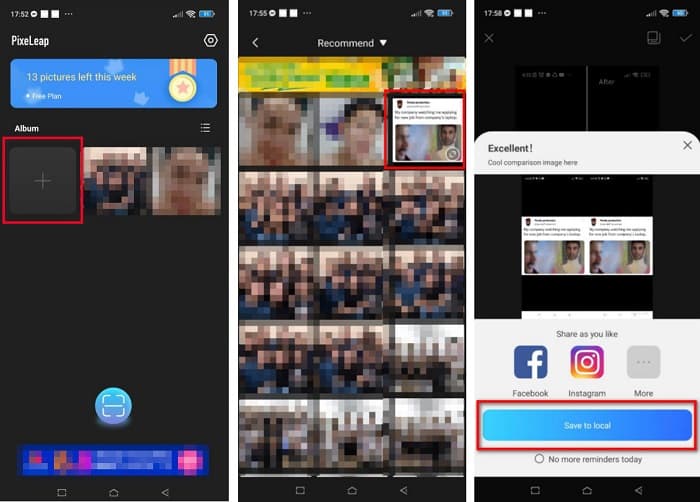
步驟 2. 然後,在應用程式的主介面上,點選「+」方框以上傳你想調整尺寸的圖片。接著,應用程式會要求你先觀看一則廣告,才能進入下一個介面。
步驟 3. 瀏覽並選擇你要調整尺寸的圖片,然後點選它。選取圖片後,點選Enhance(增強)選項。之後,應用程式會自動增強你的圖片。點選存到本機以下載你的輸出結果。
第 3 部分。 如何為 Facebook 在線調整照片大小
使用在線應用程序的優勢在於它可以讓您節省設備上的空間。除此之外,您還可以在瀏覽器上使用許多免費訪問的網絡應用程序。因此,如果您想使用在線應用程序調整要上傳到 Facebook 的圖像大小,我們將向您展示如何調整 Facebook 的照片大小。
FVC Free Image Upscaler 是最佳的線上照片調整尺寸工具,能讓你將圖片放大到 2 倍、4 倍、6 倍或 8 倍。憑藉其簡單的使用者介面,新手也能輕鬆調整圖片尺寸。此外,它支援所有圖片格式,包括 JPEG、JPG、PNG 和 BMP。更令人印象深刻的是,此工具採用 AI 技術,能自動偵測圖片中解析度較低的部分並加以強化。另外,它可以完整且精準地修復遺失的像素、色彩紋理及更多細節。而且,它可在所有網頁瀏覽器上使用,包括 Google、Firefox 和 Safari。因此,如果你想利用 FVC Free Image Upscaler 來調整或增強圖片尺寸,請依照以下簡單步驟操作。
如何使用 FVC Free Image Upscaler 為 Facebook 調整圖像大小:
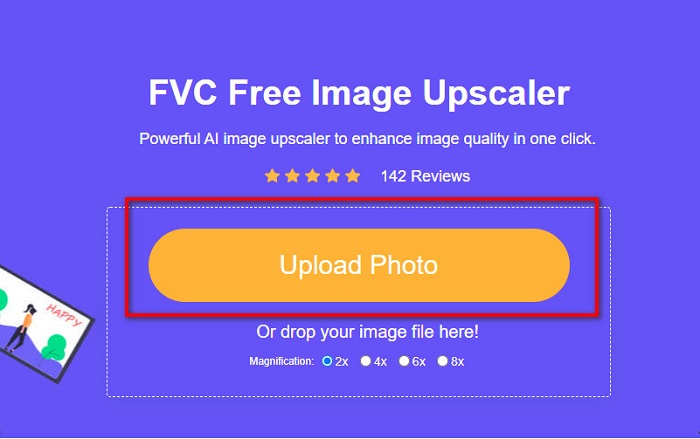
步驟 1. 打開瀏覽器,在搜尋框輸入 FVC Free Image Upscaler。你也可以點選提供的連結直接前往網站。點選Upload Photo(上傳照片)以啟動工具。
步驟 2. 在此線上軟體的主介面上,點選Upload Photo(上傳照片)以匯入你想調整尺寸的圖片。
步驟 3. 在下一個介面中,選擇你想要的輸出放大倍率預設值。你可以在2x、4x、6x 和 8x放大倍率之間選擇。然後進入下一步。
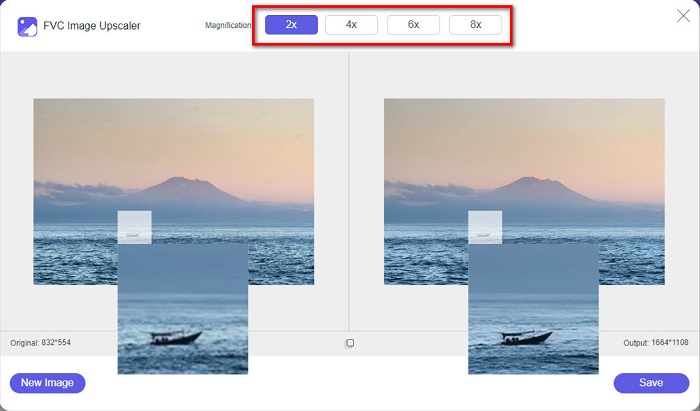
步驟 4. 最後,勾選Save(儲存)按鈕,將輸出結果儲存到你的電腦。你會看到原始檔案與調整後圖片之間的差異。只需幾秒鐘,你的圖片就會被儲存完成。
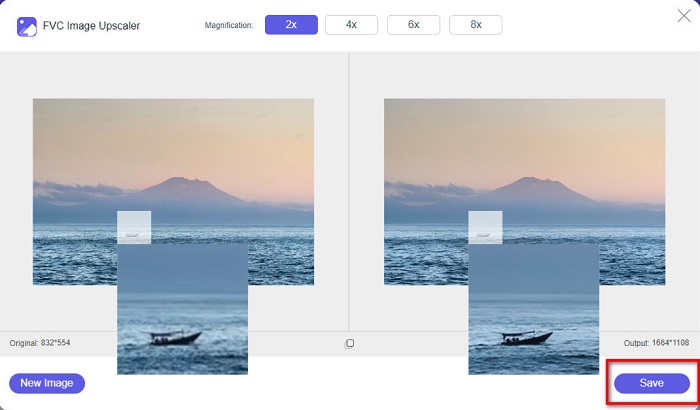
就是這樣!像 ABC 一樣簡單,您的圖像現在得到增強和調整大小。
相關內容:
如何調整圖片大小 ─ Adobe Resize Image【線上與離線】
第 4 部分。有關如何為 Facebook 調整照片大小的常見問題解答
Facebook 的最佳照片比例是多少?
關於照片比例,最好使用縱橫比為 4:5 和 1200 x 1500 像素的垂直圖像。如果你想要一個方形圖像,分辨率必須是 1080 x 1080 像素。
Facebook 帖子的大小是多少?
Facebook 帖子的推薦圖像大小為 1200 x 630 像素,以避免像素化並加快加載時間。
在 Facebook 上上傳的最佳圖片格式是什麼?
在 Facebook 上上傳的最佳和推薦圖像格式是 JPG 格式。最好上傳 RGB 顏色小於 15MB 的 JPG 格式。
結論
如果你想為 Facebook 調整照片尺寸,以上這些方法都能派上用場。透徹閱讀本文後,我們希望你已經學會所有必須了解的重點。你確實可以透過 iPhone、Android 或線上應用程式來調整任何圖片的尺寸。但若想獲得更佳的效果,建議使用 FVC Free Image Upscaler,它同時也能幫你節省裝置空間。
-
 最佳照片調整器應用程序在線、離線、Android 和 iPhone
 什麼是最好的照片調整器應用程序?單擊該頁面以了解可用於增強或調整文件大小的前五個最強大的照片調整器應用程序。
-
 如何調整圖像大小 - Adobe 調整圖像大小 [在線和離線]
 如果您正在搜索 Adobe 調整圖像大小,那麼我們可以為您提供解決方案。徹底查看這篇文章,了解如何在您的 PC 上使用 Adobe 調整圖像大小。
-
 不容錯過的 4 大離線和在線 GIF 放大鏡
 如果您正在尋找最好的 GIF 放大鏡,這篇文章適合您。我們列出了適用於您計算機的性能最佳的在線和離線 GIF 放大器。
