


 視頻轉換大師
 屏幕錄影大師
 影片修復
影片修復
 安全下載
安全下載3 個 Shutterstock 水印去除器,用於使用和去除視頻上的水印
你是否需要用於專案的高品質、具授權的 Shutterstock 影片,卻發現上面都有 Shutterstock 浮水印?借助Shutterstock 浮水印去除工具,你就能輕鬆抹除已下載影片上的浮水印。無論是專業用途還是個人用途,我們都不喜歡影片上出現浮水印,因為那會破壞整支影片原本的觀感。因此,如果你想去除 Shutterstock 浮水印,可以繼續閱讀本文中的相關資訊與簡短教學。

第 1 部分。如何使用市場中的 Ultimate Watermark Remover 刪除 Shutterstock 水印 [編輯選擇]
FVC Video Converter Ultimate 能精準地協助並引導你如何移除已存影片上的 Shutterstock 浮水印。它是一款可在 Windows 和 Mac 上下載使用的全方位解決方案,可用來調整影片,例如移除浮水印。儘管是功能全面的軟體,開發者仍刻意維持操作介面簡單易懂,讓所有想使用它的人,即使沒有深厚專業知識也能輕鬆上手。
即使是低級技能,一旦使用此編輯器,您也可以在最後獲得頂級輸出。仍然不相信我們添加的信息?為了證明這一點,我們將教您如何使用此視頻編輯器免費刪除 Shutterstock 水印。
步驟 1. 若要移除你已下載影片上的浮水印,首先需先下載這款編輯器,點擊適用於你作業系統的下載按鈕即可。接著只需完成一個簡短的安裝流程,之後便可開始使用此軟體。
步驟 2. 接著要使用的是 影片浮水印移除工具(Video Watermark Remover),你可以在工具箱(Toolbox)中找到這個功能。你會看到多種編輯功能,可依照你的偏好調整畫面。
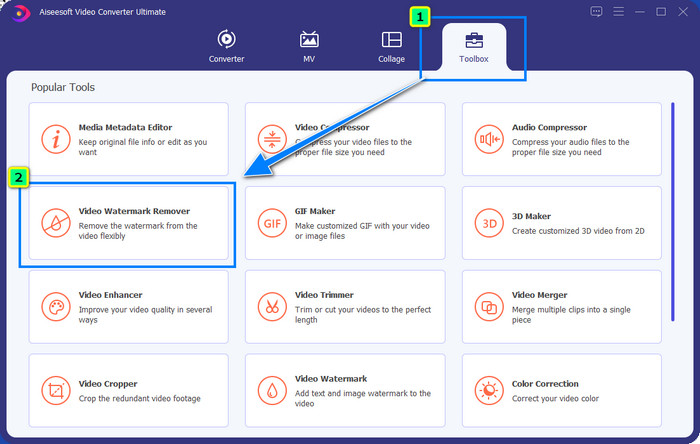
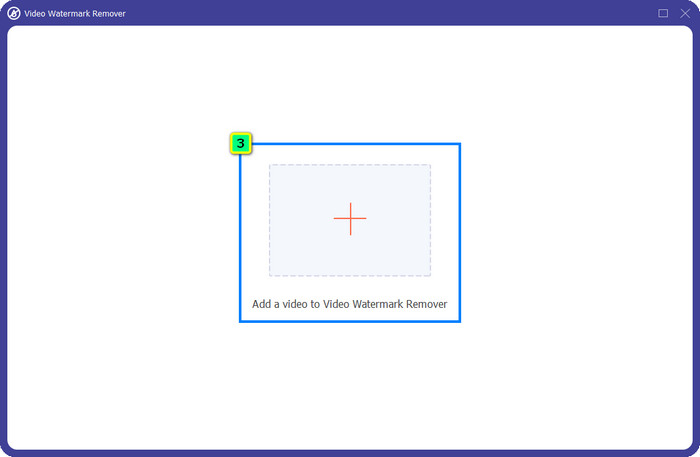
步驟 3. 點擊加號圖示後,檔案管理器會顯示在螢幕上。選擇含有浮水印的影片檔,再點擊開啟(Open)上傳。
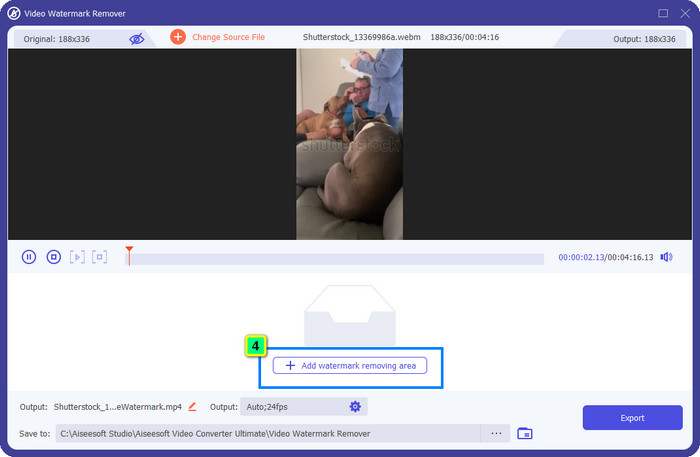
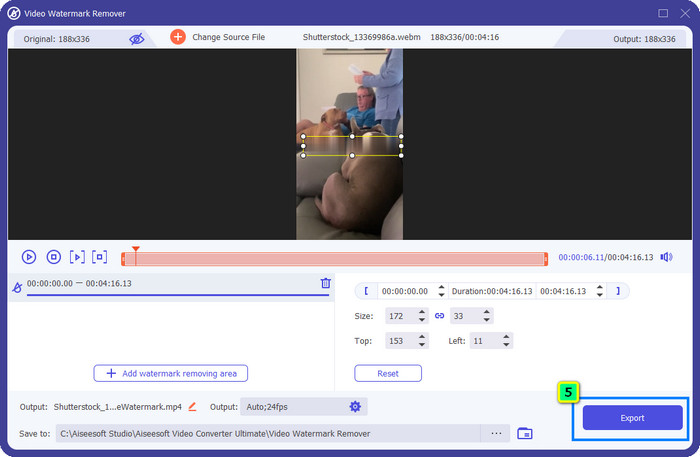
步驟 4. 若要抹除已上傳影片中的浮水印,請按新增浮水印移除區域(Add Watermark Removing Area),隨後將會跳出新視窗。
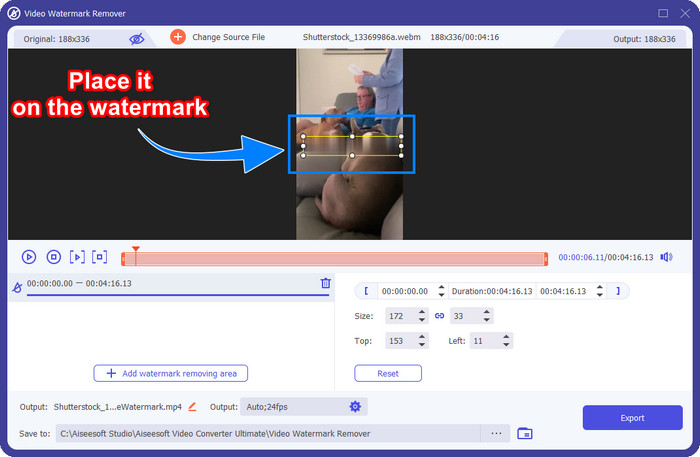
步驟 5. 在這一步,影片畫面上會出現一個方形框,請將它移到浮水印位置上。你可以調整大小、拖曳、縮小或放大,讓它精準覆蓋你想刪除的浮水印。
步驟 6. 最後,點擊匯出(Export)按鈕,即可將處理後的 Shutterstock 影片下載到你的裝置中。現在你就能無需再擔心浮水印,盡情欣賞影片。
第 2 部分。如何免費在線刪除 Shutterstock 水印
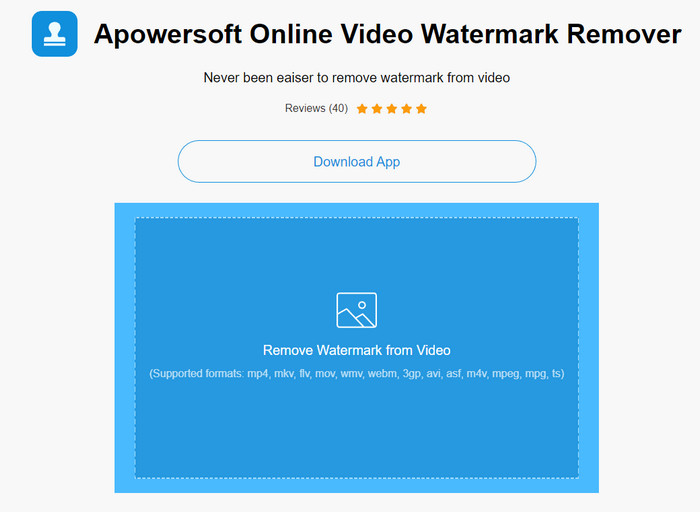
不想在桌面電腦上下載浮水印去除程式嗎?那麼,你可以改用Apowersoft 線上浮水印去除工具(Apowersoft Online Watermark Remover),我們也會教你如何在線上去除 Shutterstock 浮水印。這是個相當不錯的選擇,無論是想移除影片還是圖片上的浮水印都適用。我們之所以推薦它,是因為它可直接透過網頁存取,而且能相容於你手邊使用的各種作業系統。
與離線工具不同,您需要穩定而強大的互聯網連接才能使用它們。正如我們所承諾的,以下是使用此水印去除器去除 Shutterstock 留下的水印的教程。
步驟 1. 使用你常用的搜尋引擎開啟 Apowersoft 線上浮水印去除工具的官方網站,接著點擊右側的 + 按鈕以上傳影片檔。
步驟 2. 將選取框(selection box)拖曳到影片中 Shutterstock 浮水印的位置。
步驟 3. 完成後,點擊Erase(抹除)以去除浮水印並預覽結果。
步驟 4. 按下下載檔案(Download File),即可取得已無浮水印的 Shutterstock 影片。
第 3 部分。如何使用 Photoshop 刪除 Shutterstock 水印 [付費]
許多使用者想知道如何用 Photoshop 去除 Shutterstock 浮水印,而我們也在這裡為你解答!Adobe Photoshop 具備專業級的浮水印移除功能,相信你會樂於使用。和本文提到的其他軟體一樣,它確實能完成去除浮水印的工作;但不同之處在於,它是以逐格畫面的方式來處理。也就是說,你必須一幀一幀地移除影片中的浮水印;影片越長,畫面格數就越多,需要投入的時間也越多。若你想了解此工具的實際操作方式,請閱讀以下詳細步驟。
步驟 1. 在桌面電腦上下載並安裝該應用程式,然後點擊檔案(File),在選單中按下開啟(Open)以上傳儲存在電腦裡的影片。
步驟 2. 在左側工具列中選擇魔術棒工具(Magic Wand Tool),再點擊你想要移除的浮水印。此功能會自動描繪該畫面格中的浮水印範圍。
步驟 3. 前往編輯(Edit)選單,然後在其中選擇內容感知填滿(Content-Aware Fill)。
步驟 4. 開啟內容感知填滿後,系統會自動去除你先前選取的浮水印,完成後再按下確定(OK)。
延伸閱讀:
第 4 部分。有關如何刪除 Shutterstock 水印的常見問題解答
如何在沒有 Photoshop 的情況下刪除 Shutterstock 水印?
您可以使用 FVC Video Converter Ultimate 刪除綁定到您的視頻的 Shutterphoto。它有一個強大的水印橡皮擦,你會很想嘗試。按照我們在本文中添加的步驟,可以像 Photoshop 一樣有效地執行此操作。
裁剪 Shutterstock 水印是否適用於視頻?
如果您想通過更改尺寸來調整視頻大小,您可以在線和離線使用多個視頻編輯器來裁剪視頻。由於 Shutterstock 的水印在中間,所以最好不要使用裁剪功能。許多水印去除器可以提供幫助;您可以閱讀和復制我們添加的教程,以便您可以有效地擦除它而不會留下污跡。
刪除 Shutterstock 水印是否合法?
去除 Shutterstock 的水印是不合法的,但如果您想將其用於非商業用途,您可以藉助水印去除器來完成。如果您打算將其用於商業目的,最好在 Shutterstock 上購買您想要的照片;雖然它會花費你,但它至少會讓你擁有使用它的合法權利。
結論
現在,你已經知道如何使用本文介紹的軟體來移除 Shutterstock 浮水印了。那麼,你比較偏好哪一種?付費版、免費線上工具,還是這款旗艦級軟體?無論選擇哪一個,你都能取得不含產品標誌的 Shutterstock 相片。若你要問我們會推薦哪一款,我們毫不猶豫會選擇FVC Video Converter Ultimate,因為它在完成任務方面表現最為出色。即便是功能強大的浮水印移除工具,它依然維持簡單易用。因此,如果你想試試這款軟體,只要點擊下載按鈕,便能將此工具安裝到你的電腦上。
-
 從 Renderforest 導出的視頻中刪除水印的終極工具
 要從 Renderforest 中刪除水印,您需要在設備上安裝水印去除器,您可以使用的所有工具都在這裡。
-
 如何刪除 WOW 滑塊水印的簡單步驟 [已解決]
 WOW Slider 是一款用於創建精彩幻燈片的應用程序。但是,它會在其輸出中嵌入水印。閱讀以下內容以了解如何刪除 WOW Slider 水印。
-
 如何免費去除威力導演水印[完成]
 如何免費去除威力導演水印?消除水印的最佳工具在這裡,因此請通過閱讀本文來學習它們。
