如何從照片中刪除水印的顯著方法
Do you desire to learn how to remove watermarks from photos? But there are some instances where the pictures you want to save have watermarks, which irritates the eyes, and you can’t see the full beauty of the images. Fortunately, you can use software applications to remove those unnecessary watermarks on your computer, iPhone, and Android. In this way, you can already save the photos you want by using those applications with watermark remover. Reading this article is the best choice to learn more about easy methods for removing watermarks.
第 1 部分。如何從計算機上的照片中刪除水印
1. FVC Free Watermark Remover
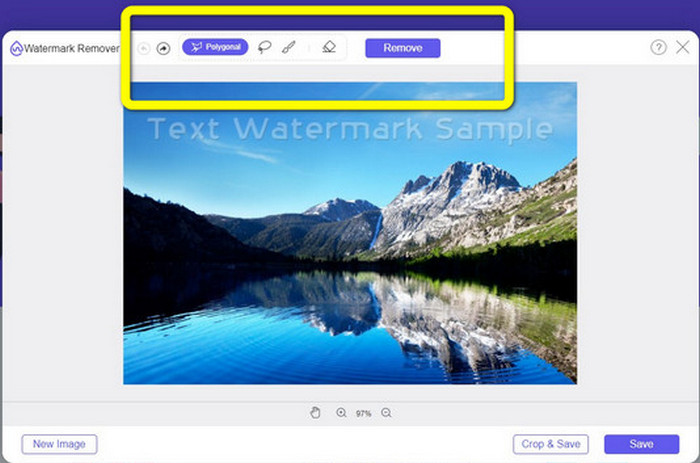
If you want to remove a watermark from a photo free online, you can use FVC Free Watermark Remover. This application can help remove any watermark from your pictures, like logos, texts, images, and more. In addition, it can support different image formats, such as JPG, PNG, JPEG, BMP, and more. Furthermore, this software is easy to use and understand because it has a straightforward interface, detailed guide, and simple buttons. In terms of actually removing watermarks, FVC Free Watermark Remover lets you use your mouse to draw a polygonal line or lasso on the image to choose the watermark you want to remove. The brush is also another option for eliminating watermarks on your pictures. If you want to remove the watermark from the photo for free, follow the simple steps below.
Step 1: Go to the website of FVC Free Watermark Remover and click Upload Image. Then add the image with the watermark you want to remove.
Step 2: After you open your image with watermarks, you can use the watermarks remover options, like the Polygonal tool, Lasso, and Brush tool, to remove the watermarks.
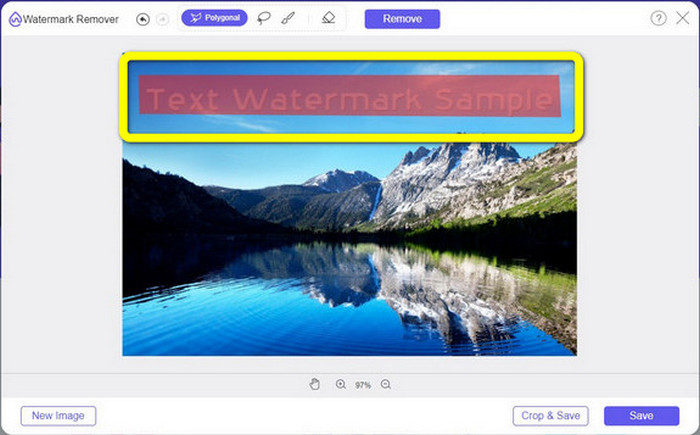
Step 3: Using the Brush tool, Lasso, or Brush tool, highlight the watermarks on your photo.
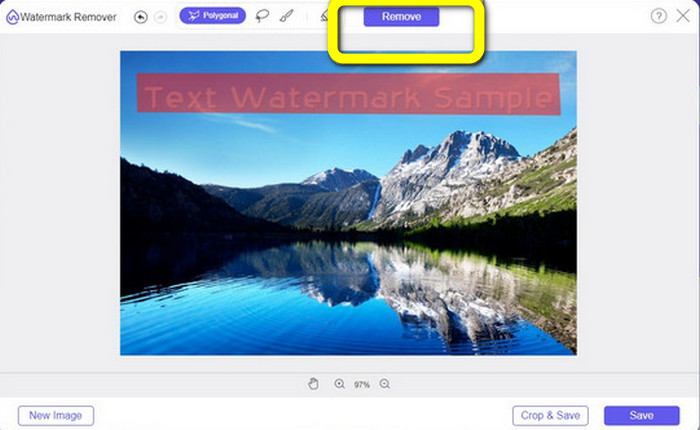
Step 4: If you are done highlighting the watermarks on your photo, click the Remove button.
Step 5: If the watermark is already removed from your photo, click the Save button to download your image, and you can now enjoy looking at your pictures without feeling irritated about the watermarks.
2. Photoshop
Suppose you are also looking for an excellent and reliable application you want to download on your computer. In that case, Adobe Photoshop is one of the reliable applications that you can use. This part will show you how Photoshop removes watermarks from photos. This application is suitable for photographers, web designers, graphic designers, meme makers, etc. However, you need to purchase Adobe Photoshop because it only has a 7-Days free trial. Also, Photoshop is unsuitable for batch work with photos and has complicated learning curves. If you want to know the most straightforward way to remove watermarks on your images, follow these simple steps below.
Step 1: Open your Adobe Photoshop. Select File > Open and add your photo with watermarks.
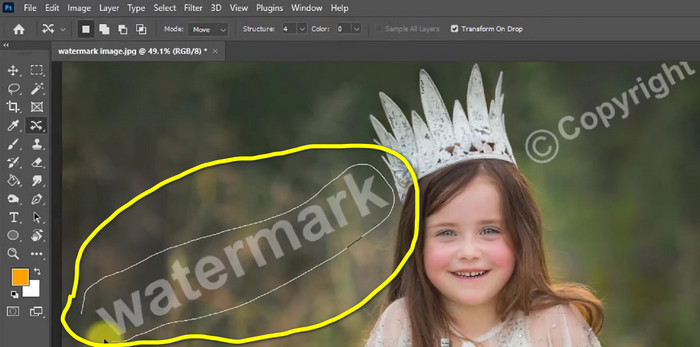
Step 2: Click the Content-Aware Move Tool on the editing tools.
Step 3: After clicking Content-Aware Move Tool, select the watermark area on your photos and press Delete on your keyboard.
Step 4: When you already press Delete, another mini interface will appear, then click OK.
3. GIMP
Another proper application to remove watermarks on your photos is the GIMP. It is an open-source raster graphics editor used to manipulate and edit images, making it a helpful tool for image editing. In addition, it supports many file formats, such as JPG, PNG, TIFF, GIF, and more. However, there are times that it crashes instantly, and it is also hard to arrange layers. If you want to know how to remove watermarks on your photos using GIMP, follow these simple steps below.
Step 1: If you are on the website of GIMP. Click Download Directly to download the application and follow the installation process.
Step 2: Open the application and click File > Open to add your photo with watermarks.
Step 3: Click the Clone tool and place the cursor on the blank area. Press Ctrl and click the empty area.
Step 4: Drag your cursor on the watermarks to remove them. Your watermark is already gone. You can now save your photo.
4. Aiseesoft 免費在線水印去除器
If you want the best online photo watermark remover, Aiseesoft Free Watermark Remover Online is for you. This application can help remove multiple watermarks, text, date stamps, logos, and more on your photos. Moreover, it is easy to utilize, which is perfect for beginners. Also, it supports various image formats, such as PNG, JPEG, BMP, JPG, and more. However, this application is not 100% free; you must purchase its license to enjoy advanced features. If you want to remove watermarks on your images, follow these steps.
Step 1: Go to the website of Aiseesoft Free Watermark Remover Online. Then click Upload Image to add your photo with watermarks.
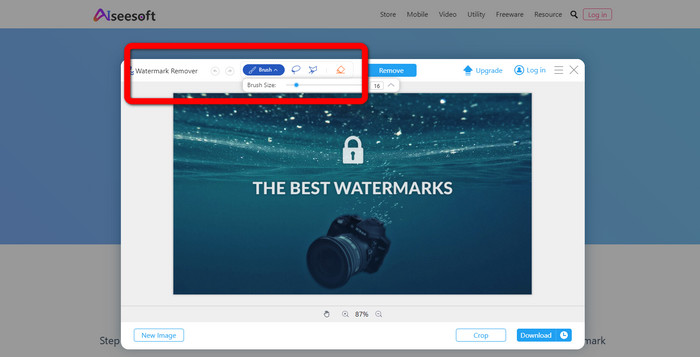
Step 2: If you have already attached your photo, proceed to the watermark remover tool. Then you can see the remover tools, like Brush, Polygonal, and Lasso tools.
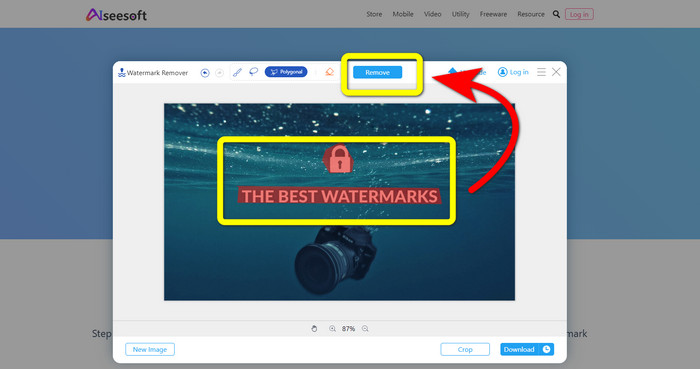
Step 3: Use these tools and highlight the watermarks on your photo and click Remove.
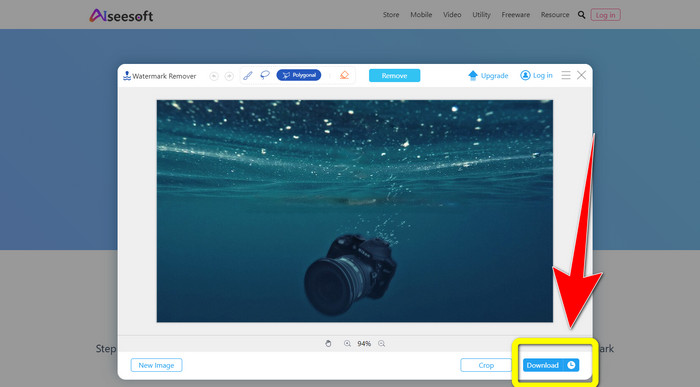
Step 4: If you are already satisfied with the result, click Download to save your photo.
5.像素
Pixlr is another online tool you can use to remove watermarks on your photos. It is easy to use and suitable for beginners. It supports different image formats, like PSD, PNG, JPEG, WEBP, and PXZ. Moreover, you can use this application with your devices, like iPhone, Android, Desktop, and Laptop. But, it doesn’t have many options like the other applications and has a limited effect. If you want to learn how to erase the watermark on a picture, follow the steps below.
Step 1: Go to the Website of Pixlr. Click Open Image to add the image with the watermark.
Step 2: After you have added your photo, go to retouch > heal tool.
Step 3: After you click the retouch > heal tool, click the watermark on your image.
Step 4: If the watermark is gone, click the Save button.
6.修復
Inpaint is another online application you can use if you want to remove watermarks on your images. Not only watermarks but also logos and text. It also supports image formats like JPG, PNG, and WEBP. However, if you want to get high-quality images, you have to purchase the application. If you want to remove watermarks on your photos, follow the simple steps below.
Step 1: Go to the website of Inpaint. Click Upload Image and your image with the watermark.
Step 2: When you upload your image, select the watermark remover tools like Marker, Polygonal, Lasso, and Eraser tool and highlight the watermarks on your photo.
Step 3: If you are done highlighting the watermarks, click Erase.
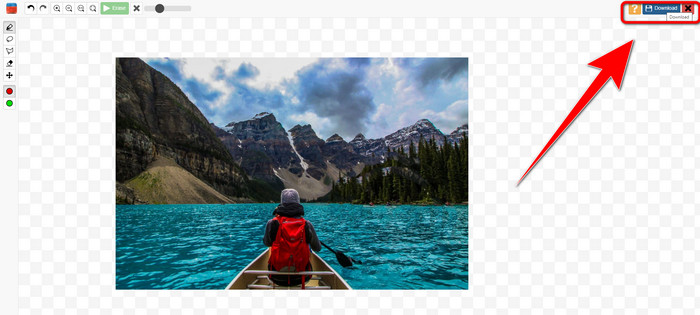
Step 4: If the watermark is gone, click the Download button to save your image.
7. 照片印章去除器
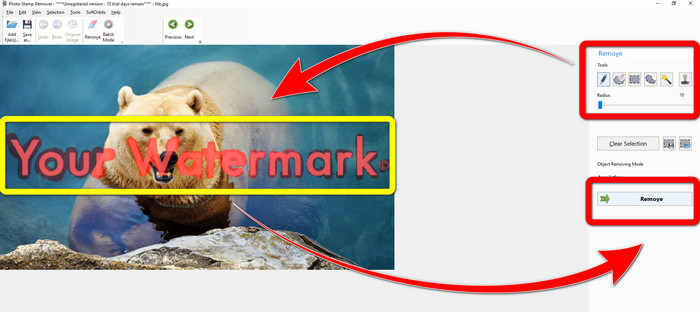
Photo Stamp Remover 是一款可與計算機配合使用的應用程序。您可以免費下載。此應用程序可以快速刪除圖像上不需要的對象,例如徽標、文本、水印和日期。但是,它在背景複雜的圖片上表現不佳。此外,這款軟件還可以還原原圖的顏色和紋理,遮蓋水印,讓照片看起來更真實。按照以下步驟刪除圖像上的水印。
Step 1: Click the Download button to download the Photo Stamp Remover on your Windows and follow the installation process.
Step 2: Launch the application and click Add File to add your photo with the watermarks.
Step 3: Go to Remover tools and click the Selection Marker. Highlight the watermarks and click Remove.
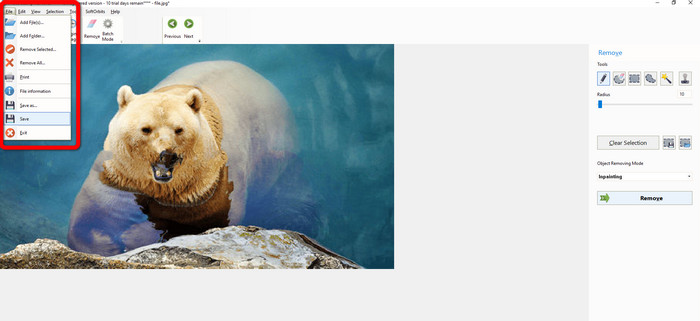
Step 4: If you have already removed the watermarks on your image, click File > Save. Then you are done removing watermarks on your image.
第 2 部分。 如何從 iPhone 和 Android 上的照片中刪除水印
1.視頻橡皮擦
If you want to know what application may help you to learn how to remove watermarks from a photo using Android, Video Eraser is for you. This application can remove unnecessary objects on your photos, like text, watermarks, etc. In addition, with this application, you can also remove watermarks on your videos. But, the picture will become blotchy on the area where the watermark was effaced. If you want to learn how to use a Video Eraser, follow the steps below.
Step 1: Install the Video Eraser on your Android. Open the application when the installation is done.
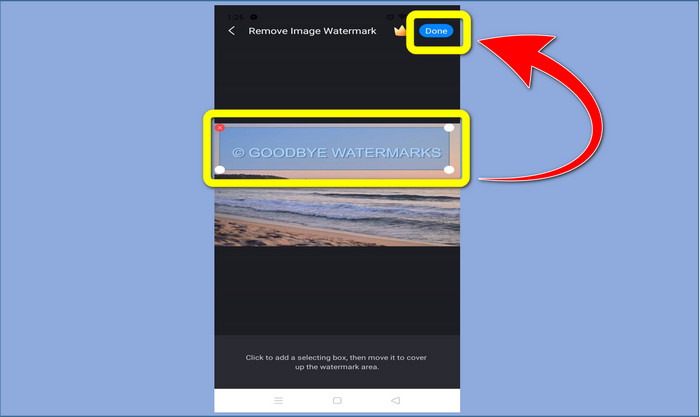
Step 2: Click Remove Image Watermark to add your photo with the watermarks.
Step 3: Highlight the watermark on your photo and click Done.
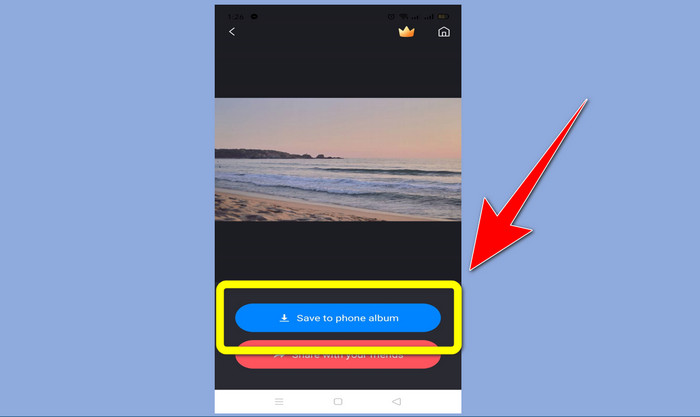
Step 4: After clicking Done, the watermark will disappear. Click Save to Photo Album to save your photo.
2. 快播
Snapseed is an excellent editor you can use, especially if you want to learn how to remove a watermark from a photo on an iPhone. This application is good if you want to remove watermarks on your images. In addition, it has various editing tools you can utilize, like crop, rotate and more. This application is also not for beginners, especially in terms of advanced editing, and even though it is user-friendly, it has a slight learning process. Follow the steps below to remove watermarks on your photo using this application.
Step 1: Install the Snapseed on your iPhone. When the installation is finished, open the software.
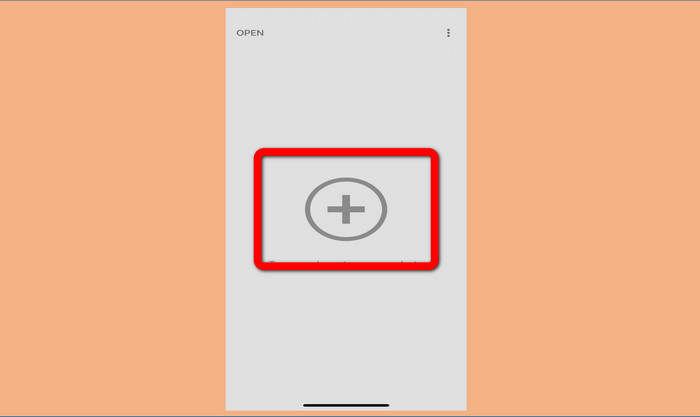
Step 2: Click the Plus sign button to add your photo with the watermarks.
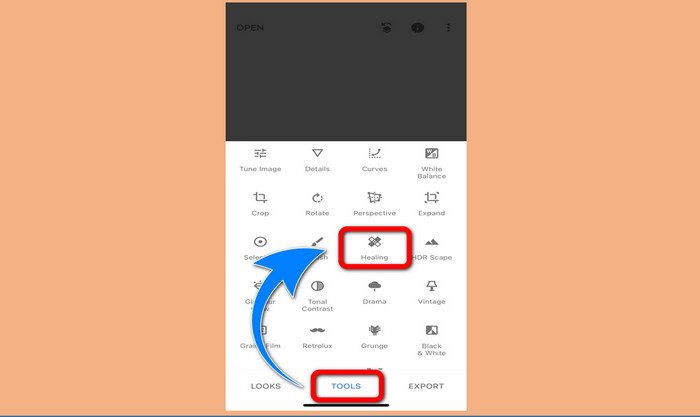
Step 3: When you have already added the photo, select Tools > Healing and highlight the watermarks on your image. After you highlight the watermarks, they will automatically disappear.
Step 4: After you highlight the watermarks, they will automatically disappear.
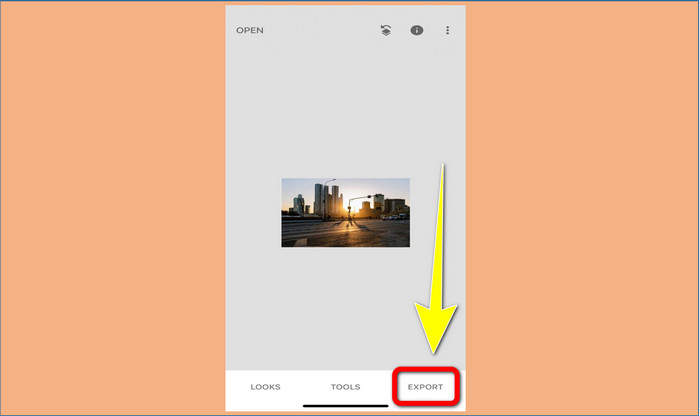
Step 5: When you are done removing watermarks on your photo, click the Check sign and Export to save your picture on your iPhone.
相關內容:
Quickest Trick to Remove the Adobe Stock Watermark From a Video [ Tutorial ]
5 Ways to Remove a Watermark from a Video in a Professional Manner
第 3 部分。有關從照片中刪除水印的常見問題解答
有沒有我可以免費使用的水印去除器,尤其是適用於 Mac 的水印去除器?
Yes, there is! You can use many watermark removers on your Mac, like FVC Free Watermark Remover. It is an online application to remove watermarks on your Mac.
有沒有辦法去除視頻中的水印?
確實!這是一件容易的事。您現在可以使用的一些水印去除應用程序可以去除照片和視頻上的水印。您需要做的就是在搜索框中搜索水印去除器並查看結果頁面。
去除水印容易嗎?
是的當然!如果您已經擁有要使用的應用程序,則需要尋找刪除工具,例如畫筆、標記、套索和多邊形工具。然後,突出顯示水印並完成。
結論
As shown above, this article provides remarkable ways to remove watermarks from photos. But if you want an excellent tool you can use to remove watermarks, FVC Free Watermark Remover is the best for you.


視頻轉換大師
屏幕錄影大師