


 視頻轉換大師
 屏幕錄影大師
 影片修復
影片修復
 安全下載
安全下載Apowersoft Watermark Remover:你永遠需要知道的深度評測
許多使用者都偏好選擇使用 Apowersoft Watermark Remover 來移除影片與圖片上的浮水印或標誌。就我們所知,這款軟體擁有強大的浮水印去除功能,並能以較柔和的處理方式保留影片畫質。你是否曾考慮過下載這款軟體?或是打算購買 Apowersoft 的方案?在你做出倉促決定之前,先閱讀我們為這款浮水印去除工具撰寫的完整評測,看看它是否符合你的需求!

Part 1. Apowersoft Watermark Remover全面評測:你必須知道的
Apowersoft Watermark Remover 是一款可下載到 Windows 上使用的浮水印去除工具,能神奇地移除影片或圖片上的浮水印。沒錯,你沒有聽錯!此軟體可以處理圖片與影片,但無法同時處理兩者。此外,它還提供 Apowersoft 線上浮水印去除工具版本,你可以在常用的網頁瀏覽器上免費使用與存取。不過,大多數可在離線版本中使用的功能,線上版並不支援。
如果您想在視頻或圖片上添加個性化水印怎麼辦?這可能嗎?是的!您可以在照片中添加文字或徽標。您必須使其獨一無二,以防止視頻被盜。想更深入的了解Apowersoft最好的去水印軟件嗎?如果是這樣,請在我們添加功能、優點和缺點、價格/計劃以及如何使用它時繼續閱讀下麵包含的信息。
Apowersoft Watermark Remover 的主要功能:
◆ 上傳不限長度的視頻。
◆ Apowersoft去水印一鍵去水印。
◆ 支持拖放功能。
◆ 支持多種格式的視頻和圖片供您導入。
◆ 添加和刪除水印是這裡可以完成的任務。
◆ 您可以在Windows 11/ 10/ 8/ 7/ 和Vista 上下載此軟件。
優點
- 它有 30 天的退款保證,對於那些獲得月度訂閱的人來說,還有 7 天的退款保證。
- 它具有無限的軟件更新和技術支持。
- 它有在線和離線版本,您可以自由使用。
缺點
- 它只提供刪除和添加水印的功能。
- 您必須在免費試用後購買該軟件才能繼續使用它。
- 它不支持 Mac 版本。
Apowersoft Watermark Remover 的價格與方案:
您使用的任何計劃都支持退款保證。因此,如果您決定購買此軟件,您可以購買以下計劃,以充分體驗使用 Apowersoft 視頻和圖像水印去除器的體驗。
| 計劃 | 費用 |
| 包月計劃 | $ 19 |
| 年度計劃 | $ 29 |
| 永久計劃 | $ 39 |
如何使用 Apowersoft Watermark Remover:
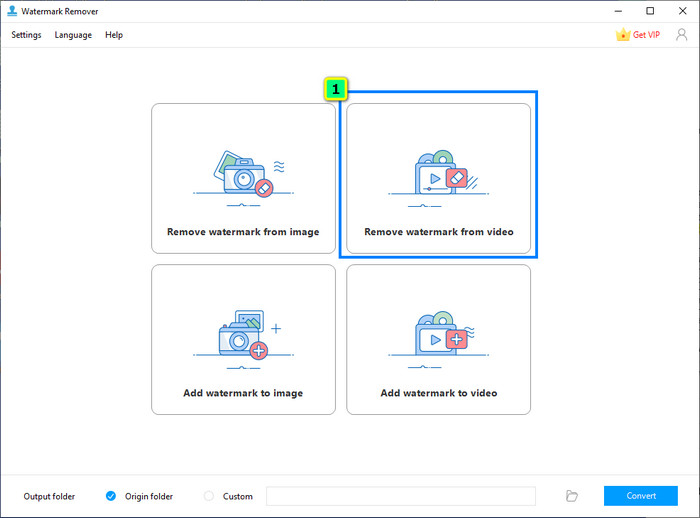
步驟 1. 在你的 Windows 上下載此浮水印去除工具,啟動後點選 Video Watermark Remover(影片浮水印去除)。
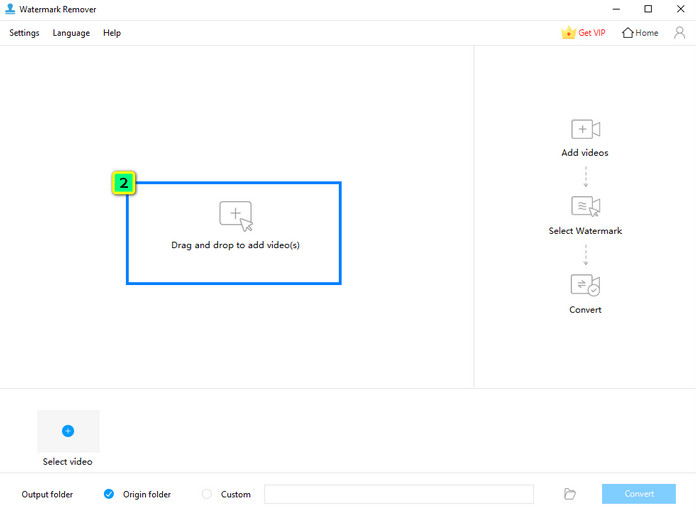
步驟 2. 點擊 Add Files(新增檔案)以上傳儲存在本機硬碟中的影片。
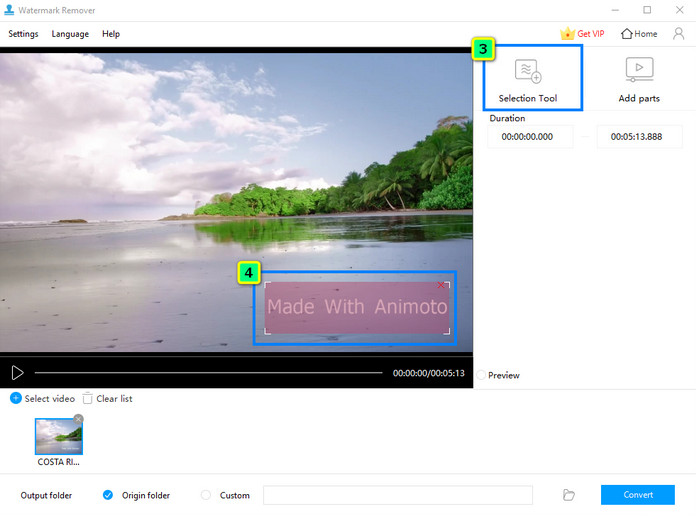
步驟 3. 按下 Selection Tool(選取工具),然後拖曳並將選取框放置在浮水印位置上。
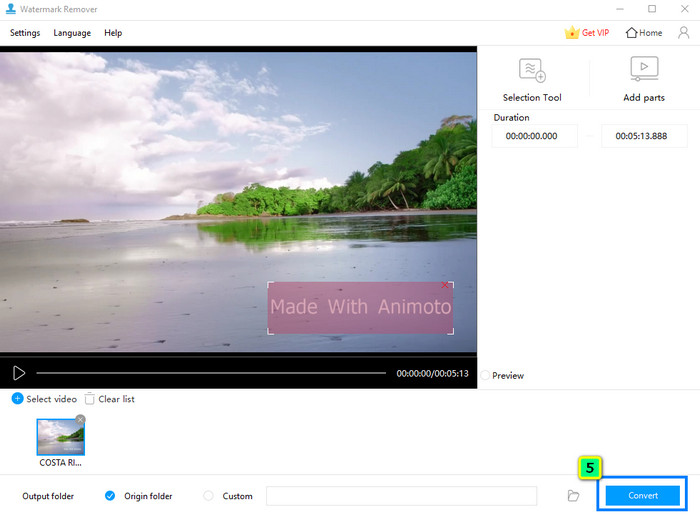
步驟 4. 完成後,點選 Convert(轉換)即可將影片儲存到你的本機硬碟。
第2部分。具有多功能特性和功能的Apowersoft Watermark Remover的最佳替代品
Apowersoft Watermark Remover 尚不支援 Mac,那麼你該用什麼來移除浮水印呢?FVC Video Converter Ultimate 是你可以下載、快速編輯並去除影片浮水印的最佳替代方案,且提供 Windows 版本。與 Apowersoft 的產品相同,此軟體也能在影片上移除與新增浮水印。
此外,該軟件還具有我們評測過的水印去除器所沒有的多功能特性和功能,例如裁剪、修整、創建 GIF、添加和刪除元數據等等。儘管具有所有這些功能,該軟件已成為專業人士的選擇,但由於其易用性,它可以成為初學者的選擇。你想了解更多關於這個軟件的信息嗎?您可以閱讀其他功能、優缺點、價格以及接下來的使用方法。
FVC Video Converter Ultimate 的主要功能:
◆ 它有一個新的和先進的方法來去除和添加每個視頻的水印。
◆ 視頻所需的終極編輯特性和功能都在工具箱中。
◆ 不影響視頻的整體質量;它有一個你可以使用的視頻增強器。
◆ 產生高質量輸出的簡單GUI。
◆ 支持極速處理和硬件加速,助您處理任何事情迅捷。
◆ 可在不同版本的Windows 和Mac 操作系統上運行。
優點
- 由於其特性和功能,多視頻編輯的最佳選擇。
- 您在此處所做的每項編輯都是安全的。
- 它支持編輯器的無限更新和24/7 技術支持。
- 支持 30 天退款保證。
缺點
- 它的價格略高於Apowersoft去水印。
如何使用 FVC Video Converter Ultimate 的浮水印去除功能:
步驟 1. 透過下方下載按鈕,在你的桌機或筆電中下載正確版本的 FVC Video Converter Ultimate。安裝完成後,點選「Start Now」啟動程式,並開始移除影片上的浮水印。
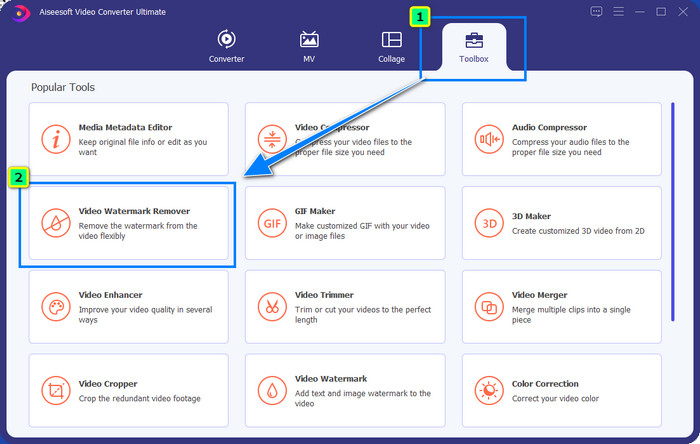
步驟 2. 當你在系統上執行此應用程式後,前往 Toolbox(工具箱)並開啟 Video Watermark Remover(影片浮水印去除)。
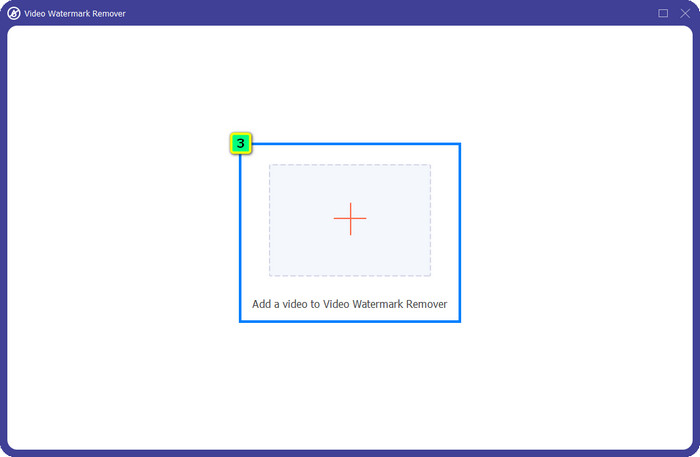
步驟 3. 按下 + 圖示,匯入你想在此處編輯的影片。
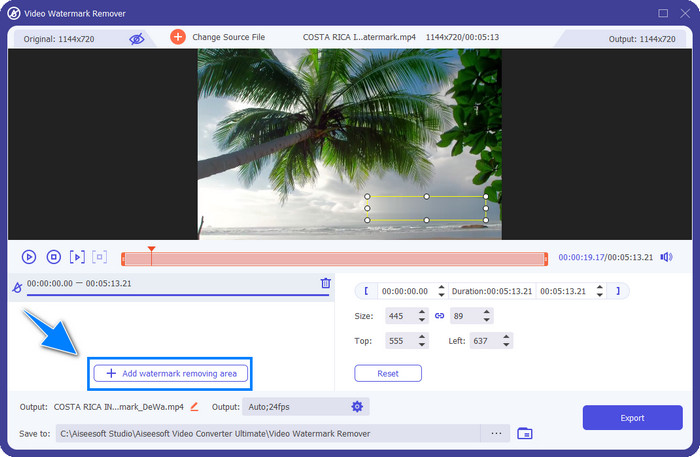
步驟 4. 選擇 Add Watermark Removing Area(新增浮水印去除區域),以啟用此軟體的浮水印去除功能。

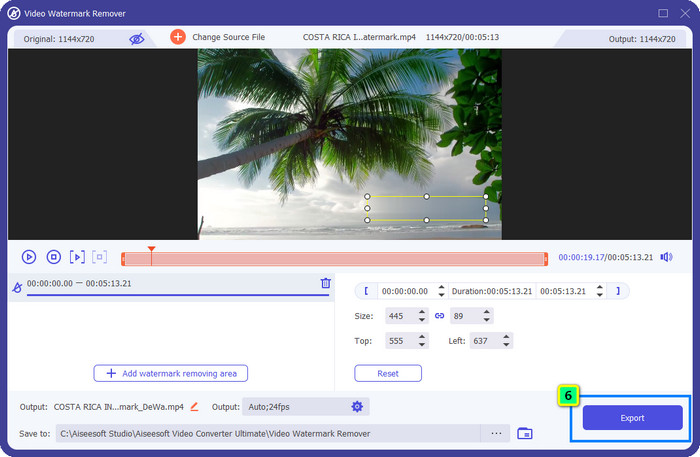
步驟 5. 點擊後,畫面上會出現一個選取框,請調整大小並將其放置在浮水印上。請確保它能完整覆蓋影片中的全部浮水印。
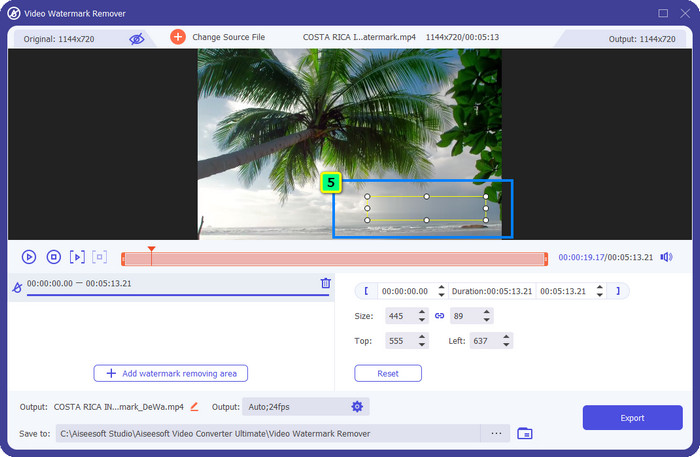
選用: 如果有兩個或以上的浮水印,要怎麼移除?在這款軟體中,只要多次點選 Add Watermark Removing Area,就能新增多個去除區域,將影片上的浮水印全部清除。
步驟 6. 現在點擊 Export(匯出)按鈕儲存最終輸出檔案;檔案會直接儲存在你的本機硬碟中。
然而,這裡無法編輯圖片。所幸,它還提供一款 FVC Free Watermark Remover,可更有效地移除圖片上的浮水印。
延伸閱讀:
你必須了解的 Apowersoft Free HEIC Converter 公正評測【2022】
Part 3. Apowersoft Watermark Remover常見問題解答
Apowersoft視頻水印免費試用版會留水印嗎?
Apowersoft視頻水印免費試用版會留水印嗎?借助Apowersoft視頻水印,您可以在視頻或圖片上添加水印。雖然您使用的是免費試用版,但Apowersoft不會在您編輯後的最終輸出上添加水印。
Apowersoft Watermark Remover 破解版在哪裡下載?
最好在其官網下載該軟件的正式版。最好不要使用其他第三方網站下載本軟件。您可以花點錢購買正式版,而不是下載破解版。
購買 Apowersoft Watermark Remover 值得嗎?
Apowersoft Watermark Remover值得購買,但如果你想要多功能軟件,你最好選擇FVC Video Converter Ultimate作為替代品。
結論
Apowersoft Watermark Remover 提供完善的浮水印新增與去除功能,你可以輕鬆應用在影片與圖片上。不過,它的功能並不算特別豐富,如果你想要更多進階功能,就必須更上一層樓,下載 FVC Video Converter Ultimate。
-
 在 Windows 和 Mac 上刪除 Fiverr 水印的 3 種簡單方法
 如果您正在尋找可以刪除 Fiverr 水印的應用程序,那麼您就在正確的頁面上。閱讀這篇文章,了解如何輕鬆刪除 Fiverr 水印。
-
 123rf 水印去除器 – 徹底審查終極工具
 如果您想知道最出色的 123rf 水印去除器是什麼,請仔細閱讀本文。本文對這些工具進行了深入的回顧。
-
 你不能錯過的傑出的阿諾德瑪雅水印去除劑
 許多水印去除器可以去除 Arnold Maya 水印。但是,如果您想知道什麼是最好的 Arnold Maya 水印去除劑,請閱讀此頁面。
