視頻轉換大師 大盒

多合一視訊工具箱,能夠以超快的速度將視訊/音訊轉換為 1000 多種格式。

免費下載

Login Security安全下載

免費下載

Login Security安全下載

4 種最簡單的去除 iFunny 水印的方法

iFunny is one of the most popular applications if you want to read funny messages with pictures (memes). However, some of these pictures have an iFunny watermark, which is irritating. But if you want to discover the most outstanding methods to remove these watermarks, you are on the right page. We will introduce you to numerous applications you can use to eliminate annoying elements from your photos. These tools are tested and proven, so you don’t need to doubt if they are legitimate or not. Are you ready to learn the best methods to remove iFunny watermarks? Then read this article from the beginning to the end.

如何刪除 iFunny 水印

第 1 部分:使用裁剪工具去除 iFunny 水印

刪除 iFunny 水印的最佳方法之一是使用裁剪工具。如果水印位於圖片的邊緣或角落,則此方法適用。您可以左右和上下剪切圖片。如果您想從圖像中裁剪 iFunny 水印,請按照以下簡單步驟操作。

Step 1: Open your photo with an iFunny watermark. Select the Edit Image option to use the Cropping tool. You can also press ctrl+E.

編輯圖像選項

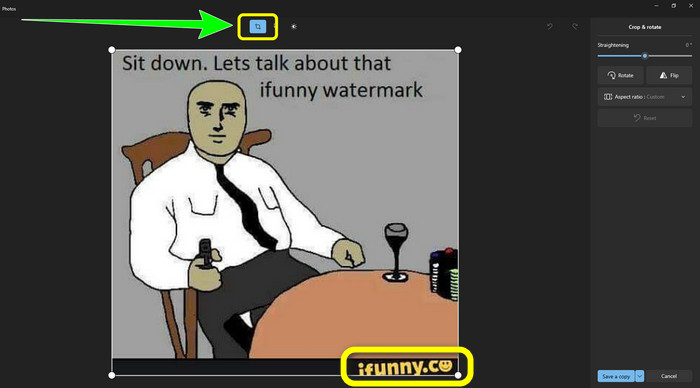
Step 2: After that, click the Cropping tool. Then, you can already crop your photo to remove the iFunny watermark from your picture.

單擊裁剪工具

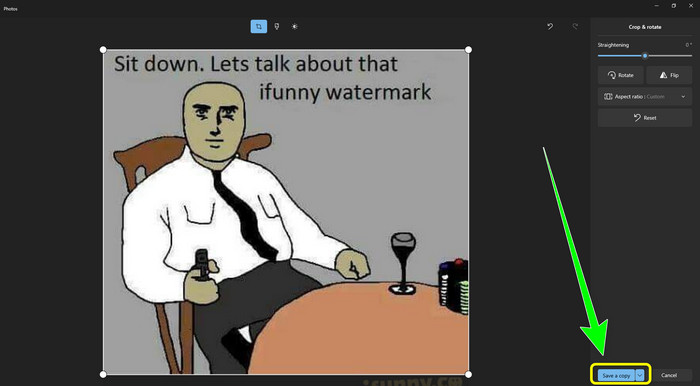
Step 3: When you are done cropping your photo, click the Save a copy button. Wait for the saving process and place your final photo in your desired location.

保存副本

這是使用裁剪工具去除 iFunny 水印的最簡單方法。

第 2 部分:無需裁剪即可刪除 iFunny 水印的最佳方法

使用 FVC Free Watermark Remover

Suppose you are looking for an iFunny watermark remover, then you can use FVC Free Watermark Remover. You can remove any watermarks from images using this application easily and instantly. Also, you can rely on this watermark remover if you have multiple watermarks on your photo. In addition, almost all image file formats are supported by this online tool, including JPG, PNG, BMP, TIFF, and more. For removing unnecessary objects and watermarks from images, this watermark remover offers three different tools: Lasso, Brush, and Polygonal. With the assistance of these tools, you can easily remove anything you don't want from your picture. In addition, FVC Free Watermark Remover has a comprehensible interface accessible to all users, whether they are beginners or professionals. Moreover, your file is safe here because this watermark remover guarantees your privacy, which means you are the only user who can edit your photo. Lastly, this is free software, so you can use it every time and upload unlimited files you want to enhance.

Step 1: Open the FVC Free Watermark Remover on your browser. Then, click the Upload Image button to attach your photo with the iFunny watermark.

單擊上傳圖像按鈕

Step 2: When you have already attached your photo, highlight the iFunny watermark using the watermark remover tools.

高亮 iFunny 水印

Step 3: Next, click the Remove button to erase the iFunny watermarks from your photo.

刪除突出顯示的水印

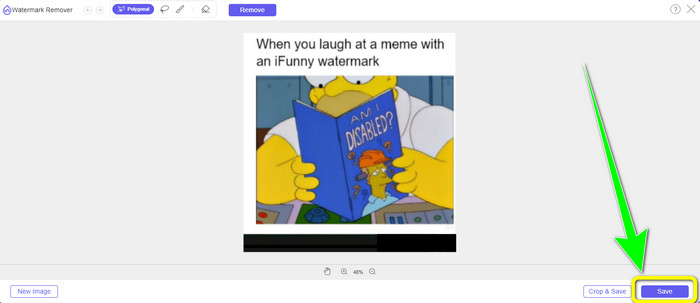
Step 4: After the removal process, your last and final step is to click the Save button to download your photo without the iFunny watermark on your device.

將照片保存到桌面

使用 WatermarkRemover.io

Use WatermarkRemover.io if you wish to use a different web application to get rid of the iFunny watermarks from your photos. This free tool can remove any extraneous elements from your images, including logos, captions, stamps, and more. Additionally, you can remove several watermarks from your pictures. Additionally, it offers an easy-to-use interface which is great for beginners. Different image formats, including PNG, JPG, WEBP, and JPEG, are supported using this web tool. When using the free version, nevertheless, there are restrictions. Only 50 photos can be uploaded at a time, and the storage space is only 25GB. If you want to upload more photographs and gain more storage, you must pay a subscription, which is somewhat expensive. Follow the steps below to use this great iFunny watermark remover.

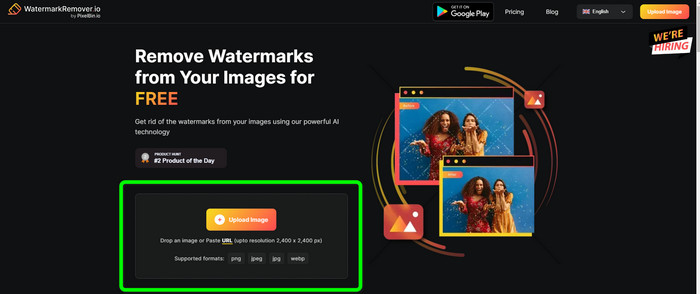
Step 1: Open your browser and visit WatermarkRemover.io. Click the Upload Image button to upload your photo with the iFunny watermark. You can also drag your file into the box.

IO Remover 上傳圖片

Step 2: After uploading the photo, it will automatically remove ifunny watermark. When the photo already shows up without a watermark, click the Download button.

下載圖像

在線使用Apowersoft水印去除

To instantly remove iFunny watermarks from your photo, Apowersoft Watermark Remover Online is also a good online application for you. It can erase unwanted elements from your photos, including signatures, texts, logos, and more. Also, it supports different image file formats, such as JPEG, JPG, PNG, TIFF, and more. Beginners can utilize this tool even if they don’t have enough skills because Apowersoft Watermark Remover Online has simple methods and an easy-to-understand interface. Also, the file will be automatically deleted after removing and downloading your photo, which means no one can see your work. Aside from removing watermarks from a photo, this tool can also remove watermarks from a video, which is convenient for the user. It supports various video formats, like MOV, WMV, MP4, 3GP, AVI, etc. However, this online watermark remover has a slow removal process, which is not great for users. Also, it won’t operate without an internet connection. If you want to utilize this tool, follow the basic steps below.

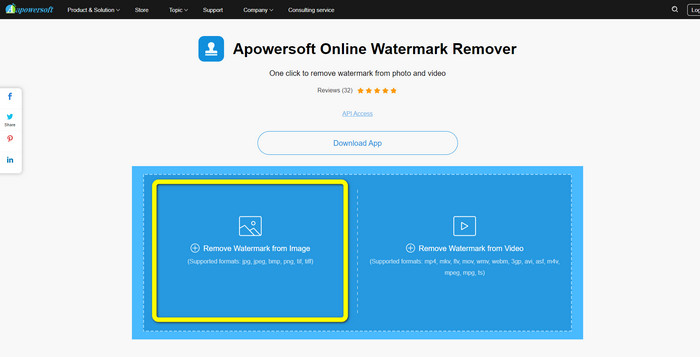
Step 1: Search for Apowersoft Online Watermark Remover. Then, click the Remove Watermark from Image button to attach your photo with the iFunny watermark.

Apowersoft在線卸妝

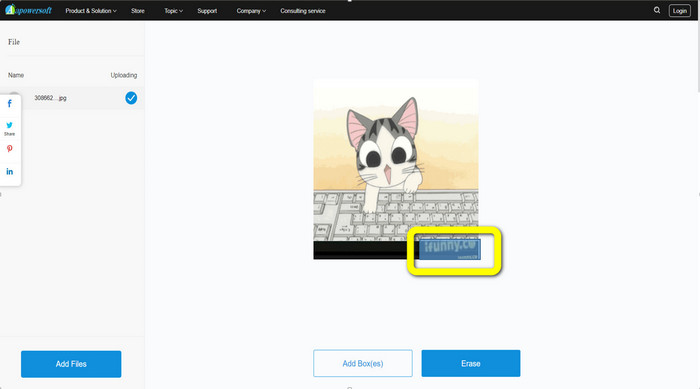
Step 2: After attaching your file, you can use the blue box to cover the iFunny watermark from your photo.

封面 iFunny 水印

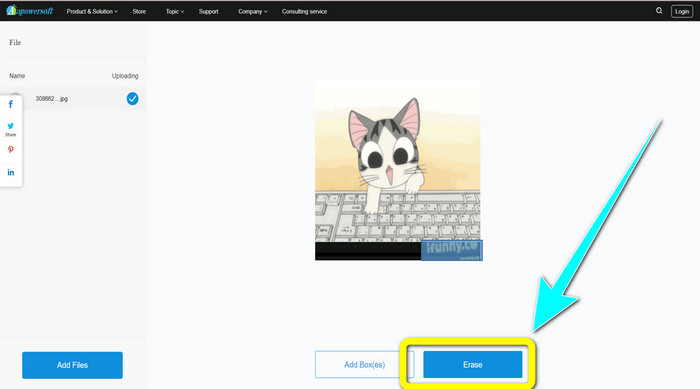
Step 3: Then click the Erase button. Wait for the removal process and download the final file.

單擊擦除按鈕

相關內容:

Honest Review of Inpaint Watermark Remover and Alternative

Straightforward Ways to Remove Watermark from JPG Online

第 3 部分:有關刪除 iFunny 水印的常見問題解答

去除 iFunny 水印的最佳應用程序是什麼?

The best application you can utilize is FVC Free Watermark Remover. This tool can easily eliminate the iFunny watermark from your image. In addition, it has a fast removal process and offers the easiest methods, which makes it the best watermark remover.

我還可以從我的視頻中刪除水印嗎?

Absolutely, Yes. You can use many online and offline applications to remove watermarks from your videos. Here are the best tools you can try.
1. Video Converter Ultimate.
2. Media.io
3. HitPaw
4. Online Video Cutter
5. Apowersoft Online Watermark Remover.

FVC Free Watermark Remover 是否有可以使用的裁剪工具?

是的。 FVC Free Watermark Remover 有兩種方法可以去除照片中的水印。第一種是使用不同的水印去除工具,例如套索、刷子和多邊形。第二個是使用裁剪工具。

結論

As the information is shown above, you can use many straightforward methods to remove iFunny Watermarks, such as using tools and cropping features. However, if you want to remove disturbing elements from your images in a simple way, use FVC Free Watermark Remover now.

優秀的

Rating: 4.5 / 5 (based on 219 votes)