


 視頻轉換大師
 屏幕錄影大師
 影片修復
影片修復
 安全下載
安全下載100%將M4V文件大小從GB壓縮為MB的免費方法
M4V文件格式類似於MP4,是Apple生產的出色視頻容器。您可以在幾乎所有流行的播放器上播放M4V文件,例如iTunes,QuickTime,VLC Media Player,RealPlayer等。但是有時候,您可能會發現M4V視頻太大而無法存儲或共享。在這種情況下,您需要減小文件的大小。
如果你還不知道如何壓縮 M4V,可以嘗試下面這些方法。

第1部分。如何免費在線壓縮M4V
如前所述,在YouTube,Facebook,Instagram或其他流媒體網站上編輯和共享大型視頻文件可能有點困難。因為這些網站通常對您上傳的視頻有嚴格的大小限制。此外,大文件可能會佔用您的計算機,磁盤驅動器,電話,閃存驅動器,存儲卡等上的大量空間。
因此,當你有一個容量很大的 M4V 檔案時,最好使用專業的影片壓縮工具來縮小檔案大小。如果你正在尋找免費程式,不妨試試看 FVC Free Video Compressor。它完全免費使用。更棒的是,它是線上壓縮工具,代表你不需在電腦上安裝龐大軟體,就能將任何影片壓縮到理想大小。
您可以在任何主流瀏覽器(例如Google Chrome,Mozilla Firefox和Microsoft Edge)上使用它。並且不會在壓縮視頻中添加水印。您甚至可以欣賞高畫質的視頻。
以下是有關如何在線壓縮大型M4V文件的步驟。
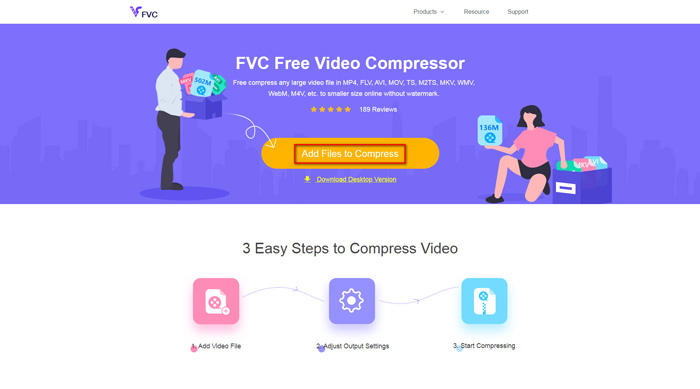
步驟一: 在瀏覽器中前往 FVC Free Video Compressor 的官方網站。你會在橫幅區看到一個 Add Files to Compress 按鈕。點擊該按鈕並依照指示在電腦上下載並安裝 FVC 啟動程式。
步驟二: 接著,選擇你想要壓縮的 M4V 檔案。然後你可以拖動 Size(大小)欄位後方的滑桿,輕鬆調整並找到你想要的精確檔案大小。你也可以依需求分別更改解析度與位元率。
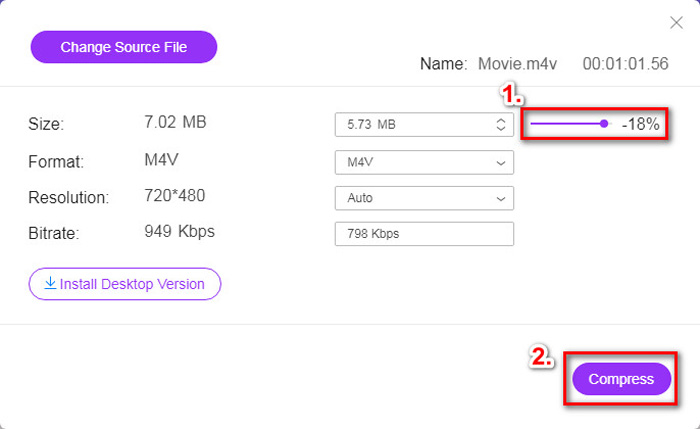
步驟三: 如果你想把 M4V 壓縮並轉成 MP4,那麼在這裡就要選擇 MP4 作為輸出格式。若無此需求,只需直接點選右下角的 Compress(壓縮)即可。選擇一個資料夾來儲存壓縮後的影片,稍等數秒就能取得你想要的影片。
第2部分。如何在Mac / Windows上減小M4V文件的大小
由於 M4V 是 Apple 開發的格式,你也可以在 Mac 上使用 Apple 的預設播放器 QuickTime Player 來壓縮 M4V 檔案。同樣地,QuickTime Player 也有提供 Windows 版本給 PC 使用者。不過要注意的是,Windows 上的最新版本是 2016 年發布的 QuickTime 7.7.9。如果你想要的是較新推出的程式,可以試試能處理 4K 影片的 FVC Free Video Compressor。
無論如何,請按照以下步驟在QuickTime中減小M4V文件的大小。
步驟一: 使用 QuickTime 開啟要壓縮的 M4V 檔案。
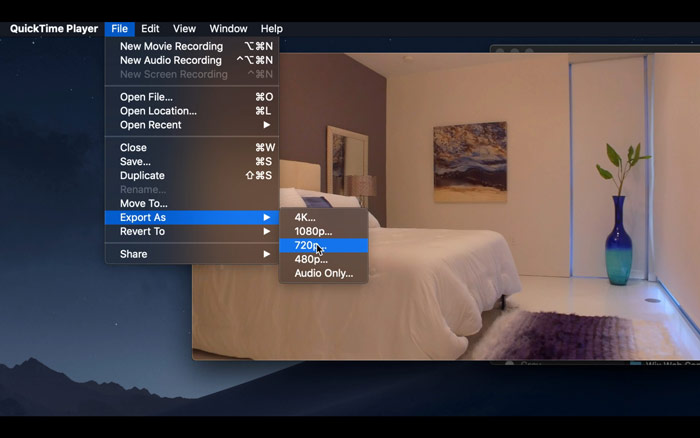
步驟二: 在左上角找到 File(檔案)選單。點擊後,從清單中找到 Export As(匯出為)選項。接著選擇一個低於原始影片的解析度來壓縮影片。畢竟,我們在這裡不是要增加檔案大小。
步驟三: 如果你不想變更儲存路徑,可以直接點選 Save(儲存)。請耐心等待影片匯出完成。
第3部分。壓縮M4V的常見問題解答
1.我可以將M4V重命名為MP4嗎?
不可以,如果你的做法只是把副檔名改成 .mp4 來將 M4V 轉成 MP4,這樣行不通,因為它們的編碼並不相同。你應該依賴更專業的工具來將 M4V 轉成 MP4。
2. YouTube是否接受M4V格式?
可悲的是,YouTube僅支持有限數量的不包含M4V的文件格式。因此,如果您要將M4V視頻上傳到YouTube,則應將其轉換為YouTube支持的格式,例如MP4。
3.如何將多個M4V視頻合併為一個?
如果你有數個 M4V 影片檔需要合併成一個,可以試試 FVC Free Online Video Merger 來合併多個影片檔。
結論
現在你已經掌握 2 種簡單又免費的方法來壓縮 M4V 檔案。如果你是 Mac 使用者,可以利用 QuickTime Player 降低影片大小。但如果你對 QuickTime 提供的固定解析度不滿意,或是你使用的是 Windows 電腦,那就不妨試試 FVC Free Video Compressor。
-
 M4V到MP3轉換器–從M4V文件提取MP3的4種最佳方法
 如果您想輕鬆地從M4V視頻中提取MP3音頻,則可以了解有關4種最佳M4V到MP3轉換器的更多信息,以從文章中獲取所需的音頻文件。
-
 在電話/計算機上免費將QuickTime電影轉換為MP4的4種方法
 閱讀並獲得4種在手機或計算機上免費將QuickTime轉換為MP4視頻的方法。您可以輕鬆地在Windows / Mac / iPhone / Android /在線上將文件格式從MOV更改為MP4。
-
 4個最佳MP4到M4V轉換器,可輕鬆將MP4視頻轉換成M4V
 當您需要將MP4更改為M4V文件時,應該從本文中了解有關兩種格式之間差異的更多詳細信息,以及最佳的MP4到M4V轉換器。
