


 視頻轉換大師
 屏幕錄影大師
 影片修復
影片修復
 安全下載
安全下載免費/線上/無需註冊,PNG圖片浮水印去除教學課程
現今 PNG(可攜式網路圖形)是最常見的影像格式之一。不過,不管你使用哪一種圖片格式,浮水印幾乎無所不在:你可能在 PNG 圖片、JPG 圖片等各種影像上遇到浮水印。如果正面臨這種情況,我們為你準備了最佳解決方案。本文將提供多種方法,教你從 PNG 圖片中移除浮水印。接下來最重要的,就是專心閱讀本篇內容,吸收所有資訊,並親自動手實作!

第 1 部分:如何免費在線去除 PNG 圖像中的浮水印
你可以使用 FVC 免費浮水印去除工具 來移除 PNG 圖片上的浮水印,因為它支援 PNG 檔案格式。從 PNG 照片中去除任何惱人的元素都很容易。這個工具幾乎可在各種瀏覽器上使用,如 Google Chrome、Microsoft Edge、Mozilla Firefox 等。此外,這款浮水印去除器提供多種工具協助你刪除浮水印。你可以使用筆刷工具、套索工具以及多邊形工具來標記想要移除的浮水印。如果浮水印較小,你也可以放大或縮小圖片,如此一來就能更清楚地看見浮水印。FVC 免費浮水印去除工具還擁有相當直覺的介面,方便你高效操作。不只如此,這個線上工具還提供兩種簡單的方法,讓你從 PNG 圖片中移除浮水印:如果浮水印區域位在照片中央或中間位置,你可以使用浮水印去除工具;相反地,如果浮水印位於圖片邊緣或角落,則可以改用裁切工具。由此可見,FVC 免費浮水印去除工具對所有使用者而言都十分便利。
功能特色
◆ 提供水印去除工具來去除照片中的水印和其他不需要的對象。
◆ 具有剪裁工具功能。
◆ 可以導出原始質量的照片。
優點
- 適合非專業用戶。
- 該軟件是 100% 免費的。
- 提供兩種去除水印的方法。
- 支持流行的圖像文件格式,如 PNG、JPG、BMP 等。
- 無需安裝和帳戶。
- 能夠去除多個水印。
缺點
- 運行該軟件需要互聯網連接。
如果您想使用 FVC Free Watermark Remover,請按照以下簡單步驟從您的 PNG 圖像中刪除水印。
如果水印位於照片的中間部分,請使用此工具。
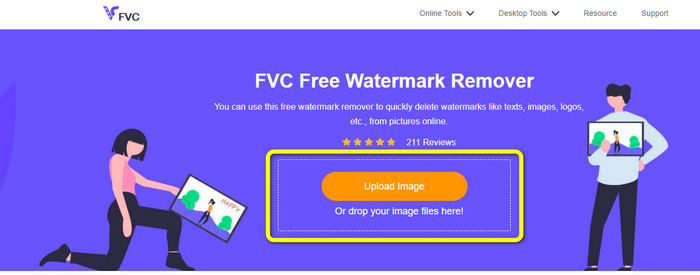
步驟 1: 若要匯入帶有浮水印的 PNG 圖片,請按一下上傳圖片按鈕。接著資料夾會顯示在螢幕上,選擇該 PNG 圖片。
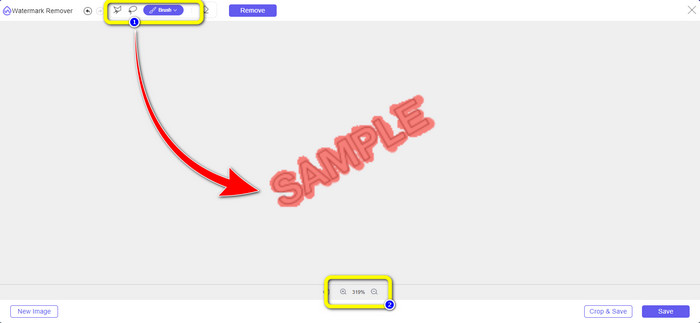
步驟 2: 新增含浮水印的 PNG 圖片後,你可以使用三種工具之一:套索、多邊形以及筆刷。使用筆刷工具時,可以調整筆刷大小。此外,也能透過介面下方的 + 與 - 符號放大或縮小照片。
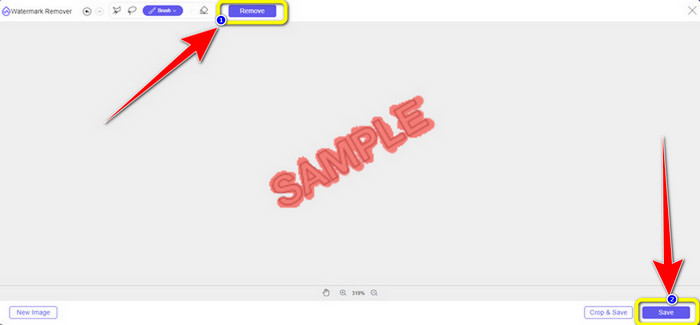
步驟 3: 使用筆刷工具標記完所有浮水印後,按一下移除按鈕來刪除浮水印。點擊之後,稍等片刻完成移除程序,再按一下儲存。
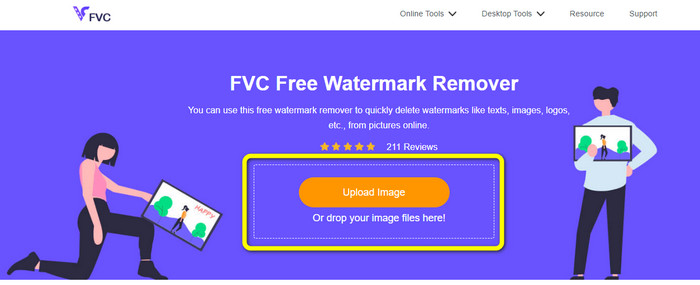
步驟 4: 若想透過裁切照片來移除浮水印,先按一下上傳圖片按鈕上傳要裁切的圖片。你也可以將圖片檔案拖曳到黃色框內。
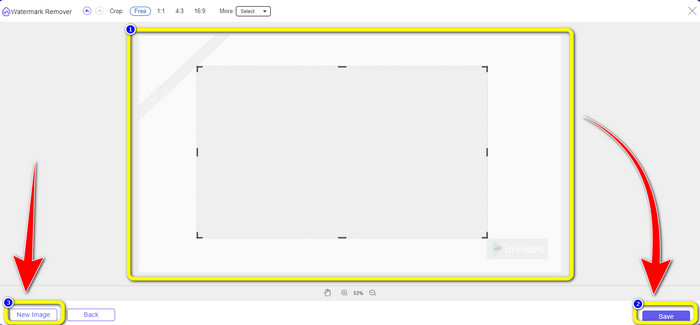
步驟 5:完成上傳 PNG 圖片後,按一下「裁切」按鈕,接著就能開始裁切帶有浮水印的照片。
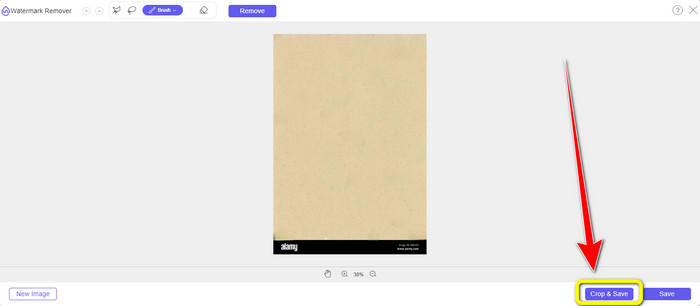
步驟 6: 裁切完成後,點選儲存按鈕,將照片下載到電腦中。此外,如果你想裁切另一張圖片,請點選新圖片按鈕。你也可以使用此工具來移除 JPG 圖片上的浮水印。
第 2 部分:使用 Watermarkremover.io 在線移除 PNG 影像中的浮水印
Watermark Remover.io 是一款能從照片中移除浮水印的線上工具。它同樣支援 PNG 圖片格式,因此你可以在幾秒鐘內利用此工具去除 PNG 圖片上的浮水印。此外,它只需要兩個步驟即可完成去除動作,你無須再為繁瑣流程而煩惱。不過,Watermark Remover.io 的功能較為有限,尤其是在免費版本中。每個月你最多只能上傳 50 張圖片,並提供 10k 次基本轉換與 25GB 儲存空間,對使用者而言並不算充足。若想上傳 50 張以上的圖片並享有更多基本轉換次數,就必須付費訂閱。
功能特色
◆ 從照片中刪除不需要的對象,例如水印、徽標、文本、貼紙等。
優點
- 步驟簡單,非常適合初學者。
- 支持多種圖像文件格式,如PNG、JPG、WEBP等。
缺點
- 購買訂閱體驗更多強大功能。
- 強烈建議使用快速的互聯網連接。
步驟 1: 前往Watermark Remover.io 官方網站,然後按一下上傳圖片按鈕,加入含有浮水印的 PNG 圖片。你也可以點選 URL 按鈕貼上圖片連結。
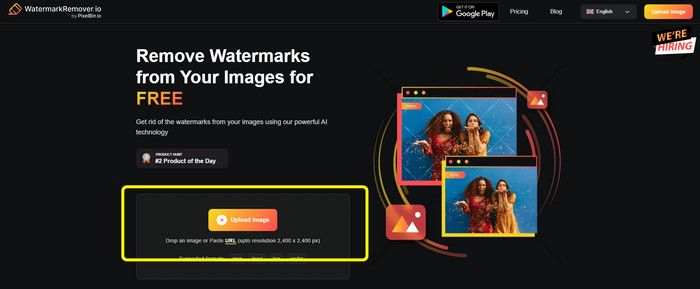
步驟 2: 匯入檔案後,軟體會自動移除浮水印。處理完成後,你即可按一下下載圖片按鈕,將沒有浮水印的圖片儲存下來。

三、使用 Inpaint 輕鬆在線刪除 PNG 圖像中的水印
另一個可用於從 PNG 圖像中刪除水印的在線工具是 Inpaint。借助這款水印去除器,您可以輕鬆清理和改善圖片。它還提供了三種有用的水印去除工具供您使用。這些工具是標記、套索和多邊形。使用這些工具,您可以突出顯示討厭的水印並將其擦除。此外,您可以恢復舊照片並使它們煥然一新。如果您嘗試使用此在線軟件,您可以做很多事情。但是,在線使用 Inpaint 有很多限制。您只能上傳最大文件大小為 10 Mb 的圖像。它還具有 4.2 兆像素的最大分辨率。如果您想要更高的分辨率和無限的文件大小,您必須使用 Inpaint 可下載版本。
功能特色
◆ 去除照片中不必要的元素,如水印、徽標、文本等。
優點
- 它支持 WEBP、PNG 和 JPG。
- 非常適合初學者。
缺點
- 免費版有很多限制。
- 下載 Inpaint 桌面版體驗更多功能。
- 它不會在沒有互聯網連接的情況下運行。
步驟 1: 造訪 Inpaint 的官方網站,然後按一下上傳圖片按鈕,匯入帶有浮水印的 PNG 圖片。
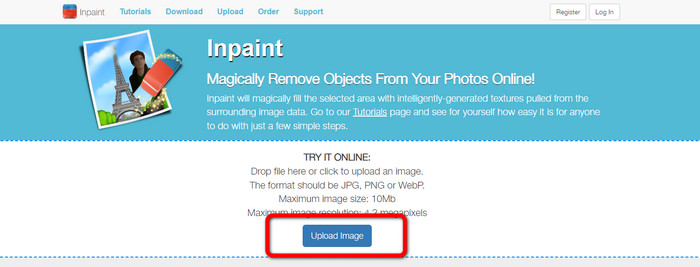
步驟 2: 在介面左側,你可以選擇任一浮水印去除工具來標記浮水印,例如多邊形、標記(Marker)與套索工具。
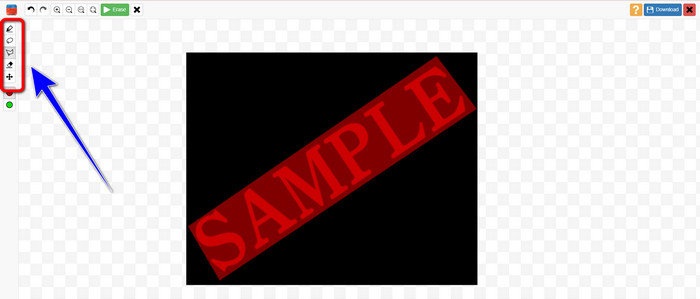
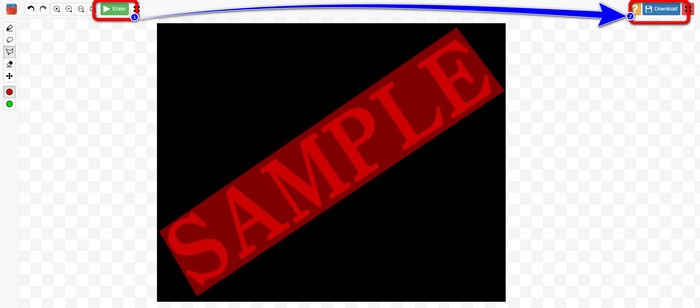
步驟 3: 標記所有浮水印後,按一下左上方的擦除按鈕。等待去除過程完成,再按右上角的下載按鈕。
第 4 部分.如何在 Photoshop 中移除 PNG 中的浮水印
學習了上述在線去除浮水印的方法後,你也可以考慮使用 Photoshop,它專門用於圖像編輯,是去除浮水印的好選擇。這款工具價格不菲,但你可以使用鋼筆工具精準地找到想要去除的水印。
功能特色
• 支援圖層、蒙版、濾鏡、混合模式和非破壞性編輯。
• 創建徽標、海報、網頁圖形、UI 模型等。
• 修復畫筆、仿製圖章和內容識別填充等工具。
• 包括自動物件選擇、天空替換和神經過濾器。
優點
- 專業圖像編輯的業界標準
- 極其強大且用途廣泛
- 定期更新新功能
- 廣泛的教程和社區支持
- 與其他 Adobe 應用程式(如 Illustrator、Lightroom、Premiere Pro)無縫集成
缺點
- 昂貴的訂閱定價
- 初學者的學習曲線陡峭
- 對於較舊的計算機來說可能會佔用大量資源
使用 Photoshop 消除浮水印的方法如下:
步驟 1: 從左側選擇移除工具(Remove Tool)。
步驟 2: 調整筆刷大小,並將其塗抹在你想要刪除的浮水印上。
步驟 3: 接著你就會發現浮水印已成功被清除。
第五部分. 關於從 PNG 中刪除水印的常見問題
從 PNG 影像中去除浮水印的最簡單方法是什麼?
最理想的方式是使用 FVC 免費浮水印去除工具。它沒有複雜的操作流程,因此你可以輕鬆移除 PNG 圖片上的任何浮水印。
刪除 PNG 浮水印是否違法?
如果您將其用於商業或其他公共用途,答案是肯定的。如果您不擁有圖片或未獲得許可,移除浮水印通常是違法的,並且侵犯了版權。您只能從您自己的圖片中去除浮水印,或者在許可證允許的情況下才能這樣做。
去除 PNG 影像中的浮水印且不模糊的最佳方法是什麼?
移除 PNG 影像中浮水印且不產生模糊效果的最佳方法是使用 Photoshop 的內容識別填充或仿製圖章等工具,這些工具可以將浮水印區域與周圍像素平滑融合。以 AI 為基礎的線上工具(例如 FVC 免費浮水印去除器)也能提供快速、乾淨的效果。
結論
從 PNG 圖片中移除浮水印 可能有點棘手,但本文提供了四種簡單的方法協助你完成。不論是想使用 Photoshop 這類專業解決方案,還是像 FVC Image Upscaler 這種表現優異又可靠的免費工具,都能帶來令人滿意的結果。在所有選項當中,我們更推薦使用 FVC 免費浮水印去除工具,因為它更容易取得,也特別適合初學者。
-
 輕鬆刪除 iFunny 水印的完整指南
 為您發現最出色的 iFunny 水印去除器。此外,學習這些簡單的方法來從您的照片中刪除 iFunny 水印
-
 如何刪除 Alamy 水印的在線和離線方法
 如果你想找到一個優秀的 Alamy 水印去除器,你可以閱讀這篇文章來了解三種有效去除 Alamy 水印的方法。
-
 Inpaint水印去除劑和替代品的誠實評論
 您想知道如何使用 Inpaint 去除水印嗎?閱讀這篇文章是正確的選擇。您還將學習可以使用的最佳替代方案。
