視頻轉換大師 大盒

多合一視訊工具箱,能夠以超快的速度將視訊/音訊轉換為 1000 多種格式。

免費下載

Login Security安全下載

免費下載

Login Security安全下載

在線剪切視頻的解決方案 [分步教程]

How do you make your long video shorter? If you don’t know the best methods you can do, then there is a reason for you to read this guidepost. While reading this article, we will give you all the essential information about decreasing the length of your video. Also, we will introduce online and offline video editing software you can utilize. This way, you will have more of an opportunity to achieve your goal. So, without anything else, read this post and learn how to cut video online.

如何在線剪切視頻

第 1 部分。在線剪輯視頻的好方法

1.視頻內

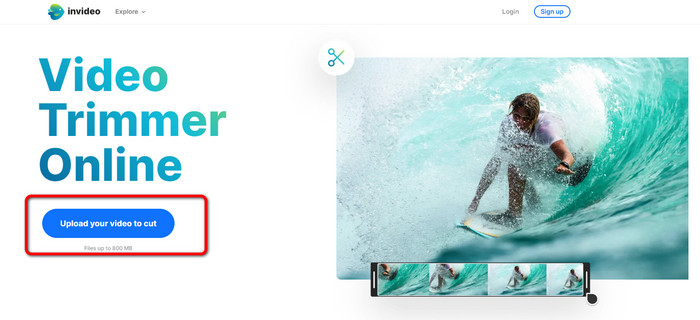
InVideo 視頻修剪器是您可以在網上找到的一種有用的視頻編輯工具。這個基於網絡的軟件提供了一個易於使用的佈局。訪問該網站後,您無需安裝該工具。您需要做的就是添加視頻,然後您就可以開始修剪了。此外,由於它具有簡單的佈局,因此也會有一種易於理解的方法。這樣,無論您是專業用戶還是非專業用戶,都可以使用 InVideo。此外,幾乎所有網絡平台都可以訪問 InVideo。您可以在 Google Chrome、Mozilla Firefox、Internet Explorer 等平台上使用該工具。然而,InVideo 有一些缺點。使用免費版時,InVideo 無法提供高視頻質量。此外,它只能提供低質量的視頻,這在 .如果您想要出色的視頻質量,則必須購買訂閱計劃。按照以下步驟使用 InVideo 視頻修剪器剪切/修剪您的視頻。

Step 1. Open your browser and navigate to the official website of InVideo. Then, if you are already on the webpage, click the Upload your video to cut button. When the file folder shows up on the screen, select the video you desire to trim/cut and open it.

上傳要剪切的視頻

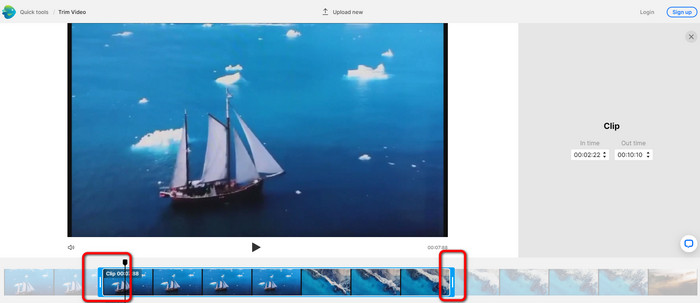
Step 2. After selecting a video, you will be directed to the section where you may trim it. To trim your movie, move the sliders on either end of the video to the timestamp you want.

拖動滑塊

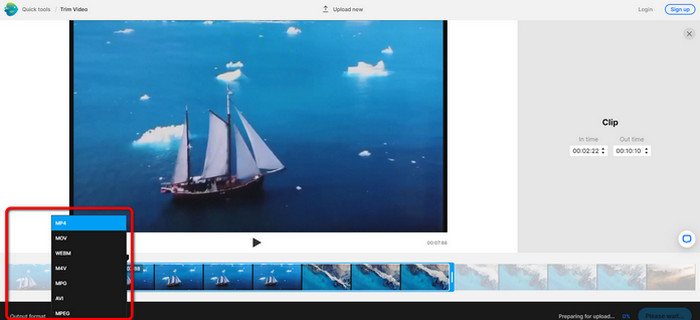
Step 3. When you trim your video, you can save it in various formats. Go to the Output Format option on the bottom left part of the interface. Then, select the preferred output format when the format options appear. Then click Done.

選擇輸出格式

Step 4. You must register for an account with InVideo or sign in with an already-established account before you can save your video. Your video will be available for saving in a few seconds after you have only filled in your credentials.

2.Ezgif

Another video trimmer online free is Ezgif. It has easy procedures to shorten a video. Ezgif is a free online tool, so you don’t need to think about spending a penny. In addition, you can access the online tool on all browsers. It includes Google, Edge, Firefox, Explorer, and more. However, online-only supports GIF. So, if you plan to cut a video with another format, Ezgif is not the right tool. Also, many disturbing ads appear on the screen when using the tool. So, it will become disturbing while editing a video.

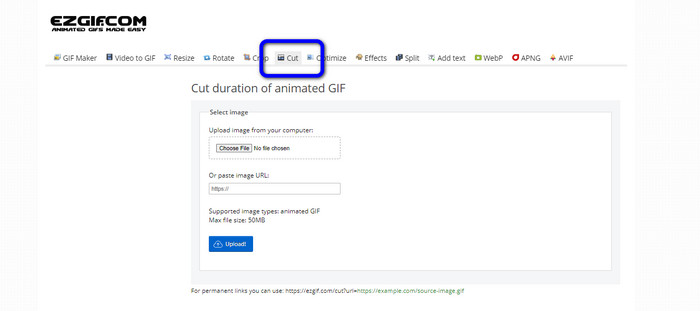
Step 1. Go to the website of Ezgif and select the Cut option.

選擇剪切選項

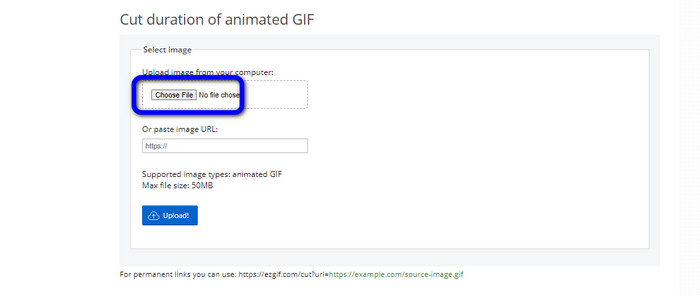
Step 2. After that, click the Choose File button. Then, add the GIF file you want to upload from the computer folder.

選擇文件按鈕單擊

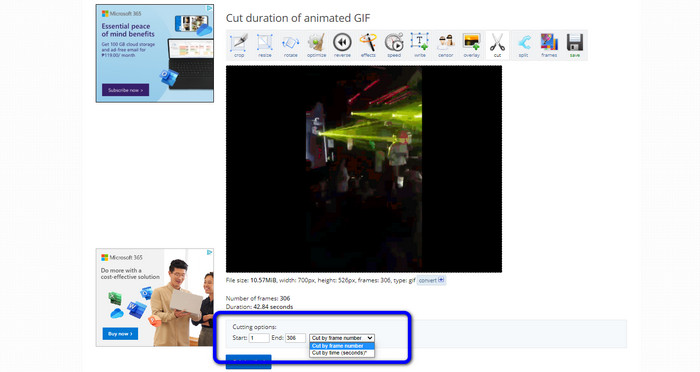
Step 3. After uploading the GIF file, you can already cut it. There are two ways to cut the GIF file. You can cut by frame number or cut by time. Cut it based on your preferred way.

剪切視頻

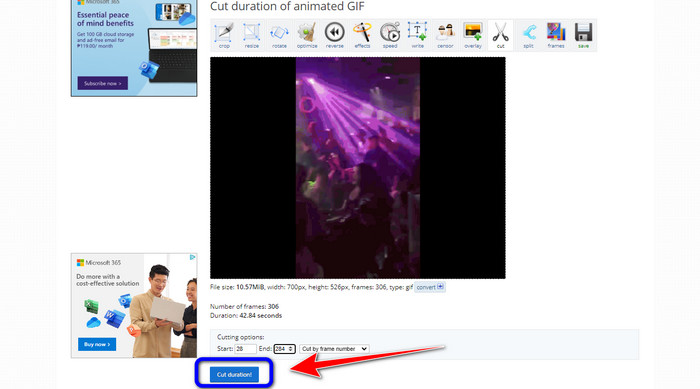
Step 4. Click the Cut Duration button to start the cutting process.

削減持續時間按鈕

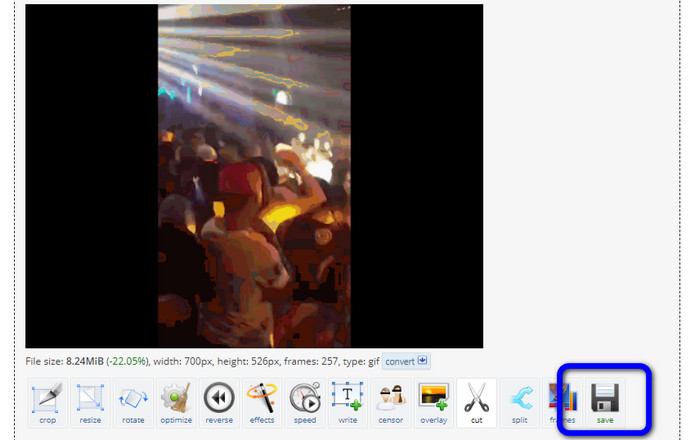
Step 5. After that, the edited one will show up. Click the Save option to download the final output on your computer.

保存視頻 Ezgif

3. 卡普林

To cut the video, you can also utilize the Kapwing video trimmer. This web-based tool is capable of cutting a video with a hassle-free method. In addition, you can access the tool on various website platforms. It includes Chrome, Mozilla, Edge, and more. Moreover, Kapwing supports different video formats, such as MP4, MOV, AVI, FLV, WEBM, and more, making it convenient for all users. However, Kapwing has some disadvantages. It has disturbing ads always appearing on the screen. In addition, it only allows you to upload a video with 720p video quality when using the free version. Also, it puts annoying watermarks after editing the video. If you want to get the video without watermarks and enjoy more great features, purchase a subscription plan.

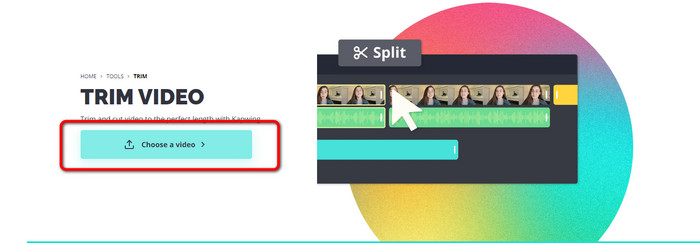
Step 1. Go to the Kapwing website. Then, click Choose a video option to proceed to the tool's main interface.

選擇一個視頻

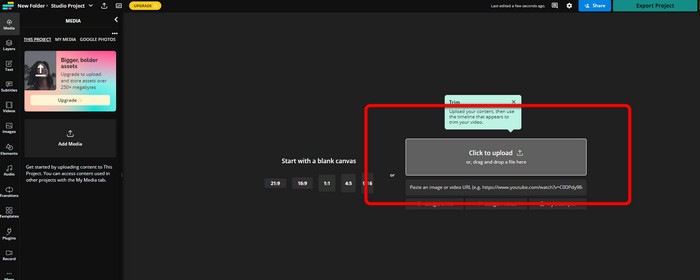
Step 2. Click the Click to upload button to insert the video from the file folder.

點擊上傳

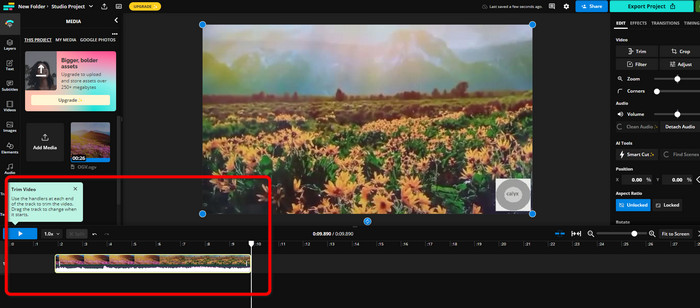
Step 3. When the video is already on the timeline, you can click the handlers of each side to start trimming the video.

處理程序每一端

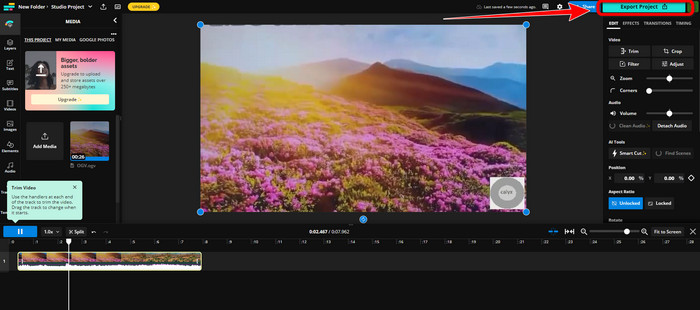
Step 4. If you are done, go to the upper right corner of the interface and click the Export Project button. This way, you can save the edited video on your desktop.

導出項目點擊

第 2 部分。 離線修剪視頻的替代方法

Use Video Converter Ultimate to edit videos offline in the best possible way. This tool makes it simple to clip and/or trim your video. It also has a simple interface with straightforward navigation, making it ideal for all users. Your finished product can also be saved in a variety of formats. Among them are MOV, AVI, MP4, MKV, and others. There are more things you can do when cutting videos. You can make various adjustments by navigating to the Output options. You can alter the video's frame rate, resolution, encoder, quality, etc. Additionally, Video Converter Ultimate won't add watermarks to the edited video. In this manner, you can still view the edited film without any annoying elements. Also, both Windows and Mac users can access Video Converter Ultimate. That signifies that the program is convenient for both Windows and Mac users. Follow the detailed instruction below to start cutting the video.

Step 1. Click the Download button below to access Video Converter Ultimate on your computer. Open the program after the installation process.

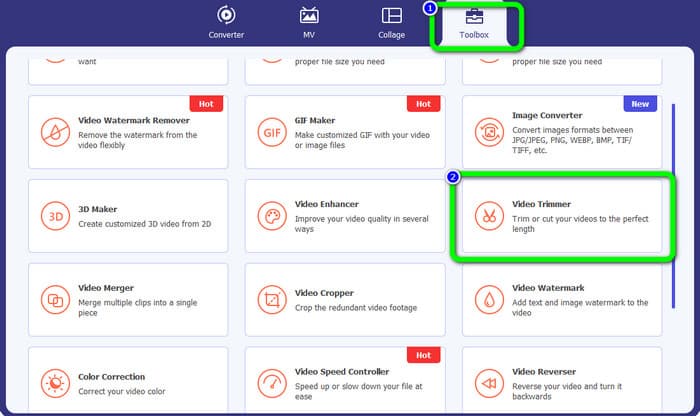
Step 2. On the interface, click the Toolbox menu and select the Video Trimmer tool.

視頻修剪工具點擊

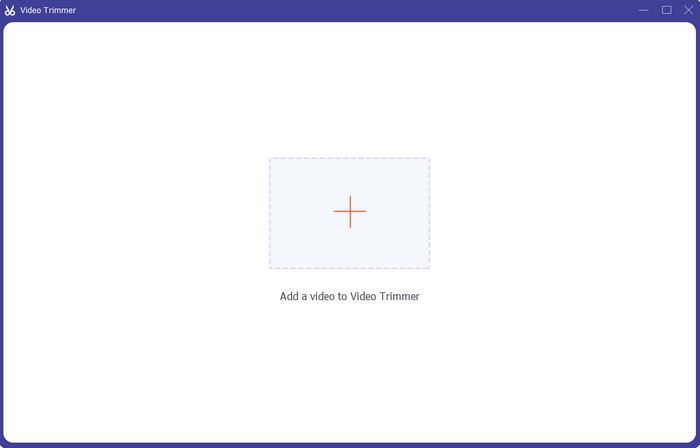
Step 3. When the new interface appears on the screen, click the Plus sign to insert the video that you desire to edit.

添加視頻

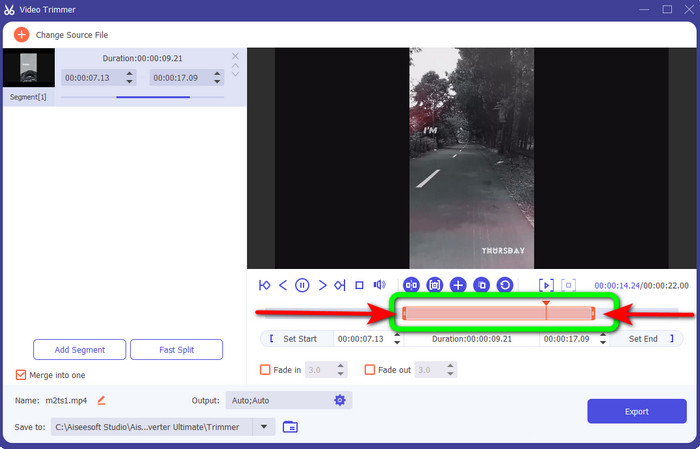
Step 4. Then, you can already start editing your video in his part. You can move the edge part of the video to control how you want to cut/trim the video. You can move the right and left edges based on your needs.

移動邊緣

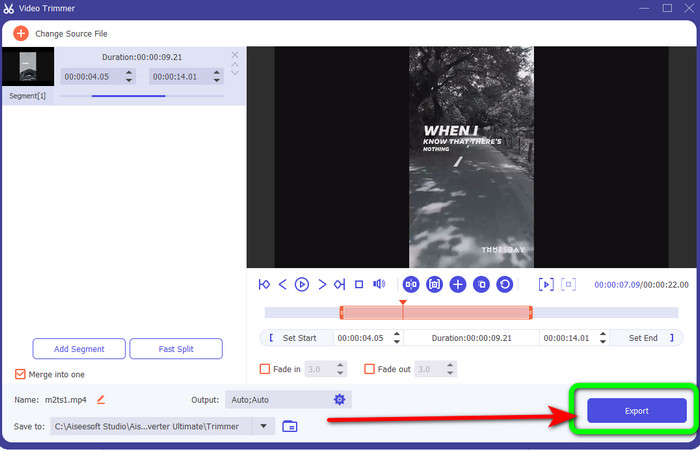
Step 5. When you are satisfied with the video, click the Export button to proceed with exporting. Then, save your final and edited video.

保存導出

第 3 部分。 關於如何在線剪切視頻的常見問題解答

如何在 iPhone 上修剪視頻?

開始後,在圖片應用中點擊您要編輯的視頻。單擊編輯。通過拖動視頻時間軸兩側的滑塊來更改開始和停止時間。使用播放按鈕查看已編輯視頻的預覽。選擇完成後選擇保存視頻或將視頻另存為新剪輯。

如何在 Shotcut 中剪切視頻?

將視頻文件導入 Shotcut 後將其拖到時間軸上。將播放頭放在要修剪的片段的開頭。然後按快捷鍵 I。將播放頭前進到該部分的結尾後按 O 鍵。該片段現在將與視頻的其餘部分分開。

離線剪切 MP4 文件的最佳軟件是什麼?

If you want to cut MP4 files offline, use Video Converter Ultimate. This free download program allows you to cut MP4 files hassle-free.

結論

These are the best methods to cut video online. You can use all the video editing tools mentioned above for cutting a video. However, when using an online tool, there are times that it won’t perform well due to poor internet connection. In that case, use Video Converter Ultimate. It is a downloadable program that lets you edit videos without an internet connection.

優秀的

Rating: 4.9 / 5 (based on 236 votes)