


 視頻轉換大師
 屏幕錄影大師
 影片修復
影片修復
 安全下載
安全下載如何修復錯誤代碼 232404:故障排除提示和指南
如果你正為神秘的錯誤代碼 232404 所困擾,並尋找一個可靠的解決方案,那麼你的搜尋就到此為止!我們的完整指南專為解開錯誤 232404 背後的謎團而設計,並提供有效的疑難排解技巧,幫助你恢復系統的正常運作。無論你面臨的是網路問題、軟體衝突、安裝不完整,還是系統檔案損毀,我們都能替你一一排解。透過深入探討錯誤 232404 的根本原因,我們讓你掌握從根源解決問題的知識。不再感到挫折——只需依照清楚、可執行的步驟,就能引導你恢復系統順暢運行。相信我們的專業,帶你穿越錯誤 232404 的種種複雜細節,為你打造無憂的電腦使用體驗。以下將介紹在 Windows 11/10 中以最簡單、最手動的方式修復錯誤代碼 232404 的方法。繼續閱讀本文以了解更多相關內容。

第 1 部分。錯誤 232404 背後的原因
由於系統設定配置錯誤或註冊表中的條目不規則,通常會出現錯誤代碼 232404。此錯誤表示潛在問題,可能會對系統穩定性和整體功能產生不利影響,從而導致故障或軟體故障。透過故障排除和糾正措施解決根本原因對於恢復無縫運行和防止進一步的中斷至關重要。以下是系統上出現此問題的一些最常見原因:
◆ 網路問題:錯誤 232404 可能是由不穩定或品質不佳的網路連線所引起。請檢查你的網路設定是否導致了此問題。這同樣也是產生 錯誤 224003 的原因。
◆ 軟體衝突:錯誤代碼可能是多個軟體應用程式之間或是過時程式產生衝突所造成。我們會協助你找出並解決這些問題。
◆ 安裝不完整:若軟體或更新安裝過程中被中斷或未完成,就可能出現錯誤 232404。學習如何讓安裝流程順利完成。
◆ 系統檔案損毀:系統檔案可能隨著時間而受損,進而導致錯誤。我們會教你如何找出並修復受損檔案,以解決錯誤 232404。
在採取行動之前了解臭名昭著的錯誤 232404 背後的原因會有所幫助,並且可能會在稍後嘗試修復該錯誤時為您節省大量工作。首先要了解問題發生的根本原因,這一點很重要。
第 2 部分:解決錯誤代碼 232404 的有效解決方案
現在您已經了解了錯誤 232404 的可能原因,讓我們來看看一些排除故障和解決問題的實用策略:
◆ 網路疑難排解:提供逐步方法,協助你診斷並解決可能導致錯誤 232404 的網路相關問題。確保連線穩定可靠,以維持不中斷的效能。
◆ 軟體更新與衝突解決:探討保持軟體隨時更新的重要性,並教你如何處理應用程式之間可能引發問題的衝突。
◆ 安裝最佳實務:關於如何完整並驗證軟體安裝的指南,以避免錯誤 232404。依照我們的建議操作,確保你的安裝過程順利無礙。
◆ 系統檔案完整性檢查:學習如何檢查系統的完整性並修復任何受損檔案。恢復系統檔案的完整性可徹底消除錯誤 232404。
在研究了錯誤代碼 232404 的含義後,您可能會找到或遇到解決該問題的有效解決方案,上面列出了解決此類問題的一些有效方法。這並不意味著您應該停止尋找其他有效的解決方案;研究和探索有效且有利於您的情況的事情。
第 3 部分:錯誤 232404 的故障排除提示
方法一:手動解決影片錯誤代碼
關於解決視訊錯誤代碼問題的手動技術,有很多。請務必執行下面列出的所有操作,如果其中一項不適合您,那麼您可以執行另一項。
1. 檢查你的網路連線:
檢查你的網路連線是否穩定。搖晃不穩或不穩定的連線可能導致影片播放問題。嘗試重新啟動路由器,或連接到另一個網路。當你要修復凍結的影片、黑畫面影片等情況時,此解決方法同樣適用。
2. 重新載入頁面或重啟應用程式:
如果問題出現在網頁或應用程式內,請嘗試重新整理頁面或重新啟動程式。這個簡單的操作有時可以解決臨時問題。
3. 清除瀏覽器快取:
如果您在透過網頁瀏覽器進行串流傳輸時遇到問題,清除快取和 cookie 可能會有所幫助。瀏覽器快取中的舊資料或損壞的資料可能會幹擾影片播放。
4. 檢查是否有軟體更新:
檢查您的作業系統和視訊播放器軟體是否是最新的。過時的軟體可能會導致相容性問題,升級可能會解決問題。
5. 調整影片畫質:
降低視訊品質設置,尤其是當您的網路連線速度較慢時。這有助於避免緩衝問題並增強播放穩定性。
6. 更換瀏覽器或裝置:
如果問題仍然存在,請選擇其他瀏覽器或裝置。這可能有助於確定問題是否是您目前配置所特有的。
記錄遇到的特定視訊錯誤代碼並記錄您為解決問題所採取的步驟至關重要。在尋求進一步協助時,本文檔可以為故障排除和簡化解決過程提供有價值的資訊。如果您盡了努力後問題仍然存在,強烈建議聯絡相應平台或服務的客戶支援。他們的專業知識可以幫助您更準確地診斷問題,並指導您針對遇到的錯誤量身定制具體的解決方案,確保更順利、更有效率的解決方案。
方法2:解決錯誤最簡單的方法
除了手動嘗試許多方法卻無法保證一定能修復或解決錯誤代碼 232404 的問題外,你也可以考慮使用能大幅提升成功率的專業軟體。Aiseesoft Video Repair 是一款能幫你大幅減少麻煩、節省嘗試各種作法與技巧時間的修復軟體。
最簡單解決錯誤的步驟:
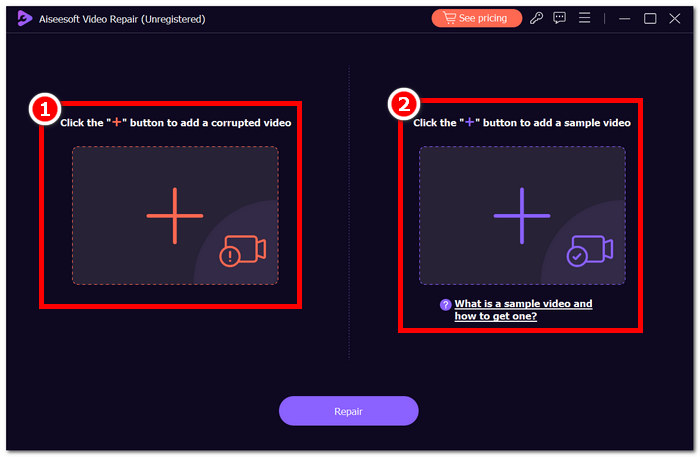
步驟 1. 要使用 Aiseesoft Video Repair 軟體,請先下載並安裝,接著啟動程式。在繼續操作前先熟悉其使用介面。
步驟 2. 在左側紅色的 + 符號上上傳帶有錯誤代碼 232404 的影片,再於紫色 + 符號上上傳另一個影片檔作為參考。
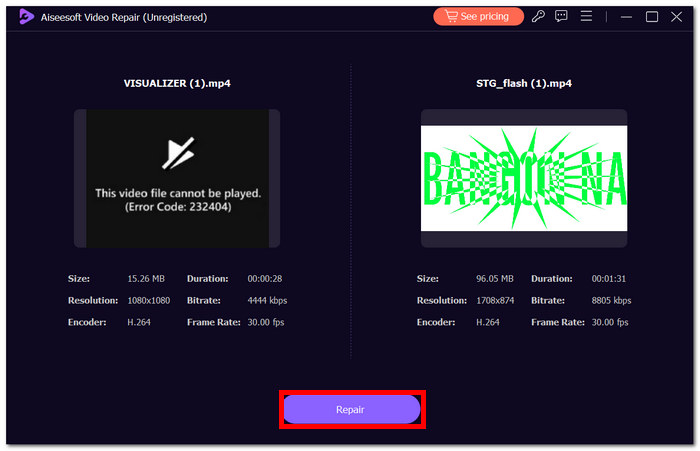
步驟 3. 點擊 Repair,利用軟體的進階工具來修復影片。接著點擊 Preview 檢視修復結果。
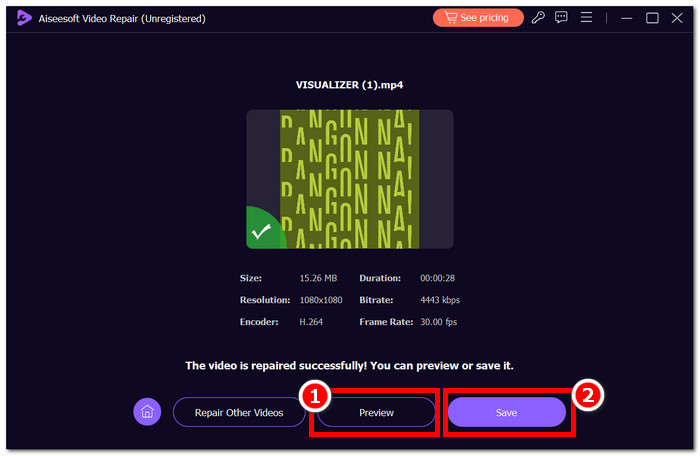
步驟 4. 點擊 Save 匯出修復後的影片,即可無干擾地播放。此軟體表現優異,能快速且高效地修復影片錯誤,如錯誤代碼 232404 等多種問題。
再也不用費力尋找解決視頻錯誤代碼 232404 的方法。使用適當的軟體,您可以保存視頻,從而節省恢復時間。立即嘗試 Aiseesoft Video Repair,體驗神奇的 AI 進階工具。
第 4 部分。有關錯誤 232404 的常見問題解答
如何防止手機出現錯誤代碼 232404?
確保穩定可靠的網路連接,以防止手機上出現錯誤代碼 232404。將手機的作業系統和應用程式保持最新以避免相容性問題。定期檢查並安裝軟體更新以修補潛在的漏洞。清除可能幹擾應用程式正常運作的快取和臨時檔案。
視訊錯誤代碼 232404 是否表示伺服器已關閉?
雖然錯誤代碼 232404 與伺服器相關的問題有關,但它並不總是表明伺服器已關閉。此錯誤訊息可能表示各種困難,例如網路問題、程式不相容或安裝不完整。檢查您的互聯網連接,確認應用程式或平台可以運行,並考慮聯繫客戶支援以獲取更多協助。
為什麼有許多不同的視訊錯誤代碼?
視訊錯誤代碼可作為串流或播放時可能發生的各種問題的唯一識別碼。錯誤代碼的範圍廣泛,可以更具體地識別從網路問題(例如 232404)到視訊檔案格式問題、伺服器故障或播放限制等問題。此類別可協助使用者和支援團隊有效地識別和解決根本原因,從而簡化故障排除流程並提供更好的整體使用者體驗。
結論
錯誤代碼 232404 帶來的不便不應妨礙您享受高品質影片內容。本文就像一座燈塔,讓使用者放心,他們可以獨立解決問題。透過正確的指導和專業軟體(例如 oesoft Video Repair),使用者可以重新獲得無縫的視訊觀看體驗。遵循這些指南可以讓您排除故障並糾正錯誤,從而消除對觀看樂趣的干擾。不要讓錯誤代碼 232404 成為障礙,而是利用此處共享的工具和見解來確保不間斷地存取您喜歡的影片內容。
-
 如何修復像素化影片:是什麼原因以及如何修復它
 不要讓像素化毀了您的影片。了解如何透過我們的專家策略減少影片像素化。提升您的影片以獲得完美像素品質。
-
 我的影片無法播放,我該怎麼解決
 被無法播放的影片困擾,並且您不知道如何修復它們?您正走在解決問題的正確軌道上。這是您需要了解的一切。
-
 如何輕鬆修復無法播放影片錯誤 5 問題
 您是否遇到過播放下載的影片之一但被無法播放影片錯誤 5 訊息中斷的情況?這是您需要了解的一切。
