


 視頻轉換大師
 屏幕錄影大師
 影片修復
影片修復Wondershare Filmora 評論 - 值得大肆宣傳
你是否曾想像過,自己能毫不費力地製作引人入勝的影片,為你的內容注入一絲魔力?透過功能強大的影片剪輯軟體 Wondershare Filmora,你就能實現這一切。它是一款多功能且易於上手的影片編輯器,搭載先進的 AI 技術。深入閱讀我們的完整評測,了解其功能特色、優缺點、價格方案,以及快速上手教學。無論你是經驗豐富的剪輯師,還是剛入門的新手,Filmora AI 都能為你提供一片創意畫布,將你的影片靈感具體呈現。
請繼續閱讀,深入探索 Filmora 在影片編輯領域脫穎而出的原因。

第 1 部分. 什麼是 Wondershare Filmora?
Wondershare Filmora 是一款用戶友好且多功能的影片編輯軟體,它利用人工智慧使個人能夠輕鬆創建、編輯和增強影片。該工具提供了直覺的介面,在功能性和簡單性之間取得了平衡。憑藉其廣泛的功能,包括效果、過渡和音訊增強,它可以滿足不同的視訊編輯需求。人工智慧技術的整合增強了軟體的功能,使其成為用戶將創意變為現實的創新解決方案。 Filmora 是影片編輯專案的無縫平台,無論是處理簡單的家庭影片還是更複雜的編輯任務。
主要特點
◆ 自動降噪以增強音訊品質。
◆ AI編輯,智慧高效的影片編輯。
◆ 自動重新構圖視頻,以便跨平台調整構圖。
◆ 音訊視覺化工具透過動態視覺化增強音訊。
◆ 自動同步,輕鬆實現音視頻同步。
◆ AI人像特效,為人像鏡頭提供特殊效果。
◆ 進階編輯可實現複雜且詳細的客製化。
◆ 使用操作簡單的 AI 影片升頻工具,輕鬆編輯與增強影片畫質。
◆ Filmora 速度斜坡可實現運動中的平滑過渡。
◆ 倒放視頻,創意播放效果。
優點
- 使用者友好的介面確保輕鬆導航。
- 提供適合基本和中級編輯的各種實用功能。
- 快速視訊渲染有助於高效的編輯過程。
- 提供高品質的視訊輸出。
- 支援螢幕錄製功能。
- 與各種文件格式的相容性增強了多功能性。
缺點
- 高級功能有限。
- 免費版本中存在浮水印。
- 包月和包年計劃的價格更高。
- 使用過程中偶爾可能會出現滯後現象。
- 4K 編輯功能的效能不足。
Wondershare Filmora 的價格是多少 - 值得嗎?
Wondershare Filmora 的定價計畫反映了其價值主張,對於尋求多功能且功能豐富的影片編輯軟體的用戶來說,物有所值。每季 $29.99 的跨平台季度計劃、每年 $49.99 的跨平台年度計劃以及 $79.99 的永久計劃提供了靈活性,可以滿足不同用戶的偏好和需求。此外,可以看出,季度和年度計劃提供相同的功能,因此付款的靈活性意味著該工具是親用戶的。
| 跨平台季度計劃 US$ 29.99/季度 | 跨平台年度計劃 US$ 49.99/年 | 永久計劃 US$ 79.99 |
| 適用於 Windows、Mac OS、iOS、iPAD OS 和 Android | 適用於 Windows、Mac OS、iOS、iPAD OS 和 Android | 僅適用於 Windows |
| 自動續訂並隨時取消。 隨時了解未來版本 無水印導出 1500 萬+ 創意資產 100 多個進階影片編輯功能 無限 Filmora AI 積分 1GB雲端儲存 | 自動續訂並隨時取消。 隨時了解未來版本 無水印導出 1500 萬+ 創意資產 100 多個進階影片編輯功能 無限 Filmora AI 積分 1GB雲端儲存 | 一次性支付。 享受 Filmora 13 更新 無水印導出 1500 萬+ 創意資產 100 多個進階影片編輯功能 2000 個 Filmora AI 積分 1GB雲端儲存 |
這種定價結構有助於財務規劃並減少與計費相關的任務。因此,從任何一種付款方式中進行選擇都被證明是一個具有成本效益的決定,因為它不僅簡化了預算流程,而且減少了頻繁的計費相關管理的需要。
第2部分.如何使用Wondershare Filmora進行AI影片產生?
Wondershare Filmora 易於使用。然而,一些技術不熟練的初學者需要一些指導。在我們開始如何使用這個影片編輯工具之前,我們必須先了解它的系統需求。這是使用者確定其設備是否能夠滿足該工具需求的必要步驟。
Wondershare Filmora 系統需求
| 處理器 | 為了獲得最佳效能,建議使用 2GHz 或以上的多核心處理器,最好是 Intel i3 或更高。要處理高清和 4K 視頻,建議使用 Intel 第 6 代或更新的 CPU。 |
| 操作系統 | Windows 7 及更高版本(64 位元作業系統)。 |
| 內存 | 8 GB RAM(高清和 4K 視訊需要 16 GB) |
| 圖形處理器 | 2GB GPU 顯示記憶體。 |
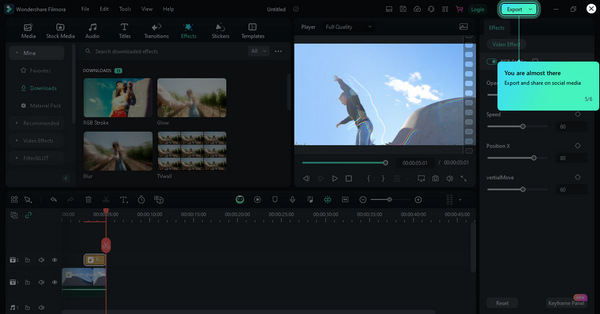
快速指南:
步驟一: 前往 Wondershare Filmora 官方網站並下載軟體。
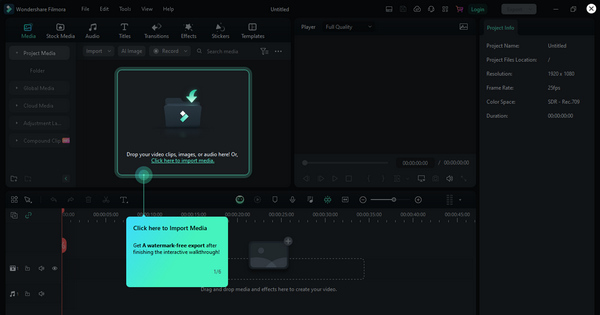
步驟二: 啟動程式,點擊 Import Media(匯入媒體),將你想用在專案中的檔案匯入,像是影片片段、音訊檔和圖片。
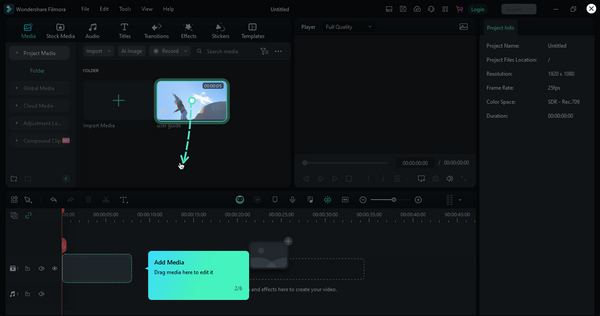
步驟三: 然後點擊 Add Media(新增媒體) 來加入檔案。之後將它們拖曳並放到時間軸上,依照你想要的順序排列。
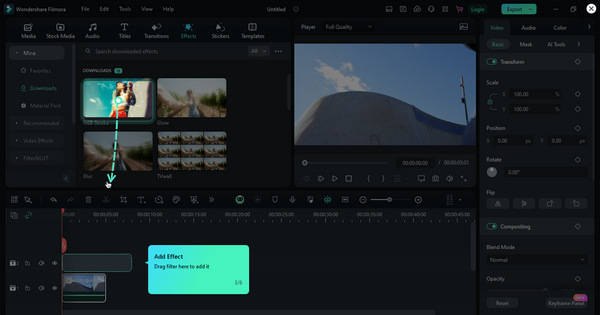
步驟四: 接著前往 Effects(特效) 分頁,為影片套用濾鏡、覆疊和其他效果。你也可以調整色彩校正與播放速度設定,以達到理想的畫面風格。
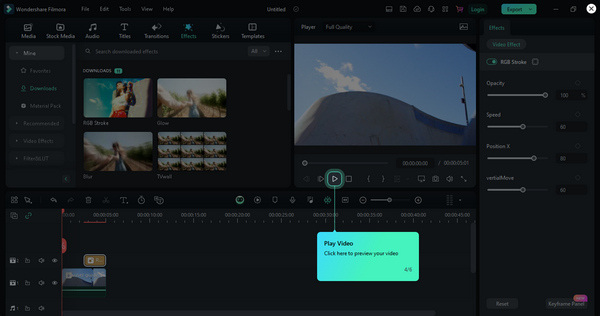
步驟五: 完成後,點擊 Preview(預覽) 按鈕預覽影片效果。
步驟六: 當你對成果感到滿意時,點擊 Export(匯出) 按鈕,即可儲存或分享你的影片。
第 3 部分。2 Wondershare Filmora 的最佳替代品
彈性夾
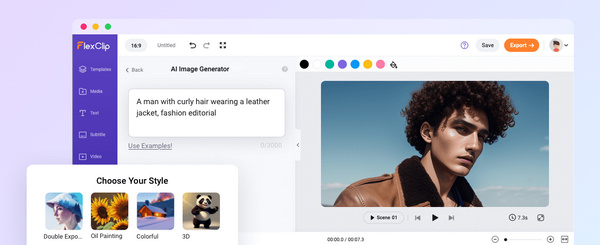
FlexClip 提供一套動態的網頁版影片製作與剪輯解決方案,是 Wondershare Filmora 相當具吸引力的替代選擇。這個多功能平台讓使用者能輕鬆製作專業水準的影片,並提供多元的功能與工具。使用者可以輕鬆上傳自己的影片片段與圖片,或使用平台內建的大型素材庫。內容上傳後,FlexClip 透過剪裁、合併與加入吸睛特效等工具,簡化整個編輯流程。文字動畫、旁白、音樂選項與流暢轉場等額外功能,進一步提升整體影片創作體驗。FlexClip 以其友善的操作介面聞名,不僅適合新手,也能滿足有經驗的創作者,帶來順暢而愉快的創作旅程。
流明5
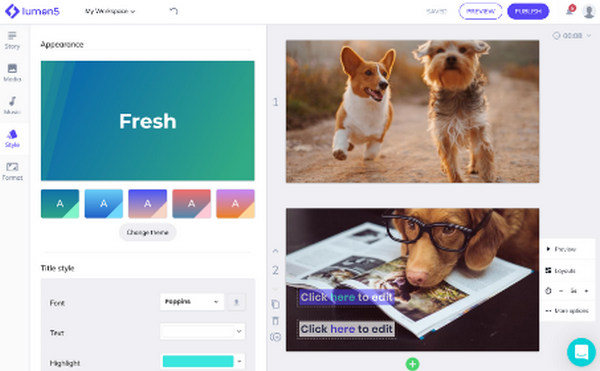
Lumen5 是一款線上工具,使用智慧技術將文字轉換為令人興奮的影片。這對任何人來說都很棒,即使您以前從未編輯過影片。只需輸入文本,它就會生成視頻。您可以透過選擇不同的主題和風格來使您的影片獨一無二。該工具有一個具有基本功能的免費版本和提供更多選項的付費版本。如果您想要一個簡單而聰明的 Wondershare Filmora 替代品來製作精彩視頻,那麼這是一個絕佳的選擇。
第 4 部分. Wondershare Filmora 常見問題解答
菲爾莫拉安全嗎?
Wondershare Filmora 是一款被廣泛認為可以安全使用的軟體。該軟體具有可靠的使用歷史,並受到用戶的普遍信任。但是,建議從其網站下載該應用程序,以避免與從非官方來源下載相關的任何安全風險。
Filmora 適合專業編輯嗎?
是的。 Wondershare Filmora 適合業餘和專業編輯。雖然它用戶友好且適合初學者使用,但它還提供最適合專業編輯的高級功能。它的多功能性使其成為許多用戶的首選,從內容創作者和愛好者到從事更複雜影片專案的專業人士。
Filmora 比 iMovie 好嗎?
Filmora 和 iMovie 之間的比較取決於使用者的喜好和特定需求。 Filmora 以其用戶友好的介面和各種功能而聞名,適合初學者和高級用戶。另一方面,iMovie 是一款專供 Apple 用戶使用的免費影片編輯軟體,並且與 Apple 生態系統完美整合。 Filmora 和 iMovie 之間的選擇通常取決於個人喜好、作業系統和影片編輯任務的複雜性。
Filmora 如何支持專案合作?
Filmora AI 提供了促進專案協作的功能。使用者可以輕鬆地與他人分享他們的專案文件、媒體資產和工作進度。該軟體支援匯入和匯出專案文件。這允許多個用戶協作處理視訊專案的各個方面。這種協作功能對於在影片編輯專案上一起工作的團隊或個人是有益的。
我可以在 Mac 電腦上使用 Filmora 嗎?
是的。 Wondershare Filmora 與 Windows 和 macOS 作業系統相容。該軟體在不同平台上提供一致的用戶體驗,使其可供許多用戶使用。
結論
Wondershare Filmora 以其強大的功能、彈性的價格方案以及易於使用的介面,堪稱當今頂尖的影片生成與剪輯工具之一。選擇這款工具幾乎不會出錯。但當然,仍可能因個人偏好而有所不足,因此我們也提供了兩款同樣值得探索的優質替代方案。
既然你已閱讀至此,請綜合本篇評測所提供的各項見解,評估 Wondershare Filmora 是否適合用來實現你的創意計畫。
-
 如何使用人工智慧製作音樂影片:創作指南
 您是否正在尋找 IA 音樂影片產生器來像專業人士一樣提升您的編輯能力?好吧,在這篇文章中,我們將為您的問題提供解決方案。現在就來學習它們吧!
-
 使用人工智慧製作社交媒體影片以賺取更多收入的完整指南
 您是否正在為社交媒體內容尋找人工智慧影片編輯器而苦惱?漫長的搜索已經結束,因為我們已經為您完成了。繼續閱讀!
-
 AI影片:你需要了解的這些!
 您是想知道什麼是人工智慧影片的人之一嗎?好吧,在這篇評論中,我們將為您提供您需要了解的所有資訊。繼續閱讀!`
