


 視頻轉換大師
 屏幕錄影大師
 影片修復
影片修復
 安全下載
安全下載如何以兩種方式推導YouTube的視頻文件大小
“「我要如何壓縮影片上傳到 YouTube,才不會讓筆電發燙?」”
製作視頻是一個漫長的過程,需要花費時間和資源。上傳視頻也是如此。
當您從計算機向YouTube上傳文件較大的長視頻時,較長的上傳時間可能會使您的計算機發熱。此外,YouTube限制了視頻的大小和上傳時間。
無論您遇到什麼問題,都可以使用視頻壓縮器來減小視頻大小,以便可以將其上傳到YouTube。
向下滾動以了解有關視頻壓縮器以及如何為YouTube壓縮視頻的更多信息。

第1部分。YouTube的最大上傳大小和長度限制
默認情況下,您可以將長達15分鐘的視頻上傳到YouTube。要將更長的視頻文件上傳到YouTube,您應該驗證您的帳戶。
您可以上傳到YouTube的最大視頻文件大小為128 GB或12小時。
要將大型視頻有效地上傳到YouTube,您應該讓視頻壓縮器減小其文件大小。
接下來,您將學習如何以兩種方式為YouTube壓縮視頻。
第2部分。如何免費為YouTube在線免費壓縮視頻而沒有水印
免費線上影片壓縮工具是一款 100% 免費的線上影片大小縮減工具。這是一個簡單好用的 YouTube 影片壓縮工具,只要 3 個步驟就能上傳、壓縮並下載壓縮後的影片檔。壓縮完成後,不會保留任何檔案,讓你可以安心使用。支援 MP4、WMV、MOV、AVI 等各種常見格式,此影片壓縮器能幫你縮小要上傳到 YouTube、Instagram、Facebook 等平台的檔案大小。
為YouTube壓縮視頻的步驟非常簡單:
1.在線上傳視頻。
2. 選擇影片檔案大小、解析度,以及YouTube 支援的輸出格式。
3.開始壓縮並下載壓縮的視頻文件。
具體步驟如下:
步驟一:線上上傳影片檔
在電腦瀏覽器中開啟這個免費線上影片壓縮工具。點擊加入檔案進行壓縮按鈕安裝影片啟動器。這個啟動器可以加快壓縮流程,透過縮小檔案大小並自動下載壓縮後的影片。
然後,在開放源代碼窗口中,選擇並添加您要為YouTube壓縮的視頻。

步驟二:選擇 YouTube 影片大小
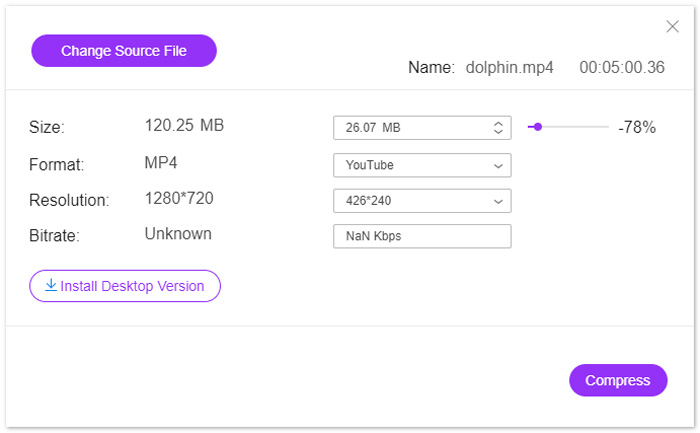
成功上傳視頻後,您將看到“壓縮”窗口,您可以在其中編輯輸出文件的設置。
在大小旁邊,點擊向下或向上箭頭圖示來調整輸出影片大小。或者,你也可以拖動滑桿來控制影片大小。你可以將要上傳至 YouTube 的影片,從數 GB 縮小到數百 MB。
接著,在解析度的設定中,完整支援 1080p HD、720p HD 等解析度,方便上傳到 YouTube。
最後,關於輸出格式,您可以從drop-dwon選項中選擇YouTube,或者為其他站點選擇其他格式,例如WMV,MOV,MKV,M4V,FLV,MPG等。
步驟三:為 YouTube 壓縮影片
完成所有設定後,點擊底部的「壓縮」按鈕,選擇儲存壓縮影片檔案的位置,立即開始為 YouTube 縮小影片。
第3部分。如何在不損失質量的情況下為YouTube壓縮視頻
為YouTube壓縮視頻的另一種方法是使用Video Converter Ultimate。
它是計算機上的多合一視頻壓縮器,編輯器和轉換器程序。
不僅可以通過減小視頻文件的大小來壓縮視頻文件,而且該軟件還可以通過拆分來縮小視頻文件的長度。
此外,您可以:
1.支持8K、5K、4K、1080pHD等視頻分辨率。
2. 編輯濾鏡、水印、裁剪、旋轉等視頻效果。
3. Toolbox 可以提高視頻質量、編輯元數據信息、轉換 3D 視頻和創建 GIF。
4.創建GIF和分屏以自由觀看視頻。
現在,讓我們檢查一下如何使用此軟件壓縮視頻文件。
步驟一:選擇影片壓縮工具
在電腦上免費下載這款 YouTube 影片壓縮程式。安裝並立即執行。前往工具箱分頁,選擇影片壓縮。
步驟二:新增影片檔
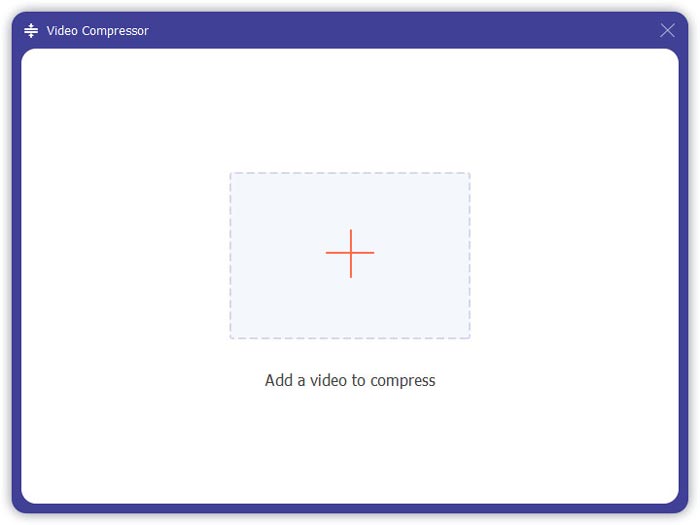
點擊加號按鈕,選擇要添加到YouTube的視頻文件並將其添加。
步驟三:為 YouTube 壓縮影片
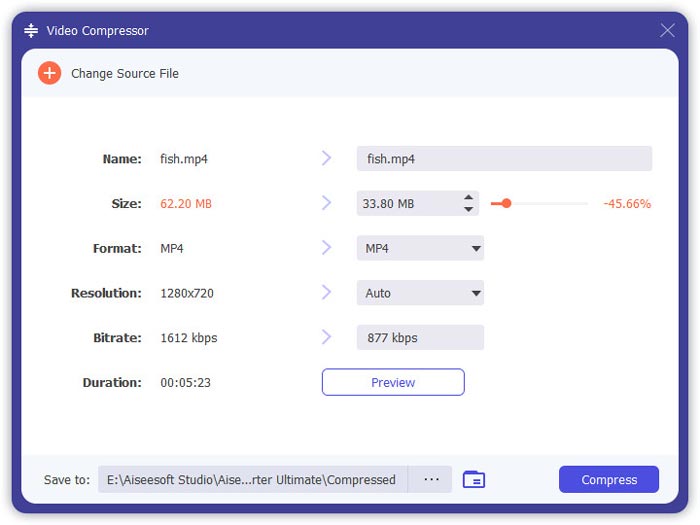
移動滑動條以選擇要保留的視頻文件大小,選擇視頻格式,分辨率和輸出格式。
按下預覽按鈕,可以先觀看壓縮後的影片,確認畫質是否符合需求。
最後,在底部確認你要儲存壓縮影片的位置,並點擊壓縮,開始縮小要上傳到 YouTube 的影片檔大小。
如果要在不損失質量的情況下壓縮視頻文件,建議的方法是在H.264中對視頻文件進行編碼。
1.再次運行此軟件,然後單擊大加號以添加視頻文件。
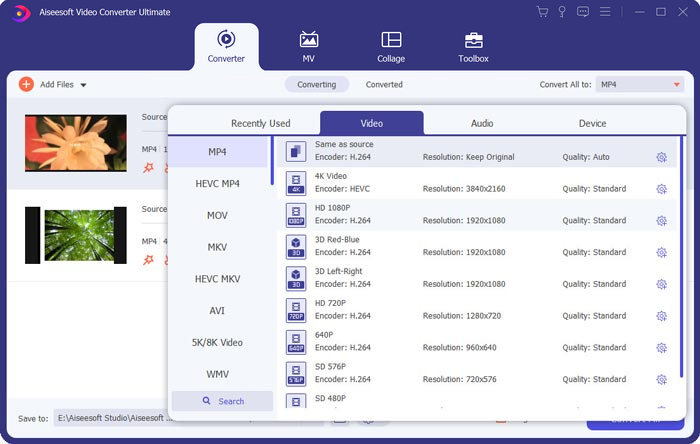
2.選擇編碼為H.264的YouTube支持的格式。
3.單擊全部轉換以開始使用H.264對YouTube視頻進行轉碼。
第4部分。為YouTube壓縮視頻文件的常見問題解答
您每天可以在YouTube上上傳多少個視頻?
影片上傳限制會依地區或頻道歷史紀錄而有所不同。如果你在嘗試上傳影片時,收到「已達上傳上限」的錯誤訊息,可以在 24 小時後再試著上傳影片。
如何在YouTube上上傳垂直視頻?
如果您在iPhone上錄製垂直視頻,請不要在視頻的兩側添加黑條。 YouTube可以找出顯示內容並適合屏幕的最佳方法。
支持的YouTube文件格式是什麼?
MOV
MPEG4
MP4
AVI
WMV
MPEGPS
FLV
3GPP
WebM
DNxHR
ProRes
CineForm
HEVC(h265)
結論
YouTube是分享視頻片段的平台之一,例如電視節目,紀錄片,音樂視頻,電影預告片,教育視頻,錄像帶,博客視頻等等。但是,當您長時間或高質量上傳視頻文件時,視頻通常表示一個大文件,這也意味著上傳將花費很長時間。這篇文章分享了兩種為YouTube壓縮視頻的方法。
您要免費在線減小視頻大小嗎?
或者您可能想通過重新編碼來壓縮視頻文件。
無論哪種方式,如果有其他建議,請在下面留下您的評論。
-
 減少Vimeo視頻上傳大小的最佳方法
 在本文中,我們將向您展示如何壓縮視頻文件以將其上傳到Vimeo上,以及視頻和音頻壓縮可能需要的準則。
-
 如何以兩種方式推導YouTube的視頻文件大小
 YouTube視頻太大且上傳速度慢嗎?只需通過在線和計算機兩種方式將視頻文件的大小壓縮為YouTube較小的大小即可。
-
 如何免費和在線為Facebook壓縮視頻
 如果您被禁止在Facebook上上傳大型視頻,請不要擔心。只需使用免費的視頻壓縮器將大視頻大小從GB壓縮到MB。
