


 視頻轉換大師
 屏幕錄影大師
 影片修復
影片修復
 安全下載
安全下載有效修復錯誤代碼 232011 的 3 種方法
正在尋找解決錯誤代碼 232011的方法嗎?這是一個常見錯誤,也是讓觀眾感到挫折的主要原因之一。一旦出現,這個錯誤會破壞線上影片的流暢觀賞體驗,造成播放問題與中斷。別再擔心,因為有多種有效的方法可以修復此問題,並提升整體串流體驗。在本指南中,我們將透過三種方法說明如何輕鬆修復此錯誤,並提供預防建議。現在就閱讀本文,讓你毫無阻礙地欣賞喜愛的影片。

第 1 部分。錯誤代碼 232011 是什麼?為什麼會發生這種情況
錯誤代碼 232011 是在各種軟體應用程式與線上服務中常見的錯誤。它很類似影片無法播放錯誤 150。
當網路連線或設定出現問題,阻止應用程式或服務存取必要的資源時,通常會發生這種情況。
以下是有關發生此錯誤的原因的全面資訊:
◆ 網路連線問題: 此錯誤的一個可能原因是網路連線異常。如果使用者的網際網路連線存在問題,例如訊號微弱或不穩定、網路壅塞,或是防火牆限制阻擋了必要的通訊,就可能產生此錯誤。
◆ 伺服器問題: 若伺服器端出現狀況,也可能導致錯誤代碼 232011。這包含伺服器當機、維護作業,或是承載應用程式或服務的伺服器發生技術性故障。
◆ 設定錯誤: 另一個可能原因是設定不正確。若網路設定有誤、IP 位址或連接埠號碼設定錯誤,或是用戶端與伺服器之間採用不相容的通訊協定,都可能導致此問題。
◆ 軟體相容性問題: 錯誤代碼 232011 也可能因不同軟體元件之間的相容性問題而產生。例如,與瀏覽器外掛或延伸功能衝突、軟體版本過舊或不相容,抑或安裝檔案毀損,都可能是成因。
第 2 部分:如何修復錯誤代碼 232011
有多種方法可以有效解決錯誤代碼 232011,因為它是我們許多人的常見問題。您可以採取以下方法來解決此問題。
方法一:清除瀏覽器快取和Cookie
清除瀏覽器快取和 cookie 對於解決因資料損壞而引起的視訊錯誤問題至關重要。損壞的快取或 cookie 會破壞網站功能,包括 23201 等錯誤。快取儲存長期網站資源,cookie 保存使用者首選項。因此,清除這些文件可以消除問題,讓瀏覽器從網站取得新的、無錯誤的資料。以下是清除瀏覽器快取和 cookie 的方法:
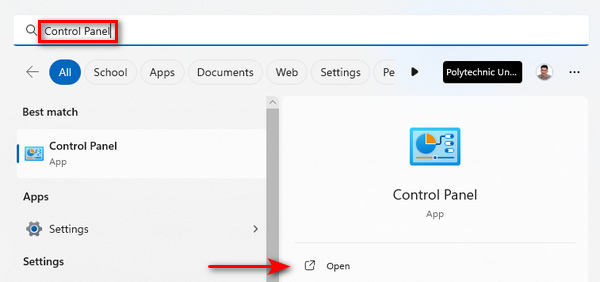
步驟一。 先在搜尋列輸入控制台(Control Panel),然後開啟它。
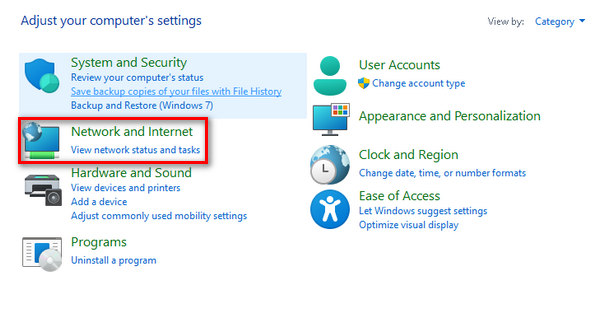
步驟二。 在控制台中,找到並選取網路和網際網路選項。
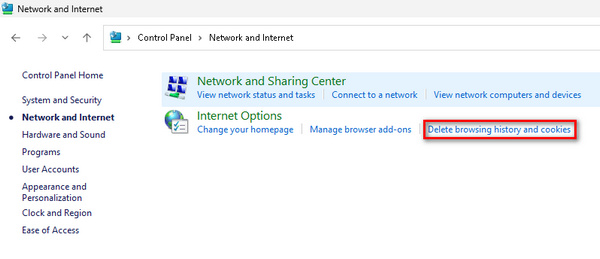
步驟三。 找到刪除瀏覽歷程記錄與Cookie,並點擊。
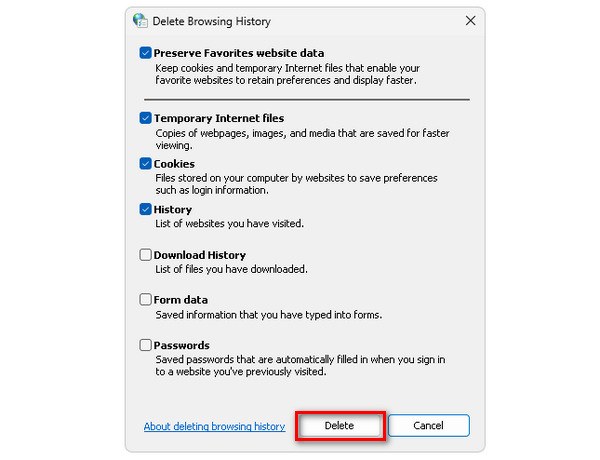
步驟四。 最後,會跳出一個視窗,讓你勾選想要清除的項目。選擇完成後,點擊刪除按鈕以完成流程。
清除快取和 cookie 不僅可以增強電腦的整體效能,還可以作為潛在中斷的解決方案,包括修復錯誤代碼 232011。
方法2:使用隱身瀏覽器
步驟一。 點擊瀏覽器畫面右上角的三個點。
步驟二。 在下拉選單中選擇開新無痕視窗。
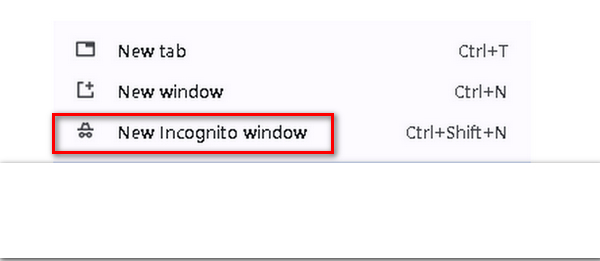
步驟三。 會開啟一個新的視窗,你可以在這個全新的瀏覽環境中播放出現錯誤代碼 232011 的影片。
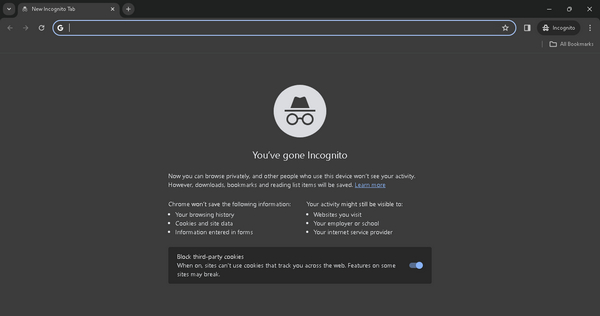
事實上,使用隱身模式可以提供一個乾淨的瀏覽環境,沒有快取資料或衝突的擴展,有助於解決錯誤代碼 232011。
方法三:使用影片修復工具
如果上述方法都無法解決瀏覽器問題,而且你是在離線播放影片時遇到此錯誤,那麼可以使用第三方的影片修復工具來快速排除。其中一款能有效解決此問題的工具是FVC Video Repair。此工具能修復常見的影片問題,包括影片錯誤代碼 232011。此外,它支援多種影片格式,如 MP4、MOV 和 3GP,使用彈性高。其採用最新 AI 技術的直覺介面,就算沒有技術背景也能輕鬆上手。使用方式如下:
步驟一。 先前往其官方網站,在裝置上下載並安裝此程式。
步驟二。 接著,按一下紅色加號按鈕,加入含有影片錯誤代碼 232021 的影片;同樣地,按一下藍色加號按鈕加入範例影片。
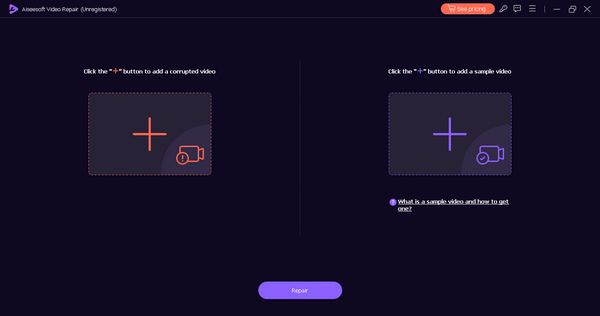
步驟 3。 然後點擊修復按鈕,開始進行影片修復作業。
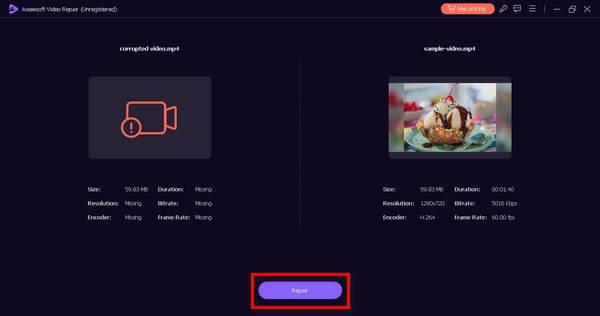
步驟 4。 最後,點擊預覽按鈕檢查影片是否已沒有錯誤代碼訊息且可以正常播放。確認一切無誤後,就可以點擊儲存按鈕將其保存。
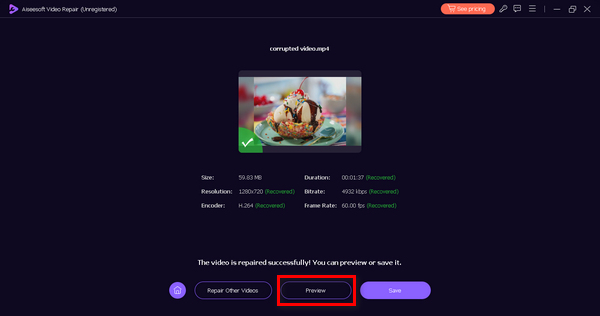
這種離線方法肯定可以修復錯誤代碼232011。只是不要忘記提供範例影片以進行無縫修復。
第 3 部分:防止錯誤代碼 232011 的提示
為了增強您的視訊串流體驗並防止遇到錯誤代碼 232011,建議遵循下面列出的提示。這些建議旨在解決與網路連線、瀏覽器效能以及可能破壞影片無縫播放的其他因素相關的潛在問題。
秘訣 1。保持網路連線穩定,以避免影片播放時中斷。這同樣也是修復影片卡頓與故障的方法之一。
秘訣 2。隨時將你的網頁瀏覽器更新到最新版本,以獲得最新功能與錯誤修正,進而提升影片串流效能。
秘訣 3。定期清除瀏覽器快取與 Cookie,避免累積資料影響影片載入與播放。
秘訣 4。停用或移除不必要的瀏覽器延伸功能,以免干擾影片播放。
秘訣 5。使用線上工具檢查你的網路速度,確認是否符合流暢串流的需求。
第 4 部分:有關錯誤代碼 232022 的常見問題解答
123movies 上的錯誤代碼 233011 是什麼?
123movies上的錯誤代碼233011是平台特定的問題,其意義只能參考123movies的官方支援資源來確定。我們鼓勵用戶訪問他們的網站並聯繫他們的客戶支援以獲得有關此特定錯誤的協助和澄清。
9anime 上的錯誤代碼 232011 是什麼?
9anime 上的錯誤代碼 232011 是 9anime 平台獨有的。要了解此錯誤代碼背後的具體原因,用戶應檢查官方 9anime 支援管道或聯繫其客戶支援以獲取解決問題的指導。
Kissanime 上的錯誤代碼 232011 是什麼?
與其他平台類似,Kissanime 上的錯誤代碼 232011 是特定於平台的。有關此錯誤代碼的含義和解決方案的準確信息,用戶應諮詢 Kissanime 提供的官方支援資源或聯繫其客戶支援尋求協助。
如何修復 Netflix 上的錯誤代碼 232011?
如果您在 Netflix 上遇到錯誤代碼 232011,請嘗試重新整理頁面、清除瀏覽器快取或重新啟動裝置。此外,請檢查您的網路速度並停用任何 VPN 或代理服務,因為它們可能會幹擾串流媒體。
結論
總結來說,解決錯誤代碼 232011,對於維持順暢的影片串流體驗至關重要。本指南提供了有效的解決方案與預防建議,以提升你的觀影品質。只要依照這些步驟操作,你就能排除問題並預防中斷,盡情享受不中斷的線上影片。
-
 什麼是影片中的 0xc10100bf 錯誤以及如何修復它
 您的影片是否因錯誤 0xc10100bf 而無法播放,並且您正在尋找修復方法?在本文中,您將了解它是什麼以及如何修復它。
-
 如何修復影片錯誤代碼 224003:您的終極修復指南
 了解如何解決此影片無法播放錯誤代碼 224003 的問題,並解決該問題以獲得無縫的用戶體驗。與我們的導遊一起回到正軌!
-
 故障排除錯誤代碼 232404 [2025 修復]
 找到針對此影片檔案無法播放錯誤代碼 232404 的可靠解決方案。使用我們的專家指南輕鬆解決問題,讓您恢復工作。
