


 視頻轉換大師
 屏幕錄影大師
 影片修復
影片修復
 安全下載
安全下載輕鬆將 H. 264 轉換為 MP4 的 3 種最佳方法 [2024]
您是否因不相容問題而難以播放 H.264 格式的影片?嗯,你並不孤單。許多用戶遇到相同的問題,並選擇將檔案轉換為 MP4 等各種裝置廣泛支援的格式。
So, if you’re one of them and are looking for ways to convert this file to have a seamless playback experience on your device, this article will provide you with the best methods to easily convert H.264 to MP4. Ready to make your videos universally compatible? Let’s dive in!

第 1 部分:H.264 與 MP4 相同嗎
H.264 和 MP4 都是視訊格式,但它們的用途不同。 H.264,也稱為AVC(高級視訊編碼),是一種常用於記錄、壓縮和分發高清視訊內容的視訊壓縮標準。另一方面,MP4(MPEG-4 Part 14)是一種容器格式,可儲存各種類型的數據,包括視訊、音訊、字幕和靜態影像。
H.264 特別指視訊壓縮技術,而 MP4 涵蓋更廣泛的多媒體內容。簡單來說,H.264 就像用來壓縮視訊資料的編碼方法,而 MP4 就像保存壓縮視訊以及其他多媒體元件的容器。
第 2 部分:將 H.264 轉換為 MP4 的快速簡單方法
The quickest and easiest way to convert H.264 to MP4 is by using the FVC Video Converter Ultimate. This desktop software tool is designed to handle various video and audio files like MP4, MKV, MOV, AVI, FLV, WMV, WEBM, M4V, TS, MXF, MPG, 3GP, VOB, and more. With these, you have a range of options as to what format you want your H.264 file to be converted. Moreover, It also has a custom profile that you can use to edit the output settings like the video codec, resolution, frame rate, bitrate, and more. Lastly, you can guarantee a fast conversion process and lossless quality output as this supports up to 4K resolution with a 30× conversion speed compared to other converter tools.
步驟 1.先下載該軟體工具並安裝到你的電腦上。
Step 2. On the Converter tab, click on the Add Files button and import your H.264 files.
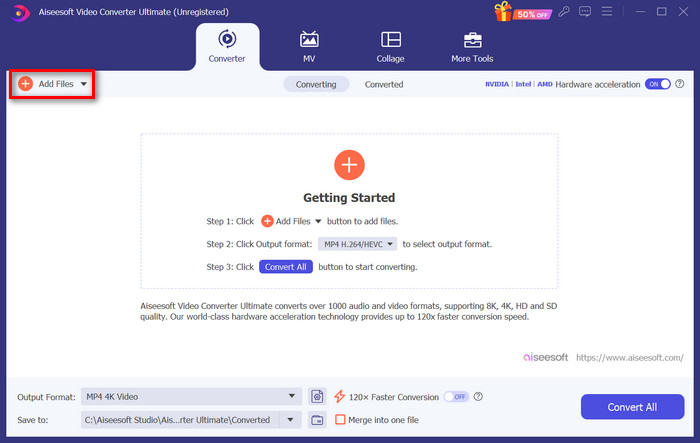
Step 3. Once the H.264 video file is imported, select MP4 among the list of formats by clicking the Output format button.
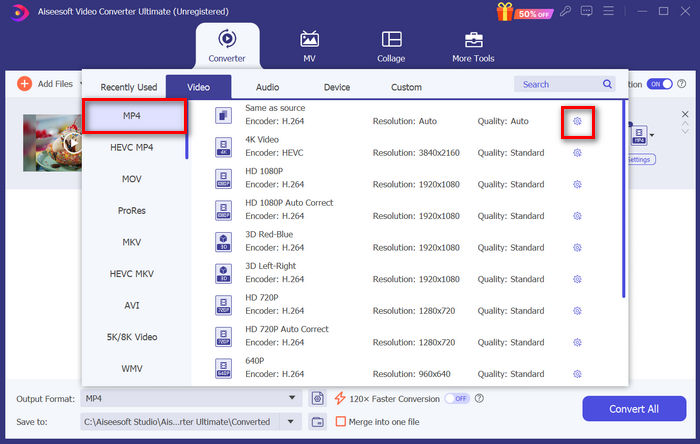
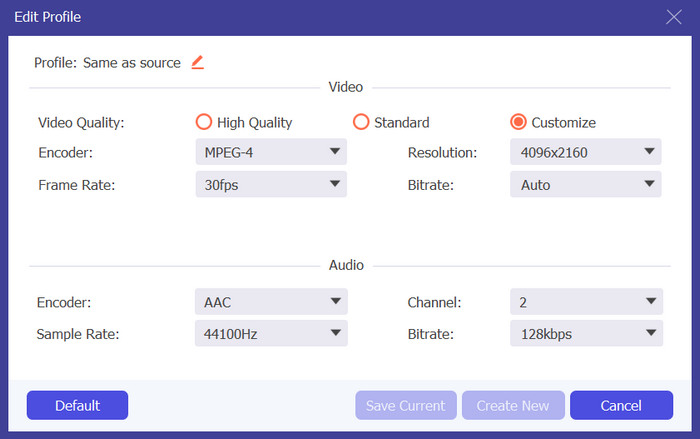
Meanwhile, if you want to customize the Custom Profile, go to the Settings dialog box. From there, you can edit the video codec, quality, file name, etc. When done, just click the Create New button to save.
Step 4. Once done, just click the Convert All button.
With FVC Video Converter Ultimate, conversion of H.264 to MP4 can be done quickly without consuming much of your time and effort. Moreover, you can convert other formats like H.265, and AVCHD to MP4. Other than that, you can be assured of maintaining high-quality output throughout the process.
第 3 部分:使用 FFmpeg 將 H.264 轉換為 MP4
FFmpeg 是一個用於管理多媒體檔案的命令列工具,提供從播放到轉換和編輯的功能。憑藉其多功能的功能,該工具允許用戶有效地將 H.264 轉換為 MP4 格式,為熟悉命令列介面的用戶提供了便捷的解決方案。
Step 1. First, you need to obtain the FFmpeg executables on your computer.
Step 2. Next, open the command-line window in the folder with executables. A terminal window pop-up will open.
Step 3. After that, add the H.264 file that you want to convert to MP4.
Step 4. Lastly, enter the command: ./ffmpeg.exe -i inputfilename.mkv outputfilename.mp4 and press Enter.
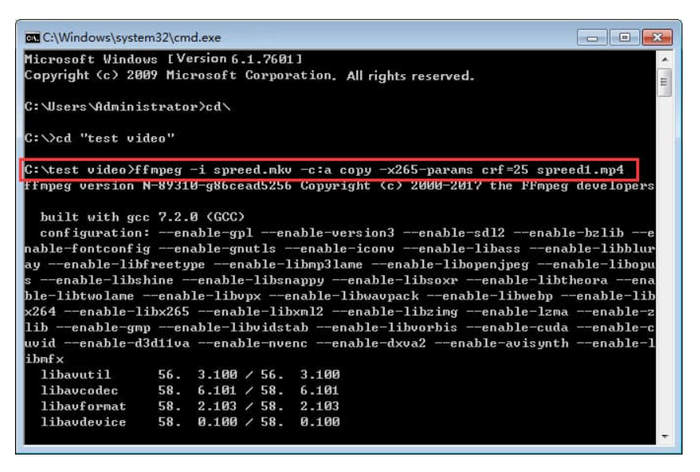
如果您熟悉命令列,那麼當您將 H.264 轉換為 MP4 時,FFmpeg 可能最適合您。然而,如果沒有,您會發現這個工具很難導航,這是它在新用戶可用性方面的失誤之一。
第 4 部分:在線將 H.264 轉換為 MP4
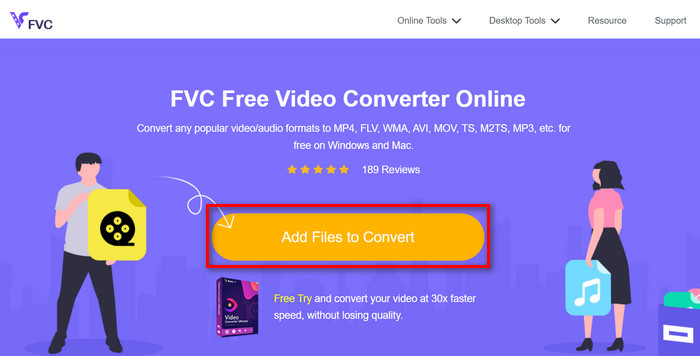
If you are looking for a tool to convert H.264 to MP4 online, the best tool that you can use for this is the FVC Free Video Converter Online. This tool offers a quick and very intuitive way of converting H.264 files to the format that you want, as you are only required to just import the file and select your preferred format and everything is magic.
Step 1. First, you need to import H.264 file that you want to convert by clicking the Add Files to Convert button
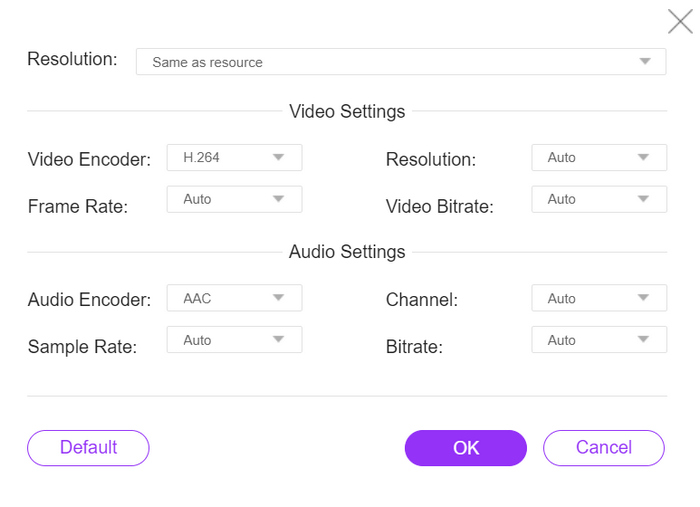
Step 2. Now, for the output format, choose MP4. Also, if you want to manually set the resolution, video encoders, bitrate, etc, just click the Gear icon on the side of the output format. If done, click the OK button.
步驟 3.最後,要開始轉檔流程時,只需點擊 轉檔(Convert) 按鈕。
您無需擔心轉換後的 H.264 檔案的輸出質量,因為該工具支援高達 1080P 的視訊解析度。此外,轉換速度不會花費太長時間,因為與其他轉換工具相比,轉換速度快了 30 倍。
第 5 部分. 將 H.264 轉換為 MP4 的常見問題解答
H264 vs mp4,哪個比較好?
說到相容性,MP4 似乎很棒,因為人們經常選擇將 H.264 轉換為 MP4 以改善裝置支援和播放體驗。然而,這兩種格式都有各自的優勢,並且有效地服務於不同的目的。
轉換為 MP4 時能否保留 H.264 影片的原始品質?
是的,在轉換為 MP4 時,您可以保留 H.264 視訊的原始質量,特別是如果您使用 FVC Video Converter Ultimate 或 FFmpeg 等信譽良好的轉換工具。這些工具提供了調整解析度、位元率和編解碼器等設定的選項,以確保高品質的輸出。
哪些影片播放器相容於 H.264 格式?
許多影片播放器都能夠播放 H.264 格式,包括 VLC Media Player、Windows Media Player 和 QuickTime Player。
結論
That's it! Now you have all the tools and methods in converting H.264 to MP4 effortlessly. Whether you prefer desktop software, a command-line tool, or an online converter, the choice is yours. Get started today and ensure compatibility with any device!
-
 2024 年最佳免費 MPG 到 MP4 轉換器(深度評測)
 為什麼需要將 MPG 更改為 MP4?在這篇文章中找到答案,了解市場上排名靠前的 MPG 到 MP4 轉換器。
-
 音頻到 MP4:將任何音頻文件轉換為 MP4 格式
 將您喜愛的歌曲、播客和錄音轉換為 MP4 格式,以獲得獨特的音頻和視覺效果。了解如何將 WMA 轉換為 MP4 或其他音頻轉換為視頻格式。
-
 前 5 名最佳 FLV 到 MP4 轉換器免費和付費(2024 條評論)
 請繼續閱讀這篇文章,了解有關 FLV 和 MP4 文件的更新。此外,我們還策劃了最可靠的 FLV 到 MP4 轉換器。
