


 視頻轉換大師
 屏幕錄影大師
 影片修復
影片修復
 安全下載
安全下載快速將 MP4 轉換為 AAC 的 3 種方法 [簡單指南]
如果你有像音樂影片這樣的 MP4 檔案,卻更希望在音訊資料庫中無間斷地播放來收聽,那你就來對地方了。本文將帶你學會並熟練如何輕鬆將MP4 轉換為 AAC。不論是建立播放清單、隨時隨地欣賞你最愛的曲目,或只是想在沒有影像干擾的情況下聆聽,現在就把它們變成音訊檔,享受更便利的聆聽體驗吧!

第 1 部分:將 MP4 轉換為 AAC 的最快方法
將 MP4 轉換為 AAC 最快速的方法,就是使用 FVC Free Video Converter Online。這是一款影音轉檔工具,可以滿足使用者各式各樣的轉檔需求。所以,如果你想把影片轉成音訊檔,那麼以下這些理由會讓這個工具成為你的完美選擇。
該工具是免費的,可以輕鬆在線訪問,您只需導入文件,然後您會遇到一個非常簡單的介面來設置輸出格式,然後進行轉換。
此外,除了 AAC 格式外,該工具還支援各種流行的音訊格式,例如 AC3、AIFF、AMR、AU、FLAC、M4A、MKA、MP2、MP3、OGG、WAV 和 WMA。最後,使用此工具,您可以調整位元率、樣本或音量等音訊設置,確保您的輸出符合您的確切需求。
步驟 1.首先,點擊加入檔案進行轉換(Add Files to Convert)按鈕匯入你的 MP4 檔案。
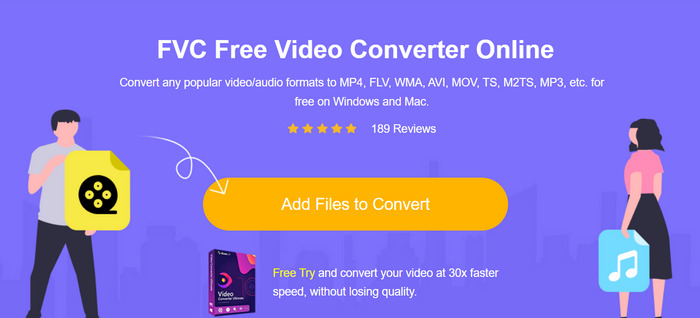
步驟 2.接著,點擊音樂(Music)圖示,並選擇AAC作為輸出格式。
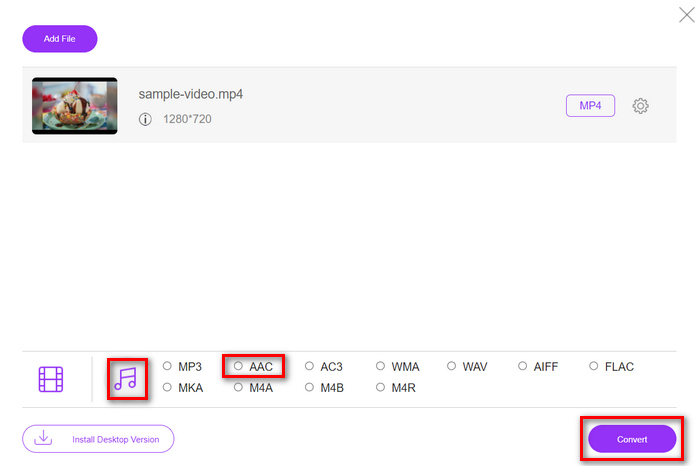
步驟 3.完成設定後,直接點擊「Convert」按鈕即可。
使用 FVC 免費線上影片轉換器,您可以獲得將 MP4 轉換為 AAC 的最快方法。其用戶友好的介面使轉換變得容易。此外,它支援各種音訊格式,這對於確保與各種設備和平台的兼容性至關重要。
第 2 部分:將 MP4 轉換為 AAC 的專業方法
FVC Video Converter Ultimate 是一款功能完整的影音轉檔工具,讓使用者能以更全面、專業的方式將 MP4 轉換為 AAC。透過這個工具,使用者可以順利轉換對規格要求較高、較複雜的檔案,例如在不犧牲效能與輸出品質的情況下,轉換檔案容量龐大的 MP4 檔案。
此外,該工具提供了一個用戶友好的介面,可以簡化文件轉換過程。其高級功能包括批量轉換、可自訂的輸出設定以及對多種音訊格式的支援。最後,使用此轉換器工具,您可以確保快速轉換過程,因為它的運行速度比其他轉換器工具快 30 倍。
步驟 1.在電腦上下載並安裝此工具。
步驟 2.在轉換器(Converter)分頁中,上傳你想要轉換的 MP4 檔案。
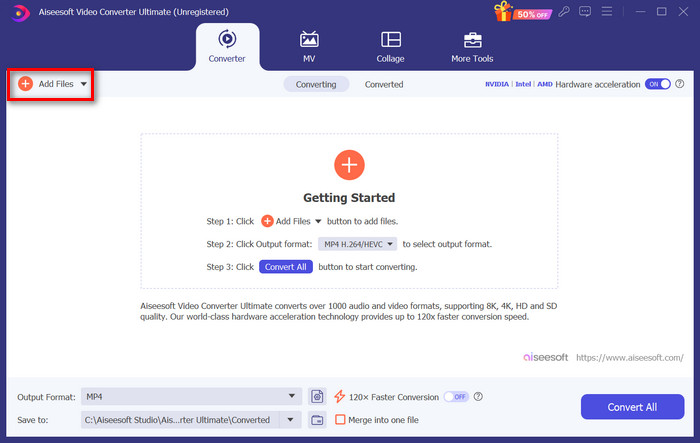
步驟 3.現在,點擊下方的輸出格式(Output format)按鈕來設定輸出格式。選擇音訊(Audio),並選取 AAC。
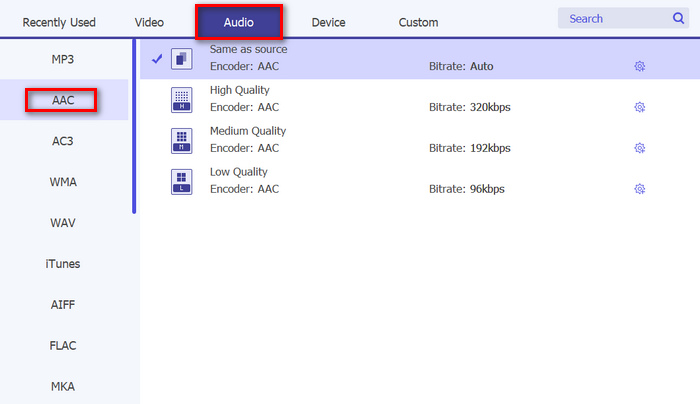
步驟 4.若要自訂位元率、聲道數與取樣率,請點擊齒輪(Gear)圖示,開啟新視窗進行編輯。完成後,點擊建立新檔(Create New)按鈕。
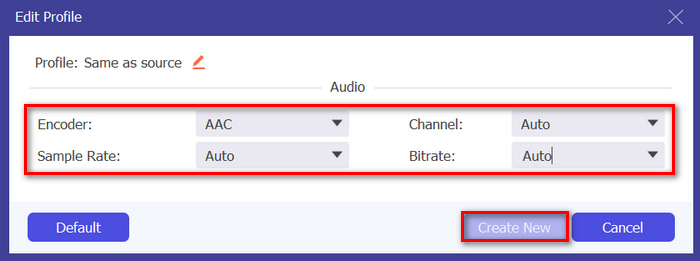
步驟 5.全部設定完成後,點擊全部轉換(Convert All)按鈕開始轉檔。
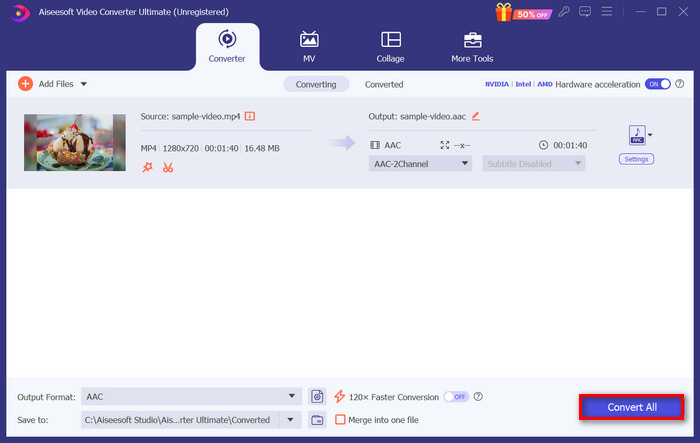
如果你有大量 MP4 檔案需要轉換,可以利用此工具的批次轉換功能,一次輕鬆完成所有檔案的轉換。另外,若你想為 AAC 檔案新增更多後設資訊,只要切換到本軟體「工具箱(Toolbox)」分頁下的 AAC 後設資料編輯器(AAC metadata editor) 即可。
第 3 部分:使用 iTunes 將 MP4 轉換為 AAC
如果您要轉換的 MP4 影片檔案位於 iTunes 庫中,那麼最好的方法是使用 iTunes 軟體進行轉換。這種多功能工具可用作媒體播放器和圖書館組織者。但除此之外,該工具還可以完美地將MP4檔案無縫轉換為AAC格式,確保與各種裝置和平台的兼容性。
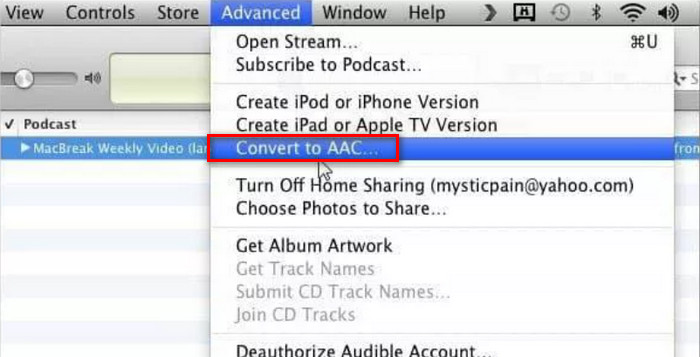
步驟 1.在 iTunes 中,前往編輯(Edit)選項並點擊偏好設定(Preferences)圖示。接著,在按下一般(General)分頁後,選擇匯入設定(Import Settings)圖示。
步驟 2.現在,在編碼格式(Encoding)中選擇 AAC 音訊格式。接著,點擊確定(OK)以繼續。
步驟 3.最後,選擇你想轉換成 AAC 的 MP4 影片。完成後,只要點擊轉換(Convert)按鈕即可。
對於 MP4 檔案儲存在 iTunes 庫中的使用者來說,iTunes 確實是一個完美的轉換器。然而,這個工具可能會佔用大量資源,而且它的介面對每個人來說可能並不直觀。
此外,iTunes 也提供選項,讓你可以為已轉換的 AAC 檔案編輯 ID3 標籤。
第 4 部分:將 MP4 轉換為 AAC 的常見問題解答
將 MP4 轉換為 AAC 會影響品質嗎?
將 MP4 轉換為 AAC 通常涉及有損壓縮過程,這意味著音訊品質可能會有所損失。但是,借助高品質的轉換工具和設置,您可以將這種損失降至幾乎無法察覺的水平。
我可以一次將多個 MP4 檔案轉換為 AAC 嗎?
是的,許多轉換工具,包括 FVC Video Converter Ultimate,都支援批次轉換,讓您一次將多個 MP4 檔案轉換為 AAC。因此,透過利用此功能,您可以節省時間並簡化轉換過程。
將 MP4 轉換為 AAC 會影響視訊品質嗎?
將 MP4 轉換為 AAC 僅擷取視訊檔案的音訊部分,視訊品質保持不變。但是,必須使用信譽良好的轉換工具和適當的設定來確保產生的 AAC 檔案具有最佳音訊品質。
AAC 比 MP3 好嗎?
是的。 AAC 被認為在相同位元率下可提供比 MP3 更好的音訊品質。它提供了更高的壓縮效率和更好的保真度,使其成為音訊編碼的首選,尤其是在高品質音訊應用中。
M4P 和 AAC 一樣嗎?
不。 M4P 是用於 iTunes Store 中出售的受保護 AAC 音訊檔案的檔案副檔名。雖然 M4P 檔案使用 AAC 壓縮進行編碼,但它們受到數位版權管理的保護,以防止未經授權的分發。另一方面,AAC 指的是音訊編解碼器本身,不一定與 DRM 保護相關。
結論
總結來說,將MP4 轉換為 AAC,是讓你在不受影像干擾的情況下享受喜愛音樂的一種便利方式。現在,你已經能夠輕鬆從 MP4 檔案中擷取音訊。別再讓影片內容限制你聽音樂的方式,立刻改用 AAC,享受更純粹的聆聽體驗吧!
-
 MP3 到 AAC 轉換:如何提高音頻質量
 輕鬆將 AAC 轉換為 MP3,將 MP3 轉換為 AAC!本文指南涵蓋了有關這些流行音頻格式的所有內容,包括文件大小、質量和兼容性。
-
 AAC 到 WAV:頂級轉換器的全面回顧
 使用 AAC 到 WAV 轉換器釋放音頻轉換的力量。將 AAC 文件轉換為高品質 WAV 格式,保留音樂的每一個細微差別。
-
 在購買 AAC 到 M4R 轉換器之前您應該了解的事情
 繼續這篇文章,我們將為您提供有關選擇將 M4R 轉換為 AAC 的工具的詳細指南。
