


 視頻轉換大師
 屏幕錄影大師
 影片修復
影片修復
 安全下載
安全下載將 MP4 轉換為 WhatsApp 影片的 2 種有效方法 [2024]
如今,WhatsApp 在線上互動方面變得越來越受歡迎,尤其是在共享照片和影片等媒體檔案方面。然而,這個社群媒體平台在文件格式和大小方面強加了用戶需要遵守的規則。考慮到這一點,用戶經常需要轉換 MP4 影片以確保它們符合 WhatsApp 的要求。
因此,如果你正為檔案大小上限與檔案格式相容性傷腦筋,這篇文章就能替你解決問題。學習如何輕鬆將MP4 轉換成 WhatsApp 視訊,完全不需要繁瑣步驟。我們也會一步步帶你完成整個流程,確保你的影片已最佳化,能在 WhatsApp 上順暢分享。還在等什麼?一起開始吧!

第 1 部分:與 WhatsApp 相容的影片格式
與其他社群媒體平台相比,WhatsApp 在分享影片方面有其限制。使用此應用程序,您只能分享持續時間在 90 秒到 3 分鐘之間的短視頻。
另外,它們不能太大,因為預設影片大小限制最多為 64 MB。至於分辨率,您只能發送 480p 分辨率的視訊檔案。
另外,在影片格式方面,請確保您的影片檔案為 MP4、MKV、AVI、3GP 或 MOV 格式。因此,當您要在 WhatsApp 上傳送 MP4 檔案時,請注意這些事項,以避免不便和不相容問題。
第 2 部分:如何在線上將 MP4 轉換為 WhatsApp 影片 [免費且簡單]
如果你正在尋找一種免費又簡單的方法,把 MP4 轉成 WhatsApp 視訊,最好的工具就是線上的FVC 免費影片轉檔器。由於 WhatsApp 對檔案大小與格式有特定限制,透過這個工具,你可以輕鬆將 MP4 檔轉成此平台支援的格式。除此之外,在轉檔時你也可以自訂 MP4 檔的視訊與音訊編碼格式,以及解析度。
現在,要執行此操作,請按照以下步驟操作:
步驟 1:先匯入你想要轉換的 MP4 檔案。要這麼做,只要按一下新增待轉檔案按鈕。
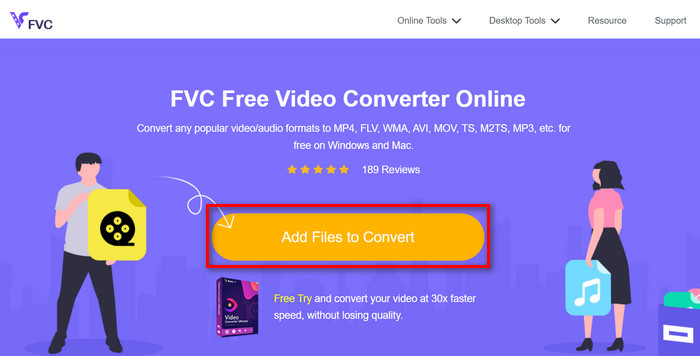
步驟 2:接著,選擇你偏好的輸出格式。你可以自由從 WhatsApp 支援的格式中做選擇。另一方面,如果你想手動設定解析度、視訊編碼、位元率等,只要按一下輸出格式旁邊的齒輪圖示。設定完成後,按一下確定按鈕。
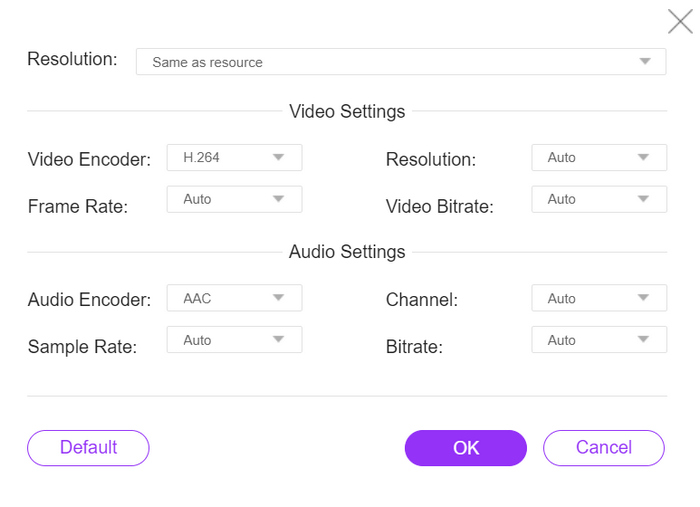
步驟 3.最後,要開始轉檔流程時,只需點擊 轉檔(Convert) 按鈕。
透過 FVC 免費線上影片轉換器簡單直覺的介面,可以輕鬆將您的 MP4 檔案轉換為 WhatsApp 支援的檔案格式。此外,憑藉其廣泛的文件格式和視訊解析度選項,您可以確保滿足 WhatsApp 中共享文件的要求。
第 3 部分:將 MP4 轉換為 WhatsApp 影片的最快方法
同時,如果您正在尋找一款功能齊全的工具,能夠將 MP4 文件轉換為 WhatsApp 視頻,那麼大家都會關注它。 FVC Video Converter Ultimate 是一款綜合轉換器工具,旨在處理各種視訊和音訊檔案以進行轉換。因此,如果您想將 MP4 檔案轉換為與 WhatsApp 相容的格式,請使用此工具使其快速且輕鬆。
此外,此工具可讓您調整視訊的編碼器和視訊分辨率,使您可以完全控制轉換過程。
步驟 1.先下載該軟體工具並安裝到你的電腦上。
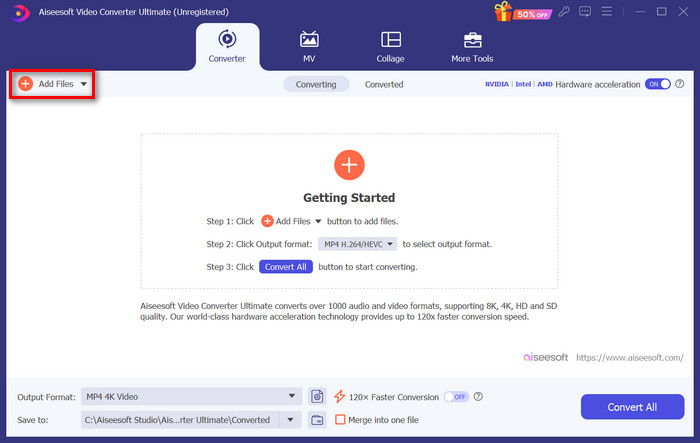
步驟 2:在轉檔器分頁上,按一下新增檔案按鈕並匯入你的 MP4 檔案。
步驟 3:MP4 檔案匯入後,按一下輸出格式按鈕,從格式清單中選擇你偏好的輸出格式。
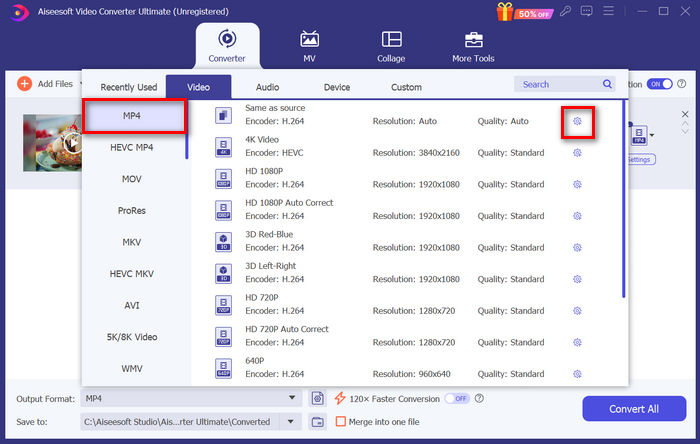
步驟 4:在自訂個人設定檔中,前往設定對話框。在那裡,你可以變更視訊編碼並調整視訊解析度。完成後,只要按一下建立新設定按鈕以儲存。
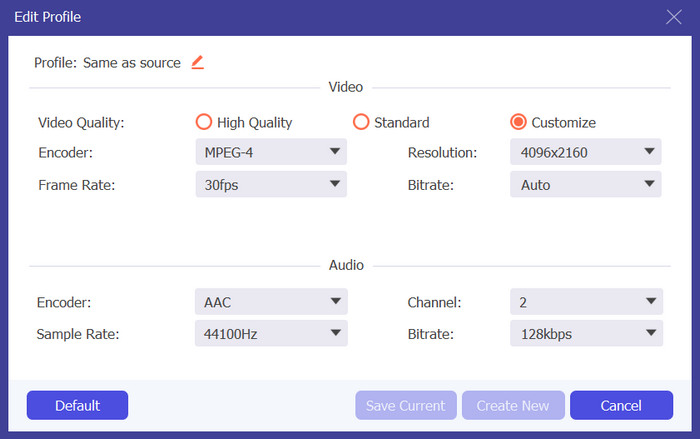
步驟 5:全部設定完成後,只要按一下全部轉換按鈕。
請記住在自訂設定檔中將視訊解析度調整為 480p,以確保與轉換後的 MP4 輸出的 WhatsApp 相容。
另外,如果你想壓縮 WhatsApp 視訊大小以符合限制,你可以切換到「工具箱」分頁,使用「視訊壓縮器」功能。
第 4 部分:有關將 MP4 轉換為 WhatsApp 影片的常見問題解答
如何從 WhatsApp 下載 MP4?
要從 WhatsApp 下載 MP4 視頻,請打開包含該視頻的聊天,點擊視頻將其打開,然後點擊通常位於視頻播放器一角的下載圖標。
可以在 WhatsApp 上傳送 MP4 嗎?
是的。您可以在 WhatsApp 上發送 MP4 影片。但是,請務必記住確保您的影片符合 WhatsApp 的檔案大小和格式限制,以避免發送或接收時出現任何問題。
如何縮小 WhatsApp 的 MP4 影片的檔案大小?
您可以使用視訊壓縮軟體或線上工具來變更 WhatsApp 的 MP4 影片的檔案大小。這些工具能夠壓縮視頻,同時保持合理的質量,更容易透過 WhatsApp 發送。
我可以同時將多個 MP4 檔案轉換為 WhatsApp 影片嗎?
是的。您可以使用 FVC Video Converter Ultimate 上提供的批次轉換功能同時將多個 MP4 檔案轉換為 WhatsApp 影片。透過此功能,您可以快速輕鬆地一次轉換一堆文件,從而節省您的時間和精力。
結論
總而言之,將MP4 轉換成 WhatsApp 視訊從未如此輕鬆。有了 FVC 免費影片轉檔器線上版以及 FVC 影片轉檔大師等工具,你就能無縫地將影片轉成符合 WhatsApp 在大小與格式方面要求的檔案。無論你偏好簡單的線上方案,還是功能完整的桌面工具,現在都能輕鬆在 WhatsApp 上分享你的影片。
告別 WhatsApp 相容性問題,迎接應用程式內無憂分享。
-
 如何在桌面和在線上輕鬆將 MP4 轉換為 MPG
 了解如何通過簡單的步驟將您喜愛的 MP4 轉換為 MPG。沒有令人頭疼的技術問題,只需平穩地過渡您的媒體文件。
-
 指南如何輕鬆地將 MP4 轉換為 MXF
 將 MP4 轉換為 MXF 變得非常簡單!了解如何輕鬆切換視頻格式。獲取分步指導以實現平穩過渡。
-
 您應該考慮使用的最佳 MP4 到 WAV 轉換器
 MP4 到 WAV 變得簡單。擺脫技術壓力,像專業人士一樣切換格式。現在就嘗試一下,開始欣賞您新發現的 WAV 曲目吧!
