


 視頻轉換大師
 屏幕錄影大師
 影片修復
影片修復
 安全下載
安全下載如何壓縮 SVG 檔案:實現無損品質輸出
SVG(即可擴展向量圖形)是一種獨特的圖像格式,它根據網格上的精確點和線透過數學公式儲存圖像。這與 JPEG 完全相反,JPEG 是基於像素的光柵檔案。此外,由於其可擴展性和可工作的文件大小,這種文件通常用於網頁和圖形設計。
然而,如今使用者通常會壓縮這種檔案來改善載入時間與效能。因此,如果你正在尋找適用於 SVG 檔案的壓縮工具,那麼你就來對地方了。透過本篇文章,了解最佳的SVG 壓縮工具,以及如何有效使用它們在不犧牲畫質的情況下最佳化你的圖片。

第 1 部分:以最小尺寸壓縮 SVG,不會造成明顯的線上品質損失
如果你想在網路上將 SVG 檔案壓縮到最小體積、同時又不會有明顯的品質損失,你能使用的最佳工具就是FVC Free Image Compressor。這個工具 100% 免費,而且與其他提供免費服務的壓縮工具相比,它是個例外,因為它能在維持圖片品質的同時壓縮圖片檔案。
步驟 1。首先,你需要造訪此工具的官方網站。
步驟 2。進入其主介面後,點擊Upload Images按鈕匯入你想壓縮的照片。
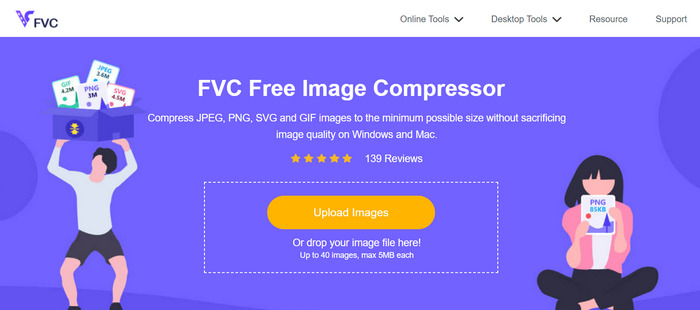
步驟 3。等待轉換過程完成。之後,你會看到顯示已完成的狀態列。現在,點擊Download即可儲存你的圖片。
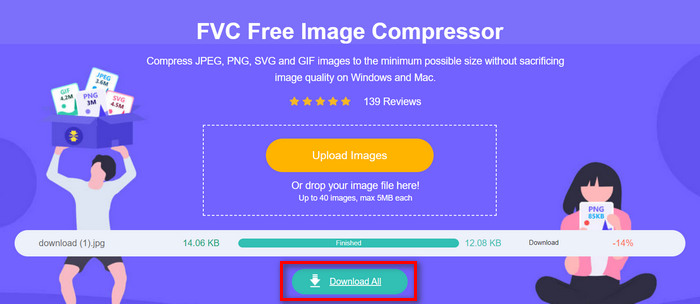
這個 SVG 壓縮工具的最大優點是它在上傳時會執行自動壓縮。此外,其批次功能允許使用者同時壓縮多達 40 個影像檔案。這對於那些有大量需要壓縮的 SVG 檔案的人很有幫助。此外,這些檔案會快速自動減少到最大 5MB,以確保使用它們時的載入效能。最後,除了 SVG 檔案之外,您還可以壓縮其他圖片檔案格式,例如 JPEG、PNG 和 GIF。
第 2 部分:使用專業軟體壓縮 SVG - Adobe Illustrator
如果您需要專業軟體來壓縮SVG文件,Adobe Illustrator將是最佳選擇。該軟體程式以其先進的圖形設計功能而聞名。儘管如此,它還能夠優化和減小 SVG 檔案的檔案大小,同時保持高品質。
以下是有關如何在使用 Adobe Illustrator 時壓縮 SVG 檔案的步驟:
步驟 1。在 Adobe Illustrator 中,先到File分頁並點擊Open按鈕開啟 SVG 檔案。
進入主介面後,再次前往File分頁,點擊Save As按鈕,或按下Shift-Control-S來儲存文件。
步驟 2。現在,將檔案類型選擇為 Adobe Illustrator (.Ai),設定文件名稱,然後按下Save。
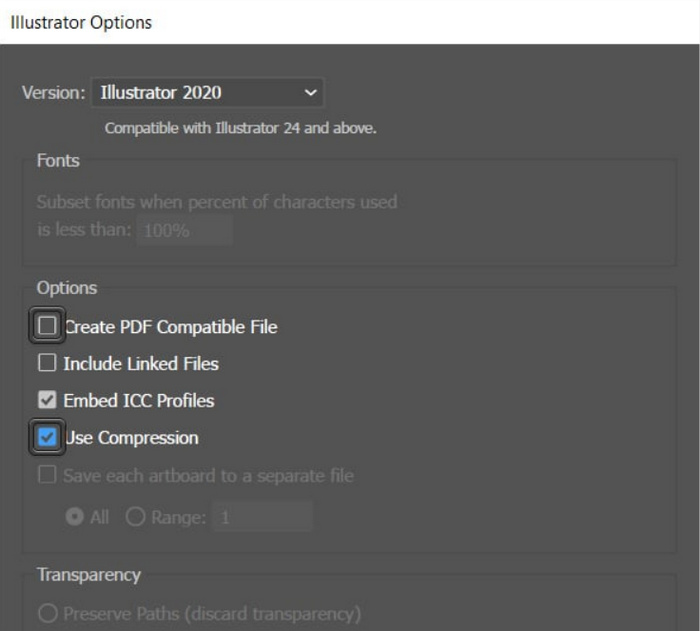
步驟 3。接著,取消勾選Create PDF Compatible File選項,並確認Use Compression選項已勾選。完成後,只要點擊OK即可儲存已縮小檔案大小的文件。
在這裡,你也可以使用此工具將 SVG 匯出為 JPG 或 PNG,依你的需求選擇。
使用者在 Adobe Illustrator 程式中建立 SVG 檔案專案時可以利用此方法。該程式有一個功能,允許用戶在保存檔案之前直接壓縮檔案。然而,這不是典型的 SVG 壓縮工具,它為一堆 SVG 檔案提供批量轉換並具有自動壓縮率,但話又說回來,當您使用此程式時,您可以輕鬆快速地將此類檔案壓縮為在保持品質完整性的同時盡可能減少檔案大小。
第 3 部分:快速壓縮 SVG
當你在尋找一款壓縮速度快速的 SVG 壓縮工具時,Compress-Or-Die也許就是最適合你的選擇。這是一款線上圖片壓縮工具,不僅能減少檔案的圖片大小,還能分析並修復它們。此外,此工具能在最大程度維持品質的情況下,將 SVG 檔案壓縮到更小的容量。
步驟 1。首先,點擊Select File按鈕匯入 SVG 檔案。除此之外,你也可以使用Drag & Drop拖放功能,或直接貼上網址。
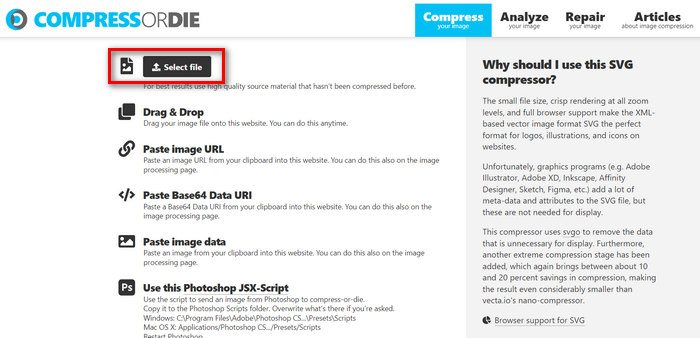
步驟 2。選取 SVG 檔案後,它會自動開始進行壓縮。
步驟 3。壓縮完成後,你將看到 SVG 檔案的新檔案大小。若要儲存,只需點擊Download按鈕即可。
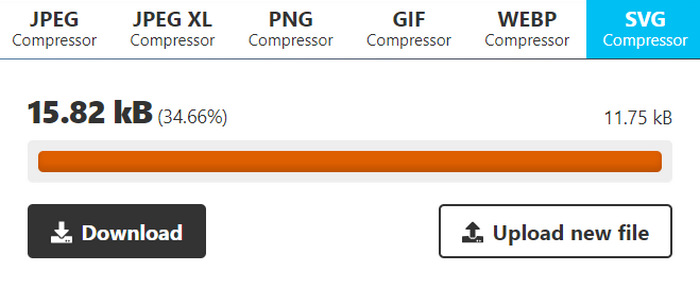
該工具在壓縮 SVG 檔案時提供了便利和靈活性。使用者可以自訂壓縮設定以實現不同等級的最佳化,並比較原始影像和壓縮影像。然而,缺乏對大量影像壓縮的支援限制了使用者同時管理多個影像的效率。壓縮速度會根據影像大小和複雜性等因素而變化。總體而言,雖然它在單一壓縮任務中表現出色,但對於需要批次功能的使用者來說可能不是最佳選擇。
第 4 部分:有關壓縮 SVG 的常見問題解答
您可以調整 Cricut 的 SVG 檔案大小嗎?
是的。 SVG 檔案是可縮放的向量圖形,這意味著它們可以在不損失品質的情況下調整大小。這使得它們非常適合與 Cricut 等切割機一起使用,因為您可以更改設計的尺寸以完美適合您的專案。
調整大小時 SVG 是否會降低品質?
不會。與 JPEG 或 PNG 等其他影像格式(在調整大小時可能會出現像素化)不同,SVG 檔案可以保持其質量,因為它們基於數學公式而不是固定的像素網格。
如何建立可調整大小的 SVG?
建立可縮放的 SVG,需先使用 Adobe Illustrator 等向量繪圖軟體設計圖像。儲存檔案時,只要確保將其存為 SVG 格式即可。此格式允許圖像在放大或縮小時不會失真,因此能在各種應用程式與裝置上彈性調整尺寸。想了解更多將圖片轉換為 SVG的方法,可在此查閱。
結論
以上就是你現在可以依照自身需求,使用 3 種不同工具來壓縮 SVG檔案的方式。每一款工具都提供不同且獨特的功能組合,以符合你的偏好與需求。記住,減少 SVG 檔案大小不僅能提升效能,還有助於最佳化頻寬使用、改善載入時間,並確保更順暢的使用者體驗。所以,不妨多加嘗試這些工具、實驗它們的各種功能,並找到最符合你工作流程的完美解決方案。現在就開始壓縮吧!
-
 將 HEIC 轉換為 SVG 的頂級和簡單方法
 這些 HEIC 到 SVG 轉換器將幫助您輕鬆地將 HEIC 轉換為 SVG。閱讀本文以了解這些最好的免費在線工具。
-
 如何將 SVG 轉換為 JPG 格式的輕鬆方法
 正在尋找將 SVG 轉換為 JPG 的最佳方法?這篇文章將提供一些您可以嘗試的萬無一失的教程。您還將發現適合您的 SVG 到 JPG 轉換器。
-
 關於如何將 JPG 轉換為 SVG 的主要方法 [已解決]
 在本文中,您將獲得不容錯過的有關將 JPG 轉換為 SVG 的最佳方法的數據。閱讀帖子以使用 JPG 到 SVG 轉換器。
