


 視頻轉換大師
 屏幕錄影大師
 影片修復
影片修復
 安全下載
安全下載前 5 名最佳 PDF 尺寸縮小工具 [線上與離線]
當然,你來這裡也是出於同樣的原因。您遇到了 PDF 文件過大的問題。對於任何使用 PDF 作為文件文件格式的使用者來說,這是一個常見問題,因為 PDF 文件包含大量圖像、圖形、複雜的設計和不同的字體,讓他們無法移動。
然而,這樣做的缺點是 PDF 文件會累積很大的尺寸,這通常會成為其故障的原因,尤其是在打開或透過電子郵件發送它時。
因此,如果你正在尋找一款用來壓縮 PDF 檔案的PDF 減肥工具(PDF size reducer),那你就來對地方了。本文將介紹 5 種不同的工具,幫助你縮小檔案大小,並帶你了解各自的特色,方便你依照自己的需求與偏好做出最合適的選擇。

第 1 部分:FVC 免費 PDF 壓縮器
FVC Free PDF Compressor 作為一款優秀的 PDF 減肥工具脫穎而出,能夠快速、輕鬆地縮小體積龐大的 PDF 檔案。透過這款線上工具,使用者可以在確保高品質壓縮的前提下,於不同平台上流暢使用。此外,它的操作介面相當友善,使壓縮流程變得輕而易舉,而在維持頂尖輸出品質方面的表現,更讓它從眾多工具中脫穎而出。
借助 FVC 免費 PDF 壓縮器,體驗毫不妥協地壓縮大型 PDF 的便利,使其成為尋求效率和可靠性的用戶的最終選擇。
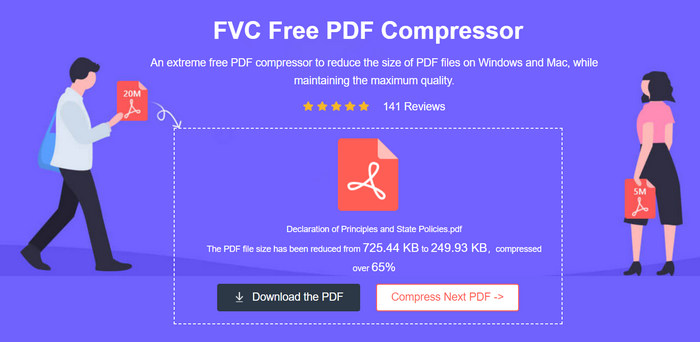
平台 支援多數主流平台。
價格:免費
主要功能:
• 壓縮率:可將檔案大小減少至 100 KB 以下或 70%。
• 時間:壓縮一個 4 MB 的 PDF 檔案約需 5 秒。
• 品質:維持高品質輸出,與原始檔案相當。
FVC 免費 PDF 壓縮器是一個高效且非常用戶友好的工具,用於減少 PDF 文件大小。該工具的最大優點是能夠輕鬆快速地壓縮 PDF,顯著減小檔案大小,同時保持高品質的輸出。最後,它是完全免費的,不需要帳戶,因此這款 PDF 尺寸縮小工具真正脫穎而出,成為休閒和專業用途的可靠選擇。
第 2 部分:Adobe 線上 PDF
Adobe Acrobat PDF 壓縮器在線上是當今最好的免費線上 PDF 尺寸縮小器之一。該工具提供了一種在不犧牲品質的情況下壓縮 PDF 文件的便捷方法。雖然該工具確實易於使用且安全,但它不提供與付費 Acrobat Pro 軟體相同等級的微調,但在大多數情況下它仍然會顯著減小檔案大小。
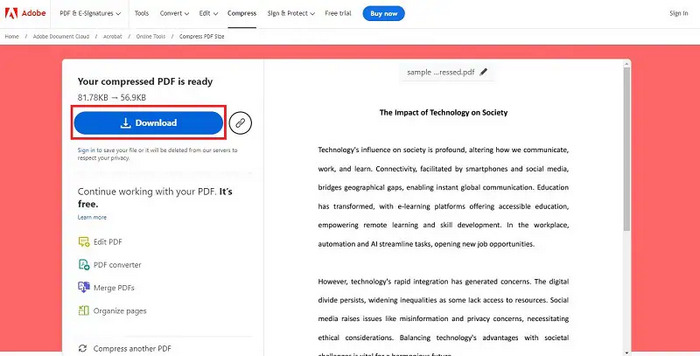
平台 網頁端
價格:免費
主要功能:
• 壓縮率:壓縮效果極佳,可將檔案縮小最多達 20%。
• 時間:壓縮速度迅速,每個檔案通常只需幾秒。
• 品質:維持高品質輸出,確保文字與圖片依然清晰細緻。
Adobe Acrobat PDF Compressor Online 是用來在不降低品質的情況下壓縮 PDF 的頂級 PDF 減肥工具,具備無與倫比的效率與穩定性。再加上其直覺易懂的介面與強大功能,讓使用者能非常輕鬆地壓縮 PDF 檔案,同時不必為品質打折或操作困難而煩惱。
第 3 部分:iLovePDF
iLovePDF 提供全面的 PDF 操作工具,包括複雜的 PDF 壓縮器。這款基於 Web 的 PDF 尺寸縮小工具可有效縮小 PDF 檔案的大小,同時保留盡可能高的品質。該工具可以免費使用,並且不會對壓縮限制施加任何限制。透過 iLovePDF,使用者可以輕鬆快速地壓縮 PDF,這對於希望簡化文件共享或儲存的人來說是一個絕佳的選擇。
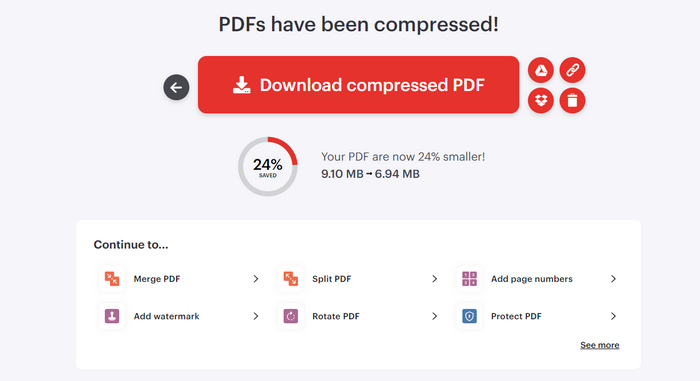
平台 網頁版,任何具備網路連線的裝置皆可存取。
價格:免費
主要功能:
• 壓縮率:能在維持品質的情況下,大幅減少檔案大小。
• 時間:壓縮速度快,每個檔案僅需數秒。
• 品質:維持極佳品質,確保文字與圖片依然清晰易讀。
對於想要快速有效壓縮 PDF 檔案的人來說,iLovePDF 是一款多功能且可靠的工具。其基於網路的特性確保可以從任何設備進行訪問,並且沒有壓縮限制使其成為非常方便的選擇。憑藉其直覺的介面和高品質的輸出,這款 PDF 尺寸縮減工具是滿足您所有 PDF 壓縮需求的卓越解決方案。
第 4 部分:Adobe Acrobat
Adobe Acrobat 是一款著名且廣泛使用的 PDF 尺寸縮小工具,用於管理 PDF 文件。在其眾多功能中,壓縮 PDF 檔案的能力尤其引人注目。對於需要縮小 PDF 大小以便更輕鬆共享、更快載入時間和優化儲存空間的用戶來說,此功能至關重要。
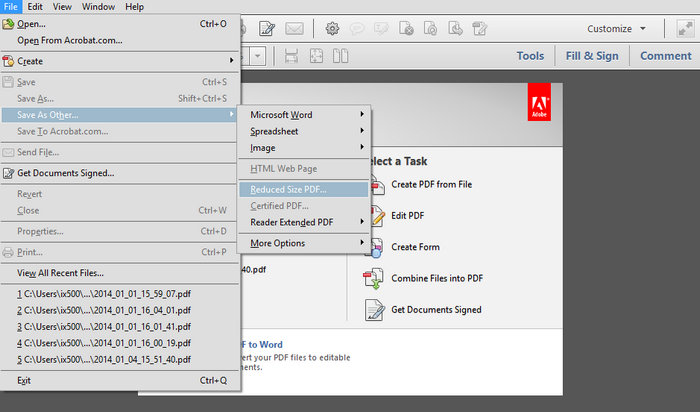
平台 Windows、MacOS 和 Android。
價格:每月 $19.99。
主要功能:
• 壓縮率:效果顯著,最高可將檔案大小減少 40%。
• 時間:壓縮速度快,通常在數秒內即可完成。
• 品質:維持高品質輸出,確保文字與圖片依然清晰細緻。
Adobe Acrobat 作為一款頂級 PDF 減肥工具表現突出,具備卓越的效率與可靠度。它能在不犧牲品質的前提下壓縮檔案大小,再加上能與 Adobe 全家桶無縫整合及友善的使用介面,無論是個人用途或專業應用,都是極佳的選擇。
第 5 部分:預覽
Preview 是一款內建 macOS 應用程序,可讓使用者存取、檢視和編輯各種文件格式,包括 PDF。它包括基本的編輯工具,使用戶能夠對其文件文件進行簡單的更改,例如將大型 PDF 壓縮為較小的文件大小。雖然 Preview 可能無法提供市場上其他 PDF 尺寸縮小工具的廣泛功能,但其易用性和即時可用性使其成為直接 PDF 修改的便利工具。此外,它與 Mac 系統的整合可確保流暢、無縫的使用者體驗,非常適合快速編輯和高效的文件管理。
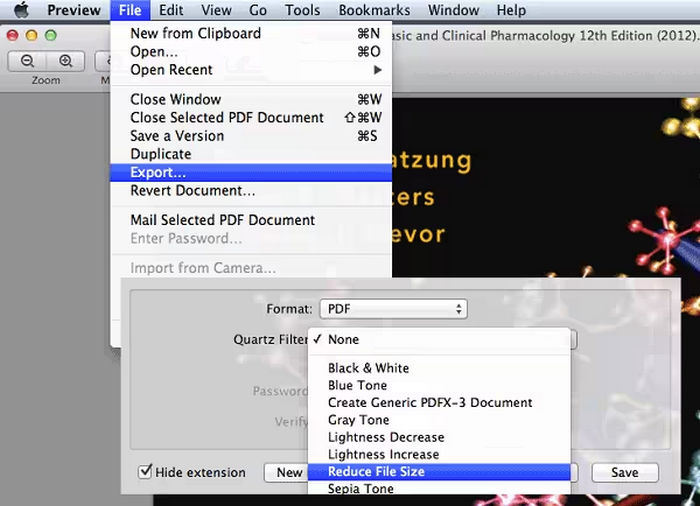
平台 MacOS。
價格:免費
主要功能:
• 壓縮率:可有效將檔案大小減少最多 30%。
• 時間:壓縮過程通常只需數秒。
• 品質:維持高品質輸出,完整保留文字與圖片的細節。
對於尋求輕鬆 PDF 尺寸縮小器的 Mac 用戶來說,Preview 是理想的工具。然而,與其他提供高級功能的 PDF 壓縮工具相比,該工具有些不足。儘管如此,該工具為減小 PDF 檔案大小和進行簡單編輯提供了可靠且簡單的解決方案。
第 6 部分:有關 PDF Size Reducer 的常見問題解答
為什麼我的 PDF 這麼大?
由於多種因素,例如包含高解析度圖像、嵌入字體、複雜圖形和大量註釋,PDF 文件可能會變得很大。建立文件或將其掃描為 PDF 時,這些元素會顯著增加文件大小,從而使共用或儲存變得困難。
如何超級縮小 PDF 的大小?
若想將 PDF 檔案大幅縮小,可以使用 FVC Free PDF Compressor、Adobe Acrobat 或 iLovePDF 這類 PDF 減肥工具。以下是一些可遵循的技巧:
• 將 PDF 上傳到線上壓縮工具,讓系統自動幫你減少檔案大小。
• 降低 PDF 內圖片的解析度並進行圖片壓縮。
• 刪除 PDF 中不必要的頁面、註解或物件。
• 在 PDF 軟體中使用「另存新檔」功能,將檔案儲存為最佳化格式。
• 在 Adobe Acrobat 等工具中調整壓縮設定,以在品質與檔案大小之間取得平衡。
什麼被視為大型 PDF 檔案?
大型 PDF 檔案通常超過 10 MB。但是,大的定義可能會根據上下文和文件傳輸方式而有所不同。對於電子郵件附件,大於 5 MB 的 PDF 可能被視為較大。對於儲存和 Web 使用,超過 20 MB 的檔案可能會被視為龐大。這就是許多用戶使用 PDF 尺寸縮小工具來比較這些文件的原因。
壓縮的 PDF 可以輕鬆編輯或列印嗎?
是的。壓縮的 PDF 仍然可以輕鬆編輯和列印。大多數 PDF 尺寸縮減工具都會保持文字和圖像的質量,因此您可以編輯和列印文檔,而不會造成任何明顯的品質損失。但是,在共享或列印之前檢查壓縮檔案以確保所有必要的詳細資訊完好無損始終是一個好主意。
結論
將大型 PDF 檔案壓縮,確實是實現更容易分享、更快載入與更佳儲存效益的關鍵步驟。無論你需要的是免費、快速的方案,還是功能全面的專業工具,都能找到適合的PDF 減肥工具(PDF size reducer)。像 FVC Free PDF Compressor、Adobe Acrobat Online、iLovePDF、Adobe Acrobat 以及 Preview 等工具,都提供多種功能,幫助你在不犧牲品質的情況下,有效縮小 PDF 檔案的大小。
-
 3 如何輕鬆從視頻中刪除水印的最佳解決方案
 想要去除視頻上惱人的水印?通過此博客,您可以了解去除視頻水印的不同想法。
-
 如何快速在任何視頻上添加水印的 4 種最佳方法
 如果您閱讀本文,讓我們通過詳細步驟了解如何在 Windows、Mac、在線、iOS 和 Android 上的任何視頻中添加水印。
-
 Adobe 壓縮 PDF:輕鬆壓縮 PDF 檔案的 3 種方法
 想知道 Adobe Compress PDF 是用於壓縮大型 PDF 文件嗎?在本文中,了解如何利用它們輕鬆縮小 PDF 文件。
