


 視頻轉換大師
 屏幕錄影大師
 影片修復
影片修復
 安全下載
安全下載WavePad 聲音編輯器:完整評論和使用者體驗
你是否已經厭倦嘗試各種音訊剪輯軟體,卻一次次對結果感到失望?別再擔心了,我們將為你介紹並深入解析這款由 NHC 打造、效果卓越的軟體——WavePad。這是一款以強大功能聞名的音訊製作與編輯程式,具備專業級水準,很可能正是你需要的工具。還在等什麼?繼續往下閱讀,全面了解這款軟體是什麼、適用情境、進階功能,以及使用它的優缺點。

第 1 部分.WavePad 判決
經過我們親自測試,WavePad 確實以其音訊編輯能力而聞名,特別強調音訊編輯和創作工具的多樣性。提供的壓倒性的、無窮無盡的功能清單植根於其編輯器功能,其中包含所有基本的音訊編輯功能,例如剪切、修剪、刪除音訊部分等。淡出效果,音訊雜訊消除器和節拍偵測器到聲音效果庫,創建不同的情緒和氛圍以應用於專案。下面列出了我們使用 WavePad 的另一個值得注意的經驗,作為優缺點。
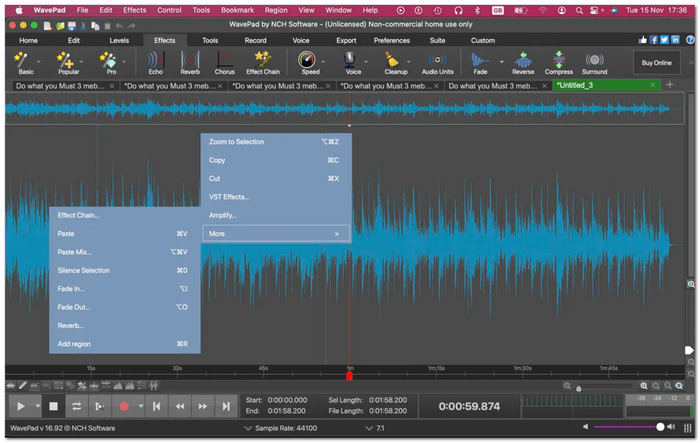
優點
- 免費版本可以廣泛使用其功能和編輯功能。
- 一個可用作錄音器、編輯器和增強器的程式。
- 該軟體擁有全面的編輯功能和工具。
- 它支援多種檔案格式,例如 WAV、MP3、MP4、WMA、FLAC 等。
- 桌面和行動裝置上的多平台可用性。
- 具競爭力的專業級軟體。
缺點
- 它的一些高級功能僅適用於其付費版本。
- 缺乏客戶支援服務。
- 應用多種效果時渲染速度緩慢。
總體而言,功能強大的所謂高級音訊編輯軟體 WavePad 在品質項目方面超出了我們的預期,因為該軟體確保了無損品質匯出。利用變聲器等進階編輯功能,可以最大限度地發揮該軟體作為全功能工具的功能。因此,價格相對不便宜,但考慮到功能的數量和高級工具的可用性,這對用戶來說是一個勝利。有些人可能會爭論並擔心該軟體的複雜介面,但透過正確的指南和材料來導航該軟體,一切都可以學習。我們建議您在使用前先熟悉 WavePad。
第 2 部分.WavePad 概述
WavePad 音訊編輯軟體是 NCH Software 製作的一款工具,是一款多功能音訊編輯器和錄音器,旨在無縫完成專業和個人用途的任務。這不是典型的音訊軟體工具,因為它具有專業功能,例如修剪較長的音訊檔案、減少音軌中的人聲、音訊均衡器、音訊雜訊消除器、畫外音錄音機、創建鈴聲等等。這款適用於 Windows 和 Mac 的全功能音訊和音樂編輯器適合任何人使用,因為它支援流行的音訊格式 MP3 和 WAV 以及其他 50 多種音訊格式。
平台
• Windows 10、7、8、8.1 和 11。
• macOS 10.5 及更高版本。
• iOS 12.0 及更高版本。
• Android 5.0 (Lollipop) 及更高版本。
價格
• 標準版($34.99)。
• 大師版 ($59.95)
第 3 部分. WavePad 的主要特性
使用方便
WavePad 的易用性來自於它的幾個關鍵功能和設計選擇,例如:
• 直覺式介面,具備標示清楚的圖示、整理良好的工具,以及乾淨俐落的選單介面。
• 拖放功能,簡化將 WAV 檔匯入軟體的流程。
• 使用指南與工具提示,簡要說明並協助使用者上手操作軟體、了解每個按鈕的功能,以及取得額外協助。
• 批次處理,可同時編輯或套用變更到多個 WAV 檔案。
• 可自訂工作區,可重新排列面板與工具列,讓介面更符合使用者的操作習慣與工作配置。
音訊編輯
WavePad 的音訊編輯功能超出了包含一些基本音訊編輯功能的典型音訊編輯軟體工具。
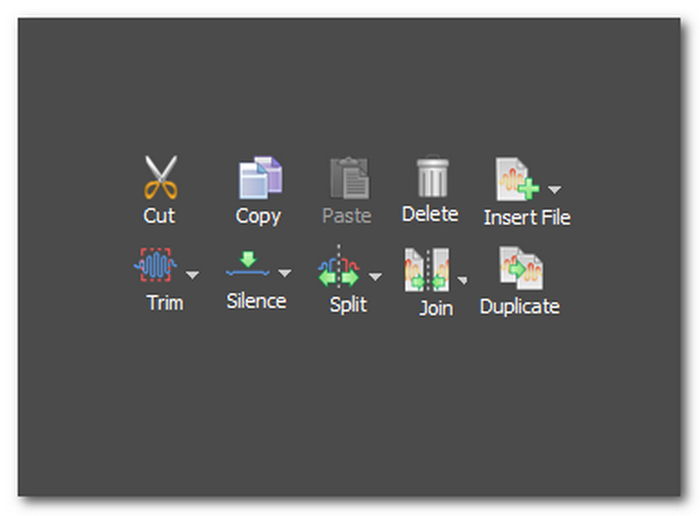
• 剪下、複製與貼上工具,可順暢地裁切、複製並整理音訊檔案中的各個片段。
• 刪除與插入工具,可移除不必要的段落,並在音軌中插入靜音。
• 修剪工具,用來縮短音訊檔案。
• 靜音修剪工具,自動修剪音軌開頭與結尾處的靜音。
• 分割工具,可在單一音訊檔中建立多個區段。
• 合併工具,讓使用者將兩個或多個不同音訊檔合併為單一檔案。
• 複製,建立一個與所選音訊檔完全相同的副本。
效果器和過濾器
這是指可以應用於專案的現成效果和濾鏡。這些允許用戶編輯和增強音頻,而無需付出太多努力或高級技術知識。以下是該軟體工具中可以找到的一些流行的音訊效果。
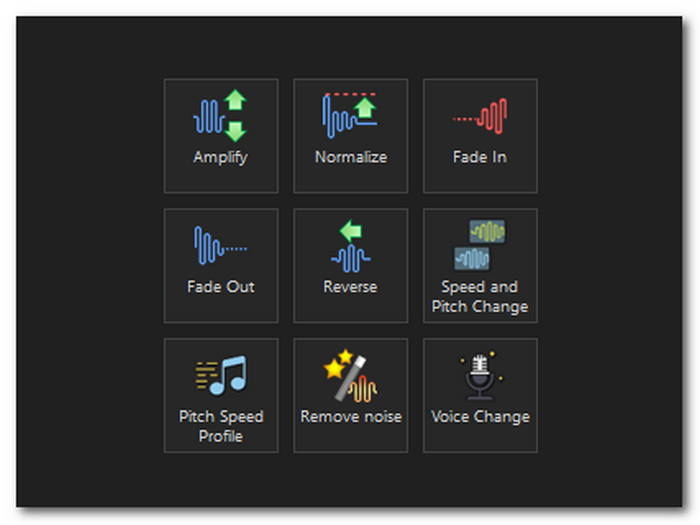
• 淡入、淡出與交叉淡化效果,可在音軌開頭與結尾逐漸增加或降低音量。
• 噪音消除,掃描整個音訊檔並移除雜音、靜電聲、嗡鳴及其他不必要的聲響。
• 速度與音高調整,可逐步加快或放慢音訊檔的播放速度,並調整音高。
• 反轉效果,讓使用者將音訊檔反向處理並倒放。
• 音量放大器,可控制並放大整個檔案的總體音量。
• 變聲器,可調整人聲音色品質,並加入如顫音、耳語等額外效果。
進階工具
WavePad 的其他值得注意的高級工具使該軟體在音訊編輯和錄製方面功能強大且用途廣泛,如下所示。
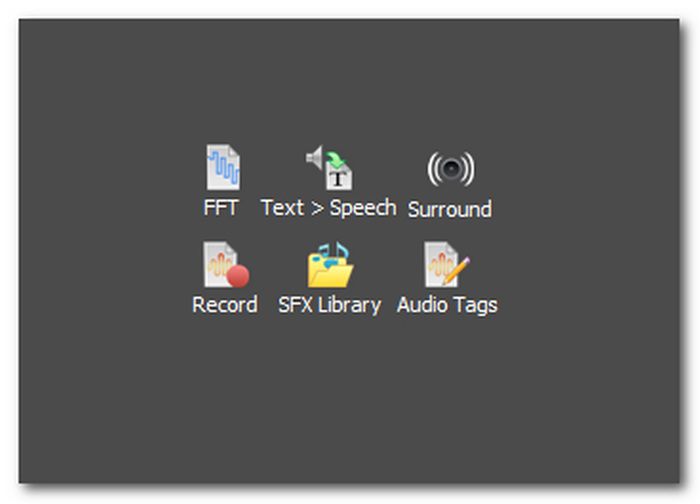
• 頻譜分析(FFT),以圖表顯示音訊檔的頻率分佈,方便分析與觀察頻率是否偏強或屬正常。
• 語音合成(文字轉語音),可將使用者輸入的文字轉換為電腦合成語音。
• 錄音工具,可作為錄音軟體使用,一邊錄製、一邊在同一空間中進行編輯。
• 音效素材庫(SFX Library),提供預先內建的音效與免版稅音樂,提升音訊檔的層次感與整體品質。
• 環繞音效,可立即為你的音訊檔建立環繞音效混音。
• 音訊標籤,讓使用者編輯音訊檔的中繼資料。
如果您不想安裝任何軟體,可以直接在線上剪切和合併音訊檔案。
第 4 部分:WavePad 用例
WavePad 用例不僅限於音訊編輯,因為該軟體可用於 Windows 和 Mac,並具有適用於 iOS 和 Android 的應用程式版本。軟體的可用性已經廣泛,其中包括:
• 旁白錄製,可快速錄製個人專案、Podcast、商業應用等所需的旁白,並可透過軟體提供的音質強化功能進一步提升清晰度。
• 音訊修復,用於清理舊錄音,並套用濾鏡與效果來提升音訊的清晰度。
• 聲音設計,用於創作與編輯可作為電影與影音製作配樂的音訊內容。
• 音樂製作,可輕鬆完成錄音、剪輯、混音與後期處理等所有音樂創作流程。
第 5 部分:WavePad 的評級和用戶評論
G2 審查摘要
G2 中的用戶評論認為,WavePad 清楚地顯示了其在音訊編輯方面的實力,並且是一款令人驚嘆的混音工具。使用者評論中普遍提及的一些內容包括 WavePad 作為音訊編輯器的功能、該軟體的使用方便程度、其編輯功能等等。一位用戶還指出,WavePad 是一款專業的錄音和編輯應用程序,但一些用戶可能會發現該軟體的導航有點複雜且耗時。
WavePad 的整體滿意度為 4.3 分(滿分為 5 分)。
GetApp 評論摘要
GetApp 中評論的用戶發現 WavePad 音效庫功能下的有趣過濾器很有用,而且並不尷尬。 WavePad 物有所值、易於使用,軟體中的功能豐富,但在客戶支援方面的滿意度較低,正如用戶普遍指出的那樣。另一方面,一位用戶也指出,儘管該軟體比其他插件和軟體具有靈活性,但該用戶建議透過添加更多針對新手的應用程式內教學和指南來改進WavePad。
WavePad 的整體滿意度為 4.5 分(滿分為 5 分)。
TechRadar 評論摘要
TechRadar 上關於 WavePad 的評論非常具體且詳細。在定價計劃方面,用戶表示 WavePad 是首選工具,因為它提供各種數量的免費和付費效果和功能;因此,這是一項巨大的投資。其編輯功能獲得了用戶的積極評價,作為音訊編輯工具表現出色,並且導出無損質量,這給用戶帶來了更多滿意度。
WavePad 的整體滿意度評分為 4 分(滿分為 5 分)。
第 6 部分:編輯音訊和視訊的最佳 WavePad 替代方案
FVC 在網路上搜尋理想的 WavePad 編輯器替代方案時,意外發現了FVC 精選的 Video Converter Ultimate。這款軟體可在 Windows 與 Mac 裝置上免費下載,介面直觀、功能完整。它提供音量增強、分割、合併、剪裁工具與淡入淡出效果,並針對影音設有獨立的編輯區域。此外,在工具箱區域中還具備進階功能,例如音訊壓縮、降噪、影片增強、音訊同步等。
這款出色的程式擁有超過 500 萬次下載量,是一款多功能音訊和視訊編輯器程序,支援 1000 多種檔案格式,例如 MP3、MP4、AAC、WMA、WAV 等。與WavePad不同的是,該軟體擁有最簡單的介面和高速處理技術,讓新手無論是個人使用還是專業使用都能獲得無縫的導航體驗。
第 7 部分:有關 WavePad 音訊編輯器的常見問題解答
WavePad 可以去除人聲嗎?
是的,WavePad 有一個名為「人聲減少和隔離」工具的功能,用於從效果選單下的音訊檔案中刪除人聲。要進行導航,只需按照以下步驟操作:效果 > 語音 > 減少人聲。
WavePad 好用嗎?
是的,它的設計宗旨是讓個人和專業專案都輕鬆無憂。該軟體提供了輕鬆導航的指南和教程。
WavePad 的缺點是什麼?
WavePad 的一些缺點與其過時的介面有關,這些介面看起來令人困惑,並且各種圖標和按鈕讓用戶不知所措。另一個是其免費版本的限制,這可能會阻礙用戶在匯出或想要執行免費版本中不可用的任務時的音訊編輯過程。
WavePad 的降噪功能效果如何?
其降噪功能足以有效減少靜態噪音、嗡嗡聲和背景噪音,並進一步提高整體品質。然而,使用者仍然需要調整和試驗設定以獲得最佳品質的結果。
WavePad 與其他音訊編輯軟體相比如何?
WavePad 具有競爭力,可與 Adobe Audition 等昂貴的音訊編輯軟體相媲美。由於 WavePad 在功能和功能方面具有巨大優勢,因此該軟體可以取代專業且昂貴的音訊編輯軟體。
結論
閱讀本篇WavePad 音訊剪輯軟體評測,能幫助對 WavePad 運作方式與表現毫無概念的使用者了解它作為音訊編輯器的實際能力。無論是個人用途或專業需求,WavePad 都提供了大量可探索與體驗的功能,協助你在音訊製作與剪輯中獲得最佳成果。因此,儘管在使用 WavePad 時可能會遇到一些限制,它仍然值得你花時間一試。
-
 適合桌面和在線用戶的 10 款最佳 GIF 壓縮器
 在這篇文章中,您將了解最好的 GIF 壓縮器,以幫助您解決大型 GIF 檔案的問題。檢查它們並獲得最好的見解。
-
 Android 和 iOS 上 5 個最受歡迎的錄音機應用 [2023 年更新]
 不知道應該使用什麼錄音機應用程序?如果是這樣,本文將幫助您選擇哪個應用程序可以幫助您完成錄音任務。
-
 您應該考慮使用的優秀 MP4 到 MP3 轉換器工具
 使用我們頂級的 MP4 到 MP3 轉換器釋放音頻多功能性的力量。體驗無縫轉換、卓越的音質和閃電般的處理速度。
