


 視頻轉換大師
 屏幕錄影大師
 影片修復
影片修復
 安全下載
安全下載視訊檔案修復:快速恢復的常用方法
我們熱衷於觀看視頻,這被認為是一種擺脫無聊的好方法,可以真正享受一天而不去想任何事情,只是觀看自己喜歡的視頻而已。但是,如果您在享受美好時光的時候,影片突然中斷,該怎麼辦?它停止了,出現了錯誤訊息,丟失了音軌,等等。在這種情況下,大多數人會因為煩惱而置之不理,而其他人則會嘗試採用基本方法來解決。
為了避免你花時間和精力走錯方向,本文將帶你了解 2 種有效的影片檔案修復方法。這將幫助你簡化修復影片的流程,讓你能夠迅速找回重要片段。事不宜遲,我們開始吧!

第 1 部分。
這可能很難令人相信,但視頻修復是真實存在的。這些是專門設計用於解決最常見的視訊問題並相應地修復它們的軟體應用工具。視訊問題並不局限於一個問題。每個問題都有不同的根本原因和解決方案,該工具將自動讀取並最終修復。
視訊檔案修復是透過分析視訊檔案的結構來進行。因此,當您的影片播放時遇到問題或停止時,您就需要一個影片修復工具。現在,此工具會掃描或讀取視訊檔案以查找可能存在的不一致問題,例如資料遺失、幀損壞、音訊視訊同步問題或檔案頭損壞。之後,該工具將自動應用一系列演算法來修復遺失或損壞的資料。修復過程通常包括恢復視訊和音訊品質、修復播放問題以及確保視訊檔案可以在各種媒體播放器上播放而不會出現錯誤。
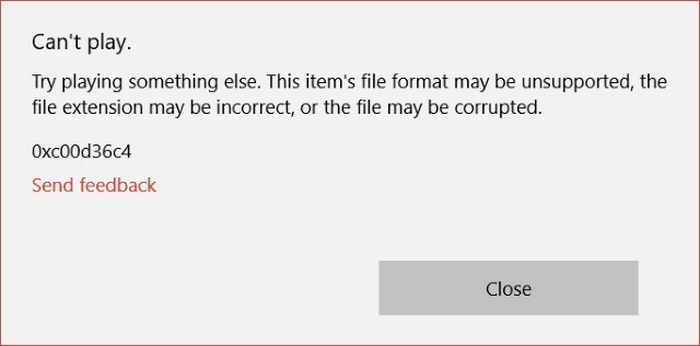
以下是影片損壞的常見原因:
檔案損毀
除了在線上播放影片外,我們還下載或傳輸影片檔案到其他裝置觀看。然而,當視訊檔案在傳輸過程中遇到某種中斷時,例如突然斷電、不正常關機或硬體故障,視訊將會出現資料不完整,導致視訊損壞。
下載未完成
這也與檔案損壞相對相同,因為不完整的下載有時會損壞視訊檔案。然而,下載不完整也會導致資料遺失或片段損壞,從而導致播放錯誤或檔案根本無法開啟。
編解碼器問題
影片依靠特定的編解碼器來編碼和解碼資料。現在,問題是,當編解碼器遺失或不相容時,影片可能無法正確播放,導致無聲音、播放不流暢或完全無法開啟等問題。
第 2 部分。
現在您已經了解了一些導致視訊損壞的常見原因,接下來是時候學習修復視訊檔案的不同方法了。有些人可能會問,如果可以找到其他來源,為什麼要修復此視頻,或者重複相同的過程,但這次的步驟更有趣?雖然這可能是個好的觀點,但問題是它不能 100% 保證你的影片不會再次損壞或出現錯誤。因此,解決此問題最簡單、最有效的方法是使用視訊修復工具。
方法一:使用FVC視訊修復
FVC Video Repair 是一款專門用來修復各種影片問題的修復軟體,包括因設備損壞、系統當機、病毒攻擊等原因導致無法播放的損壞影片。此工具會先掃描需要修復的影片資訊,之後整個影片修復流程將自動完成。最後,使這款工具成為目前最佳影片修復工具之一的關鍵,在於它採用了最新的 AI 演算法,高效修復受損影片,並支援多種常用影片格式。
主要功能:
• 採用最新的AI演算法,高效修復影片。
• 自動掃描和修復影片。
• 預覽恢復的影片。
• 支援MP4、MOV 和3GP 等視訊格式。
• 可以修復損壞和無法播放的影片。
• 恢復損壞的視訊檔案。
• 保留恢復的視訊解析度、幀速率和位元率。
以下是使用 FVC Video Repair 修復損毀影片檔案的方法:
步驟 1。首先前往其官方網站,然後下載此工具並安裝到你的裝置上。
步驟 2。接著,點擊紅色加號按鈕新增損毀的影片檔案,同樣地,點擊藍色加號按鈕新增範例影片。之後,點擊修復按鈕開始修復流程。
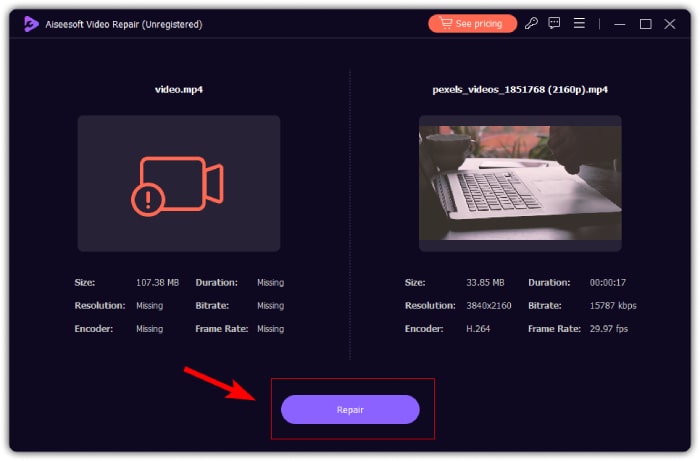
步驟 3。最後,點擊預覽按鈕預覽已處理完成的影片。當修復程序成功後,你可以點擊儲存按鈕將其保存。
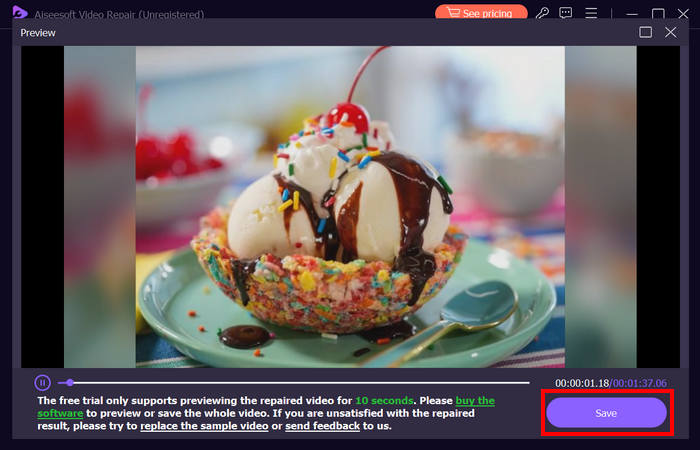
當涉及視訊修復需求時,FVC 視訊修復確實是頂級選擇,因為它具有簡單但全面的方法可以修復各種視訊問題。由於採用了先進的技術和直覺的介面,它成為了當今可靠且易於使用的視訊修復工具。
方法 2:手動修復技術
雖然 FVC Video Repair 等自動化工具提供了便利的解決方案,但您也可以嘗試使用手動技術來修復小型的視訊問題:
重新啟動系統
對視訊進行的操作是重新啟動電腦。通常,此技術可以解決電腦上的臨時故障或軟體衝突,這些可能是導致視訊出現異常的原因。
若要重新啟動 Windows 電腦:
步驟 1。在主畫面上前往開始功能。
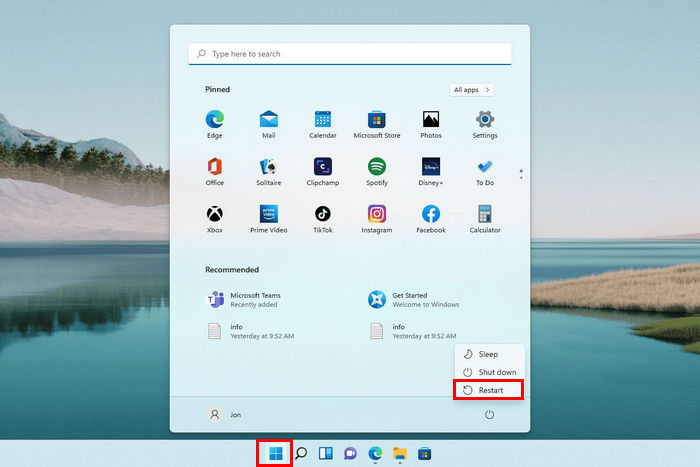
步驟 2。接著,點擊電源按鈕,然後選擇重新啟動。
同時,要重新啟動 macOS 計算機,請按照以下步驟操作:
步驟 1。首先,點擊蘋果選單,選擇系統設定,再在側邊欄中點選一般。
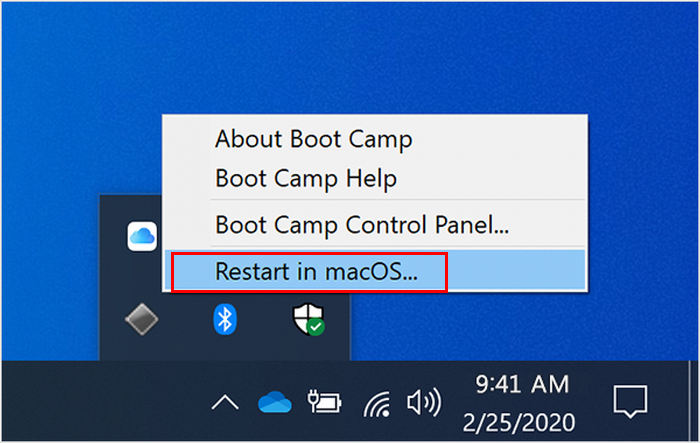
步驟 2。在右側點擊啟動磁碟,選取Boot Camp磁區,然後點擊重新啟動。
如果重新啟動系統不能解決問題,那麼這可能不只是一個小視訊問題。現在,如果您覺得問題出在您所使用的媒體播放器上,請按照下一種方法操作。
使用其他媒體播放器播放影片
一些媒體播放器能夠更好地處理某些視訊格式或損壞的檔案。如果您的影片無法在某個播放器中播放,請嘗試使用其他播放器打開,例如 VLC Media Player,它具有內建編解碼器和更好的錯誤處理功能。
若要在 VLC 媒體播放器中播放影片,請依照以下步驟操作:
步驟 1。前往你的媒體庫,並在要觀看的影片上按一下滑鼠右鍵。
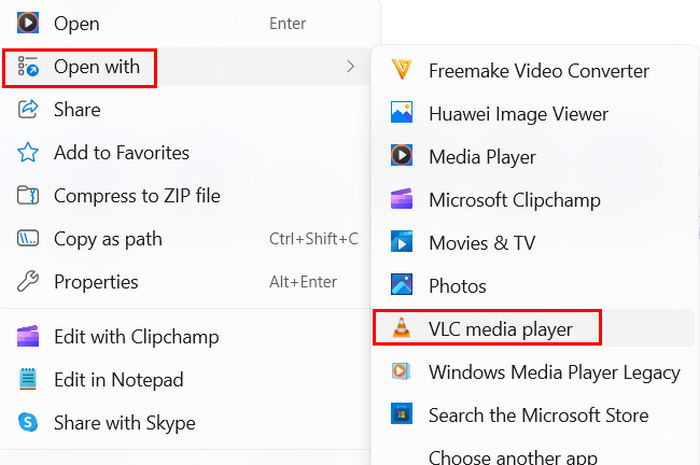
步驟 2。然後點擊開啟方式,並選擇VLC media player。
這樣,在 VLC 等其他媒體播放器上播放影片可能會解決問題。但是,如果問題仍然存在,您確實需要使用像 FVC Video Repair 這樣的視訊修復工具。
第 3 部分。
損壞的視訊檔案真的可以修復嗎?
絕對是的!可以使用專門的視訊修復工具(例如 FVC 視訊修復)修復損壞的視訊檔案。該工具專門用於解決許多視訊問題,包括損壞的視訊檔案。
手動修復影片檔困難嗎?
手動修復視訊檔案可能很有挑戰性,特別是當您不懂技術的時候。雖然一些小影片問題可以透過重新啟動系統、安裝正確的編解碼器或使用其他媒體播放器(如 VLC)輕鬆解決。然而,更嚴重的損壞通常需要使用專用的修復軟體。
你能修復 VLC 中的影片嗎?
是的,您可以在 VLC 中修復您的影片。 VLC 媒體播放器有一些內建的修復功能,可以幫助解決一些小的影片問題。但是,如果您的影片確實出現了嚴重的問題,您將需要更全面的影片修復工具來有效地恢復損壞的影片。
視訊損壞嚴重到無法修復嗎?
在某些情況下,如果視訊檔案嚴重損壞,可能無法修復,甚至先進的工具也可能無法完全恢復視訊。但是,使用像 FVC Video Repair 這樣的專業視訊修復工具可以增加成功恢復的機會。
您能使用修復工具恢復已刪除的影片檔案嗎?
不可以。它們專門用於修復現有視訊檔案中損壞或損毀的問題。如果影片檔案已被刪除,您需要使用檔案復原軟體或專門用於資料復原的服務才能嘗試修復。
結論
學會正確執行影片修復的方法,以及了解該使用哪一款工具,確實非常重要。這就像隨身備有一個可靠的解決方案,一旦影片出問題,就能立刻將檔案還原。不論遇到的是哪一種影片問題,無論只是輕微故障,還是嚴重損毀,你都可以放心交給 FVC Video Repair。
-
 出色的視頻修復:您可能不知道的事情 [評論]
 對影片的恆星修復感到好奇嗎?在本文中,您將了解有關它的一切,包括它的功能、優缺點、相容性和價格。
-
 如何修復像素化影片:是什麼原因以及如何修復它
 不要讓像素化毀了您的影片。了解如何透過我們的專家策略減少影片像素化。提升您的影片以獲得完美像素品質。
-
 如何修復 MP4 檔案:在幾分鐘內恢復您的視頻
 揭開MP4修復的秘密!請按照我們易於理解的教程進行故障排除和修復。不要讓損壞的影片破壞您的媒體體驗。
