


 視頻轉換大師
 屏幕錄影大師
 影片修復
影片修復
 安全下載
安全下載修復 VLC 不播放 DVD 的 3 個技巧
VLC Media Player 是最受歡迎的影片與音訊播放軟體之一。除了各種數位媒體格式之外,VLC 也能播放 DVD、音樂 CD 和 VCD。不過,許多使用者遇到了 VLC 無法播放 DVD 的問題。你也正面臨同樣的情況嗎?

其實,造成 VLC Media Player 無法播放 DVD 的原因有很多。無論是 VLC 無法讀取 DVD 光碟、DVD 影片與音訊播放卡頓,還是 VLC 無法播放整張 DVD,本文都會從 3 個不同方向來說明解決方法。
第 1 部分。更新或重新安裝 VLC 以修復 VLC 不播放 DVD
當 VLC Media Player 無法播放 DVD 時,你應該先重新啟動電腦與 VLC,檢查問題是否仍然存在。如果 VLC 無法播放 DVD 的情況依舊,便可以選擇 將 VLC 升級到最新版本。
在 Windows 10/8/7 或 Mac 上開啟 VLC Media Player。點擊上方功能表中的 Help(說明)分頁,從下拉選單中選擇 Check for Updates(檢查更新)選項。如果有可用更新,依照畫面上的指示將 VLC 升級到最新版本。
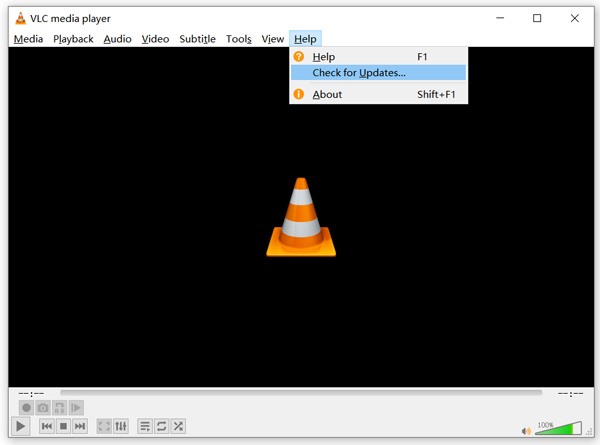
你也可以先解除安裝 VLC,然後再重新安裝到電腦上。請前往 VideoLAN 官方網站,免費安裝適合的版本。
安裝新的 VLC 版本後,您可以播放 DVD 並檢查它是否可以正常打開 DVD。
第 2 部分。重置首選項以修復 VLC 不播放 DVD 問題
在某些情況下,您可以自定義或重置 VLC 首選項來解決 VLC 無法播放 DVD 的問題。以下指南將向您展示如何設置 VLC 首選項。
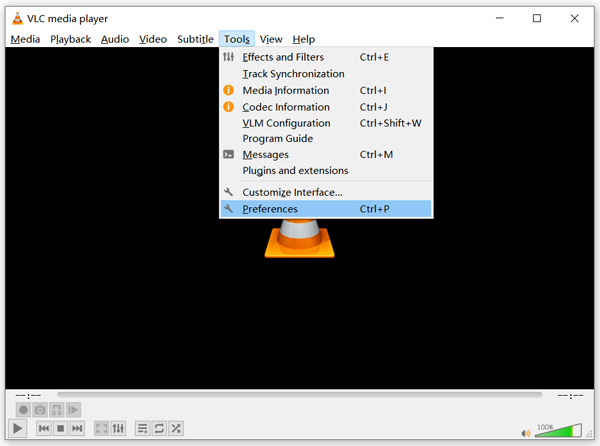
步驟 1: 開啟 VLC,選擇 Tools(工具)選單,從下拉清單中點擊 Preferences(偏好設定)選項。
步驟 2: 接著會進入 Simple Preferences(簡易偏好設定)視窗。在左下角的 Show Settings(顯示設定)下勾選 All,以進入 Advanced Preferences(進階偏好設定)視窗。
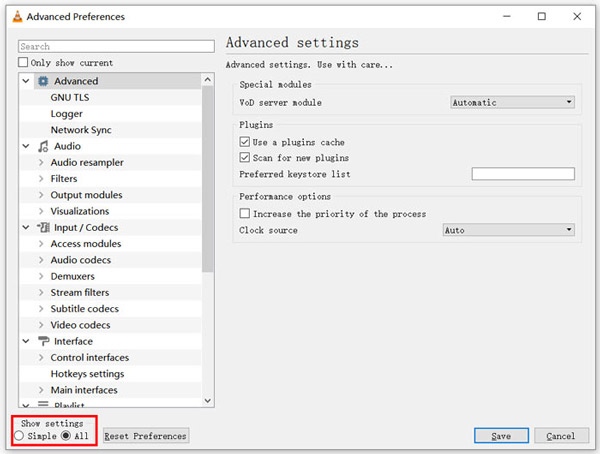
步驟 3: 在這裡,你可以點擊 Reset Preferences(重設偏好設定)按鈕,嘗試修復 VLC 無法播放 DVD 的問題。你也可以到左側的 Video(視訊)區塊,點選 Filters(濾鏡),然後在右側勾選 Deinterlacing video filter(去交錯視訊濾鏡)選項。點擊 Save(儲存)按鈕以確認操作。
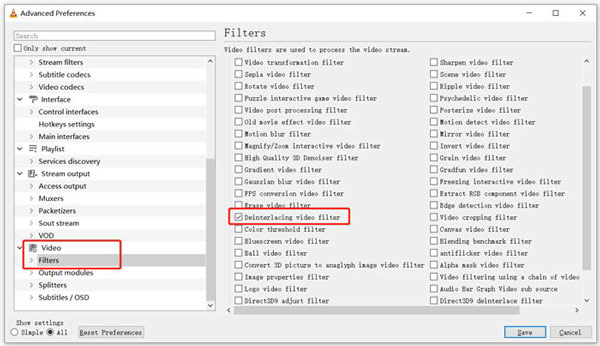
不論你選擇重設或自訂 VLC 偏好設定,在完成所有操作後,都應該先 重新啟動 VLC,再用它來播放 DVD。
第 3 部分。獲取 VLC 替代工具來播放 DVD
如果 VLC 在 Windows 10/8/7 或 Mac 上仍然無法播放 DVD,你就應該尋找 VLC 的替代播放器,協助你在電腦上觀看 DVD 電影。在此強烈推薦你使用 Free Online DVD Player,以高畫質播放任何 DVD。
它是一款完全免費的 DVD 播放器,可讓您在 Windows 10/8/7 PC 和 Mac 上播放 DVD 光盤、DVD 文件夾和 ISO 映像文件。這款免費的 DVD 播放器可以在任何網絡瀏覽器(如 Chrome、IE、Firefox 和 Safari)上直接播放您的 DVD。它配備了您需要的所有 DVD 播放功能。此外,它使您能夠拍攝快照、添加、調整和選擇字幕和音軌。
步驟 1: 當你想播放 DVD 時,可前往這個 Free Online DVD Player 頁面,然後點擊 Play Now 按鈕,安裝用於 DVD 播放的啟動程式(Launcher)。安裝完成後,DVD 播放器會自動啟動。

步驟 2: 進入這款 DVD 播放器後,你可以依需求選擇 Open Disc(開啟光碟)或 Open File(開啟檔案)。若要播放 DVD 光碟,先將 DVD 光碟放入,再選擇 Open Disc。若要開啟 DVD 資料夾或 DVD ISO 檔,則可使用 Open File。
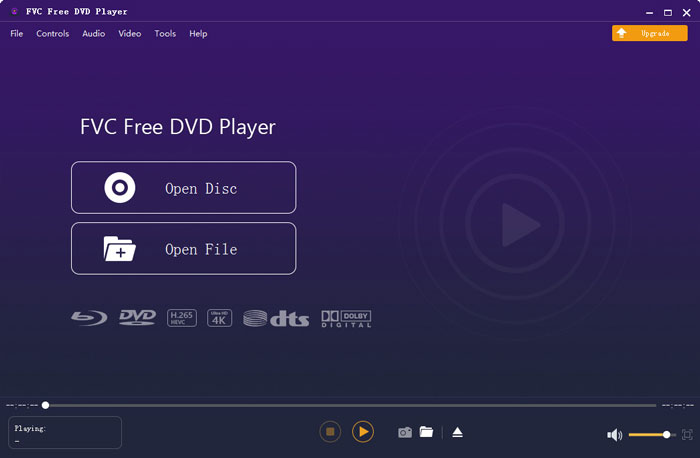
步驟 3: 你可以完全掌控 DVD 的播放。可以任意快轉、倒轉、暫停與停止。你也能擷取喜愛片段的畫面截圖。此外,還可以依需求更換音軌、視訊軌與字幕軌。
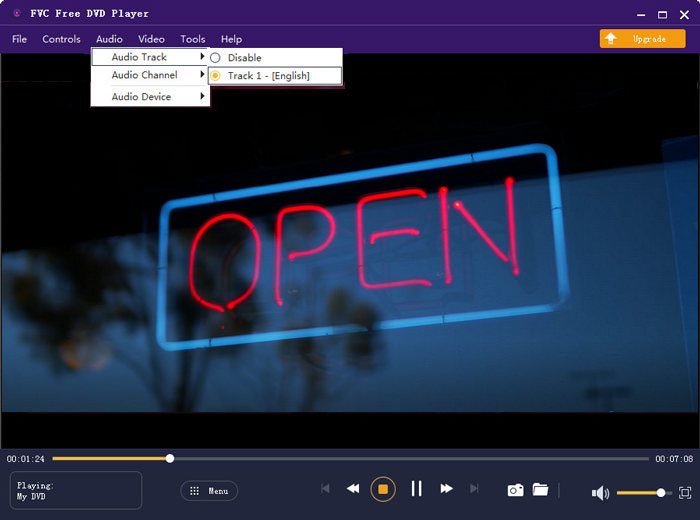
這種 VLC 媒體播放器替代品能夠以高圖像和聲音質量播放任何 DVD 電影。它採用先進的視頻編碼技術設計,同時支持 DTS-HD 和 Dolby TrueHD。因此,當您遇到 VLC 無法播放 DVD 的問題時,您可以依靠此 DVD 播放器來觀看您的 DVD。
更多 VLC 替代播放器 在這裡。
第 4 部分。 VLC 媒體播放器的常見問題解答不播放 DVD
問題 1. 如何使用 VLC 播放 DVD?
要在 VLC 媒體播放器上播放 DVD 電影,您可以將 DVD 光盤插入計算機光驅,打開 VLC 媒體播放器,然後單擊媒體菜單。選擇打開光盤和 DVD,然後單擊瀏覽按鈕加載您的 DVD 文件。之後,VLC 將開始播放您的 DVD。
問題 2. 為什麼我不能在 Windows 10 中播放 DVD?
Microsoft 的內置 DVD 播放支持在 Windows 10 中不再可用。這就是您無法在 Windows 10 PC 上播放 DVD 的原因。取而代之的是,Microsoft 提供 Windows DVD 播放器軟件,價格為 $14.99,供您觀看 DVD。
問題3.如何將DVD翻錄到MP4?
當你想在電腦上看 DVD,也可以選擇將 DVD 轉換為 MP4 等數位影片檔。你可以依靠功能強大的 DVD 轉 MP4 轉檔工具,將 DVD 無損轉換成 MP4。
結論
VLC 可以作為免費 DVD 播放器,幫助你在 Windows 10/8/7、Mac 與 Linux 電腦上播放 DVD。它能輕鬆存取 DVD 選單、章節及其他相關內容。不過,仍有不少使用者抱怨遇到 VLC 無法播放 DVD 的問題。
在本文中,你可以取得 3 個有效方法,來修復 VLC Media Player 無法播放 DVD 的狀況。希望在閱讀完本頁內容後,你能更順利地欣賞 DVD 電影。
-
 如何在Mac / Windows 10上將視頻_TS文件刻錄到DVD
 如何將TS文件轉換和刻錄到DVD光盤?本分步指南將向您展示如何在Windows / Mac上將TS文件和文件夾複製到DVD,以便可以在DVD播放器或電視上觀看TS文件。
-
 如何使用VLC Media Player錄製帶有音頻的屏幕視頻
 它是有關VLC屏幕錄製功能的綜合用法的分步指南。您可以從本文中找到詳細的過程,故障排除和最佳選擇。
-
 2021 年不容錯過的 5 款 iPhone 最佳視頻播放器
 要在 iPhone 上播放所有格式的視頻並獲得更好的觀看體驗,您應該閱讀本文並了解適用於 iPhone 12/11/X/8/7/6 的最佳 5 視頻播放器。
