


 視頻轉換大師
 屏幕錄影大師
 影片修復
影片修復學習如何在 Adobe Premiere [2024] 中修剪視頻
在編輯影片時,處理一些較長的片段是很常見的,這些片段可能包含一些需要刪除的不必要部分。此外,有時我們需要發送影片的某個特定部分,因此最終會修剪掉其中的一部分。
好消息是,有一款工具能讓這個流程變得非常簡單。Adobe Premiere 讓使用者可以精準地選取、剪裁或剪掉影片中的特定片段。如此一來,不論你是為了符合時間限制而縮短影片,還是想刪除干擾內容,這款影片剪輯工具都能輕鬆辦到。現在,透過這份簡化版教學,你就有機會學習如何在 Adobe Premiere 裡剪裁影片。還在等什麼?繼續往下看吧!
第 1 部分:什麼是 Adobe Premiere
Adobe Premiere 是 Adobe Systems 開發的一款知名的專業影片編輯軟體。它於 1991 年首次推出,從那時起,它就因其強大的功能而迅速流行起來。
如今,Adobe Premiere 已成為 Adobe Creative Cloud 套件的一部分,並且仍然是業內眾多資深影片編輯人員使用的領先影片編輯程式之一。透過這款影片編輯工具,使用者可以進行修剪、合併、添加效果、整理影片片段等操作。
為什麼要用 Adobe Premiere 來剪裁影片?
如果您需要處理較長的影片並剪掉不需要的部分,使用 Adobe Premiere 修剪影片是一個不錯的解決方案。透過其 Razor 功能和時間軸標記,您可以輕鬆地將影片修剪到精確的幀數,確保剪輯流暢,最終成品精美絕倫。最後,它還能讓您快速進行乾淨專業的剪輯。
第 2 部分.在 Adobe Premiere 中修剪影片 [簡化]
在 Adobe Premiere 中修剪影片非常簡單且有效率。它可以讓用戶輕鬆地從冗長的影片片段中剪掉不需要的部分。以下是如何在 Adobe Premiere 中輕鬆修剪影片的指南:
步驟一: 首先,在你的 Adobe Premiere 中建立一個新專案。
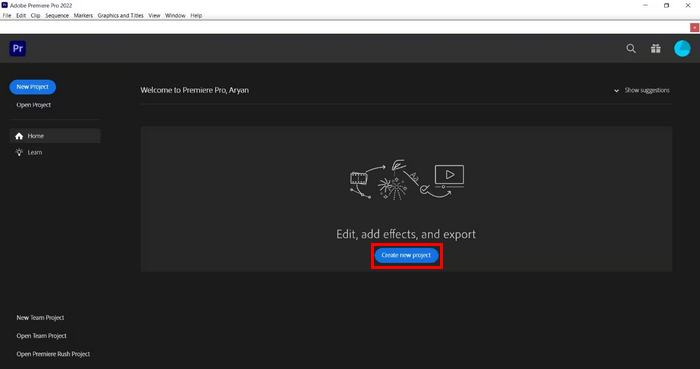
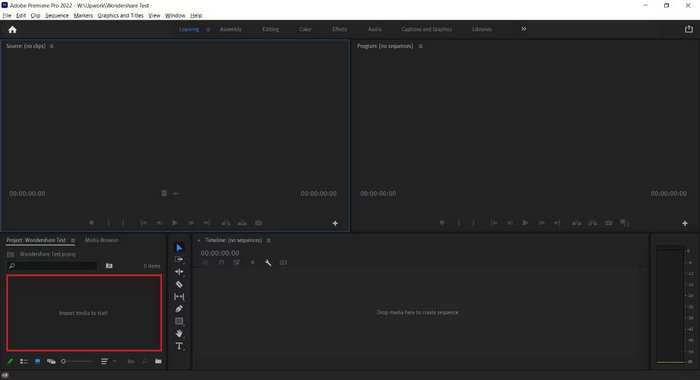
步驟二: 接著,點擊下方的「Import Media to Start」,匯入你想要剪裁的影片檔。
步驟三: 然後,從「來源」視窗中選取你匯入的影片,並將它直接拖曳到時間軸(Timeline)上。
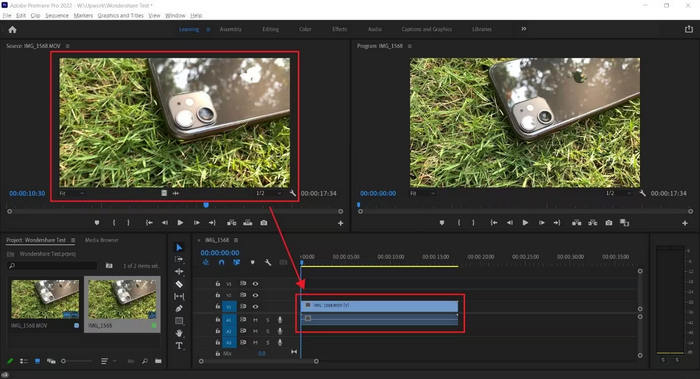
步驟四: 現在,在時間軸上點擊你想剪裁的影片,並選擇剃刀工具(Razor Tool)。接著,選擇你想開始剪切的位置或片段,然後用滑鼠左鍵點擊以確認。
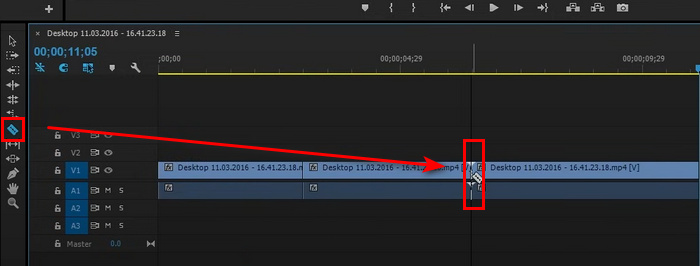
提示: 你也可以在鍵盤上按 C 來啟用剃刀工具。
就這樣!現在,您已經使用 Adobe Trim Video 功能修剪了影片。確實,使用這款影片編輯工具,您可以輕鬆精準地剪輯影片。所以,如果您正在處理冗長的影片片段,現在可以輕鬆剪掉其中不必要的部分。
如果你對 Adobe Premiere Pro 有興趣,點擊此處即可進一步了解如何在其中加快影片播放速度。
第 3 部分:Adobe Premiere Trim Video 的最佳替代方案
雖然使用 Adobe Premiere 修剪影片是精確剪掉不想要部分的好方法,但如果只使用其影片修剪功能,可能會覺得購買成本高昂。如果您正在尋找價格更低但品質與視訊修剪器相當的產品,Aiseesoft Video Converter Ultimate 是您的最佳選擇。
這款一體化影片轉換工具提供一系列功能,可滿足用戶大多數影片編輯需求。它擁有專用的視頻修剪工具,可以輕鬆修剪視頻,無需使用更複雜的高級軟體。此外,它還允許您選擇影片片段的起點和終點,以便更輕鬆地進行修剪。
主要功能:
• 手動輸入選項來修剪影片片段的開始和結束時間。
• 允許增加多個片段來修剪影片的不同部分。
• 快速將影片分割成片段,以便更快進行編輯。
• 透過播放、暫停和逐幀導航預覽修剪後的影片。
• 將多個修剪的片段合併為一個檔案。
以下是在 Aiseesoft Video Converter Ultimate 中剪裁影片的方法:
步驟一: 先在你的電腦裝置上下載並安裝 Aiseesoft Video Converter Ultimate。
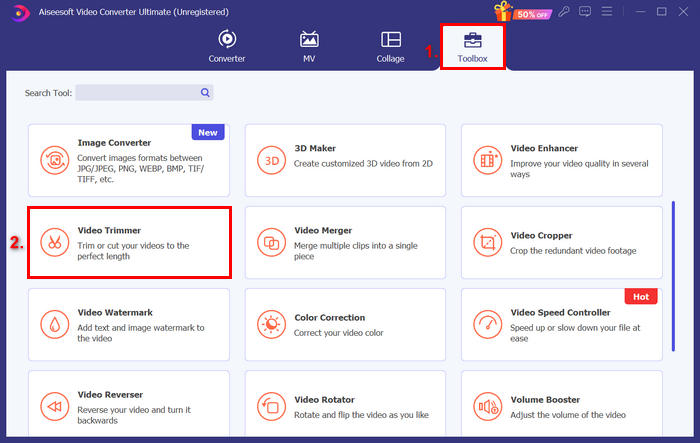
步驟二: 啟動工具,前往工具箱(Toolbox)分頁,並選擇影片剪輯(Video Trimmer)。
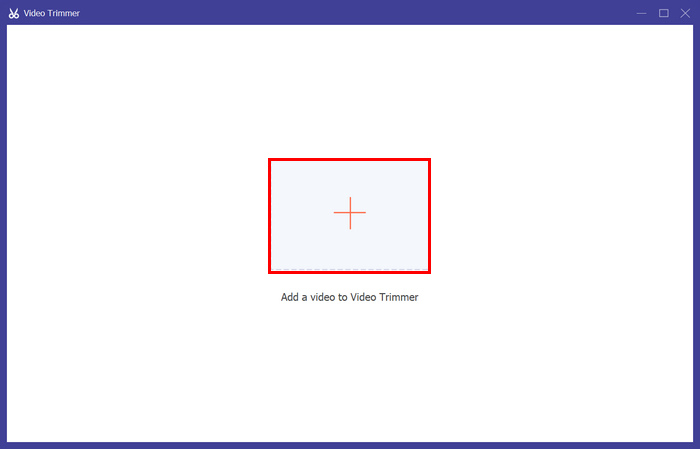
步驟三: 點擊「Add a Video to Video Trimmer」,加入你想剪裁的影片。
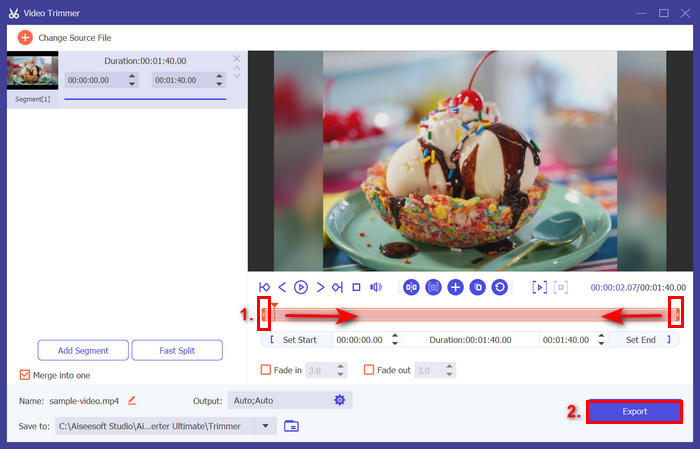
步驟四: 接著,拖曳片段的起點與終點,向左或向右移動,或直接輸入你想剪裁之影片部分的開始與結束時間。完成後,點擊下方的匯出(Export)按鈕。
提示: 若你想更快速地剪裁影片,可使用「Fast Slip」快速剪輯功能。你只需點擊「新增片段(Add Segment)」旁邊的 Fast Slip 按鈕,接著選擇你想分割片段的模式。如果選擇按「平均」分割,則輸入分割數量;若選擇按「時間」分割,則輸入時間長度。之後,點擊「Split」按鈕。
Aiseesoft 在剪裁 MP3 等音訊檔案方面也同樣表現優異。
第 4 部分:關於在 Adobe Premiere 中修剪影片的常見問題解答
如何在 Adobe Premiere 中進行精確修剪?
Adobe Premiere 提供了多種工具,可協助您精準修剪。一種方法是使用來源監視器在將剪輯新增至時間軸之前設定入點和出點,這樣可以更好地控制剪輯的開始和結束位置。為了獲得更高的精確度,您可以使用縮放滑桿放大時間線,聚焦於特定影格。
是否可以在 Adobe Premiere 中撤銷修剪或恢復修剪後的素材?
是的。您可以輕鬆撤銷任何修剪操作,只需按 Ctrl+Z(Windows 系統)或 Cmd+Z(Mac 系統)即可。如果您不小心修剪過多或刪除了錯誤的部分,可以多次使用「撤銷」命令來恢復變更。此外,如果影片的某個部分被修剪但未完全移除,您只需在時間軸中將剪輯的邊緣拖回即可恢復修剪後的素材。
我可以在 Adobe Premiere 中一次修剪多個剪輯嗎?
是的。 Adobe Premiere 可以同時修剪多個影片。只需在時間軸中選擇要調整的剪輯,然後使用「波紋編輯」工具或時間軸標記即可一次修剪所有剪輯。當您需要對多個剪輯應用一致的修剪效果時,此功能非常有用。
結論
學會如何在 Adobe Premiere 中剪裁影片,現在已是我們數位生活中的重要一環,特別是在處理長影片時更是如此。若你的電腦中已有這款軟體,就能好好加以運用;若尚未安裝,也可以嘗試使用 Aiseesoft Video Converter Ultimate 來滿足你的影片剪裁需求。
-
 11 個出色的視頻剪輯器可供使用 [免費和付費]
 以下是可用於修剪視頻的視頻編輯軟件列表。我們將認真審查這些計劃並提供您尋求的所有詳細信息。
-
 3 種關於如何在 Android 上修剪視頻的好方法
 您想使用您的 Android 設備來剪輯視頻嗎?那麼這篇文章適合你。我們將討論有關如何在 Android 上縮短視頻的有價值的方法。
-
 如何使用 TikTok 剪輯視頻 [詳細說明]
 您想知道如何使用 TikTok 縮短視頻嗎?然後,我們將提供簡單的方法。此外,您還將學習使用離線應用程序/程序的其他方法。
