


 視頻轉換大師
 屏幕錄影大師
 影片修復
影片修復
 安全下載
安全下載Aimersoft DVD Ripper 評價:它真的值得花錢嗎?
Aimersoft DVD Ripper 是一款專業的 DVD 擷取工具,能從 DVD 中擷取內容。它採付費授權制度,並提供多種實用功能。透過這款工具,你可以將 DVD 轉換為多種數位格式,方便在各種裝置上播放。不過,和現今多數 DVD 擷取工具一樣,它可能也存在一些需要留意的缺點或限制。若想進一步了解 Aimersoft,請繼續閱讀本文,看看它是否真的值得我們付費購買。

第一部:Aimersoft DVD Ripper 的完整評測
Aimersoft DVD Ripper 是一款軟體工具,允許使用者將 DVD 內容轉換為各種數位格式。它專為那些想要提取 DVD 內容並將其數位化的用戶而設計。此外,它還提供了一種便捷的方式,無論在行動裝置、筆記型電腦或媒體播放器上都能輕鬆使用。 Aimersoft 擁有使用者友善的介面,支援快速轉換和與各種平台相容的多種輸出格式。正因如此,這款軟體工具成為當今最好的 DVD 翻錄工具之一。
價錢:
• 1 年訂閱:$29.95
• 終身許可證:$49.95
• 商業終身計畫:$59.95
主要特點:
• 支援 MP4、AVI、MOV 等流行格式。
• 刪除常見的 DVD 複製保護和區域限制。
• 提供修剪、裁剪和添加字幕等基本編輯工具。
• 最佳化預設,以便在各種裝置上輕鬆播放。
• 翻錄速度快,輸出品質高。
優點
- 介面簡潔,易於使用。
- 支援多種視訊和音訊格式。
- 繞過 DVD 複製保護和區域代碼。
- 用於快速調整的基本編輯工具。
缺點
- 翻錄速度會根據設備而變化。
第 2 部分:如何使用 Aimersoft DVD Ripper
現在您已經了解了 Aimersoft DVD Ripper 是什麼,是時候學習如何使用它了。以下是使用 Aimersoft 翻錄 DVD 的逐步指南:
步驟 1. 首先,在你的電腦裝置上下載並安裝 Aimersoft DVD Ripper。
步驟 2. 接著,開啟工具並點選「Load DVD」將 DVD 匯入程式中。此外,你也可以上傳 ISO 檔、IFO 檔或 DVD 資料夾進行轉檔。
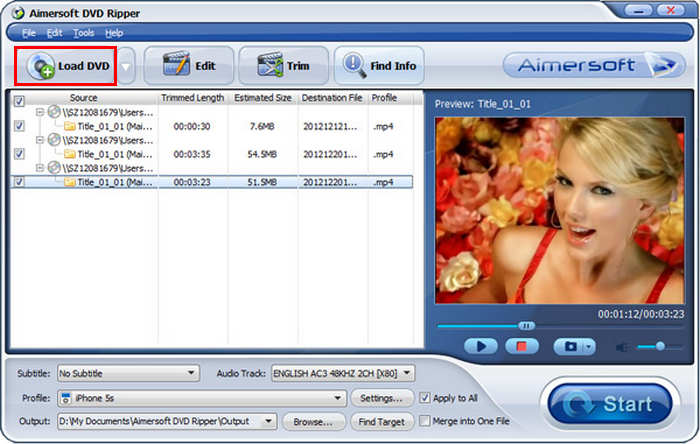
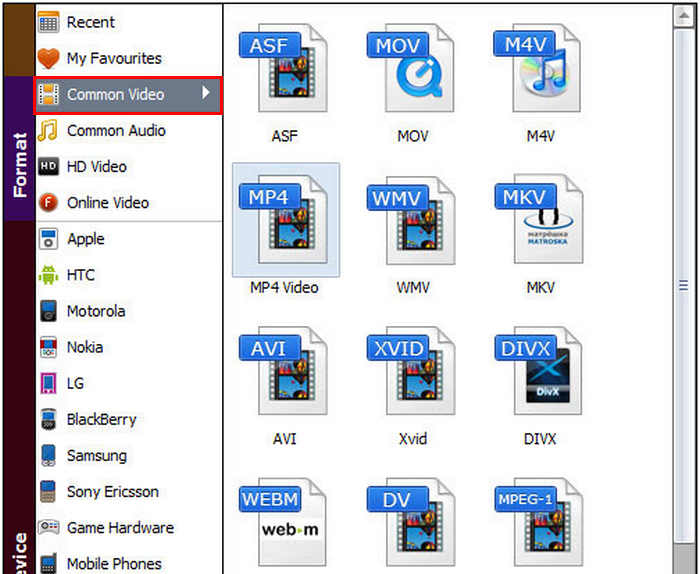
步驟 3. 然後,在下方點擊 Profile,在其下選擇 Common Video,並在下拉清單中選取你偏好的格式。完成後,點選 Start 以開始擷取過程。
Aimersoft DVD Ripper 是一款可靠的 DVD 翻錄工具。它擁有用戶友好的介面、廣泛的格式支援以及繞過複製保護的功能,無論對於初學者還是經驗豐富的用戶來說,都是一個便捷的選擇。然而,它也存在一些局限性,例如無法從 ISO 文件或 DVD 資料夾中翻錄,並且在性能較弱的系統上翻錄速度可能會較慢。
三、最佳 Aimersoft DVD 翻錄器替代品
如果您覺得 Aimersoft DVD Ripper 對您來說比較複雜,可以試試看這些免費的 DVD 翻錄器。它們各自都有獨特的功能,或許能更滿足您的需求。因此,在本部分中,我們將探索一些最佳的免費 DVD 翻錄選項,以幫助您輕鬆地將 DVD 轉換為數位格式。
AnyMP4 DVD 翻錄器
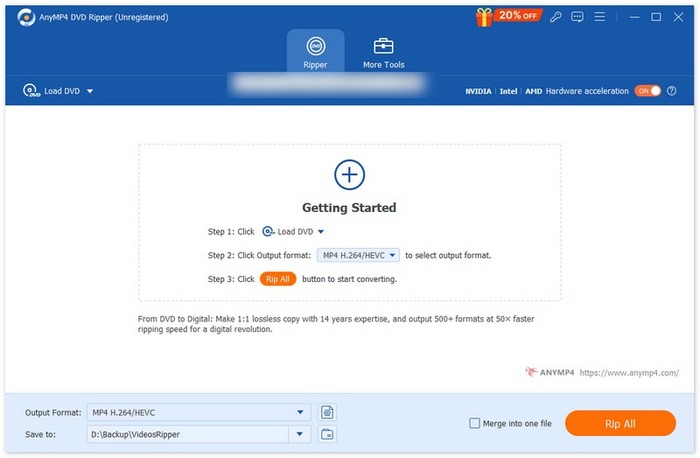
首先要介紹的是這款 AnyMP4 DVD Ripper。這款 Aimersoft 的替代工具以其強大的 DVD 轉數位視訊轉換功能而聞名,支援超過 500 種常用視訊輸出格式,包括 MP4、MOV、AVI、MKV 等。有了它,您可以輕鬆地將 DVD 轉換為任何您選擇的數位格式。此外,該工具採用 Blu-Hyper 技術,結合 GPU 和 CPU 處理,可達到 50 倍的轉換速度。無論您的 DVD 是自製的、商業的、損壞的、包含 99 個標題的,還是健身 DVD,它都能將其翻錄,並為您提供無損的數字視頻,從而獲得更高的兼容性和更廣泛的用途。
優點
- 提供快速 DVD 翻錄功能,並支援 NVIDIA、Intel 和 AMD 的硬體加速。
- 支援超過 500 種格式和設備,例如 MP4、MKV、MOV、FLV、AVI 等。
- 使用者介面友好,易於初學者使用。
- 適用於 Windows 和 MacOS。
缺點
- 免費版本不包含該工具的全部功能。
手剎
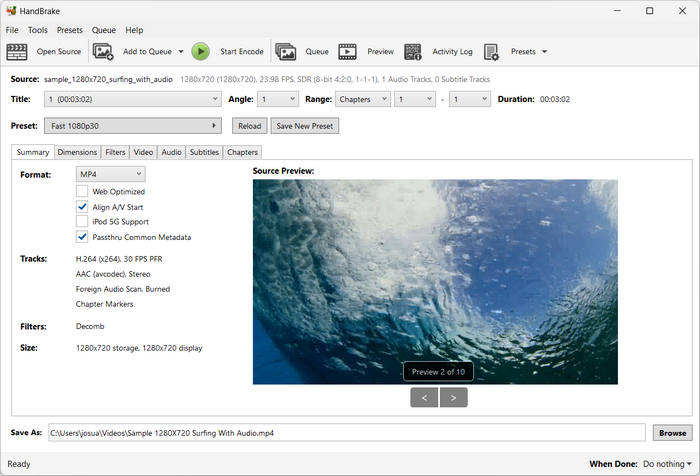
HandBrake 也是你可以用來擷取 DVD 的最佳 Aimersoft 替代方案之一。與其他 DVD 擷取工具不同的是,它是一款開源軟體。在 DVD 擷取方面,此工具支援多種音訊與視訊格式,能讓你輕鬆且高效地將 DVD 和藍光轉成數位檔案。
優點
- 可以讀取舊來源格式的影片並輕鬆翻錄它們。
- 支援多種視訊格式。
- 允許自訂影片品質、解析度和檔案大小。
- 有預設可輕鬆轉換至各種設備。
缺點
- 對於初學者來說,界面可能很複雜。
- 某些 DVD 解密需要第三方插件(如 libdvdcss)。
VLC
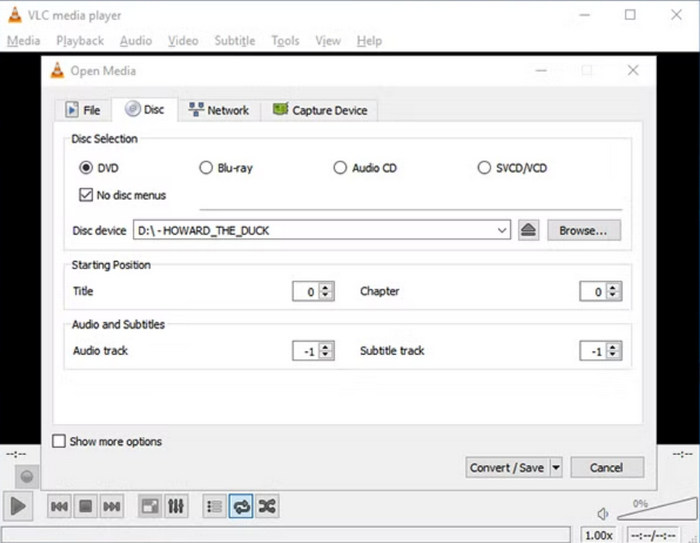
VLC 是一款可在 Windows、macOS 和 Linux 作業系統上運行的多媒體播放器。它以多功能著稱,使用者不僅可以播放各種影片格式,還能擷取 DVD,提升在不同裝置間的使用便利性。此工具的原理是先從光碟中擷取內容,再將其轉換為數位化的影片檔案,方便儲存與分享。
優點
- 免費開源軟體,所有使用者都可以使用。
- 能夠讀取和轉換 DVD 和藍光光碟的內容。
- 允許使用者在轉換過程中選擇特定的音軌、字幕和章節。
- 支援多種編解碼器,確保順利轉換為 MKV 格式。
- 可以處理各種視訊和音訊格式。
缺點
- 對於初學者來說,介面可能不太友善。
- 某些使用者可能會遇到某些 DVD 複製保護的困難。
- 有限的高級編輯功能。
第 4 部分。關於 Aimersoft DVD Ripper 的常見問題解答
Aimersoft DVD Ripper 是否會刪除 DVD 的複製保護?
是的。 Aimersoft DVD Ripper 的主要功能之一是能夠繞過常見的 DVD 複製保護和區域限制。此功能使用戶能夠翻錄影帶保護的 DVD。但是,需要注意的是,翻錄此類 DVD 的成功取決於光碟上採用的特定複製保護類型。
Aimersoft DVD Ripper 安全嗎?
是的。 Aimersoft DVD Ripper 使用起來非常安全。它由 Aimersoft Studio 開發,這是一家信譽良好的公司,會定期更新和修復其程式中的任何安全問題。當然,為了確保安全,請從其官方網站下載工具。
Aimersoft 免費嗎?
不,Aimersoft DVD Ripper 並非免費。它提供付費許可證,例如一年訂閱($29.95)和終身許可證($49.95)。雖然可能提供免費試用,但您需要購買許可證才能使用所有功能。
結論
Aimersoft DVD Ripper 在 DVD 擷取方面的確是一款相當出色的工具。它的各項功能都相當實用,特別適合想將實體光碟轉換成數位格式,以便更便利播放的使用者。由於它能繞過防拷保護、支援多種輸出格式,並提供基本的編輯選項,因此無論是新手還是較有經驗的使用者都能從中受益。此外,如果你發現 Aimersoft 不符合你的需求,也別錯過文中提到的三款替代方案。準備好開始擷取你的 DVD 了嗎?不妨試試這些 DVD 擷取工具吧!
-
 將 DVD 翻錄為 AVI:3 款最佳 DVD 翻錄軟體 [評測]
 想要將 DVD 翻錄為 AVI 以便更輕鬆地播放和儲存嗎?閱讀我們對最佳 DVD 到 AVI 轉換器的詳細評論,找到適合您的完美工具。
-
 如何修復 Windows Media Player 無法播放 DVD:3 種方法
 Windows Media Player 無法播放 DVD 嗎?無論您的裝置使用的是 Windows 7、8 還是 10,都沒關係。您可以找到解決方案。以下是一些最佳播放器。
-
 您需要了解的有關DVD播放器格式的所有信息
 這是一份指南,提供有關 DVD 播放器格式的知識,包括如何使用 DVD 播放器格式打開文件以及如何轉換為其他格式。
