


 視頻轉換大師
 屏幕錄影大師
 影片修復
影片修復
 安全下載
安全下載DVD區域碼:你需要知道的一切[評論]
您在嘗試使用 DVD 播放器播放光碟時遇到困難和錯誤嗎?這種情況並不常見,但如果出現,通常是由於區域碼限製造成的。 DVD 區域碼是一種嵌入式數位保護機制,可根據光碟的地理位置控制其播放範圍。這些代碼由電影公司創建,用於管理電影在世界各地發行的時間、定價和發行。
在本文中,我們將學習什麼是DVD 區碼、為何會實施區碼機制,以及你可以如何繞過它們。準備好隨時隨地欣賞你的 DVD 了嗎?繼續往下看!

第 1 部分。為什麼有 DVD 區域碼
電影製片廠引入了 DVD 區域碼,以控制電影在世界各地發行和上映的時間。 DVD 中嵌入區域碼,以限制在特定地理區域播放,並確保內容僅在特定國家或地區可用。以下是 DVD 設定區域碼的其他原因:
1.市場管控及發佈時機:
為了控制電影市場和發行時間,電影公司需要創建DVD區域碼。如果一部電影可能在美國上映較早,但在歐洲或亞洲等其他地區上映較晚,那麼區域碼可以起到作用,因為它可以防止或限制DVD在電影尚未正式發行的地區被觀看。
2.定價和經濟差異:
第二個原因是DVD在不同地區的定價上有差異。考慮到經濟差異,某些DVD在某些地區(例如發展中國家)的定價可能低於較富裕的地區。 DVD區域碼的存在就是為了防止消費者從國外購買較便宜的DVD,然後在價格較高的地區使用。
3.內容監管和許可:
不同國家對媒體內容有獨特的規定,例如審查制度和語言要求。區域代碼透過控制 DVD 各個版本的播放範圍,幫助電影公司遵守這些區域法律。此外,某些發行權是按國家授予的,因此電影公司可以使用區域代碼來遵守與世界各地發行商簽訂的合約協議。
第 2 部分。 DVD 區域代碼清單及相關區域
以下是 DVD 區域代碼及其覆蓋的區域列表:
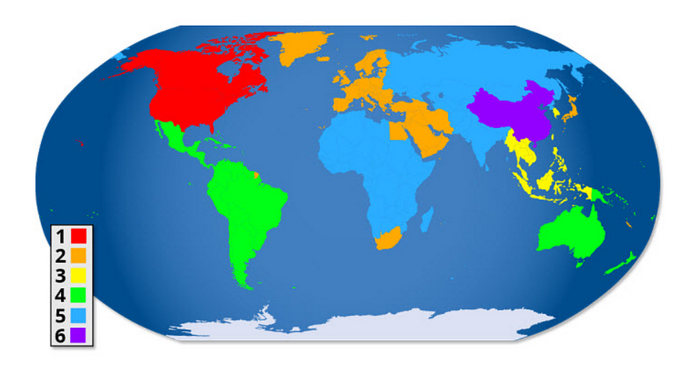
DVD 地區 1:美國、加拿大。
DVD 區域 2:歐洲、日本、中東、埃及、南非、格陵蘭。
DVD 區 3:東南亞、韓國、台灣、香港。
DVD Region 4:拉丁美洲、澳洲、紐西蘭、太平洋島嶼、加勒比海地區
DVD 區域 5:東歐、俄羅斯、印度、非洲、北韓和蒙古。
DVD 地區 6:中國。
DVD Region 7:保留以備將來使用,通常在南亞非正式使用。
DVD 區 8:國際領土,包括遊輪和飛機。
DVD 區域 0、9 或區域 ALL:這些 DVD 不受區域限制,可以在所有區域播放。
區域代碼系統嵌入在 DVD 和 DVD 播放器中,用於控制內容的可存取區域。針對特定區域設計的播放器通常只能播放以該區域編碼的 DVD,除非將其設定為無區域限製或進行修改以繞過這些限制。
第 3 部分:如何檢查我的 DVD 區域代碼
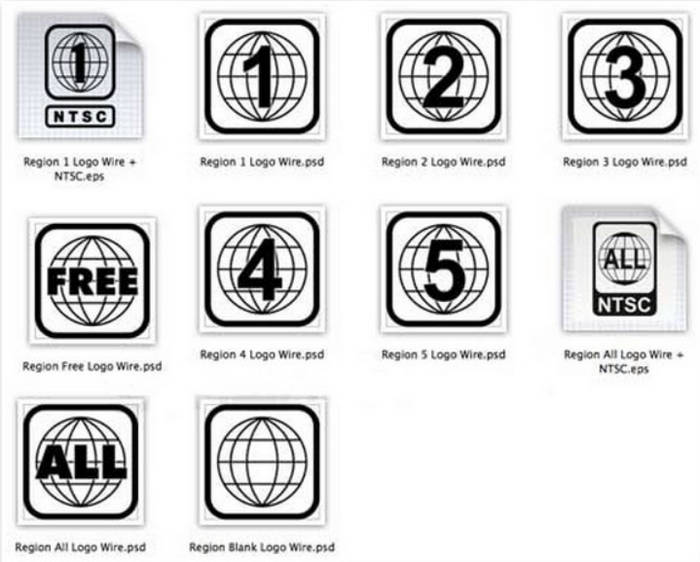
您可以透過查看標準化的小地球圖示來尋找光碟或播放器的區域代碼,該圖示上會有一個數字,表示區域。如果光碟相容於多個區域,地球圖示上會顯示多個數字。沒有區域限制的光碟會顯示 0 或 ALL,表示可以在所有區域播放。
第4部分。如何繞過DVD區域程式碼
現在您已經確定DVD中嵌入的區域代碼確實存在不相容問題。在本部分中,您將學習如何輕鬆繞過它們。以下是繞過DVD區域程式碼的三種方法:
方案一:使用 AnyMP4 DVD Ripper
AnyMP4 DVD Ripper 是一款專業的 DVD 擷取工具,可讓使用者將 DVD 轉換為數位格式,以便彈性播放。它支援多種輸出格式,包括 MP4、MKV、MOV、AVI 等,讓你能夠輕鬆在各種裝置上觀看 DVD 內容。透過此工具,你可以將光碟擷取為數位檔案,有效繞過 DVD 區碼限制,實現不受限制的觀賞。
主要特點:
• 將 DVD 轉成數位影片,方便在 PC 和 iOS/Android 裝置上播放。
• 將 DVD 擷取為 MP4、MKV、MOV、AVI 等常見格式。
• 先進的加速技術在維持高輸出品質的同時,確保快速的擷取速度。
• 支援批次擷取,可一次轉換多個 DVD 片段/標題。
• 內建編輯工具,可用來剪輯、裁切、合併、添加浮水印及調整效果。
• 可自訂輸出設定,例如編碼器、解析度、位元率、影格率以及音訊參數。
• 介面簡潔直觀,新手與進階使用者皆適用。
步驟 1: 將 DVD 放入外接或內建的 DVD 光碟機中。啟動程式並點擊「載入 DVD」來匯入光碟。
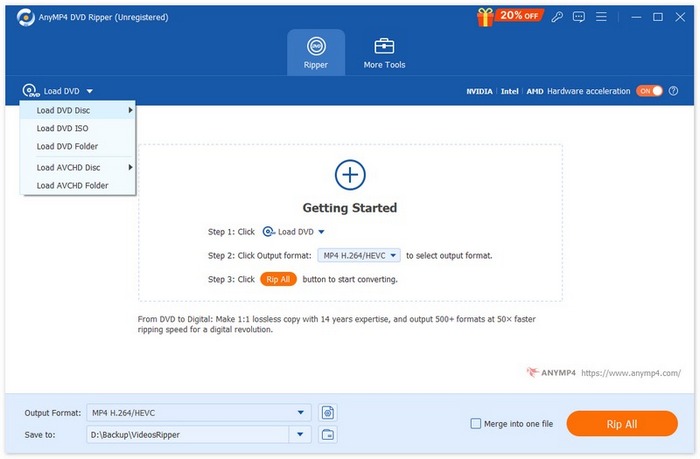
步驟 2: 載入完成後,點擊格式下拉選單,選擇 MP4、MKV 或其他與你的裝置相容的數位格式。
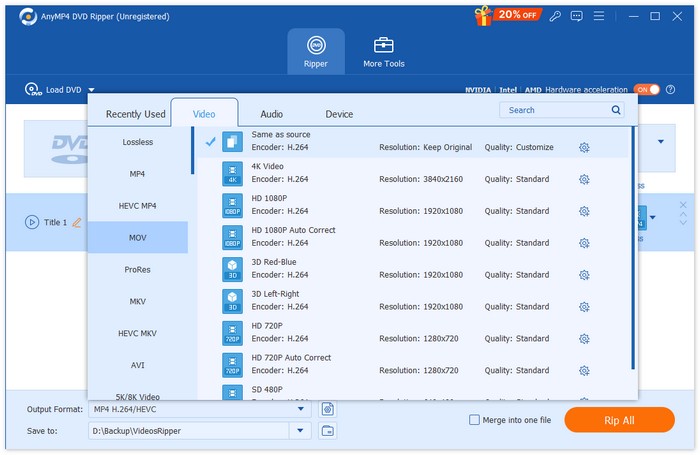
步驟 3: 如有需要,你可以調整影片解析度、位元率、編解碼器,或使用內建的編輯工具。
步驟 4: 點擊「全部擷取」開始將 DVD 轉換成數位檔案。
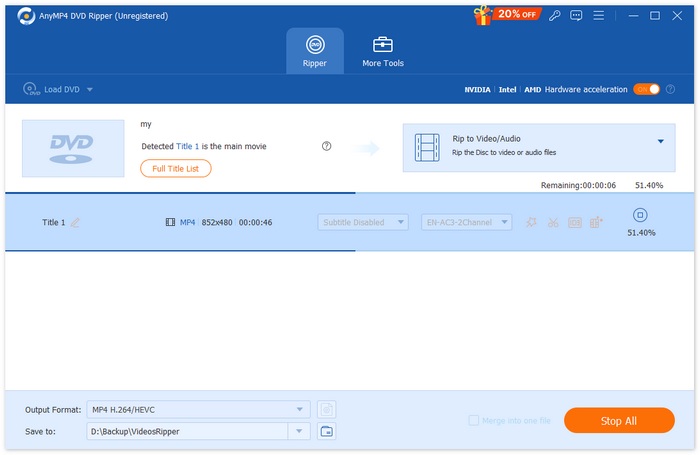
完成後,你即可在任何相容裝置上播放已擷取的影片,而不受 DVD 區碼限制。
解決方案 2. 使用獨立 DVD 播放器變更區域代碼
若要變更獨立 DVD 播放器的區域碼,只需使用遙控器上的簡單序列即可。這樣,您的 DVD 播放器就可以播放不同地區的光碟,甚至可以將其設定為不受區域限制的模式。請依照以下步驟調整 DVD 播放器的區域碼:
步驟 1. 開啟你的 DVD 播放機電源,並確認托盤中沒有放入任何光碟。
步驟 2. 現在前往開始按鈕,選擇控制台,點選「系統及維護」,然後按一下裝置管理員。
步驟 3. 使用遙控器依序按下 3 1 4 1 5 9。你應該會在電視螢幕上看到「CODE」或「FF」的顯示。接著輸入你想要的區碼。
步驟 4. 之後,再次按下遙控器上的暫停 (PAUSE)按鈕。
步驟 5. 最後,在完成變更後,關閉 DVD 播放機以儲存新的區碼設定。
並非所有 DVD 播放機都允許更改區域,因此如果這些步驟不適用於您的型號,請查看播放機手冊。
解決方案3.修改DVD區域代碼
繞過DVD區域碼的最後一個解決方案是修改它。以下是修改DVD區域碼的步驟:
適用於 Mac:
步驟 1. 將光碟插入 Mac 的光碟機。接著,在跳出的對話框中,選擇與你的 DVD 播放機相同的區碼,然後按一下設定磁碟機區碼 (Set Drive Region)按鈕。
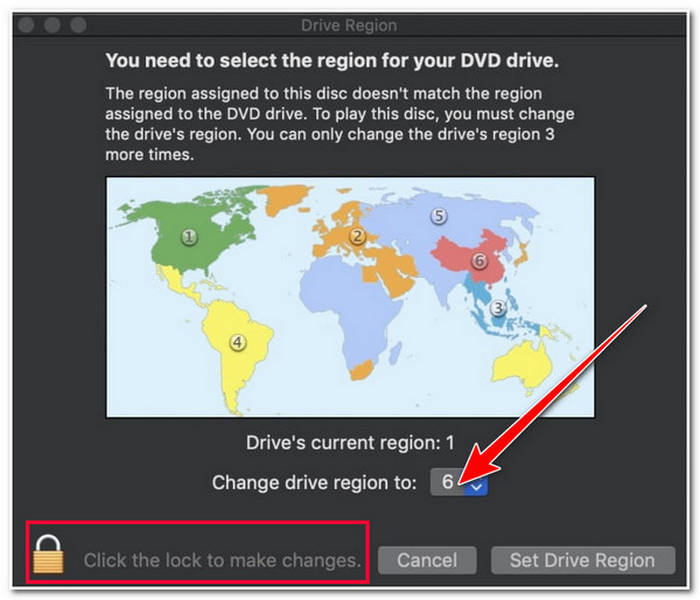
步驟 2. 之後,按一下鎖定 (Lock)按鈕以儲存你所做的變更。
適用於 Windows:
步驟 1. 將光碟插入電腦的光碟機。之後,按住Windows 鍵,再按下R鍵,開啟執行程式。
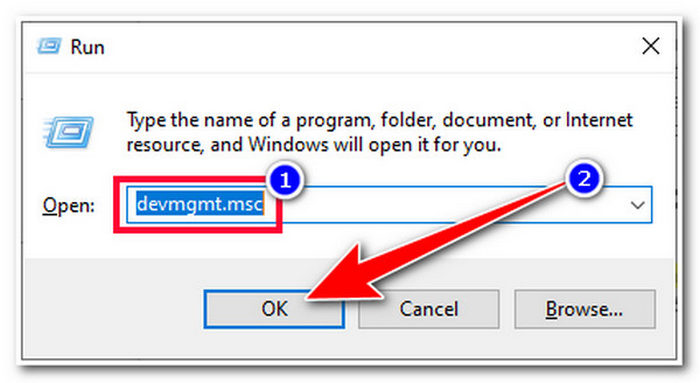
步驟 2. 接著輸入 devmgmt.msc 並按一下確定 (OK)按鈕。然後,在「裝置管理員」視窗中,展開DVD/CD-ROM 光碟機選項。
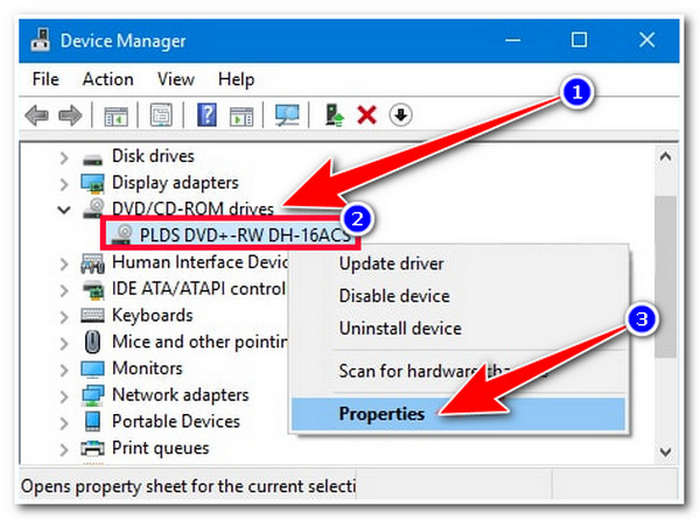
步驟 3. 之後,右鍵按一下你的磁碟機 (Drive)並選擇內容 (Properties)選項。接著,在新視窗中選取DVD 區碼 (DVD Region)索引標籤,選擇你目前所在的區域,並按一下確定 (OK)。
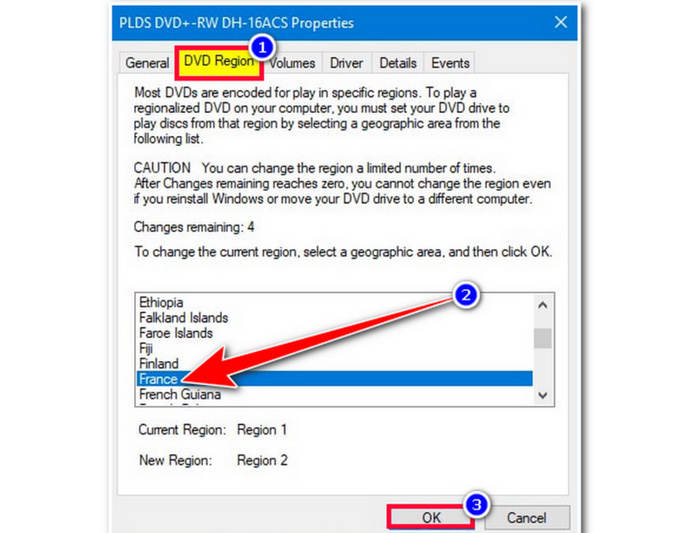
DVD 區域碼最多可更改五次。超過此限制後,設定將永久生效,您將無法再次修改區域碼。
第 5 部分。有關 DVD 區域代碼的常見問題解答
我可以在我的 DVD 播放機上播放不同地區的 DVD 嗎?
可以。如果你的DVD 播放機是無區碼機種,或是你已經變更了 DVD 的區碼,那麼就可以播放不同區域的 DVD。不過要注意,多數播放器只允許你變更區碼的次數有限。
如果我嘗試在播放機上播放不同地區的 DVD,會發生什麼事?
如果您嘗試在沒有正確設定的情況下播放來自不同地區的 DVD,您可能會遇到錯誤訊息,表示該光碟與您的播放器不相容。
我可以更改 DVD 區域代碼多少次?
您最多可以在 DVD 播放器上更改 DVD 區域碼五次。超過此限制後,區域碼設定將永久生效,您將無法再次修改。
結論
現在你已經了解什麼是DVD 區碼,也知道如何判斷並繞過它們,你就可以開始變更 DVD 的區碼,讓自己能無限制地觀賞影片。立刻去檢查一下你的 DVD 區碼吧!
-
 將 DVD 翻錄為 AVI:3 款最佳 DVD 翻錄軟體 [評測]
 想要將 DVD 翻錄為 AVI 以便更輕鬆地播放和儲存嗎?閱讀我們對最佳 DVD 到 AVI 轉換器的詳細評論,找到適合您的完美工具。
-
 在 Windows 和 Mac 上將 Video_TS 燒錄到 DVD 的 3 種方法
 手邊有 TS 檔案並想將其保存在 DVD 上,請閱讀本指南。我們將詳細教您如何在 Windows 或 Mac 電腦上將 Video_TS 燒錄到 DVD。
-
 如何修復 Windows Media Player 無法播放 DVD:3 種方法
 Windows Media Player 無法播放 DVD 嗎?無論您的裝置使用的是 Windows 7、8 還是 10,都沒關係。您可以找到解決方案。以下是一些最佳播放器。
