


 視頻轉換大師
 屏幕錄影大師
 影片修復
影片修復
 安全下載
安全下載如何將 8 毫米膠片轉換為數位或 DVD
在數位相機與可錄影的手機尚未普及之前,大多數人都是使用膠片相機來記錄生活中的美好時刻。拍攝完成後,我們需要將膠片送到專業的相館沖洗處理,才能拿到完整的照片或影片。如今,除了少部分追求特殊質感、仍以膠片拍攝影片的電影製作者外,一般人幾乎已經接觸不到這種老物件。不過,我們的父母可能還保存著一些早年用攝影機拍攝的老膠片,裡面承載的回憶非常珍貴。然而,膠片隨時都有劣化、老化的風險,也很可能因意外而遺失。因此,我們最好為它們做備份,也就是將其轉換為常見的數位影片或 DVD 格式,並儲存在電腦硬碟或雲端中。那麼,我們究竟該如何保存這些美好回憶,並將 8mm 膠片轉成數位格式呢?本文將為你介紹幾種最佳方法。你可以尋求專業服務協助,或是自行操作相關設備。

第一部分:為何將 8mm 底片轉換為 DVD 或數位格式
你可能會想,如果我們家裡有一部完好無損的膠片,為什麼還要匯出裡面的影像或影片呢?然而,我們需要明白,要觀看8毫米膠片的內容,必須使用專用的8毫米播放機。即使家裡有這種設備,也必須考慮底片的磨損。每次播放8毫米膠片上的內容,都會留下新的刮痕。但如果看不到裡面的內容,保存底片也毫無意義。當磨損達到一定程度時,膠片上的影像或膠片就會遺失,我們將無法看到一些承載著我們與親人共度時光的影片和照片。因此,即使你想保留膠片作為紀念品,我們也建議將8毫米膠片轉換為數位格式作為備份。
匯出膠片檔案後,您可以將它們儲存到各種現代儲存裝置中,例如 USB 隨身碟、DVD,或直接儲存在電腦記憶體中。如果檔案過大導致儲存空間不足,可以考慮將影片上傳到雲端硬碟。如果您還記得自己的帳戶,可以隨時在線回顧這些珍貴的回憶,並與重要的家人和朋友分享。以下我們推薦三種可行的解決方案,幫助您成功將 8 毫米膠片轉換為數位格式。
第二部分:使用 DVD 翻錄軟體將 DVD 底片數位化
AnyMP4 DVD Ripper 是一款專業的 DVD 翻錄工具,可將您的實體 DVD 翻錄成數位版本。它支援多種輸出格式,可轉換為常見的 MP4、MOV 等格式,以及其他不常見的格式。其簡潔易用的介面讓您輕鬆上手。如果您的 DVD 區域碼與您所在地區的 DVD 播放器不相容,您也可以使用 AnyMP4 DVD Ripper 輕鬆轉換。憑藉先進的技術,它能夠快速地將 DVD 翻錄成其他格式。
接下來我們將向您展示如何將8毫米膠片轉換為數位版本:
步驟一:在電腦上下載 AnyMP4 DVD Ripper,將 DVD 放入光碟機中,它通常會自動偵測。如果沒有自動偵測,你可以手動點擊「Load DVD(載入 DVD)」讓此工具進行辨識與分析。
步驟二:點擊「Output Format(輸出格式)」旁的下拉按鈕,選擇你偏好的儲存格式。
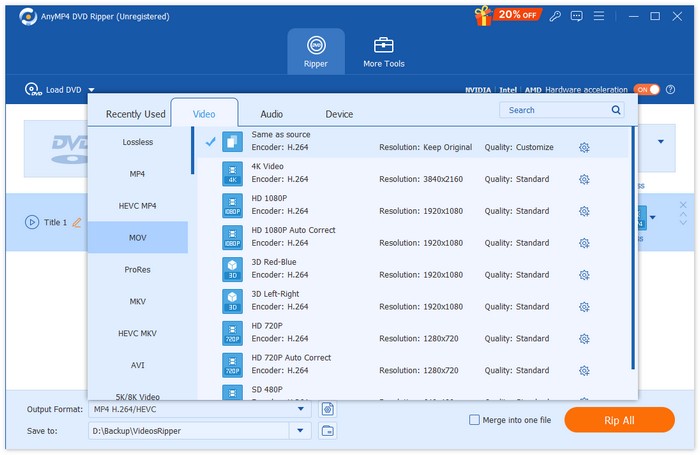
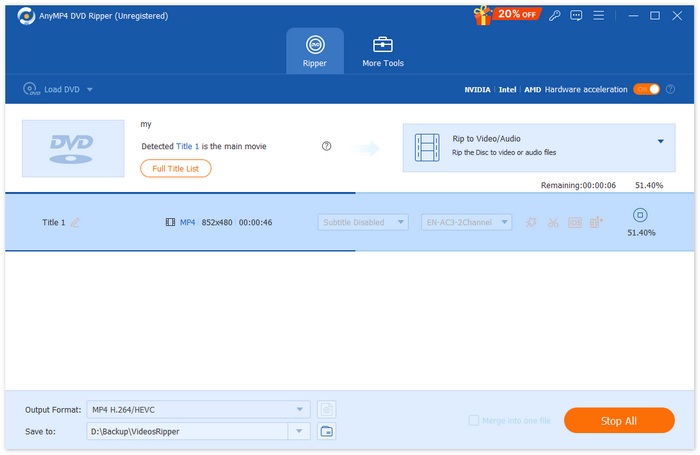
步驟三:你也可以依照需求編輯字幕與音軌。若對結果感到滿意,就可以點擊「Rip All(全部擷取)」來將實體 8mm 膠片數位化。
第三部分:邊播放邊錄製影片以進行數位化處理
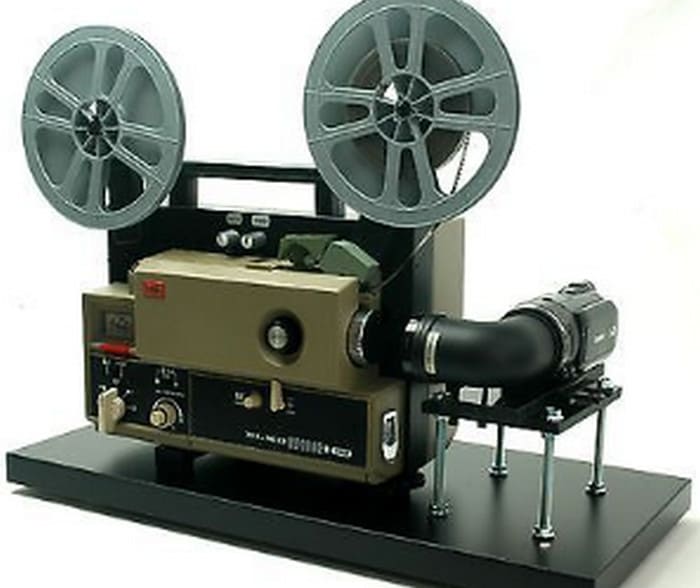
如果您家裡有 8 毫米膠卷播放器,可以嘗試在家中自行轉換。這樣,您無需額外付費或花時間尋找可靠的膠片沖洗服務。此操作的關鍵在於使用 8 毫米膠片投影機在空白牆面或平板螢幕上播放視頻,然後使用視頻錄製設備錄製正在播放的內容。錄製設備的最佳選擇是專業的攝影機,它可以幫助您獲得盡可能高的解析度。當然,您也可以使用更常見的設備,例如手機。啟動投影機後,仔細調整投影的焦距,使影像清楚顯示在螢幕上。然後,使用三腳架或手機支架固定相機,並確保相機將投影影像框入畫面。在錄製整部影片之前,您可以錄製幾秒鐘進行測試。
如果你想用手機錄製畫面,又不想花太多時間再把影片傳到電腦上,我們推薦使用 FVC Screen Recorder。只要將手機連接到它,就能讓手機鏡頭所看到的畫面即時顯示並錄製在電腦螢幕上,幾乎沒有延遲。之後,你可以直接在電腦上使用影片剪輯軟體提升畫面品質,並將其轉換成更通用的數位格式。FVC Screen Recorder 也內建了一些簡單的處理工具,可用來剪輯與調整影片長度。
以下是使用這款最佳 MP4 錄影工具錄製 8mm 膠片時需要執行的步驟:
步驟一:準備一台 8mm 投影機與一面乾淨的白牆或投影幕。將手機穩固地架設在投影畫面前方。
步驟二:在電腦上下載並安裝 FVC Screen Recorder。啟動程式後,選擇「Phone Recorder(手機錄製)」功能。
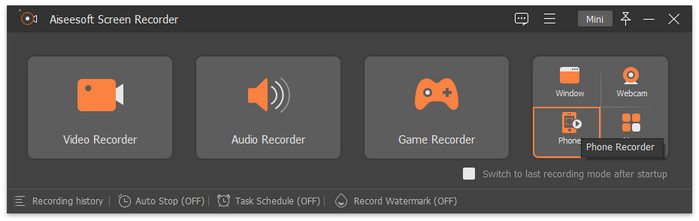
步驟三:選擇「iOS Recorder」。
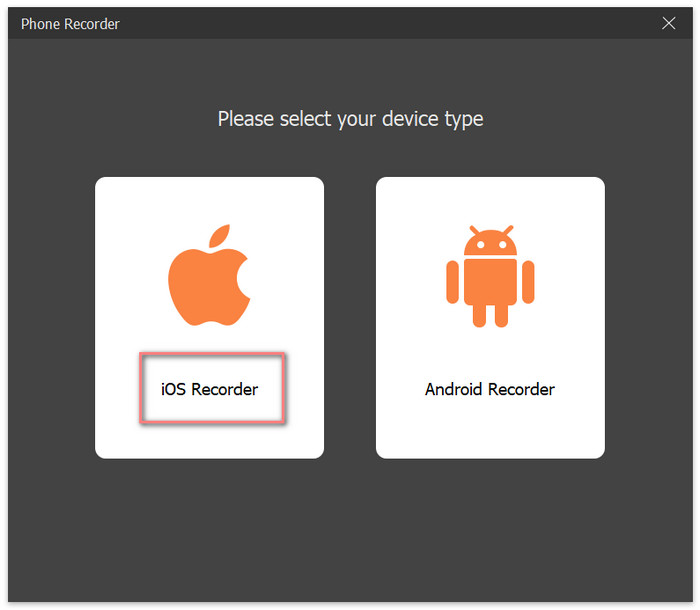
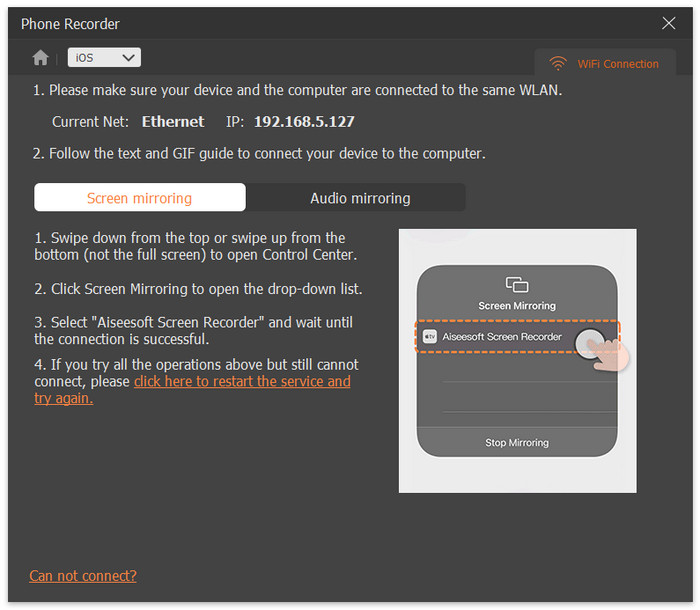
步驟四:依照螢幕上的說明步驟,將 iPhone 與 FVC Screen Recorder 連接。
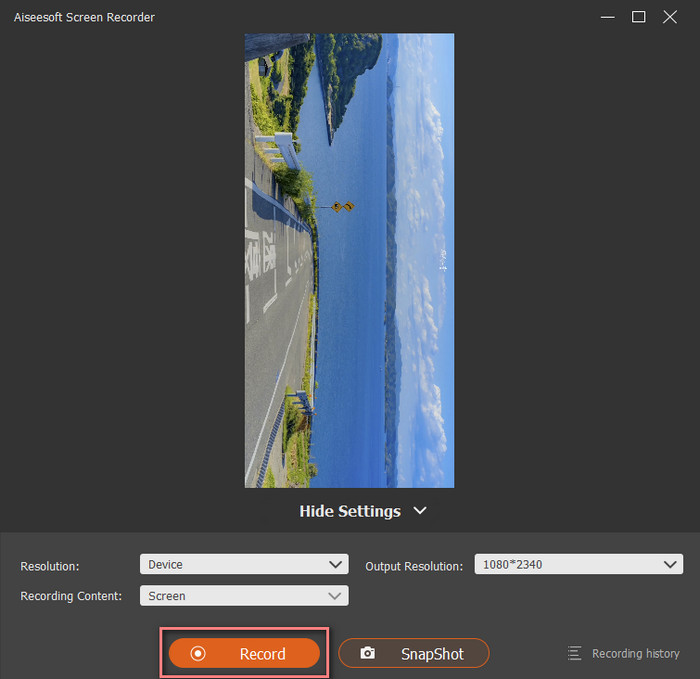
步驟五:此時,你就能在 FVC Screen Recorder 的介面上看到 iPhone 的畫面。選擇解析度後,點擊「Record(錄製)」開始錄影。
第四部分:聘請專業的底片轉錄服務
如果您沒有處理膠片的經驗,擔心可能會損壞膠片,或者家裡沒有可以讀取8毫米膠片的機器,那麼最安全的選擇是尋求專業的膠片轉數位服務。他們擁有齊全的設備和經驗豐富的膠片處理人員。您可以在線上或線下找到這些服務,但在交付膠片之前,最好先檢查一下他們的服務品質和客戶滿意度。修復費用通常取決於膠片的尺寸。有些公司也可能根據膠捲盒的大小來定價,但如果您擁有的膠卷總量不大,這種方法可能不太划算。
在支付8毫米膠片轉數位服務費用之前,您必須諮詢幾個問題,包括轉換價格、所需時間、處理地點、是否有任何隱藏費用以及可以處理的膠片類型。如果您的底片損壞或影片模糊,您也可以要求服務提供者協助您清潔和修復底片,並對匯出的影片進行色彩校正、銳利度增強、對比度調整等。
第五部分:8mm膠片轉數位常見問題
將 8 毫米膠片轉換為數位膠片的成本是多少?
一般機構報價是每英尺25美分,如果你的底片是16毫米的,那麼每英尺就要40美分。
在數位化之前如何清潔 8 毫米膠片?
最好使用專用的膠片清潔劑,因為它們甚至可以填補表面的刮痕。如果沒有,也可以使用 98% 酒精。
如何將舊的 8 毫米膠片轉換為數位膠片?
請以上述格式之一錄製視頻,然後使用 AnyMP4 DVD Ripper 等專業轉換器將文件轉換為常用格式。 MP4 是最佳選擇,因為許多平台和裝置都支援 MP4 播放器。
結論
本文闡述了沖洗8毫米膠片的必要性以及幾種沖洗方法。為了防止底片上的影片隨著時間推移而遺失,我們建議您將8毫米膠片轉換為數位格式並儲存到其他儲存裝置上。 AnyMP4 DVD Ripper 是您完成此過程的最佳助理。
-
 在 Zoom 上錄製會議的前 5 位 Zoom 會議記錄員 [2024]
 需要錄製縮放會議以免錯過會議的重要細節?如果是這樣,這篇文章提供了你應該知道的最好的變焦記錄器。
-
 適用於 Windows/Mac/Mobile 的 8 款最佳螢幕錄影機(線上和離線)
 查找適用於 Windows 和 Mac 的最出色的屏幕錄像機。閱讀本文以了解最好的免費在線和離線屏幕錄像機。
-
 適用於 Windows 和 Mac 的 8 大最佳網絡攝像頭錄像機
 如果您正在尋找最好的網路攝影機錄影機,我們有您想要的。閱讀本文,了解適合您的 Windows 和 Mac 的八個最佳選擇。
