視頻轉換大師 大盒

多合一視訊工具箱,能夠以超快的速度將視訊/音訊轉換為 1000 多種格式。

免費下載

Login Security安全下載

免費下載

Login Security安全下載

全面了解 DVD 解析度 [解釋]

Have you noticed varying video quality when playing your DVDs? For example, others have better quality than the one you’ve played before. This difference often comes down to the resolution and format of the DVD, as they are not often the same. In this guide, we'll explore what DVD resolution is, why it matters, and how you can change it. We'll also discuss how DVD quality differs from Blu-ray and provide you with practical tips on adjusting DVD resolution for optimal playback. Continue reading to know more.

DVD解析度

第 1 部分:什麼是 DVD 分辨率

解析度是指視訊影像中的像素數,以寬度 x 高度表示。通常,我們可以在串流媒體平台上輕鬆識別視訊分辨率,它可以調整視訊的品質。與 DVD 一樣,各種解析度都會影響 DVD 影片播放的品質。以下是 DVD 解析度的類型:
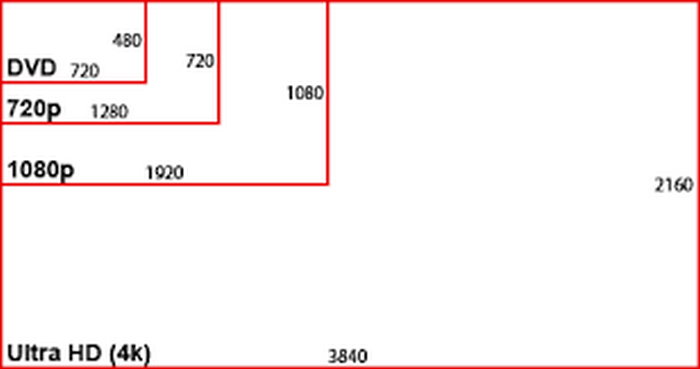
DVD 解析度尺寸。

NTSC DVD Resolution: 720 x 480 pixels can be displayed in either 480i or 480p formats. This resolution is Standard Definition or SD, is compatible with NTSC television systems, and is commonly used in North America and parts of Asia.

PAL DVD Resolution: 720 x 576 pixels. This resolution supports 576i and 576p formats, providing slightly higher quality compared to NTSC DVDs. Also, it is commonly used in Europe, Australia, and other regions.

Note: Both NTSC and PAL DVD resolutions are available in both 4:3 and 16:9 aspect ratios.

最後,DVD 的最大解析度為 480i/p 或 576i/p,這意味著 DVD 僅限於標準清晰度品質。

第 2 部分。 DVD 品質與藍光

藍光光碟是一種專為播放高清格式而設計的數位光碟。就畫質而言,DVD 的品質略有不足,請參閱下表以了解這一點:

特徵 DVD 藍光
解析度 高達 720 x 480 標準清晰度 全高清解析度最高可達 1920 x 1080,4K 解析度最高可達 3840 x 2160
視頻質量 標準清晰度或 SD 高清或超高清
音質 杜比數位 5.1 高清或超高清
儲存容量 單層 4.7 GB,雙層 8.5 GB 單層為 25 GB,雙層為 50 GB。
資料傳輸速率 較低,限制視訊/音訊保真度。 與 DVD 相比,數據傳輸率更高,並且支援更好的視訊/音訊保真度。
兼容性 與藍光相比相容性更強,因為它可以在 DVD 和藍光播放器上播放。 需要藍光播放器才能播放全高清內容。

This table shows that there are indeed differences between DVD quality vs. Blu-ray. DVDs are limited to SD or Standard Definition when it comes to the resolution, but Blu-ray can deliver an HD video up to 4K. Additionally, Blu-ray offers a larger storage capacity than DVD’s capacity. But in terms of compatibility, HD is more flexible as it can be played on both DVD and Blu-ray. Nevertheless, this comparison does not determine which is the best. This is to give you a picture of what you can expect more of your DVD resolution.

第 3 部分。如何更改 DVD 分辨率

Now, if your DVD resolution is low, you can easily change that by ripping it with the help of FVC picked Video Converter Ultimate. This is a full-featured video and audio converter tool that supports a number of media formats. With this, users can easily convert their media, even DVDs, to the format and resolution they wish for. Moreover, users don’t need to worry about losing quality during the conversion process, as FVC Video Converter Ultimate preserves the original quality while enabling resolution upgrades.

主要特點:

• 將 DVD 轉換為數位視頻,以便在 PC 和 iOS/Android 裝置上播放。

• 支援超過 1000 種格式和視訊分辨率,例如 MP4、MKV、MOV、FLV、AVI、MP3、AAC、GIF 等。

• 使用藍光超技術和先進的編碼技術來增強轉換後的視訊。

• 支援大量轉換,可一次轉換多張 DVD。

• 具有內建影片編輯功能,如修剪、裁切、浮水印和效果。

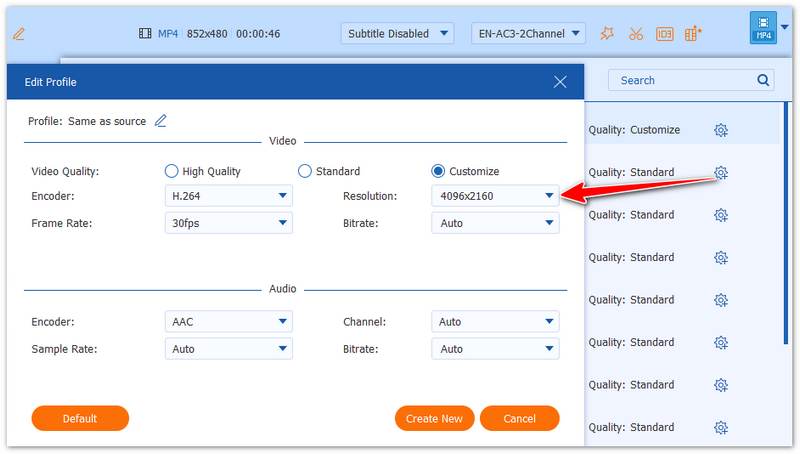
• 可自訂的輸出設置,如編碼器、取樣率、通道和位元率。

• 使用者介面非常簡單。

以下是如何使用 FVC 精選的 Video Converter Ultimate 更改 DVD 解析度的方法:

Step 1. First, you need to download and install the tool on your device.

Note: Before the next step, you must insert the DVD into the DVD driver on your computer and wait for a few minutes until it is detected.

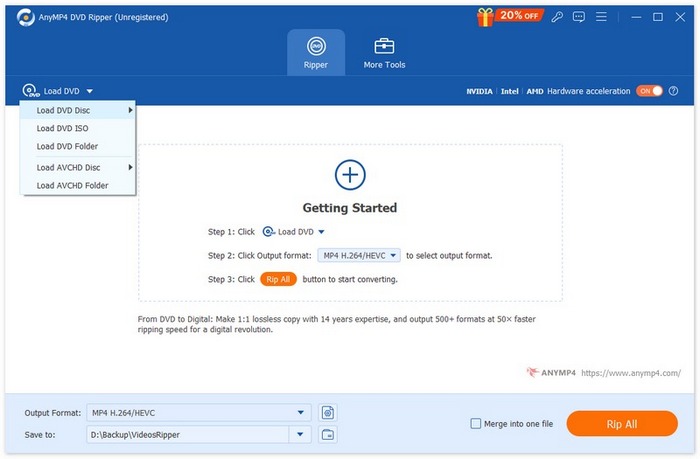
Step 2. Now, launch the tool and click the Add File icon to load the disk.

FVC 視訊轉換器 Ultimate DVD 轉 MKV 新增文件

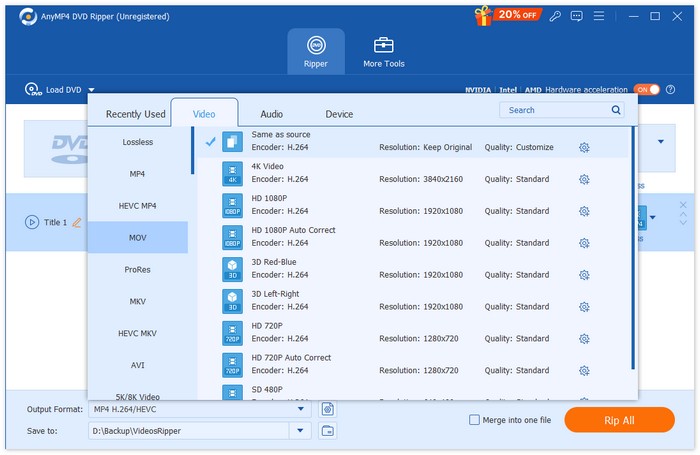
Step 3. After that, click on the Output Format below and choose the digital format that you prefer from the Video tab. Once done, just simply click on the Convert All button to start ripping your DVD.

FVC 視訊轉換器終極版 DVD 轉 MKV

使用 FVC 精選的 Video Converter Ultimate,您可以輕鬆地將 DVD 轉換為更高解析度。此外,您也可以選擇最適合您需求的輸出格式。最後,此工具支援批量轉換,非常適合一次性轉換多張 DVD。

Tip: Click here to read more about converting a DVD to digital files.

第 4 部分。有關 DVD 解析度的常見問題解答

DVD 的標準解析度是多少?

DVD 的標準解析度因地區而異。 NTSC 製式 DVD 的解析度為 720 x 480 像素。而 PAL 製式 DVD 的解析度為 720 x 576 像素。兩種格式均提供 4:3 和 16:9 的寬高比。

為什麼 DVD 解析度會影響影片品質?

解析度決定了顯示影像所需的像素數量,直接影響影片品質。解析度越高,像素越多,通常品質越好。 DVD 僅限於標清(SD)格式,與藍光等高清格式相比,其品質較低。

我可以更改 DVD 的解析度嗎?

是的。您可以使用視訊轉換器(例如 FVC Video Converter Ultimate)翻錄 DVD 來變更其解析度。此工具可讓您將 DVD 轉換為更高的分辨率,例如 720p 或 1080p,從而提高視訊質量,以便在高清設備上播放。

NTSC 和 PAL DVD 解析度有何不同?

NTSC 主要用於北美和亞洲部分地區,解析度為 720 x 480 像素。而 PAL 則廣泛用於歐洲、澳洲和其他地區,解析度為 720 x 576 像素。 PAL 的畫質略高於 NTSC,但兩者都僅限於標清(SD)。

DVD 解析度與藍光解析度相同嗎?

不是。 DVD 解析度明顯低於藍光解析度。 DVD 的解析度僅限於標清 (480p/576p),而藍光光碟可顯示高達 1080p 甚至 4K 超高清的高清解析度。與 DVD 相比,藍光提供更好的視訊品質、更大的儲存容量和更卓越的音訊效果。

結論

While DVD resolutions are confined to Standard Definition, like 720 x 480 pixels and 720 x 576 pixels, respectively, they can still deliver a quality video experience once played. But if you’re looking for ways to change its resolution, don’t hesitate to use the FVC Video Converter Ultimate.

艾倫·米勒2025 年 8 月 8 日

優秀的

Rating: 4.8 / 5 (based on 501 votes)