


 視頻轉換大師
 屏幕錄影大師
 影片修復
影片修復
 安全下載
安全下載將 DVD 快速匯入 Final Cut Pro [初學者指南]
Final Cut Pro 是一款專為 macOS 用戶設計的影片編輯軟體。它以其全面的功能而聞名,對所有類型的影片編輯者都非常實用。憑藉其強大的功能,它是 Mac 生態系統中最受歡迎的影片編輯軟體之一。
然而,和大多數影片剪輯工具一樣,這款工具並不支援 DVD 格式,但先別擔心!在本文中,我們將教你如何輕鬆將DVD 匯入 Final Cut Pro,讓你可以在數位化的格式中編輯它們。如果你覺得這對你有幫助,請繼續閱讀本文以了解更多資訊。

第 1 部分:Final Cut Pro 是否支援 DVD
Final Cut Pro 是一款專為 Mac 用戶設計的專業影片編輯軟體。它以其全面的影片編輯功能和直覺的介面而聞名。這款影片編輯軟體支援多種影片格式。然而,它不支援 DVD 格式。儘管不支援這種格式,但想要將 DVD 匯入 Final Cut Pro 的用戶仍然可以實現。
Final Cut Pro 支援 MOV 等多種格式。也就是說,用戶仍然可以將 DVD 匯入到這款影片編輯軟體中。為此,他們需要一個 DVD 翻錄工具,將 DVD 轉換為這款影片編輯軟體支援的格式。
Final Cut Pro 支援的格式:
• ProRes(422、4444、RAW)
• QuickTime (.MOV)
• AVC-Intra
• XAVC
• XF-AVC
• DNxHD/DNxHR
• DV/DVCPRO
• H.264
• H.265/HEVC
• MPEG-4 (MP4)
• AVCHD(MTS、M2TS)
• MXF
• REDCODE RAW (R3D)
• ARRIRAW
• Blackmagic RAW(附外掛程式)
在清單中,他們可以選擇轉換 DVD 的流行消費格式是 H.264(常見於 MP4 和 MOV 容器)以及 H.265/HEVC。因此,為了順利將 DVD 匯入 Final Cut Pro,請務必注意這些格式,因為這些是這款影片編輯軟體唯一可以處理的格式。
第 2 部分。如何將 DVD 轉換為 Final Cut Pro 支援的格式
既然您知道不能直接將 DVD 匯入 Final Cut Pro,那麼翻錄 DVD 的選項就變得必不可少了。
要輕鬆將 DVD 轉換為 Final Cut Pro 支援的格式,最好使用 FVC 推薦的 AnyMP4 DVD Ripper。這款工具可讓使用者輕鬆地將 DVD 翻錄成 MOV、MP4 等多種格式。事實上,它支援數百種輸入和輸出格式,確保每位使用者都能找到自己需要的格式。此外,該工具具有非常直覺簡潔的介面,使用起來非常方便。最後,在輸出品質方面,由於該工具採用了先進的編碼和藍光超高清技術,因此可以確保在翻錄過程中以及翻錄後 DVD 內容的品質始終如一。
以下是使用 FVC 精選的 AnyMP4 DVD Ripper 擷取 DVD 的方法:
步驟 1。首先,你需要下載這款專業 DVD 擷取程式並將其安裝到你的裝置上。
注意: 在進行下一步之前,你必須先將 DVD 放入 Mac 的 DVD 光碟機中,並稍等數分鐘直到系統偵測到它。
步驟 2。當裝置讀取到 DVD 之後,啟動本程式,然後點擊中央加號形狀的「Getting Started」按鈕來載入 DVD。
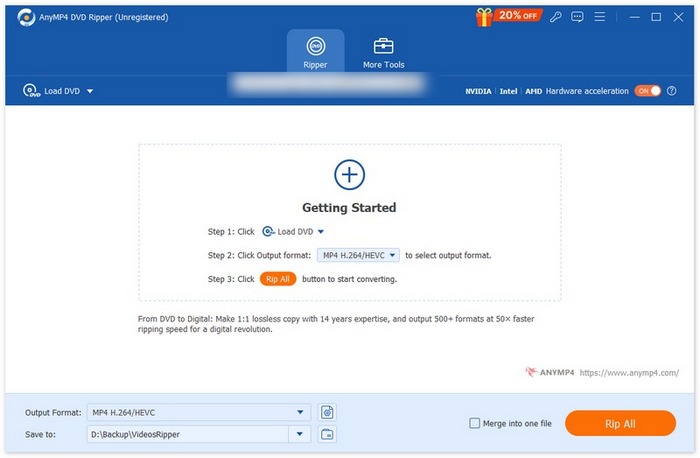
步驟 3。之後,點擊下方的「Output Format」輸出格式,並在「Video」影片分頁中選擇 Final Cut Pro 支援的格式。完成後,點擊「Rip All」全部擷取按鈕,開始將你的 DVD 數位化。
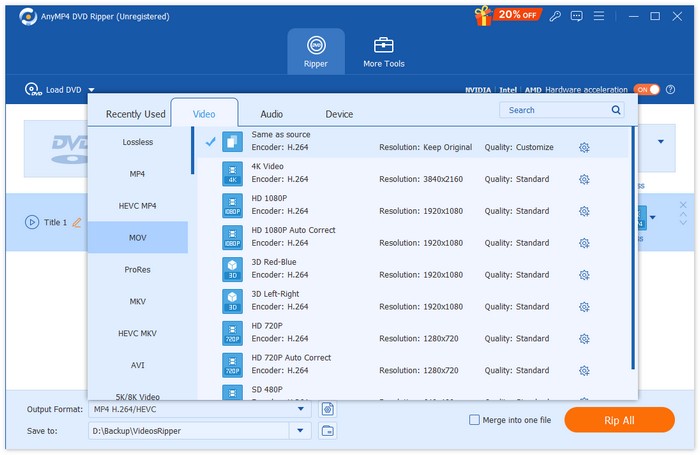
快速又方便,對吧?有了 FVC 推薦的 Video Converter Ultimate,您可以輕鬆翻錄 DVD。使用這款優秀的 DVD 翻錄軟體完成翻錄後,您就可以繼續下一步,學習如何將 DVD 匯入 Final Cut Pro。
第 3 部分。如何將翻錄的 DVD 匯入 Final Cut Pro
現在您終於了解如何將 DVD 翻錄為 Final Cut Pro 支援的格式,下一步您需要知道的是如何將轉換後的 DVD 匯入 Final Cut Pro 進行編輯。
若要將 DVD 匯入 Final Cut Pro,請依照以下步驟操作:
步驟 1。首先,在你的 Final Cut Pro 介面上,點擊頂端選單列中的 File(檔案)。
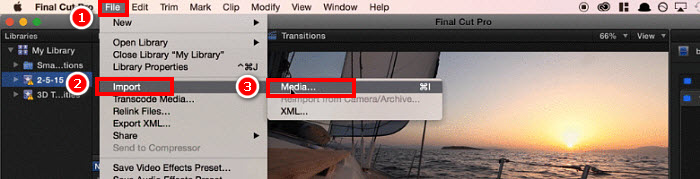
步驟 2。在 File(檔案)選單中,選擇 Import(匯入),並點選 Media(媒體),或直接在鍵盤上按 Command+I。
步驟 3。最後,從你的 Mac 本機中選取該 DVD 檔案,它就會被載入到 Final Cut Pro 中。
提示:你也可以使用 Finder 尋找已擷取的 DVD 視訊檔,然後直接將檔案拖放到 Final Cut Pro 的時間軸上,即可快速、輕鬆地完成匯入。
第 4 部分。有關將 DVD 導入 Final Cut Pro 的常見問題解答
Final Cut Pro 可以直接匯入 DVD 嗎?
很遺憾,不行。 Final Cut Pro 不支援 DVD 格式,因此無法直接處理 DVD 檔案。不過,使用者仍可將 DVD 翻錄成 Final Cut Pro 支援的格式(例如 MOV 或 MP4),然後匯入。之後,將 DVD 翻錄成數位化格式後,使用者就可以輕鬆匯入。
將 DVD 匯入 Final Cut Pro 的最佳格式是什麼?
將 DVD 匯入 Final Cut Pro 的推薦格式是 MOV 和 MP4,因為它們受到廣泛支援並保持較高的視訊品質。
哪一種工具最適合將 DVD 翻錄為 Final Cut Pro 支援的格式?
FVC 精選的 Video Converter Ultimate 是一款極佳的工具,可將 DVD 擷取成 Final Cut Pro 支援的格式,例如 MOV、MP4 等。這款視訊編輯軟體能確保高品質輸出,並支援超過 1,000 種輸入與輸出格式。
轉換後,我可以直接在 Final Cut Pro 中編輯翻錄的 DVD 內容嗎?
是的。您可以直接在 Final Cut Pro 中編輯已翻錄的 DVD,只需確保將其翻錄為支援的格式即可。之後,只需匯入已翻錄的 DVD 檔案即可開始編輯。
有沒有什麼快速的方法可以將翻錄的 DVD 導入 Final Cut Pro?
是的。您可以使用 Finder 找到已翻錄的 DVD 檔案。只要將檔案直接拖曳到 Final Cut Pro 時間軸即可。
結論
雖然 Final Cut Pro 的確無法直接處理 DVD 檔案,但完全不必擔心。只要使用像 FVC 精選的 Video Converter Ultimate 這類第三方軟體工具,先將 DVD 擷取成此視訊編輯軟體支援的格式,就能解決問題。所以,如果你對如何將 DVD 檔案匯入 Final Cut Pro感到灰心,只要依照本文介紹的方法操作,就能輕鬆開始匯入 DVD,無須煩惱。
-
 如何辨別空白CD/DVD的容量[指南]
 想知道你的 DVD 容量嗎?我們幫你搞定。閱讀本文,了解如何輕鬆確定 DVD 容量,以及黑色 CD/DVD 的容量。
-
 DVD 區域碼是什麼?為什麼要使用它們? [解釋]
 想知道 DVD 區域碼嗎?本文將帶您了解 DVD 區域碼的由來,以及如何解鎖 DVD,享受全球內容,不受限制。
-
 適用於 Windows/ MacOS/ Linux 的 5 款最佳免費 DVD 翻錄器 [評測]
 您是否正在尋找免費的 DVD 翻錄工具?本文將介紹 5 款 DVD 翻錄工具,協助您節省 DVD 轉換成本。
