


 視頻轉換大師
 屏幕錄影大師
 影片修復
影片修復
 安全下載
安全下載如何將您的 TS 文件轉換為 FLV 格式而不會造成質量損失
This guide focuses on how to convert TS to FLV. Generally speaking, there are two kinds of video formats, commonly used and others. FLV is one of the commonly used video formats developed for internet, while TS belongs the latter kind. TS, standing for Video Transport Stream, is used to store MPEG-2 video data. They are often seen on DVDs. Anyway, let's start the journey now.

第 1 部分:在桌面上將 TS 轉換為 FLV 的前 3 種簡單方法
方式 1:使用免費的 FLV 轉換器將 TS 轉換為 FLV
As its name indicated, FVC Free FLV Converter is just the FLV converter you need to turn TS to FLV, so that you can watch your files or share them on social media. It is total free to use with no watermark or other limit. It even provides some features you can only find in paid software.
最佳 FLV 轉換器的主要特點
- 1. 輕鬆在 FLV 和其他視頻格式之間轉換。
- 2. 轉換時保護視頻和音頻質量。
- 3.同時批量處理多個TS視頻文件。
如何免費將 TS 文件轉換為 FLV
Step 1: Import TS files
在您的計算機上安裝後啟動最好的 FLV 轉換器。然後單擊添加文件按鈕從您的 DVD 或計算機導入所有 TS 文件。然後視頻將出現在庫區域中。

Step 2: Set output format
If you need to edit the videos, click the Edit button to open the video editor window. If not, go to the bottom, click and expand the Output format option. Then search for FLV in the General Video tab and select it.

Step 3: Convert TS to FLV
Next, set a specific folder to save the FLV output files by hitting the Browse button. Finally, click on the Convert button at bottom right corner to begin converting TS to FLV.

方式 2:如何通過 VLC 將 TS 轉換為 FLV
VLC 是另一種免費將 TS 轉換為 FLV 的方法,因為它是一個開源項目。它適用於 PC、Mac 和 Linux。成本是顯而易見的。輸出質量不是很好,程序複雜。如果您不介意,請執行以下步驟。
Step 1: Open VLC, click Media menu and choose Convert/Save. The open-media dialog will pop up.
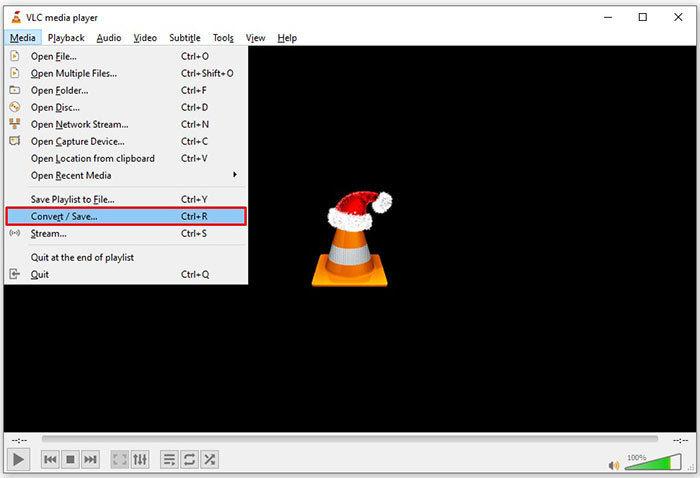
Step 2: Click the Add button and add a TS file into VLC. Hit Convert/Save button to move on.
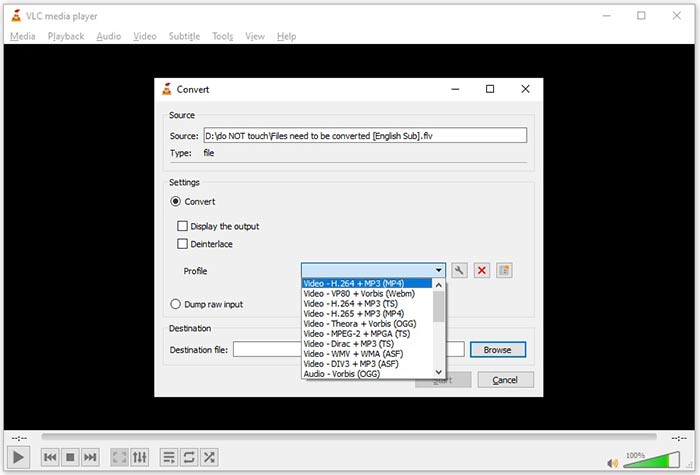
Step 3: Open the Profile option and choose the output format. If you cannot find FLV in Profile, click the Profile Edit button, enter FLV in Profile Name box, select FLV and click Create. Then select FLV from Profile.
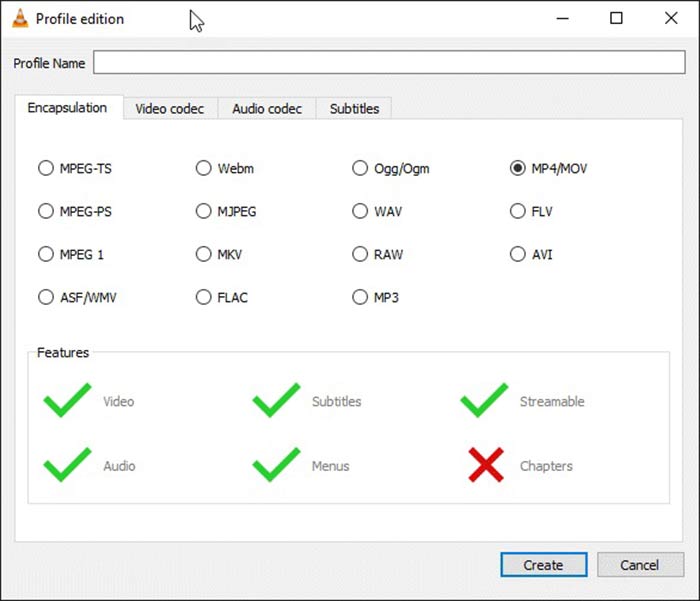
Step 4: Hit the Browse button to set the destination folder and click the Start button.
方式 3:如何通過 FormatFactory 將 TS 轉換為 FLV
FormatFactory 是一個免費的 PC 文件轉換程序。它使您無需支付一分錢即可將 TS 文件轉換為 FLV。但是,它僅支持有損轉換。這意味著您的視頻質量將會降低。另外,它在 Mac 或 Linux 上不可用。
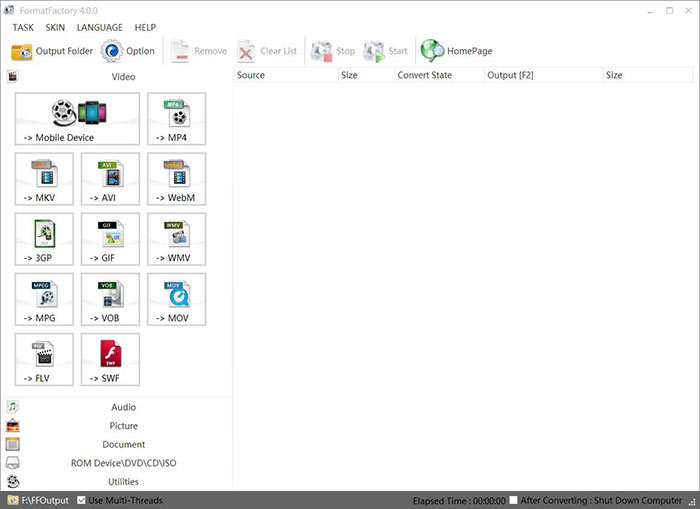
Step 1: Run the free TS to FLV converter, go to the Video section and select FLV.
Step 2: Click the Add File button and import the TS video files from your computer. Hit OK to confirm it.
Step 3: Next, click on the Start button to initiate converting TS to FLV on PC. It takes a while since the freeware is very slow. When it is done, you can go to the directory under Output section to find the FLV files.
第 2 部分:如何在線將 TS 轉換為 FLV
VLC and other video converting software all need you to install on your hard disk. It takes space of your internal memory. You may wonder whether you can convert TS to FLV without installing software. The answer is FVC Free Online Video Converter. It works online and is free of charge. Although does not provide bonus features, it is enough to meet you basic need on video converting.
Step 1: Open https://www.free-videoconverter.net/free-online-video-converter/ in a web browser and click the Add Files to Convert button to download the launcher.

Step 2: Once downloading is done, the launcher will pop up. Click the Add File button to upload the TS files. This web app supports batch conversion. Go to the bottom and select FLV at the bottom.

Step 3: If you are ready, click on the Convert button to trigger the TS to FLV conversion. The app works fast, but the real time is determined by your internet connection. Wait for the converting to finish and download the FLV output.
Don't Miss:
第 3 部分:有關將 TS 轉換為 FLV 的常見問題解答
為什麼我無法將 TS 轉換為其他格式?
TS 是 DVD 的視頻文件格式。大多數商業 DVD 都經過加密並受版權保護。如果您沒有合適的視頻轉換軟件,這也會阻止您轉換 TS 文件。
我可以在 Windows Media Player 中打開 TS 嗎?
Windows Media Player 無法打開 DVD 或 TS 文件,因此您無法在 WMP 中播放 TS。或者,您可以使用第三方視頻播放器,例如 VLC。或者您需要為 WMP 安裝額外的編解碼器包。
如何觀看TS文件?
只有少數媒體播放器支持 TS 文件,例如 VLC。 PC 和 Mac 上的內置媒體播放器、Windows Media Player 和 QuickTime Player 與 TS 不兼容。另一種觀看 TS 文件的方法是將它們刻錄到 DVD 上。
結論
現在,您應該學習至少四種將 TS 文件轉換為 FLV 視頻以在線共享或在數字設備上播放的方法。作為 DVD 電影的視頻格式,TS 並未廣泛用於計算機或移動設備。大多數媒體播放器無法打開它是有道理的。 FVC 免費 FLV 轉換器;但是,可以幫助您輕鬆地將 TS 更改為 FLV。更多問題?請把它們寫在這篇文章下面,我們會回复的。
-
 在Mac / Windows上將視頻_TS文件/文件夾刻錄到DVD的3個簡單步驟
 如何將TS文件轉換和刻錄到DVD光盤?本分步指南將向您展示如何在Windows / Mac上將TS文件和文件夾複製到DVD,以便可以在DVD播放器或電視上觀看TS文件。
-
 在Windows / Mac上將TS轉換為AVI / MKV / MOV / WMV的6種簡便方法
 想要將TS文件快速轉換為AVI / MKV / MOV / WMV?本文顯示了具有完整指南的在線和離線視頻轉換器。也許您可以在這裡獲得最好的免費TS轉換器。
-
 壓縮TS視頻文件–如何將TS文件壓縮為較小的尺寸
 當您要將高清TS視頻文件保存在設備上時,應該從本文中了解更多有關如何將TS視頻文件壓縮為較小尺寸的信息。
