


 視頻轉換大師
 屏幕錄影大師
 影片修復
影片修復
 安全下載
安全下載修正:谷歌驅動器視頻無法在 Chrome 上播放
“無法支持此視頻。”
“我們正在製作這個視頻。請稍後回來查看”
“此視頻當前未播放”
當 Google 雲端硬盤視頻未播放時,可能會出現這些錯誤消息。也許視頻已損壞,或者文件太大而無法加載。但主要原因總是谷歌云端硬盤不支持視頻格式,或者chrome視頻播放器崩潰。總而言之,原因可能是谷歌云端硬盤或chrome引起的。因此,本文將從這兩個方面給出修復 Google Drive 視頻無法播放的解決方案。

第 1 部分:如何修復由 Google Drive 引起的 Google Drive 視頻無法播放的問題
Google Drive 導致 Google Drive 視頻無法播放的主要原因是視頻格式的限制。 Google Drive 支持的所有視頻格式:
- • WebM 文件(Vp8 視頻編解碼器、Vorbis 音頻編解碼器)
- • MPEG4、3GPP 和 MOV 文件 –(h264 和 mpeg4 視頻編解碼器、AAC 音頻編解碼器)
- • AVI(MJPEG 視頻編解碼器和 PCM 音頻)
- • MPEG-PS(MPEG2 視頻編解碼器和 MP2 音頻)
- • WMV
- • FLV(Adobe – FLV1 視頻編解碼器、MP3 音頻編解碼器)
- • MTS
- • 奧格
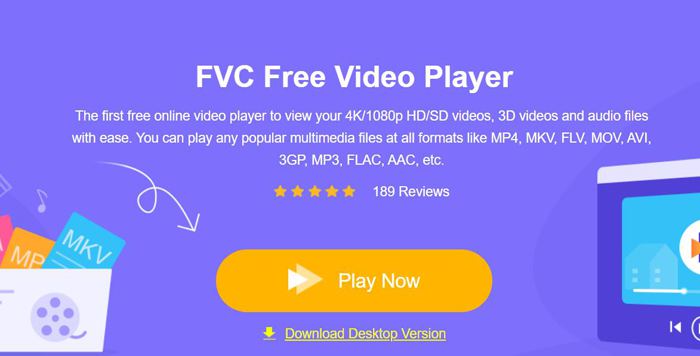
如果你的影片格式不在上面列出的清單中,你就需要透過其他影片播放器來播放這些影片。FVC Free Video Player 將會是你的最佳選擇。它支援任何格式的影片,甚至是 DVD 和 Blu-ray 檔案。而且無需下載任何軟體或大型影片,就能直接透過線上的 FVC Free Video Player 免費開啟在 Google 雲端硬碟中無法播放的影片。
步驟一: 在電腦上開啟任一 Chrome 瀏覽器並前往 FVC Free Video Player 官方網站。點擊立即播放(Play Now)按鈕安裝啟動器,然後再次點擊該按鈕以開啟影片播放器。之後只要點擊開啟檔案(Open Files)按鈕,選擇 Google 雲端硬碟中想播放的影片即可。
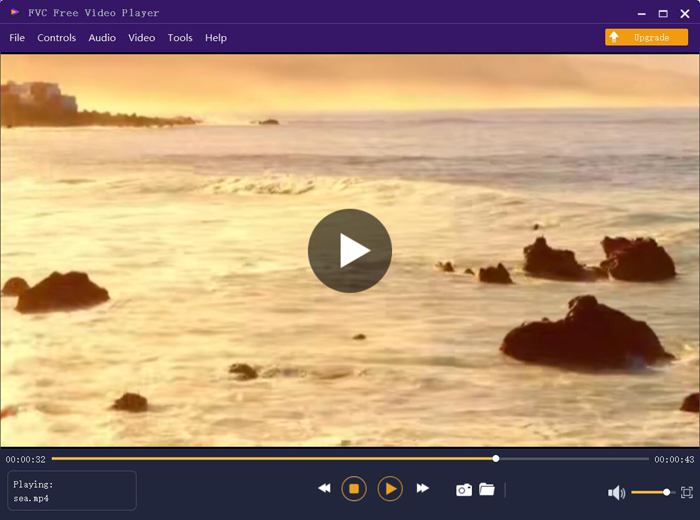
步驟二: 接著影片就會自動播放,不會再出現任何錯誤或限制。更棒的是,你還可以透過調整音量、播放速度,甚至是影片特效來提升觀影體驗。
第 2 部分:解決 Google Drive 視頻無法播放的 5 種其他解決方案
也有一些由chrome引起的問題,您可以嘗試以下5種解決方案來處理Google Drive視頻無法播放。
1. 更新 Google Chrome 或瀏覽器播放器
如果其他網站上的視頻也無法像Google Drive那樣播放,那麼很可能是谷歌瀏覽器或瀏覽器上的視頻播放器沒有及時更新。您可以前往 Google Play Store 查看 Google Chrome、HTML 5 Video Player 或 Flash Video Player 的更新信息。
2. 清除瀏覽器與 Google 雲端硬碟的快取與 Cookie
長期使用谷歌瀏覽器後,瀏覽器中肯定會存有大量垃圾文件,播放視頻時會造成緩衝。因此,您可以定期清除緩存和 cookie。以下是詳細步驟:
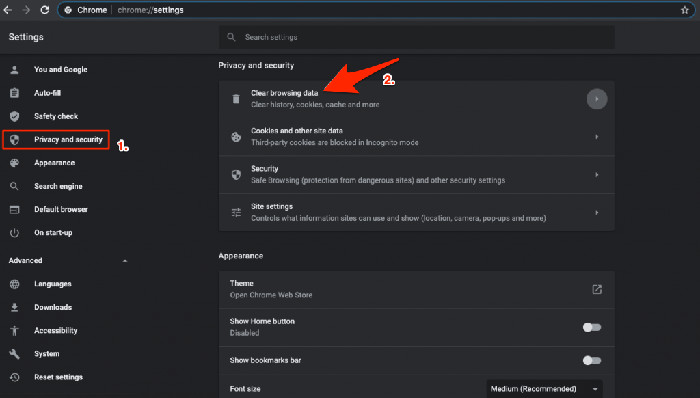
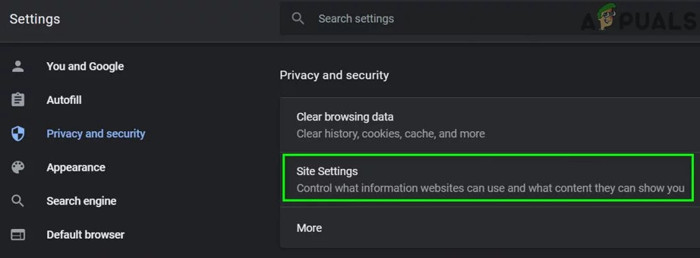
步驟一: 點擊右上角的三個縱向點圖示,選擇設定(Settings)選項。然後在左側欄位中點擊隱私權與安全性(Privacy and security),即可找到清除瀏覽資料(Clear browsing data)選項。
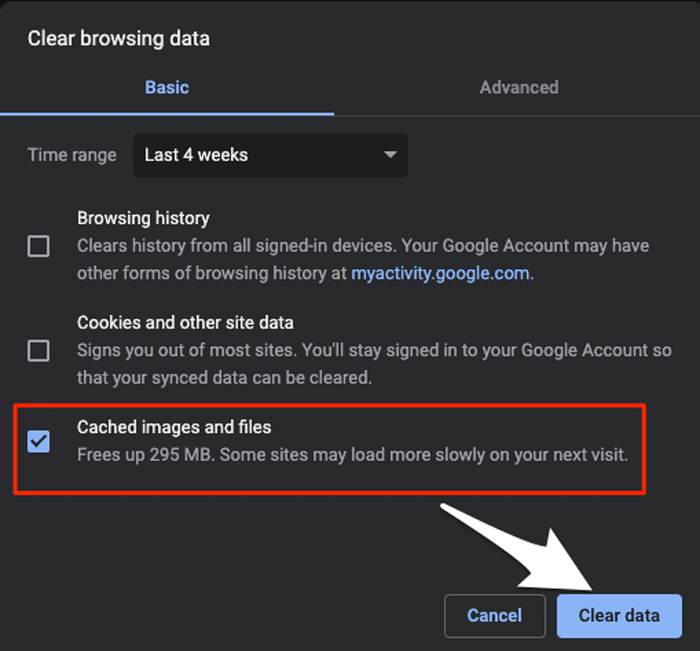
步驟二: 視窗跳出後,勾選快取的圖片和檔案(Cached images and files),再點擊清除資料(Clear data)按鈕。
3. 開啟第三方 Cookie
在 Google Drive 幫助中,有一個關於播放視頻的提示:要在 Google Drive 上播放視頻,您需要開啟第三方 cookie。因此,如果發生 Google Drive 視頻無法播放的情況,您可以檢查瀏覽器的 cookie。
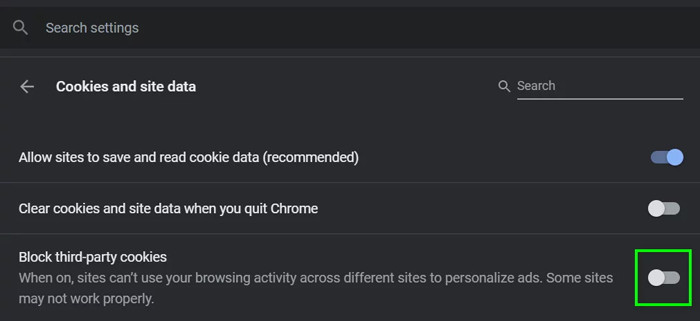
步驟一: 與解法 2 相同,先前往隱私權與安全性(Privacy and security)選項。接著點擊網站設定(Site settings),並選擇Cookie 和網站資料(Cookies and site data)。
步驟二: 關閉封鎖第三方 Cookie(Block third-party cookies)的開關。然後重新啟動 Chrome 與 Google 雲端硬碟再試一次。
4. 停用部分 Google 擴充功能
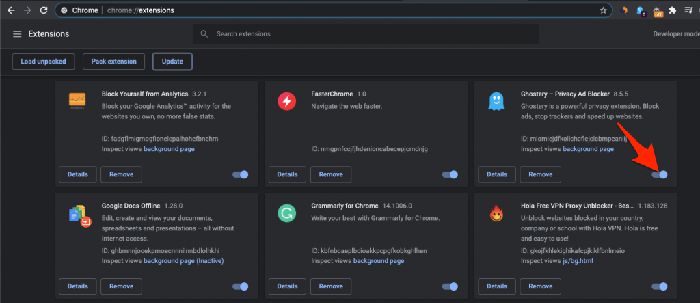
有些 Google 擴展程序用於向瀏覽器添加額外功能,但有些會阻止程序處理。要檢查 Google Drive 視頻無法播放是否是由此問題引起的,您應該按照以下步驟關閉所有擴展程序。
操作步驟:要直接開啟 Google 擴充功能頁面,你可以在搜尋列輸入 chrome://extensions。然後點擊各擴充功能旁的切換按鈕來關閉所有擴充功能。之後關閉 Chrome,再重新開啟,並嘗試播放影片。
5. 在新視窗中開啟影片
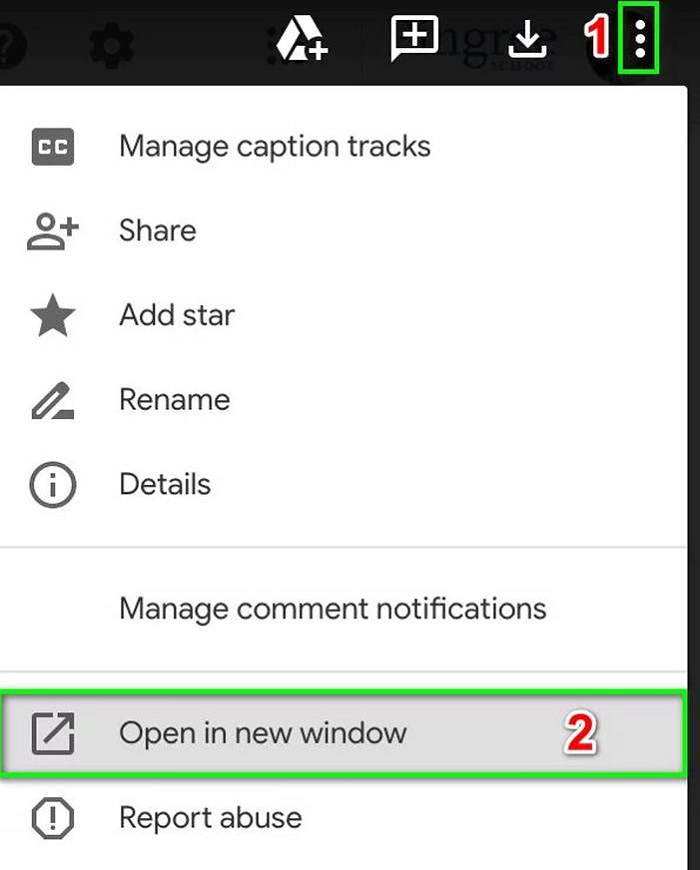
如果上述解決方案不起作用,您可以嘗試最後一種方法。在另一個窗口打開視頻使chrome重新獲取視頻信息的同時刷新網絡。
操作步驟:首先開啟 Google 雲端硬碟,找到你想播放的影片。接著點擊右上角的三個點圖示,然後選擇在新視窗中開啟(Open in new window)選項。
第 3 部分:Google 雲端硬盤視頻無法播放的常見問題解答
1. 為什麼我的 AVI 格式的 Google Drive 視頻無法播放?
雖然 Google Drive 支持 AVI 格式,但您應該下載相應的擴展程序。前往 Google Extension 進行搜索和下載。
2. 如何下載無法播放的 Google Drive 視頻?
在 Chrome 上打開 Google 雲端硬盤並選擇我的雲端硬盤選項。選擇您要下載的所需文件,然後單擊右上角的三點圖標。然後選擇下載選項。
3. 我可以在 Google Drive 上播放 4K 電影嗎?
不可以。Google 雲端硬碟僅支援最高 1920x1080p 解析度的影片。不過,你可以改用 FVC 4K UHD Player 來線上播放 4K 影片。
結論
導致 Google Drive 視頻無法播放的原因有很多,並且錯誤消息總是“無法支持此視頻”。這是因為 Google Drive 不支持視頻格式。在這種情況下,您需要通過其他專業視頻播放器播放視頻。您可以嘗試在線使用 FVC 免費視頻播放器,而無需下載任何第三方軟件。
-
 6種經過驗證的解決方案,可修復無法在Chrome上播放的視頻
 要解決視頻無法在Chrome上播放的問題,您需要做的就是閱讀我們的問題排查並逐一執行經過驗證的解決方案。
-
 5 100%修復無法在iPad上播放的視頻的工作解決方案
 您的視頻無法在 iPad 上播放?這裡有五個解決方案可以幫助您擺脫這個問題,然後您可以輕鬆地在手機上欣賞您喜歡的視頻。
-
 在 Chromebook 2021 上播放 MP4 文件
 您可以在Chromebook上播放視頻嗎?如何在Chromebook上通過USB播放MP4文件?這篇文章分享了3種在Chromebook上播放MP4的方法。
