


 視頻轉換大師
 屏幕錄影大師
 影片修復
影片修復
 安全下載
安全下載如何將您的 FLV 視頻文件轉換為 DivX 格式而不會造成質量損失
本指南將告訴你如何以最佳方式將 FLV 轉換為 DivX。這兩者都是常見的影片格式,但用途完全不同。FLV 是一種透過 Adobe Flash Player 在網路上傳輸影片的檔案格式。大多數網站都支援 FLV,包括 YouTube、Google Video、Yahoo Video 等。不過,DivX 則是一種高品質的視訊編碼格式,可用來儲存最高可達 1080 HD 解析度的影片內容。

第 1 部分:免費將 FLV 轉換為 DivX 的最簡單方法
在將 FLV 轉換為 DivX 時,你可能會擔心畫質會下降。不可否認,如果你使用錯誤的工具,這個問題一定會發生。相反地,FVC Free FLV Converter 是一款功能強大的 FLV 轉 DivX 轉檔器。雖然它完全免費,但輸出品質相當出色。這是因為這款軟體
最佳免費 FLV 轉 DivX 轉換器的關鍵功能
- 1.快速批量轉換FLV文件到DivX。
- 2.自動優化視頻和音頻質量。
- 3.支持幾乎所有的視頻和音頻格式。
如何免費將 FLV 批量轉換為 DivX
第 1 步:導入 FLV 文件
在電腦上安裝完成後,啟動這款最佳免費 FLV 轉 DivX 轉換器。然後點擊新增檔案按鈕,開啟檔案對話框。找到你想要轉換的 FLV 檔案,並將它們全部匯入轉換器。

第 2 步:將 DivX 設置為輸出格式
載入 FLV 之後,你會進入主介面,影片會顯示在媒體庫面板中。在這裡你可以預覽和編輯影片。若要設定輸出格式,請點擊底部的輸出格式選項,進入一般影片分頁,往下捲動並選擇DivX。

第 3 步:將 FLV 轉換為 DivX
接著,點擊開啟資料夾按鈕以變更輸出資料夾。預設情況下,你的影片會儲存到影片媒體庫資料夾中。最後,點擊轉換按鈕,立即開始進行 FLV 轉 DivX 的轉檔。

第 2 部分:如何在線將 FLV 轉換為 DivX
方法 1:如何無限制地將 FLV 轉換為 DivX 在線
FVC Free Online Video Converter 是一款網頁版的 FLV 轉 DivX 轉檔應用程式。與其他網路工具不同,它完全沒有任何限制。你可以一次上傳多個 FLV 檔案到線上進行轉換。此外,它完全免費,無需註冊,也不會加上浮水印。
步驟 1: 將 https://www.free-videoconverter.net/free-online-video-converter/ 複製並貼到位址列,在瀏覽器中開啟。點擊新增檔案開始轉換按鈕以下載啟動器。

步驟 2: 等待啟動器跳出視窗後,點擊新增檔案按鈕,上傳要轉換的 FLV 檔案。

步驟 3: 移動到下方並選擇你想要的輸出格式。然後點擊轉換按鈕。最後只要在轉換完成後下載結果檔案即可。
方法 2:如何通過 Convertio 將 FLV 轉換為 DivX
Convertio 是一個基於雲的視頻轉換器應用程序。您每次可以將多個最大 100MB 的 FLV 文件更改為 DivX 格式。此外,它還提供基本的自定義選項來創建所需的結果。以下是步驟。
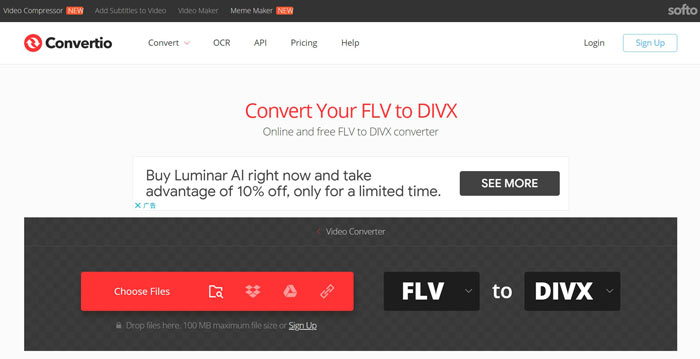
步驟 1: 在網頁瀏覽器中造訪 https://convertio.co/flv-divx/,直接開啟 FLV 轉 DivX 轉換器。
步驟 2: 上傳 FLV 檔案有四種方式:從電腦、Dropbox、Google 雲端硬碟或網址。選擇適合你的方式並上傳影片。
步驟 3: 點擊轉換按鈕,開始在線上進行 FLV 轉 DivX。等待程序完成後,將 DivX 檔案下載到你的硬碟。
第 3 部分:有關 FLV 到 DivX 的常見問題解答
DivX 是什麼格式?
DivX 是由 DivX, Inc. 創建的視頻格式。它變得流行的部分原因是它能夠將視頻壓縮到原始文件大小的近 15%,而不會損失太多質量。
如何播放 DivX 文件?
很可惜,Windows Media Player 和 QuickTime Player 都無法開啟 DivX 檔案。因此,你必須在電腦上安裝第三方DivX 播放器,或為你的影片播放器安裝解碼器套件。
FLV 還在使用嗎?
雖然 HTML 5 在網路上越來越普及,但 YouTube 和大多數影片網站仍然接受 FLV。此外,許多熱門的影片播放器也相容 FLV,例如 VLC、MPC-HC 或其他FLV 播放器。
結論
本指南為您分享了三種將 FLV 視頻文件轉換為 DivX 格式的方法,以便您可以使用媒體播放器流暢地打開和播放它們。當然,您可以嘗試使用網絡視頻轉換器應用程序。但是,如果您有大量 FLV 文件等待轉換,FVC Free FLV Converter 是最佳選擇。此外,它非常易於使用,不需要技術技能。更多問題?請在本帖下方留言。
-
 3種將FLV轉換為桌面和在線AVI的簡單方法
 1. 輕鬆將 FLV 視頻轉換為其他多媒體格式。 2. 支持幾乎所有的視頻格式,如 AVI、MP4、MKV 等。 3. 每次轉換批處理數百個 FLV 文件。
-
 在Windows和Mac上將FLV轉換為WMV的3種方法
 正在尋找在 PC 或 Mac 上將 FLV 轉換為 WMV 而不會降低質量的最佳方法?您很幸運,因為我們在這里分享了三種輕鬆完成工作的方法。
-
 前6個MP4到DivX轉換器,可輕鬆將MP4轉換為DivX
 當您需要將MP4文件備份到DVD上或在高品質的智能電視上播放它們時,可以從本文中了解有關6種最好的免費MP4到DivX轉換器的信息。
