


 視頻轉換大師
 屏幕錄影大師
 影片修復
影片修復
 安全下載
安全下載3 款最佳 Facebook 通話錄音機 - 如何錄製 Facebook 視頻通話
如何錄製 Facebook 視訊通話,來留住你與親朋好友之間的珍貴時光?自從 Facebook 推出視訊通話功能後,越來越多的使用者傾向透過 Facebook 通話而不是電話聯繫他人。不過,作為社群媒體平台的附加通訊功能,它不像電話一樣提供錄音功能。此外,其獨立應用程式 Facebook Messenger 也沒有內建錄影工具。在這種情況下,你可以參考本文,瞭解適用於電腦、iOS 裝置以及 Android 手機的 3 款好用的Facebook 通話錄製工具,並依照文中的詳細教學進行操作。

第 1 部分:適用於 Windows/Mac 的最佳在線 Facebook 通話記錄器
不需下載任何第三方軟體,你就可以使用FVC Free Screen Recorder 在線免費錄製 Facebook 視訊通話。這是一款介面簡潔且功能齊全的線上 Facebook 通話錄影工具。
- 1. 通過簡單的步驟免費在線錄製 Facebook 通話和視頻。
- 2. 無損錄製音視頻,保持高品質視頻。
- 3.無水印保護您的所有權。
- 4.錄音會自動保存在媒體庫中,您可以自由選擇刪除、下載、分享到SNS。
步驟 1: 在任意瀏覽器中前往FVC Free Screen Recorder 的官方網站。點擊Start Recording 按鈕,在數秒內安裝啟動器,接著再次點擊Start Recording 以啟動錄影工具。

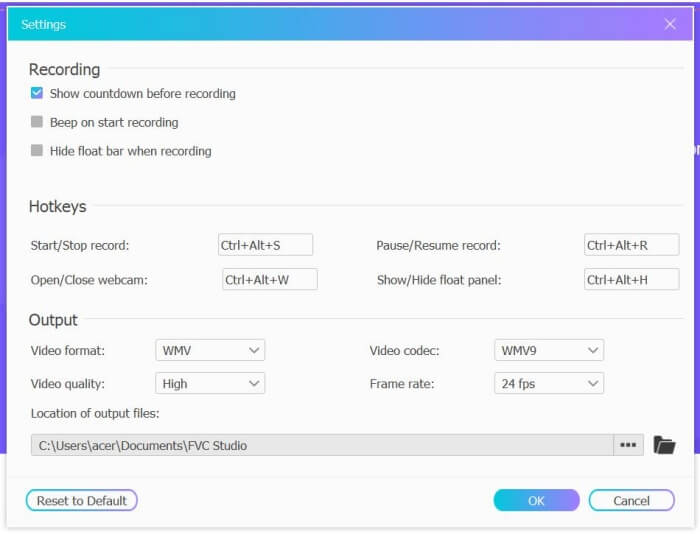
步驟 2: 點擊Recording Area 功能表,選擇全螢幕或自行框選錄製區域。然後開啟Microphone(麥克風)以及Speaker(系統聲音)。若要調整影片設定,可以點擊Setting 圖示,並選擇 MP4 格式、高畫質以及 24 fps 影格率,以確保錄影品質。設定完成後,點擊REC 按鈕開始錄製 Facebook 通話。
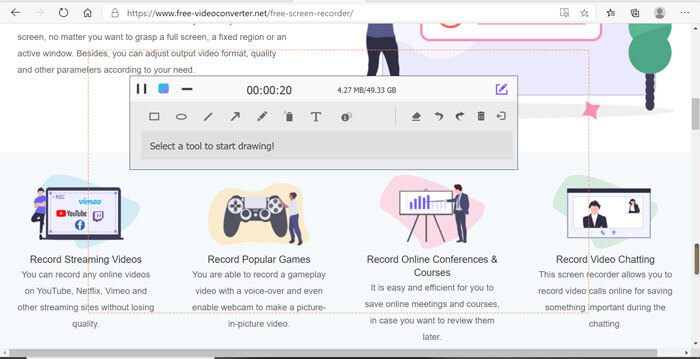
步驟 3: 螢幕上會跳出一個工具箱,內含多種編輯工具。你可以依需求加入圖形、文字與線條。完成後,點擊Stop 圖示,把錄影檔儲存到雲端。之後在雲端介面中,按滑鼠右鍵即可選擇下載到電腦。
使用這款免費的在線 Facebook 視頻通話記錄器是計算機用戶在線錄製 Facebook 視頻通話的最佳方式。通過預先調整錄音設置,它可以將Facebook通話保存為MP4格式,體積小,質量高。如果您習慣於在手機上撥打 Facebook 電話,請繼續閱讀本文。
第 2 部分:如何通過默認錄音器為 iOS 錄製 Facebook 通話
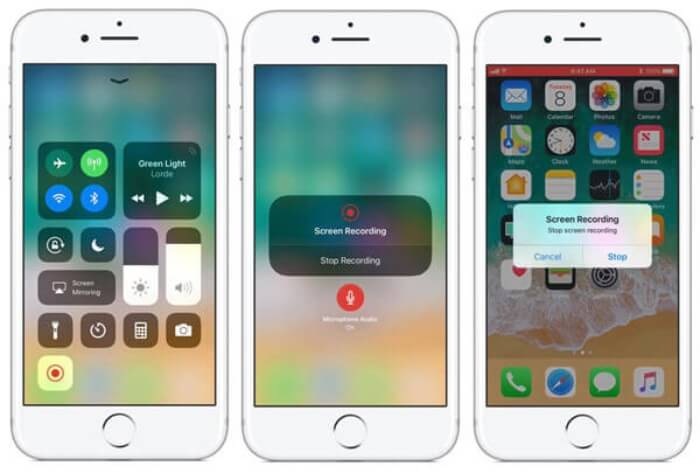
更新後的 iOS 11 或更高版本在你的 iPhone 和 iPad 上有一個新的默認錄音機,這是在不下載任何應用程序的情況下捕捉 Facebook 視頻通話的最佳選擇。在這裡,您可以了解如何將 Facebook 通話記錄器添加到控制中心的快捷方式以及使用方法。
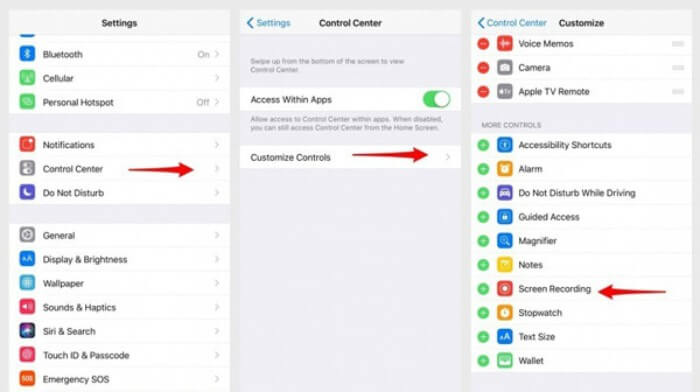
步驟 1: 在 iPhone/iPad 上打開設定(Settings),向下捲動並選擇控制中心(Control Center)。接著點擊自訂控制項(Customize Controls),找到螢幕錄製(Screen Recording) 功能,點擊加號(Plus)圖示,將此功能加入控制中心。
步驟 2: 從手機螢幕頂端下滑開啟控制中心,你會在底部看到螢幕錄製圖示。點擊螢幕錄製(Screen Recording) 圖示即可開始錄影,你可以選擇同時錄下畫面與聲音,或只錄製音訊軌。如果想結束錄製,只要點擊頂端紅色的狀態列(Status Bar),再在跳出的視窗中點擊Stop 即可停止。
第 3 部分:適用於 Android 的簡單 Facebook Messenger Recorder
一些Android手機沒有內置錄音機,Android有太多Facebook視頻通話錄音機可供選擇。因此,您可以通過以下部分中的詳細步驟了解適用於 Android 手機的最佳錄音機之一。
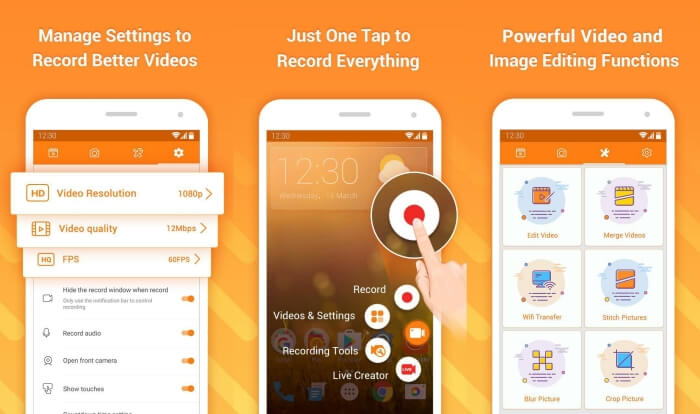
DU Recorder 是一款操作簡單、以流暢錄影聞名的 Android Facebook 通話錄影工具。無需 Root,任何人都能一鍵錄製 Facebook Messenger 通話。
步驟 1: 開啟 DU Recorder,你會看到錄影、截圖、編輯工具與設定四個選單。先點擊Settings(設定)選單來調整影片參數。為了保持高畫質,你可以選擇 1080p 解析度與 30 fps 影格率。
步驟 2: 不要關閉錄影程式,直接開啟 Facebook Messenger。此時螢幕上會顯示錄影工具圖示。點擊該圖示並選擇Recording(錄製)圖示即可開始錄製畫面與聲音。再次點擊即可停止錄影。之後你可以點擊Editing(編輯)圖示,裁剪錄影並為影片加入背景音樂。
你可能也會喜歡:
第 4 部分:Facebook 通話記錄器的常見問題
1. Facebook 有沒有默認的錄音機在 PC 上錄製視頻通話?
不,它沒有。因此,您必須依賴其他專業的 Facebook 通話記錄器。如果您不想下載其他會佔用您計算機存儲空間的軟件,FVC Free Screen Recorder 是您的最佳選擇。
2. 如何在 Facebook Messager App 上開始與朋友聊天?
首先,在您的手機上打開 Facebook Messenger,然後選擇您想要與 Facebook 通話的朋友的聊天框。現在您可以看到視頻圖標,因此您可以單擊它開始視頻通話。
3. 使用 Facebook Messenger 錄音機時,我應該選擇什麼格式來保存錄音?
無論您是在計算機還是手機上使用 Facebook 通話記錄器,保存 Facebook 視頻通話的最佳格式都是 MP4。它可以節省更多的存儲空間,並與所有設備兼容。
結論
以上內容為你介紹了 3 款Facebook 視訊通話錄影工具。對於 iPhone、iPad 與部分 Android 手機,你可以直接使用手機內建的錄影功能。若沒有內建工具,則可在 Google Play 上選擇安裝 DU Recorder 等錄影程式。而在電腦端,FVC Free Screen Recorder 是錄製 Facebook 通話的最佳選擇。如果你在使用 Facebook 通話錄影工具時遇到其他問題,歡迎在下方留言。
-
 Snagit 2021評論–優點,缺點和最佳選擇
 什麼是Snagit的最佳替代品?有像Snagit這樣的屏幕捕獲工具嗎?這篇文章將評論Snagit並分享Snagit捕獲屏幕的最佳選擇。
-
 在桌面和在線上不容錯過的 6 款最佳 WAV 錄音機
 我們在本文中分享的最好的 WAV 錄音軟件具有多種實用功能,可幫助您像專業人士一樣捕捉音頻和語音。
-
 產生高質量音頻的前 4 名免費 AIFF 錄音機
 本文討論 AIFF 以及一些可用於生成高質量 AIFF 格式的最流行工具。
