


 視頻轉換大師
 屏幕錄影大師
 影片修復
影片修復
 安全下載
安全下載使用免費的 FLV 到 Xvid 轉換器將 FLV 轉換為 Xvid 的 3 個步驟
FLV 是一種容器文件格式,被大多數媒體播放器(如 Media Player Classic、MPlayer、RealPlayer、VLC 媒體播放器等)廣泛支持。但是,一旦您想在 DVD 或 CD 播放器上播放 FLV 文件,您就會陷入困境。 CD 或 DVD 播放器本身不支持 FLV 播放。
這個問題的解決方案是將 FLV 轉換為 Xvid,Xvid 是一種可以燒錄到 CD 或 DVD 播放機上的編解碼器。
本教學旨在告訴你,只需 3 個步驟,就能用一款簡單的免費 FLV 轉 Xvid 轉換器把 FLV 轉成 Xvid。

第 1 部分。將 FLV 自由轉換為 Xvid 的 3 個步驟
將 FLV 轉換為 Xvid 很容易,將 FLV 轉換為 Xvid 的步驟啟動一個免費的 FLV 到 Xvid 轉換器。
FVC Free FLV Converter 是一款精靈工具,可以將 FLV 檔案轉碼為其他格式和編解碼器,包括 Xvid、Divx、MP4、MOV、MKV、WMV、AVI 等。

FVC免費FLV轉換
155411+ 下載- 轉換 300 多種視頻格式,包括 FLV、Xvid 等。
- 將視頻轉換為 NTSC、PAL 和 SECAM 格式的 DVD VOB。
- 從 FLV 中提取音頻以保存背景音樂。
現在,讓我們檢查使用此轉換器將 FLV 轉換為 Xvid 的詳細步驟。
步驟一: 新增 FLV 檔案
在您的計算機上免費下載此 FLV 到 Xvid 轉換器。它適用於 Windows 和 Mac 計算機。下載並安裝到您的計算機上。
點擊 新增檔案 按鈕,將多個 FLV 檔案或整個 FLV 資料夾加入此程式。
您可以直接將 FLV 文件拖放到該軟件中。

步驟二: 選擇 Xvid 輸出
打開 輸出格式 的下拉清單,搜尋 Xvid,並選擇 Xvid SD、HD 或 4K 格式。
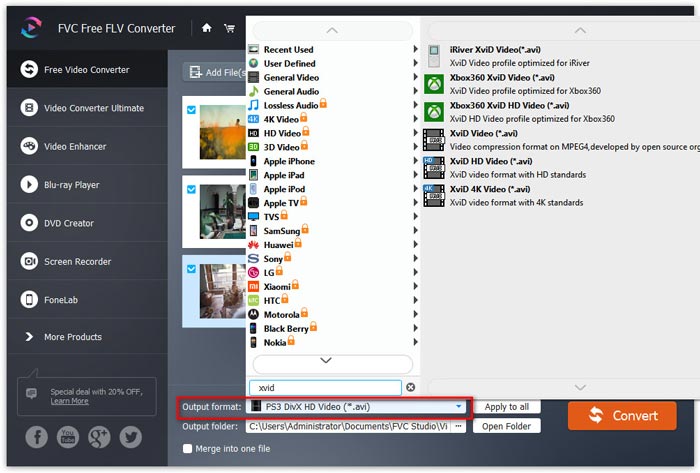
步驟三: 將 FLV 轉換為 Xvid
在勾選好 Xvid 格式後,點擊 輸出資料夾 旁邊的三個點,以定位並選擇儲存轉換後 Xvid 檔案的目的位置。
最後,點擊右上角的 轉換 按鈕,即可開始將 FLV 轉換為 Xvid。
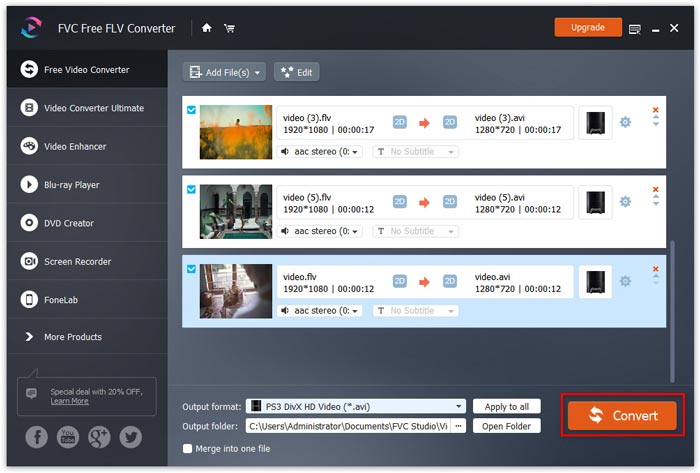
該軟件還允許您通過選中合併為一個文件框將多個文件合併為一個文件。頂部菜單中的編輯圖標允許您為視頻創作添加開始和結束主題。
第 2 部分。什麼是 FLV 和 Xvid
什麼是 Xvid?
Xvid,前身為 XviD,是一個遵循 MPEG-4 視頻編碼標準的視頻編解碼庫。作為專有軟件 DivX Pro Codec 的主要競爭對手,Xvid 是 GNU 通用公共許可證下的免費軟件。
Xvid 是一款使用 MPEG-4 進階簡單配置(Advanced Simple Profile)壓縮技術的程式。以 Xvid 編碼的檔案可以燒錄到 CD 或 DVD,並在部分相容 DivX 的 DVD 播放機和其他 Xvid 媒體播放器 上播放。
此外,Windows、Mac OS、Linux、BSD 也可以直接訪問 Xvid 庫。
什麼是 FLV?
FLV,即 Flash 視頻,作為一種容器文件格式,用於通過 Internet 傳送電視節目、電影等數字內容。
以往這個格式可以在網頁或本機由 Adobe Flash Player 外掛程式或應用程式支援。然而,Adobe 已於 2021 年起宣佈停止開發 Flash Player。不過,你仍然可以在 Media Player Classic、MPlayer、RealPlayer、VLC Media Player 等多款 FLV 播放器軟體 上開啟 FLV 檔案。
儘管大多數播放器都廣泛支持 FLC,但它無法在 CD 或 DVD 播放器上打開。
第 3 部分。 將 FLV 轉換為 Xvid 的常見問題
Xvid 和 AVI 有什麼區別?
AVI 是一種包含視頻和音頻的多媒體容器格式。它支持DV、H.263、VP8、VP9、DivX等編解碼器。使用DivX和Xvid編碼的AVI文件共享相同的擴展名.avi,使AVI文件具有與DVD相似甚至更好的質量。
Xvid 和 DivX 一樣嗎?
不是。 2021 年 1 月,DivXNetworks 最初創建 OpenDivX 作為開源 MEPG-4 視頻編解碼器,但是,它受到限制性許可,只有 DivX 高級研究中心 (DARC) 的成員才能對該項目的 CVS 進行書面訪問。然後在 2001 年 7 月,DARC 發布了他們基於 encore2 的閉源商業 DivX 4 代碼的測試版,所有 OpenDivX 代碼在被刪除之前使用下載的最新版本的 encore2 替換為 Xvid。 Xvid 編碼的文件可以寫入 CD 或 DVD,並且可以在某些 DivX 兼容的 DVD 播放器和媒體播放器上播放。但是,Xvid 可以選擇使用大多數 DivX 認證機頂播放器不支持的高級 MPEG-4 功能對視頻進行編碼。
FLV 還在使用嗎?
FLV 是一種容器檔案格式,用於在網路上傳輸數位視訊內容。它曾被廣泛用於影片、橫幅廣告、動畫、串流等。目前已有更高效率的容器檔案格式,但 FLV 仍然被 Windows、HandBrake、FFmpeg、VLC 等所支援與使用。即使你的裝置不支援 FLV,你仍然可以將其轉換成 MP4、MOV、WMV 等相容性極高的格式。
結論
儘管 FLV 已廣泛用於網頁、桌面與行動裝置上,但 CD 或 DVD 播放機並不支援這種格式。如果你需要在 CD 或 DVD 播放機上觀看 FLV 檔案,將 FLV 轉換為 Xvid 就是解決方案。這裡提供一份詳細的 3 步驟指南,教你如何利用免費的 FLV 轉 Xvid 轉換器輕鬆完成轉檔。它完全免費,可轉換大多數影片與音訊檔案。如果你喜歡這篇內容,歡迎分享給你的粉絲。
-
 3種將FLV轉換為桌面和在線AVI的簡單方法
 1. 輕鬆將 FLV 視頻轉換為其他多媒體格式。 2. 支持幾乎所有的視頻格式,如 AVI、MP4、MKV 等。 3. 每次轉換批處理數百個 FLV 文件。
-
 在Windows和Mac上將FLV轉換為WMV的3種方法
 正在尋找在 PC 或 Mac 上將 FLV 轉換為 WMV 而不會降低質量的最佳方法?您很幸運,因為我們在這里分享了三種輕鬆完成工作的方法。
-
 將FLV視頻上傳到YouTube的具體指南
 將 FLV 上傳到 YouTube 但失敗?您可以自行解決此問題,並按照我們的分步指南將 FLV 轉換為 YouTube 支持的編解碼器。
