


 視頻轉換大師
 屏幕錄影大師
 影片修復
影片修復
 安全下載
安全下載如何在 2022 年使用桌面和在線解決方案免費將 VOB 轉換為 FLV
VOB 格式的檔案通常儲存在 DVD 根目錄下的 VIDEO_TS 資料夾中。VOB 影片包含光碟上大部分的資料,包括視訊、音訊、字幕、DVD 選單以及其他導覽內容。不過,如果你想將 VOB 檔案上傳到 YouTube 等社交網路,就必須將 VOB 檔案的格式轉換成支援串流播放的格式,如 FLV——這是網際網路串流媒體的標準格式。因此,在本文中,我們將說明如何在線上或使用免費的 VOB 轉 FLV 檔案轉換器,將 VOB 轉換為 FLV,以獲得更佳的串流效果。

第 1 部分。 如何使用免費桌面軟件將 VOB 轉換為 FLV
若要快速將 VOB 檔案格式轉換為 FLV,請試試 FVC Free FLV Converter。透過這款免費軟體,你可以將 VOB 影片檔轉換成 FLV、MP4、AVI、WMV、MOV 等多種格式。此外,該程式也能在需要時執行一些基本的影片剪輯作業。只要下載這款 VOB 轉 FLV 檔案轉換器,並依照下列簡單步驟操作即可。
步驟 1: 啟動 FVC Free FLV Converter
首先,為您的 Windows 或 Mac 下載 VOB 到 FLV 轉換器。下載安裝文件後,雙擊它並按照屏幕上的說明進行操作。之後,在您的計算機上啟動它,您將看到它的界面如下。

步驟 2: 將 VOB 檔案加入程式
點擊 Add File(s) 按鈕,選取你的 VOB 檔案,然後按 Next 繼續。

步驟 3: 選擇 FLV 作為輸出格式
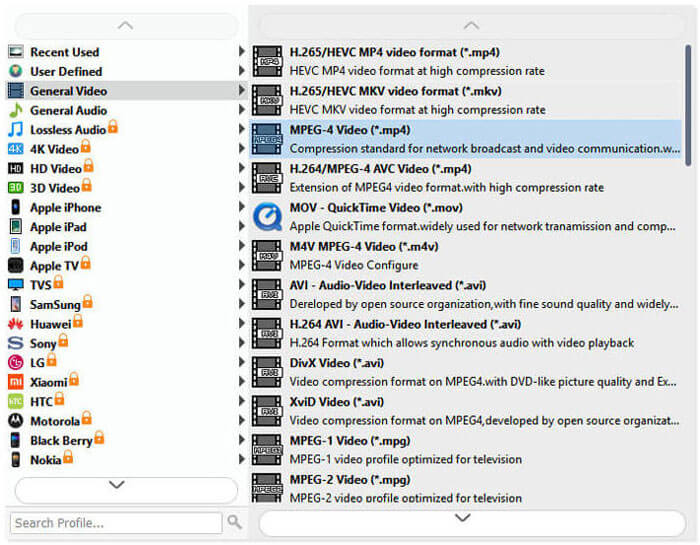
接著,在 Output format 欄位中選擇 FLV 檔案格式。
步驟 4: 將 VOB 轉換為 FLV
點擊 Open Folder 按鈕並選擇你要儲存轉檔後檔案的資料夾。若要開始將 VOB 檔案轉換成 FLV,請按下 Convert 按鈕。轉檔完成後,包含已轉換檔案的資料夾會自動開啟。
第 2 部分。 如何在線將 VOB 轉換為 FLV
使用在線服務將VOB轉為FLV也是一個不錯的選擇。我們挑選了兩個在線 VOB 到 FLV 轉換器供您選擇。所有這些在線工具都是免費的,並且經常被許多用戶使用。請繼續閱讀以了解如何使用在線工具在計算機上將 VOB 轉換為 FLV。
FVC免費在線視頻轉換器
FVC Free Online Video Converter 是一款功能完整的線上工具,支援最常見的影音格式。使用此線上服務轉檔是安全的,當你下載完成轉換結果後,伺服器上的轉檔檔案會立即被刪除。轉檔過程不需要安裝任何軟體,而且整個流程相當簡單。
您可以按照以下步驟將 VOB 文件更改為 FLV。
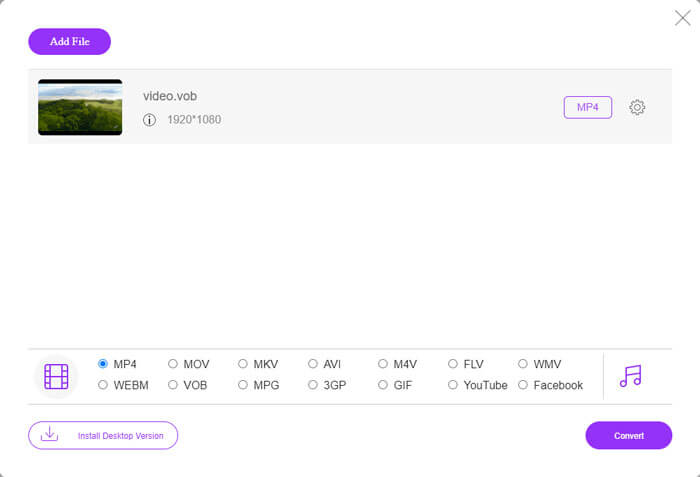
步驟 1: 在 FVC Free Online Video Converter 網站上,點擊 Add Files to Convert 按鈕新增你的 VOB 檔案。第一次使用此工具時,你需要先下載並安裝啟動器。
步驟 2: 在視窗底部的 Video 分類中,確認已選取 FLV 作為輸出格式。
步驟 3: 按下 Convert 按鈕,然後選擇目的地資料夾。當轉檔程序完成後,你的轉換檔案會自動下載,且存放轉檔檔案的資料夾也會自動開啟。
轉換文件
ConvertFiles 是另一個在線免費 VOB 到 FLV 文件轉換器。該服務可以在幾分鐘內免費轉換各種文件類型。如果您需要,此服務可以將轉換後的文件的下載鏈接發送到您的電子郵件地址。轉換不需要安裝軟件,整個轉換過程很簡單。但請注意,此在線工具可以轉換大至 250 MB 的文件。
這是您如何使用此在線 VOB 到 FLV 轉換器。
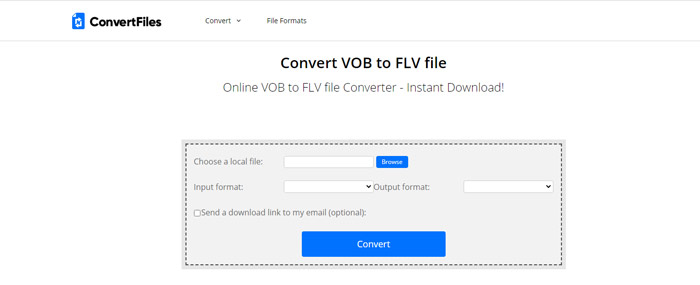
步驟 1: 前往 ConvertFiles 的網頁,點選 Browse,將你的 VOB 檔案加入程式。
步驟 2: 接著,在 Output format 下拉選單中選擇 Flash Video File (.flv)。
步驟 3: 點擊 Convert 按鈕開始將 VOB 檔案轉換為 FLV。當檔案成功轉換後,你會看到一個連結,可點擊前往下載頁面下載已轉換的檔案。
第 3 部分。 VOB 和 FLV 格式之間的比較
| 比較參數 | VOB | 輕型貨車 |
| 文件擴展名 | .vob | .flv |
| 由開發 | DVD論壇 | Adobe系統 |
| 視頻 00 編解碼器 | MPEG-1,MPEG-2 | On2 VP6、Sorenson Spark、屏幕視頻、屏幕視頻 2、H.264 |
| 音頻編解碼器 | MP1、MP2、PCM、AC-3、DTS | MP3、ADPCM、Nellymoser、Speex、AAC |
| 打開 VOB/FLV 文件的程序 | Windows 媒體播放器VLC 媒體播放器 | VLC 媒體播放器Adobe Flash Player |
第 4 部分。 VOB 到 FLV 轉換的常見問題解答
什麼是VOB?
VOB(Video Object 的縮寫)是 DVD-Video 媒體中的容器格式。VOB 可以包含影片、音訊、字幕、DVD 選單,以及 DVD 光碟上的章節導覽功能。VOB 格式通常採用 MPEG-2 編碼,幾乎可由任何媒體播放器開啟。想進一步了解 VOB 播放器,請參閱 Windows 10/8/7 PC 和 Mac 上排名前五的 VOB 播放器。
什麼是FLV?
FLV 是一種影音容器格式,用於透過 Adobe Flash Player 6 或更新版本在網際網路上串流數位影片內容。你可以使用 Windows Media Player、VLC、Adobe Media Player、Winamp、RealPlayer 或其他 FLV 播放器 來播放 FLV 檔案。
VOB 文件是否包含音頻?
是的。 VOB 文件包括視頻、音頻、字幕和 DVD 菜單。
結論
如您所見,您可以使用免費的 VOB 文件轉換器輕鬆將 MP4 轉換為 FLV,同時保留原始視頻的高質量。此外,您還可以在線進行 VOB 到 FLV 的轉換。上述桌面和在線 VOB 到 FLV 轉換器都是免費的。我們希望您能找到最能滿足您需求的滿意解決方案。
-
 什麼是 VOB 文件以及如何將 VOB 文件免費轉換為 GIF
 您想了解更多關於 VOB 文件以及被翻錄後如何分享的信息嗎?或者為什麼需要將 VOB 轉換為 GIF?然後仔細閱讀這篇文章。
-
 VOB到MP4 – 3種免費將VOB文件免費批量轉換為MP4的方法
 本文介紹了3個免費的VOB到MP4轉換器以及相關的教程。您可以輕鬆地在Windows / Mac /在線上免費免費將VOB轉換為MP4文件。
-
 如何在線免費壓縮 VOB 文件
 您是否正在尋找壓縮VOB文件的方法?在本文中了解減小VOB文件大小的最佳方法。
