


 視頻轉換大師
 屏幕錄影大師
 影片修復
影片修復
 安全下載
安全下載如何在沒有外部 DVD 播放器的情況下在 iPad 上播放 DVD 視頻
當你在 Apple 社群中詢問「iPad 有沒有 DVD 播放器?」時,你只會得到「沒有」或「為什麼不直接把 DVD 轉成 iPad 可播放的 MP4 或 MOV 呢?」之類的回答。事實上,目前確實沒有專為 iPad 設計的 DVD 播放軟體或外接 DVD 播放器。但這並不代表你就無法在 iPad 上播放 DVD 影片。

在本文中,您將了解在 iPad 上播放 DVD 視頻的 2 種有效方法,無需外部 DVD 播放器或其他第三方視頻播放器。您可以選擇將 DVD 視頻翻錄為 iPad 支持的格式,或者您可以簡單地將 DVD 格式轉換為兼容的視頻以在 iPad 上播放 DVD。通過這些方式,您可以在較小尺寸的 iPad 上播放 DVD 視頻。
第 1 部分:翻錄 DVD 視頻以在 iPad 上播放的最佳方式
Blu-ray Master Free DVD Ripper 是一款免費且功能強大的軟體,支援將 DVD 光碟轉檔成超過 200 種格式,包括 MP4、MOV 和 M4V,這些都是 iPad 相容的格式。即使 DVD 光碟受 DRM 保護,你也一樣可以將影片轉出,在 iPad 上播放。此外,它還提供彈性的編輯設定,能為 DVD 影片加入多種效果與濾鏡。以下是將 DVD 轉檔並在 iPad 上播放 DVD 影片的詳細步驟:
步驟一: 在電腦上下載 Blu-ray Master Free DVD Ripper,安裝完成後直接啟動程式。將 DVD 光碟放入電腦後,點擊 Load Disc 按鈕,並選擇 DVD Navigator Mode 選項。接著點擊 OK 按鈕,即可自動載入你的光碟。
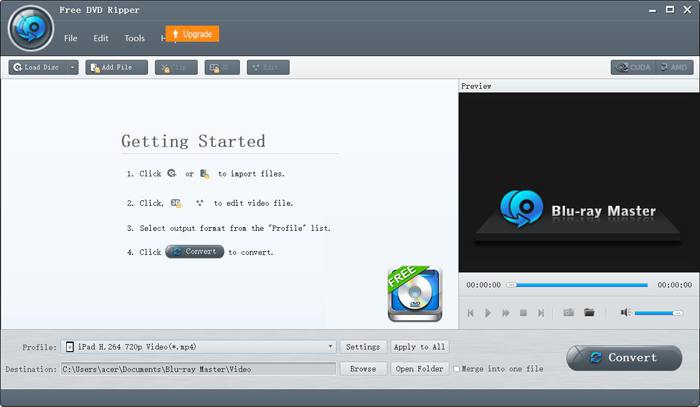
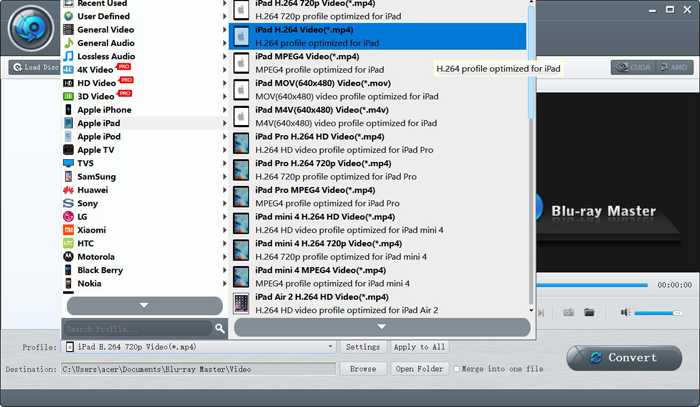
步驟二: 點擊 Profile 功能表,在左側清單中選擇 Apple iPad 選項。之後即可根據你的 iPad 機型,選擇 MP4、MOV 或 M4V 格式。建議你選擇 MP4 格式,因為它檔案較小、畫質又高。透過點擊 Settings 按鈕,你還可以調整進階的輸出設定。
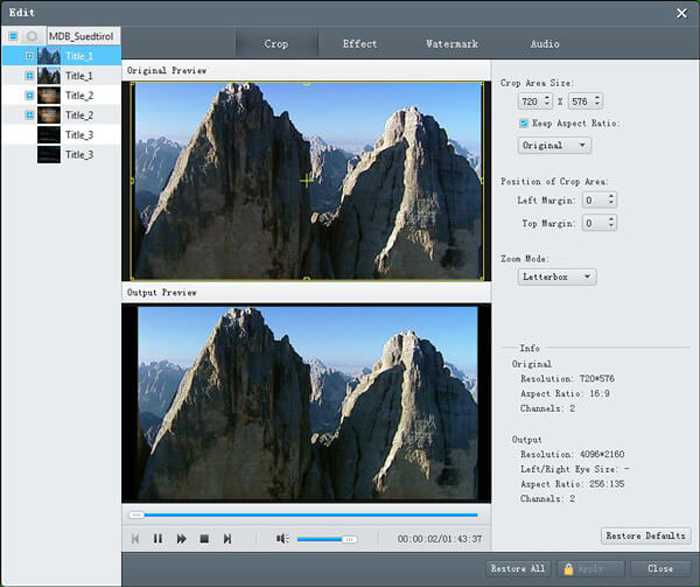
步驟三: 在輸出 DVD 影片之前,你也可以點擊 Edit 按鈕,裁剪畫面、為影片加入特效以及浮水印。
步驟四: 回到主介面後,先選擇儲存路徑,然後點擊 Convert 按鈕,即可開始轉檔,將 DVD 影片轉成可在 iPad 上播放的格式。
第 2 部分:適用於 iPad 的 DVD 播放器的常見問題以及如何在 iPad 上播放 DVD
1. iPad 有沒有外置 DVD 播放器?
雖然 iPad 不支持通過 USB 線將 DVD 播放器連接到 iPad。有外置DVD播放器可以通過Wi-Fi遠程連接iPad,外置DVD播放器要一直充電。您可以在亞馬遜上搜索 DVRP-W8AI2。
2. 轉換 DVD 在 iPad 上播放時應該選擇什麼格式?
Apple 設備(包括 iPad、iPhone 和 iPod)支持 MP4、MOV 和 M4V 格式。在這三種格式中,MP4 格式是最合適的一種。這是因為 MP4 格式具有相對較小的尺寸和較高的質量。更重要的是,MP4 格式還兼容其他便攜式設備,因此您可以輕鬆地發送和傳播視頻。
3. 如何將 DVD 視頻翻錄成 MP4 以便在我的 iPad 上播放 DVD?
若要將 DVD 的 VOB 影片轉成 MP4 格式以在 iPad 上播放,Blu-ray Master Free DVD Ripper 是你的最佳選擇。它內建 iPad 的預設參數,只要一鍵就能輕鬆將 DVD 影片轉檔,在 iPad 上播放。
結論
雖然沒有為 iPad 設計的 DVD 播放器,而且 iPad 不支持連接外部 DVD 播放器,但您可以選擇將 DVD 翻錄或轉換為支持的格式,以便在 iPad 上播放 DVD。然後您就可以在 iPad 上欣賞 DVD 視頻了。如果您有任何其他問題,請在下面留下您的評論。
-
 5 100%修復無法在iPad上播放的視頻的工作解決方案
 您的視頻無法在 iPad 上播放?這裡有五個解決方案可以幫助您擺脫這個問題,然後您可以輕鬆地在手機上欣賞您喜歡的視頻。
-
 如何在iPad 2021上播放MKV文件
 如何在iPad 2上播放MKV文件?我可以將MKV轉換為MP4以便在iPad Pro / Air / 2上播放嗎?這篇文章分享了2種在iPad上播放MKV的簡單方法。
-
 適用於Mac的DVD Player軟件免費下載2021
 如何在沒有DVD驅動器的Mac上播放DVD?如何在Mac上使用外部DVD播放器?此帖分享了5個免費的Mac DVD播放器。
