


 視頻轉換大師
 屏幕錄影大師
 影片修復
影片修復
 安全下載
安全下載所有設備平台都支持的 7 大知名 MP3 錄音機(免費和付費)
Turn your mobile device and your computer a portable MP3 to play your favorite music anytime and anywhere. You do not need to be tied with premium subscriptions from music providers like Spotify and such. You can simply stream and record it. It is like hitting two birds at the same time, you will avoid copyright issues and listen to it as you pleased. You can now have freedom on whatever songs you want to store on your mobile device. In this case, you will need an MP3 recorder that is reliable enough to record seamless and lossless audio output. Well, we got you covered. Check out our list below to discover tools that can record .mp3 for you.

第 1 部分。 免費在線 MP3 錄音機無損捕獲 MP3
FVC免費錄音
One of the smartest ways to record audio on your computer is by using a free app. Many may think that they need a special tool or pay for a premium tool to get the best quality. Actually, you do not need to. There are free ones online that can live up to your expectations. One of which is the FVC Free Audio Recorder. This audio recorder is not your ordinary audio recorder. It is capable of recording audio with the same quality as the original. Plus it can be played on almost all players used by different platforms. This is rare for a free audio recorder. You can get more of this tool if you explore it. Meanwhile, here is a step-by-step guide on how to use the tool.
Step 1. Visit the official website of FVC Free Audio Recorder. Allow the access and follow through until the floating bar appears.
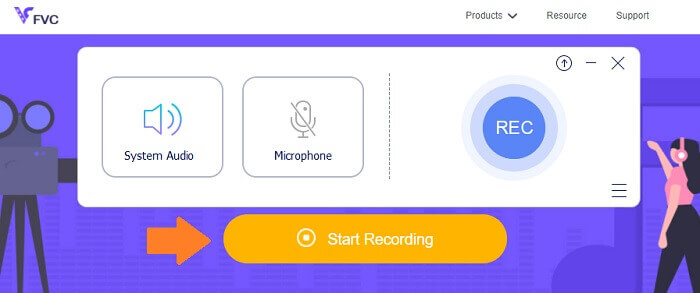
Step 2. By default, the system sound is enabled, for the microphone, you have to click it if you want to record both.
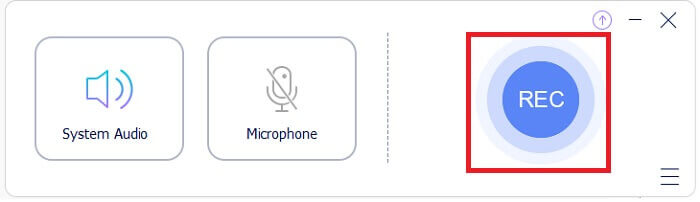
Step 3. Start recording by clicking the REC button.
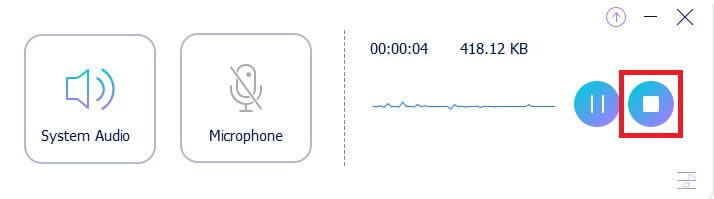
Step 4. Stop recording by clicking the blue Stop button.
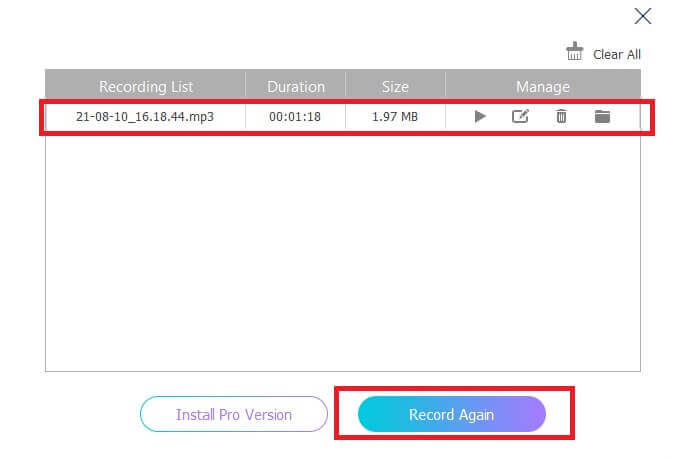
Step 5. The file then will be automatically saved. From there another window will appear where you can playback the recorded file or re-record.
優點
- 免費且安全。
- 幾乎可以在所有瀏覽器上訪問。
- 無限制訪問。
- 沒有持續時間限制。
缺點
- 無法更改工具上的任何設置。
Screencast-O-Matic
在與 FVC Free Audio Recorder 相同的聯盟中,Screencast-O-Matic 也是一款支持 mp3 的錄音機必備工具,您會發現它非常有用。這個屏幕和錄音機已經存在很長一段時間了。許多人還證明該工具對教育工作者和學生的幫助最大。為了支持這一點,我們將該工具添加到列表中。這是為了展示該工具在錄製視頻和音頻方面的幫助。您所要做的就是註冊一個帳戶並獲得對屏幕錄製、編輯工具等的訪問權限。
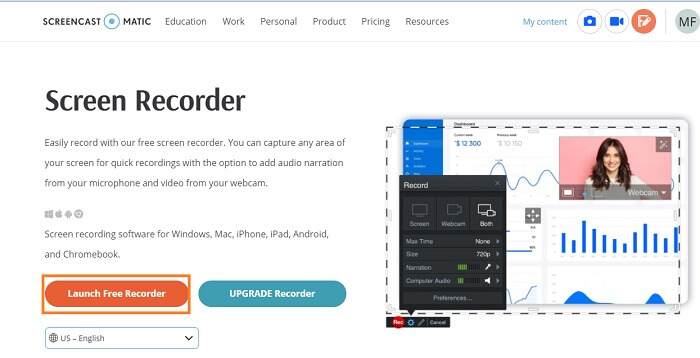
Step 1. Visit the official website of Screencast-O-Matic. Click Free Recorder then wait for the tool to launch.
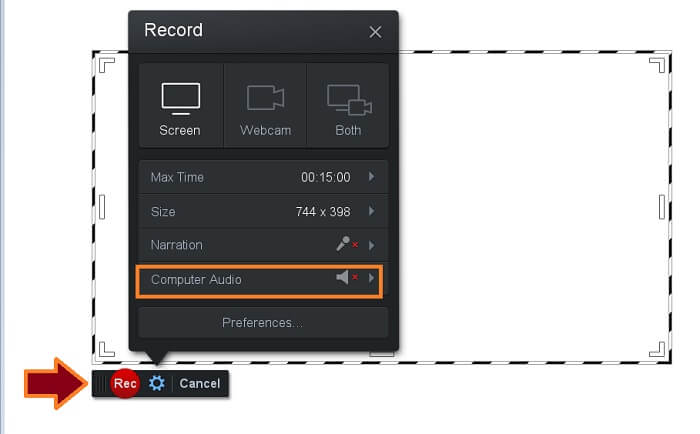
Step 2. The tool will then appear. Enable Computer Audio then to record click the REC button.
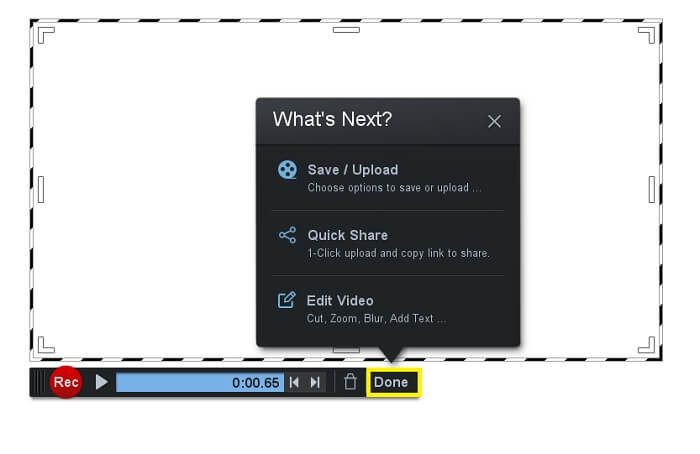
Step 3. Click the same button to Stop the recording. Then click Done to save the recording.
優點
- 免費且安全。
- 幾乎可以在所有瀏覽器上訪問。
- 無限制訪問。
- 沒有持續時間限制。
缺點
- 無法更改工具上的任何設置。
第 2 部分。 適用於 Windows 和 Mac 的前 3 名 MP3 錄音機
如果您願意比免費應用程序走得更遠,您可以考慮可以為您提供最佳體驗的可下載軟件列表。
FVC 屏幕錄像機
一個可以分別錄製屏幕和音頻的屏幕錄像機。 FVC Screen Recorder Premium 是完美的。從完美的界面到性能的一致性,使用它永遠不會浪費。只有少數屏幕錄像機可以做與 FVC 屏幕錄像機一樣多的事情。比特率是可調的,它可以錄製清晰輸出的聲音,當然,它支持幾乎所有設備上都可以播放的 MP3 格式。為您的 Podcast、教程或個人音樂列表製作高質量音頻所需的一切,此工具是您的完美工具。為了幫助您更深入地了解這個工具,這裡列出了一些優點以及如何使用它的指南。
What is likable about it?
● 沒有復雜的過程。
● 無使用限制。
● 無時長限制。
Step 1. Get the tool by clicking the Download buttons below.
Step 2. Follow the installation process until the app is launched. From there, toggle the System Sound to ON. You can also enable the microphone if necessary.
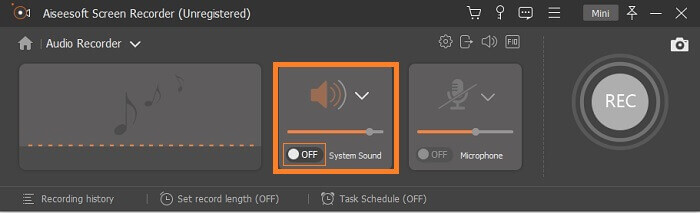
Step 3. Begin recording by clicking the REC button.
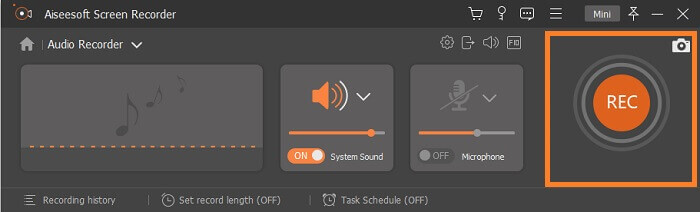
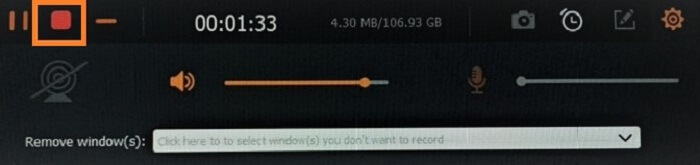
Step 4. Once done recording, click the red Square button to stop the recording.
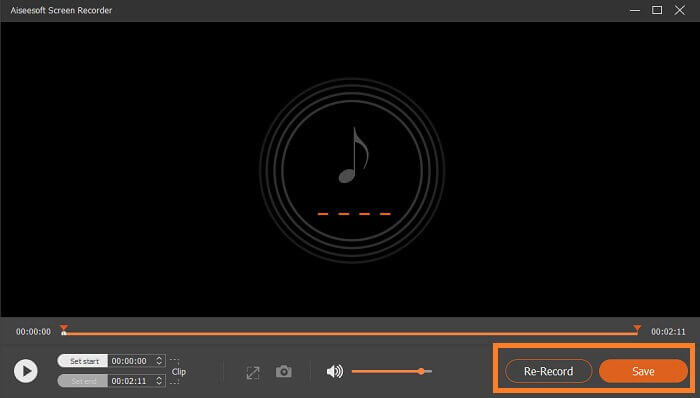
Step 5. Once you stop it, another window will appear where you can choose between Re-record and Save.
班迪康
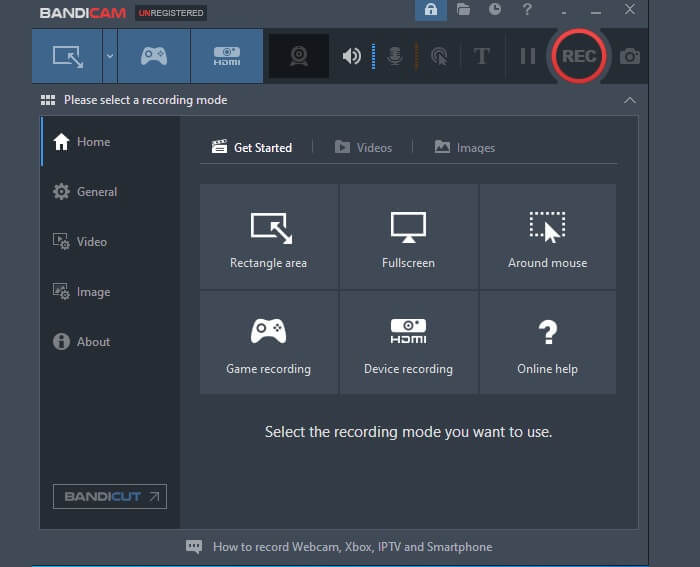
在談論屏幕錄製時被標記為最先進的工具之一。 Bandicam 可以記錄您計算機的活動,例如游戲、視頻通話、會議和課程。此外,這也可以錄製外部視頻設備,如 Xbox/智能手機、IPTV 和網絡攝像頭。當然,該工具還可以錄製音頻。唯一的缺點是您不能單獨錄製音頻。您可以關閉相機或在黑屏上錄製並捕獲音頻。通過閱讀下面的列表,更深入地了解這個工具。
What is likable about it?
● 如果您正在等待特定的廣播,您可以安排錄製。
● 您可以同時混合自己的聲音和音頻。
● 網絡攝像頭覆蓋支持色度鍵。
大膽
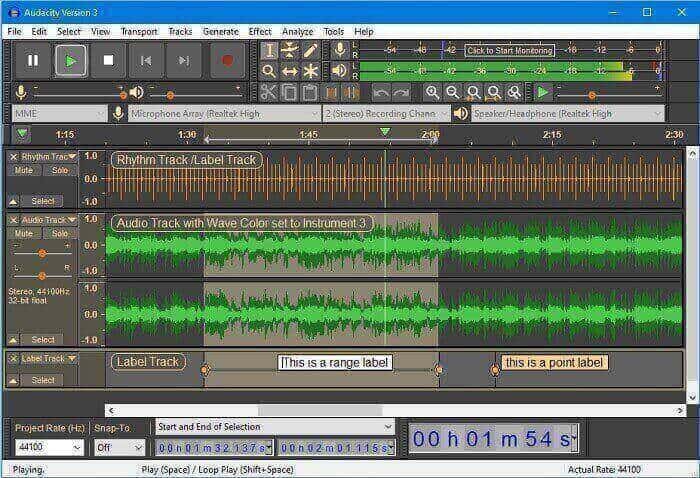
眾所周知,Audacity 是最受歡迎的提供高品質聲音的工具之一。它支持 16 位和 32 位比特率,可以通過系統聲音和麥克風錄製現場音頻。不僅如此,您還可以錄製來自混音器的設備、數字化的錄音等。對於好奇的人來說,這個工具兼容Windows 10、Windows 8和Windows 7。建議有一個合理速度為2GB/1 GHz,理想速度為4 GB/2 GHz的Ram。但是,如果您想查看該工具的最佳功能,請超出最低要求。
What is likable about it?
● 可以一次批量導出多個錄製文件。
● 您可以剪切、複製、粘貼和刪除部分錄音。
● 支持LV2、Nyquist、Audio、VST、LADSPA。
第 3 部分。 iPhone 和 Android 的 MP3 錄音機
更有可能許多人會隨身攜帶他們的移動設備。因此,我們考慮添加您也可以在移動設備上使用的應用程序。雖然安卓和蘋果設備都內置了錄音,但有時它們產生的質量並不令人滿意和不清晰。因此,請隨時查看下面的列表。
適用於 Android 的錄音機和編輯器
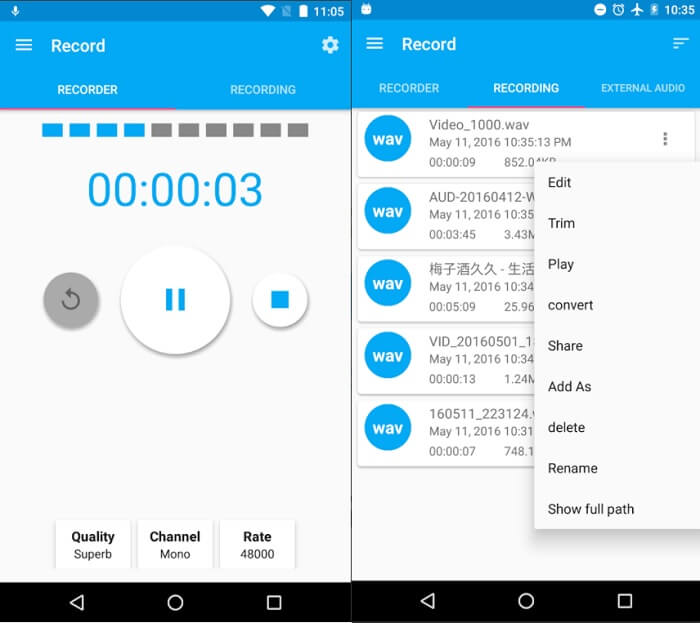
錄音機和編輯器也稱為 AAR,是一種可以從 Play 商店免費下載的工具。如果您正在尋找可以在沒有背景噪音和靜態聲音的情況下錄製音頻的工具,您可以依靠這個工具。總而言之,您可以使用一個編輯功能來修剪、合併和轉換文件。此外,在錄製您的聲音時,您可以更改您的聲音和使用起來很有趣的聲音。因此,該工具還有更多內容需要研究,請嘗試閱讀下面的列表。
What is likable about it?
● 可以錄製高品質、支持合理格式的音頻。
● 可以合併多個音頻文件,也可以混音。
● 您可以提高或降低錄製文件的音量。
錄音機和音頻編輯器
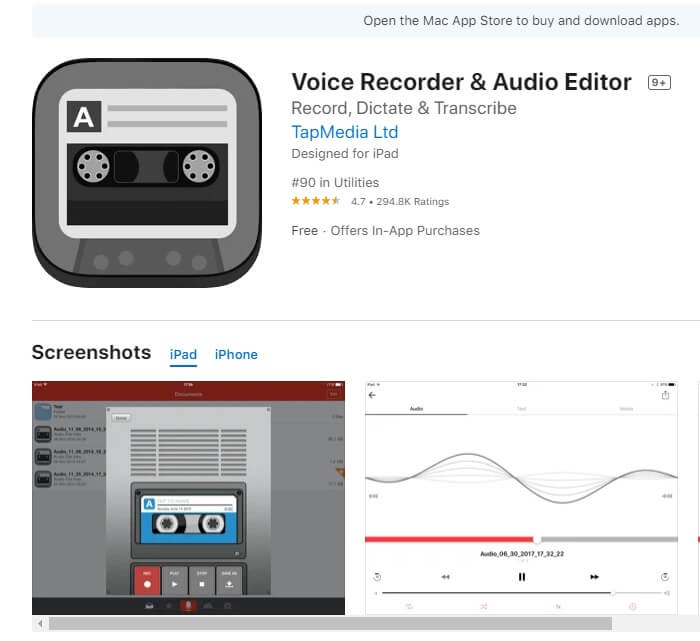
使用錄音機和音頻編輯器,您可以根據需要多次錄製音頻。只要您的手機上仍有足夠的存儲空間,此工具就不會限制您。該工具通過了 Apple 的安全標準,甚至為 iCloud Drive、Dropbox、Google Drive、OneDrive 等不同的驅動器提供商提供了雲支持。知道它具有多種音頻格式等高級功能,甚至可以通過密碼保護您的錄音。如果您想更好地了解此應用程序,請參閱下文。
What is likable about it?
● 該應用程序具有所謂的循環和修剪錄音功能。
● 跳過 15 秒。
● 直接從社交媒體網站分享錄音。
第 4 部分. 比較圖表
為了讓您更容易做出決定,請參考下表。
| 特徵 | FVC免費錄音 | Screencast-O-Matic | FVC 屏幕錄像機 | 班迪康 | 大膽 | 適用於 Android 的錄音機和編輯器 | 適用於 iPhone 的錄音機和音頻編輯器 |
| 設備平台 | 基於網絡的 | 基於網絡的 | 桌面軟件 | 桌面軟件 | 桌面軟件 | 移動應用 | 移動應用 |
| 支持 Mp3 |  | | | | | | |
| 無限制訪問 | 無限 | 無限 | 訂閱後無限制 | 訂閱後無限制 | 訂閱後無限制 | 無限 | 無限 |
| 內置編輯工具 |  | | | | | | |
| 可調比特率 | | | | | | | |
| 高音質 | | | | | | | |
| 惡意軟件安全 | | | | | 下載風險自擔 | | |
第 5 部分。 關於 MP3 錄音機的常見問題解答
MP3 支持哪些播放器?
Most audio players these days are compatible with MP3. Most especially those portable players. Since .mp3 is considered a universal file for all players supported by different devices and computers. You can read on Best MP3 player to have a check.
MP3的缺點是什麼?
對於使用有損算法的文件,仍有一些東西會受到損害是正常的。由於 MP3 格式減小了要壓縮的文件大小,因此質量不如 AC3。這也引發了音樂盜版,並且可以更大程度地向前發展,因為複製成本會更低。
MP3 和 MP4 有什麼區別?
MP4 is a multimedia container format. That means it contains video and audio. Meanwhile, Mp3 is an audio coding format that contains audio alone. However, both are considered universal formats because most players support them. To know more details, you can check on What's The Difference Between MP3 and MP4.
結論
總而言之,本文列出了用於錄製 MP3 音頻的基於 Web 的免費 MP3 錄製工具、桌面軟件和移動應用程序。還製作了一張表格,讓大家看到工具之間的顯著差異。這意味著無論您使用什麼設備,您都擁有所需的選項。
-
 行動!屏幕錄像機評論–缺點,優點及其最佳替代方案
 Action Screen Recorder 是捕捉遊戲視頻的理想遊戲錄製軟件嗎?只需從評論中了解更多詳細信息,並從文章中了解更多細節。
-
 適用於計算機、iOS 和 Android 的 3 款最佳 Facebook 通話記錄器
 當您想記錄 Facebook 通話以保存有價值的東西時,有很多 Facebook 通話記錄器可供選擇。在這裡,您可以了解 3 種為 PC、iOS 和 Android 錄製 Facebook 視頻通話的最佳工具。
-
 適用於 Windows 和 Mac 的 6 大免費 WAV 錄音機
 我們在本文中分享的最好的 WAV 錄音軟件具有多種實用功能,可幫助您像專業人士一樣捕捉音頻和語音。
