


 視頻轉換大師
 屏幕錄影大師
 影片修復
影片修復探索如何在 PS4 上播放 MKV 文件
不只有 Xbox One S 支援播放電影,現在 PS4 也開始跟上這個潮流。透過 USB 傳輸線或 DLNA,PS4 現在可以播放 MKV、MP4、AVI 等多種格式。這代表 MKV 也是你可以播放的檔案之一。若要查看完整支援的格式清單,請造訪 PS4 官方網站。此外,如果你對在 PS4 上播放 MKV 檔案沒有興趣,就不會繼續看這篇文章。請繼續往下閱讀,接下來你會發現幾種可以在 PS4 上播放 MKV 的方法。

第 1 部分。可以在 PS4 上播放所有 MKV 文件嗎?
我可以在 PS4 上播放 MKV 文件嗎?你當然可以。 PS4 支持 MKV 文件格式。但並非所有 MKV 文件都能正常播放。您可能會在播放時遇到失敗。這是因為您需要滿足 PS4 設定的標準。大多數情況下,支持 H.264/MPEG-4 AVC。如果您要從 USB 驅動器播放 MKV 文件,則適用相同的規則。同時支持音頻 MP3、AAC LC、AC-3。大多數這些格式都是杜比數字格式。如果您認為自己已達到標準,則可以繼續執行有關如何直接在 PS4 上播放 MKV 的步驟。
步驟 1. 下載並安裝 DivX Media Server,然後啟動播放器。接著在電腦上啟用分享功能。
步驟 2. 將 MKV 檔案上傳或匯入到伺服器中。
步驟 3. 在進行下一步之前,請先確認電腦與 PS4 均連接在同一個 Wi-Fi 網路下。接著在 PS4 上下載並安裝 DivX 媒體播放器。之後,開啟 PS4 的媒體播放器 App,從出現的裝置清單中選擇 DivX 媒體伺服器。
步驟 4. 最後,找到「Video(影片)」選項,勾選你想播放的影片並開始串流。
第 2 部分。 關於如何從 USB 在 PS4 上播放 MKV 的分步指南
同時,如果您使用的是 USB 存儲設備,請確保它是 FAT 或 exFAT 格式,否則將不會被檢測到。如果您認為自己已準備好並且閃存驅動器兼容,請查看下面的分步指南。
步驟 1. 開啟 PS4 並插入 USB。進入主選單。接著選擇Video(影片),然後尋找你的 USB 隨身碟名稱。
步驟 2. 當你看到檔案清單時,點選Display All(顯示全部),即可看到儲存在 USB 中的所有檔案。將檔案複製並傳輸到 PS4。
步驟 3. 最後,請確認你的 PS4 還有足夠的儲存空間以完成傳輸。
第 3 部分。 通過 Plex 服務器在 PS4 上播放 MKV 的替代方法
除了 DivX 以外,你也可以使用另一款播放程式在 PS4 上播放 MKV。那就是名為 Plex 的串流媒體伺服器。這個媒體伺服器可以讓你從電腦串流高畫質影片、音樂、電視節目與 Podcast。雖然有些人播放某些 MKV 檔案時會遇到問題,你仍然可以把它當作替代方案。同時,如果你真的想用 Plex 來播放不相容的檔案,就應該考慮將影片轉檔。一些轉檔程式能把 MKV 檔轉成 Plex 支援的格式。只要調整影片編碼格式、幀率、位元率及其他參數,就有可能達成。是否有能做到這些的工具?有的,你可以試試看 Video Converter Ultimate。沒錯,這個工具就能辦到。試著用它來解決這個問題吧。
步驟 1. 在你的電腦上下載並安裝 Video Converter Ultimate。
步驟 2. 點選Add files(新增檔案)將想要轉換的檔案加入,或直接拖曳檔案到程式介面中。
步驟 3. 接著,點選Convert to All(全部轉換為)的下拉選單,選擇 Plex 支援的格式。
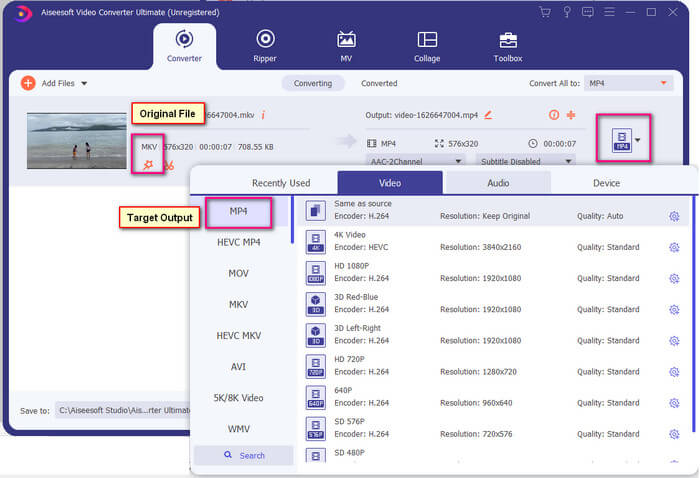
步驟 4. 設定好格式後,點選Convert All(全部轉換)按鈕開始轉檔。轉檔完成後,儲存檔案的資料夾會自動跳出。
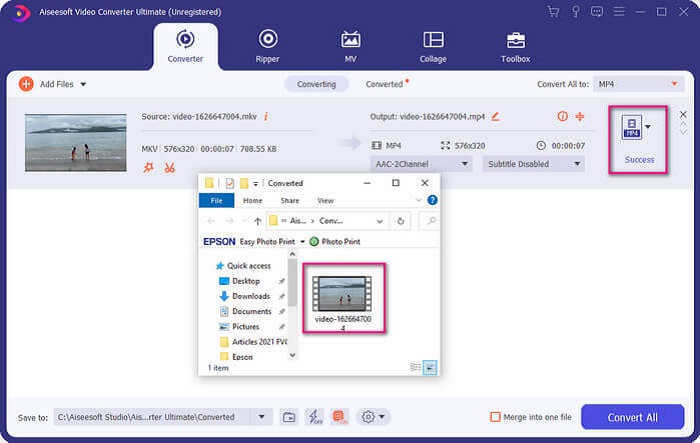
Ultimate 視頻轉換器還有更多功能。您可以查看下面的優缺點列表,以了解它提供的其他優秀功能。
● 此工具的轉換速度快至三秒。
● 具有加速技術,可以增強轉換後的文件。
● 支持高清畫質。
● 具有添加濾鏡和基本效果等編輯功能。
● 您可以調整字幕和音軌。
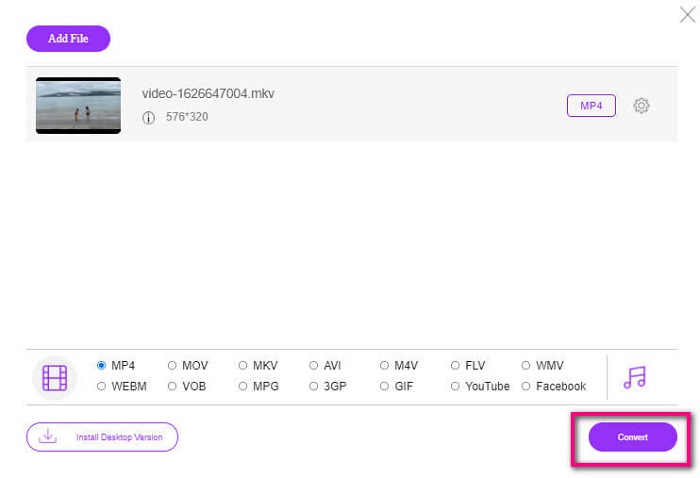
如果你正在尋找免費的轉檔工具,也可以考慮使用 FVC Free Online Video Converter。雖然它可能不如 Ultimate Video Converter 那麼強大,但依然足以應付需求。當然,它可以將檔案轉成與 Plex 或 DivX 相容的格式。你只需要這麼做……
步驟 1. 依照說明中的連結前往官方頁面,啟動此工具。
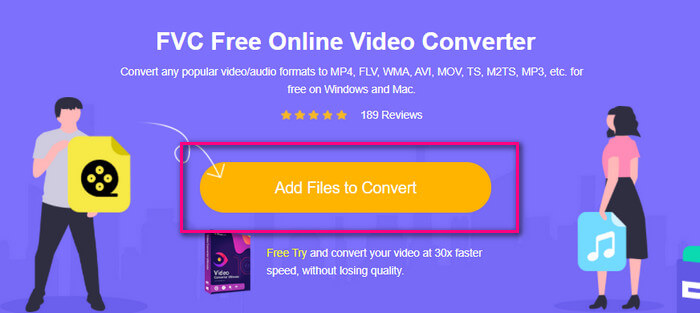
步驟 2. 點選Add Files to Convert(新增檔案以轉換)上傳影片。
步驟 3. 勾選下方的圓圈以變更輸出格式。
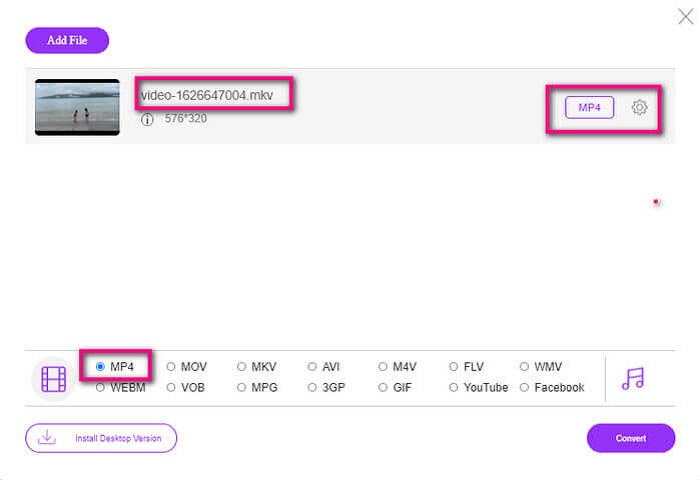
步驟 4. 最後,點選Convert(轉換)按鈕,並選擇你要儲存檔案的位置,然後點選Okay(確定)。你可以點選Folder(資料夾)圖示查看已轉換好的檔案。
延伸閱讀
在 Windows Media Player 中播放 MKV
第 4 部分。有關在 PS4 上播放 MKV 文件的更多信息
一台 PS4 多少錢?
美國的市場零售價為 399.99 美元,加拿大為 399.99 加元。價格可能會因您所在國家/地區的零售價而異。
是否有可能在 PS4 上播放 CC 或 Close Caption MKV?
有的,在無障礙功能設定(Accessibility Settings)裡。路徑是:進入 PS4 的設定(Settings),選擇無障礙(Accessibility),然後點選顯示隱藏式字幕(Display Closed Captions)。接著按下選項(Options)來啟用隱藏式字幕。
如果 PS4 支持 MKV,為什麼我的文件不能播放?
如上所述,您需要確保 MKV 文件符合您使用的播放器的標準。您只需要檢查 PS4 或其他媒體流服務器的要求。大多數媒體服務器也有分類播放 MKV 文件。
PS4 支持哪些格式?
PS4 支持多種文件格式。但是您會注意到大多數格式都是未壓縮的並且保存了一個大文件。雖然它也支持像 Mp4 這樣的未壓縮的。同時,這裡是我們正在討論的格式列表:MKV、AVI、MPEG-2 PS、MPEG-2 TS、AVCHD 以及 XAVC 和 MP4。
結論
總而言之,您可以通過多種方式直接或間接在 PS4 上播放 MKV 文件。列出的是最常用的介質。 DivX Stream Server 和 Plex 只是您可以使用的一些替代方案。強烈建議轉換文件,以避免麻煩和過多的過程。
-
 [已解決] VLC 播放器無法播放 MKV,如何修復
 VLC 播放器是否支持 MKV 文件?為什麼 VLC 不能播放 MKV?這篇文章分享了 4 個有用的技巧,可幫助您修復 VLC 播放器無法播放 MKV 文件的問題。
-
 如何在 iPad 2025 上播放 MKV 文件
 如何在iPad 2上播放MKV文件?我可以將MKV轉換為MP4以便在iPad Pro / Air / 2上播放嗎?這篇文章分享了2種在iPad上播放MKV的簡單方法。
-
 如何在 Windows Media Player 中下載 MKV 編解碼器以實現流暢播放
 無法在 Windows Media Player 中播放 MKV 視頻?您可以免費下載 Windows Media Player 的 MKV 編解碼器。相反,轉換 MKV 使其可在 Windows Media Player 中播放。
