


 視頻轉換大師
 屏幕錄影大師
 影片修復
影片修復用於即時專業影片創作的線上影片製作人工智慧
影片是進行溝通、敘事與行銷的強大媒介之一。無論你是內容創作者、企業主,還是社群媒體愛好者,擁有一款可靠又高效的影片製作工具都至關重要。線上AI 影片製作工具(online AI video maker)時代已然來臨,這是一種革命性的解決方案,以前所未有的速度與便利,讓專業級影片製作近在指尖。
在本文中探索使用 AI 工具進行影片創作的世界,探討其安全性並提供有效使用的基本技巧。深入研究人工智慧影片製作者的優勢,讓您的內容透過人工智慧線上影片製作者脫穎而出。繼續閱讀,了解本文推薦的線上工具列表,這些工具將引導您進入人工智慧影片創作的世界。擁抱人工智慧的動態格局,創新與想像力的碰撞。今天我們就一起來探索吧!

第 1 部分. 我可以用 AI 線上製作影片 - 安全嗎?
隨著對高效視訊創作的需求不斷增加,許多人轉向人工智慧驅動的線上工具。人工智慧的興起無疑引發了人們對內容創作的安全性和真實性的擔憂。隨著技術的進步,解決這些問題以確保值得信賴和可靠的數位環境變得至關重要。在人工智慧驅動的內容創作不斷發展的格局中,平衡創新與保障仍然是優先事項。
人們常問:「我可以在線上用 AI 來製作影片嗎?這樣安全嗎?」答案是可以,但需要有所考量。AI 影片製作工具透過自動剪輯等功能,大幅簡化創作流程。選擇重視使用者隱私與資料安全的可信平台非常關鍵。安全性疑慮多半集中在個人資料與內容所有權上,因此應選用具有嚴格隱私政策與明確資料處理規範的 AI 工具。充分理解使用條款與授權協議,才能確保你對內容擁有所有權。只要考慮到這些因素,使用者就能安全且高效地運用 AI,創作出引人入勝的影片。
第 2 部分:產生 AI 影片應準備什麼
要踏上產生人工智慧影片的旅程,需要做好一些關鍵準備工作,以確保流程順利成功。
◆ 為您的影片闡明清晰的願景,概述其目的、目標受眾和所需訊息。
◆ 收集與您的敘述相符的高品質內容資產,例如圖像、視訊和音訊剪輯。
◆ 熟悉所選AI 視訊產生工具的特性和功能,以充分利用其功能。
◆ 確保穩定的網路連接,因為人工智慧流程通常需要資料傳輸和即時互動。
◆ 保持開放和創造性的心態,因為人工智慧工具可以提供意想不到的建議和增強功能,有助於提高生成影片的整體品質。
第 3 部分. 推薦的生成 AI 影片的線上工具
1.影片內人工智慧
InVideo是免費線上使用的AI影片製作者之一,也是影片創作和編輯領域的遊戲規則改變者。這個用戶友好的平台消除了非影片編輯人員面臨的障礙,為那些希望生成引人入勝的內容的人提供無縫體驗。
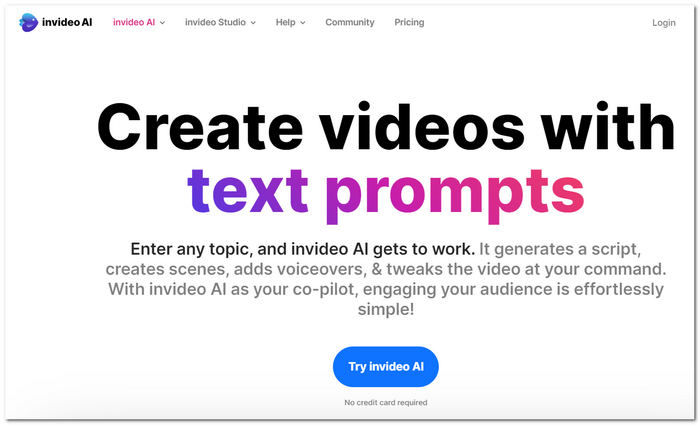
步驟一: 前往 InVideo AI 官方網站。
步驟二: 使用你的 Google 帳戶登入,並選擇你要為哪一類平台編輯影片。
步驟三: 接著你會進入另一個介面,在那裡可以輸入你腦中所有的構想。
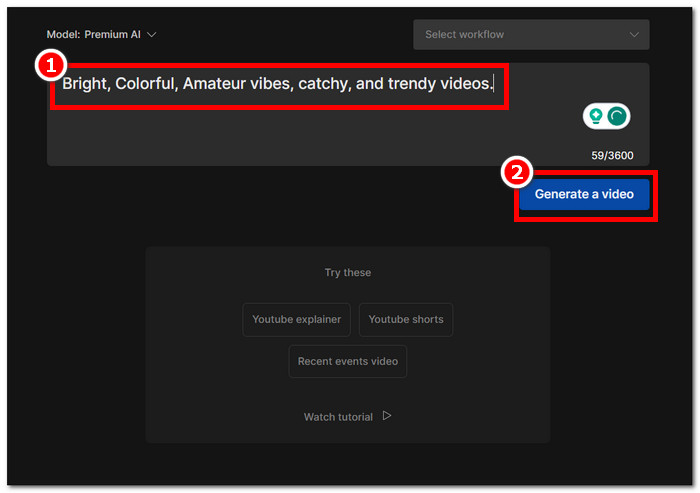
步驟四: 當你整理好所有想法後,點選 Generate Video,即可將你的點子轉換成影片。
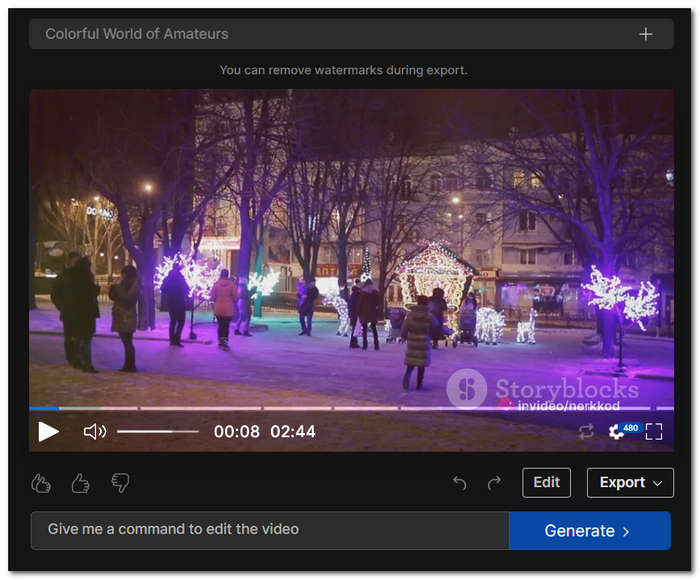
無論您是尋求簡單性的新手還是旨在規模化生產的專家,InVideo 都提供了全面的解決方案,使創建和編輯影片的過程變得輕鬆高效。
2.畫布
Canva 是一款線上影片編輯器,作為一種經濟實惠且用戶友好的解決方案而出現,提供了類似於其著名設計平台的熟悉的基於幻燈片的介面。此編輯器類似於 PowerPoint 或 Keynote 中的時間軸視圖,簡化了影片建立過程。
步驟一: 前往 Canva 官方網站,選擇要直接在瀏覽器中使用,還是下載軟體安裝。
步驟二: 在主介面上點選 Videos(影片)。
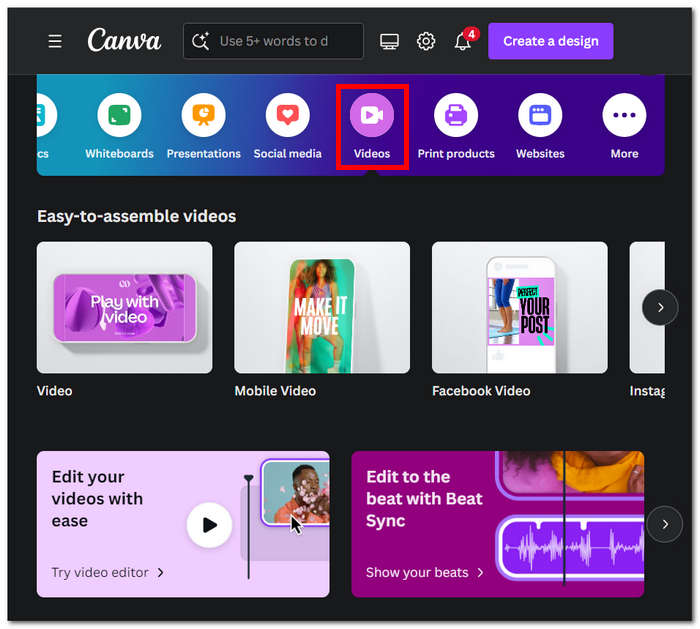
步驟三: 點選 Generate videos instantly(立即產生影片)繼續。
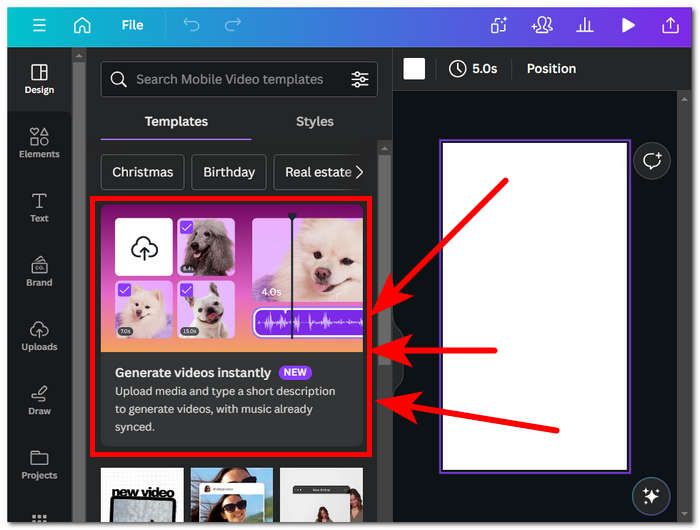
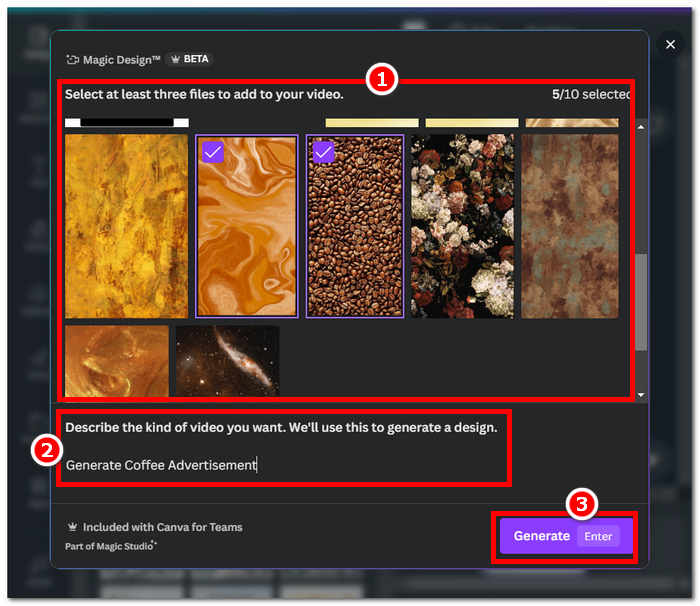
步驟四: 系統會要求你選擇圖片並輸入文字提示,以便更好地視覺化影片;完成後,點選 Generate 按鈕檢視成果。
與其他人工智慧整合工具一樣,Canva 人工智慧內容產生器也有其缺點。儘管如此,Canva 的影片編輯器為尋求簡單且經濟高效的影片製作方法的人提供了一個可訪問的切入點。
Canva 會匯出附有浮水印的 AI 產生影片。若你想去除浮水印,就需要訂閱他們的付費方案,或使用其他第三方工具來移除 Canva 浮水印。
3.流明5
Lumen5 大膽地脫離了傳統的影片創作規範,為那些尋求常規影片製作而無需時間或專業知識負擔的人們提供了量身定制的創新服務。這個基於網絡的平台獨特地將文本轉換為引人入勝的視頻,迎合具有多層定價結構的企業。
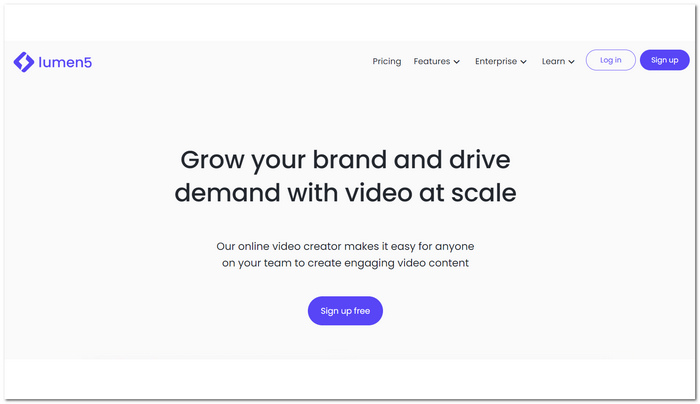
步驟一: 前往 Lumen5 官方網站並建立帳戶以使用此工具。
步驟二: 選擇一個要用在影片中的範本(Template)。

步驟三: 選擇你要使用哪一種文字轉影片(text-to-video)方式。
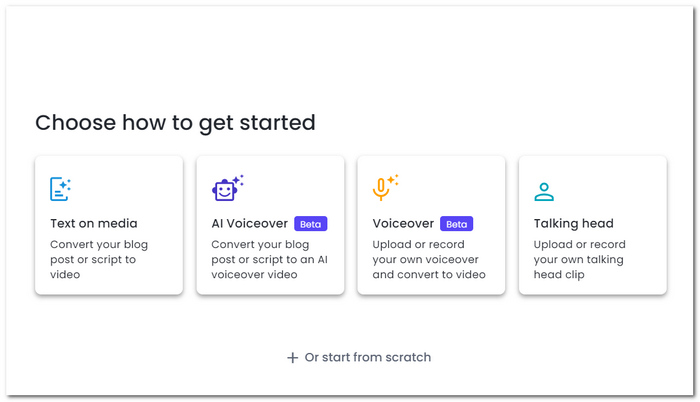
步驟四: 輸入你的文字,依序完成所有步驟,最後檢視(Review)並發佈(Publish)你的影片。
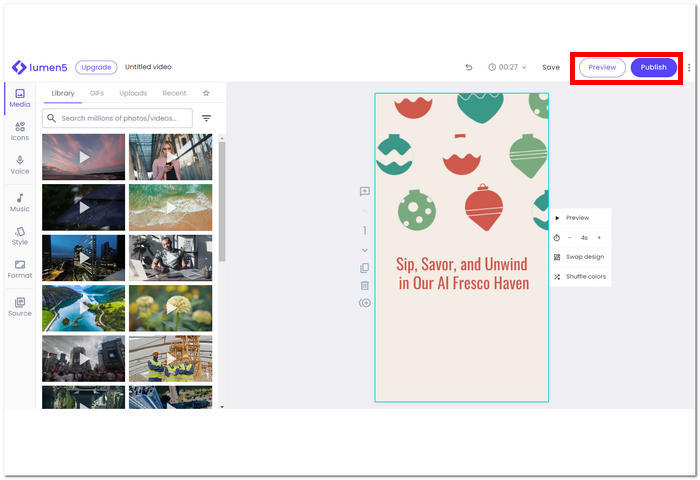
開發人員自豪地透露,超過 40 萬家企業已經接受了 Lumen5,這是一款免費的線上 AI 文字到影片產生工具,強調了它的廣泛採用和在滿足不同用戶群的動態影片需求方面的有效性。
4. aivo.ai
AIVO 是終極解決方案,它簡化了將內容轉換為引人入勝的說故事影片的艱鉅任務。該工具專為快速視訊創建而設計,旨在輕鬆將文字或圖像轉換為高品質視訊。 AIVO 利用人工智慧 (AI) 技術,實現影片建立流程的自動化,確保快速週轉,而無需花費大量時間。
步驟一: 前往 aivo 官方網站並登入,即可開始使用此工具。
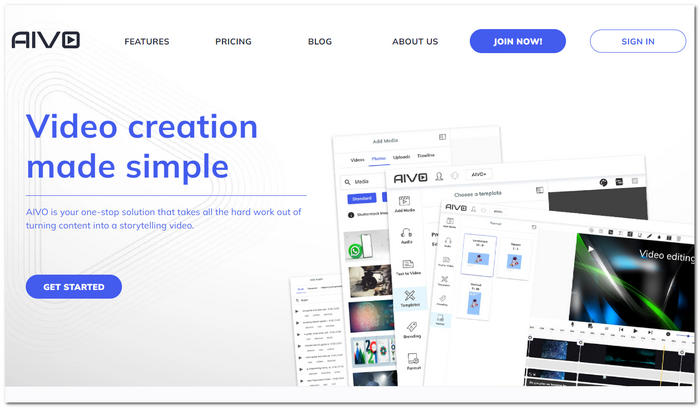
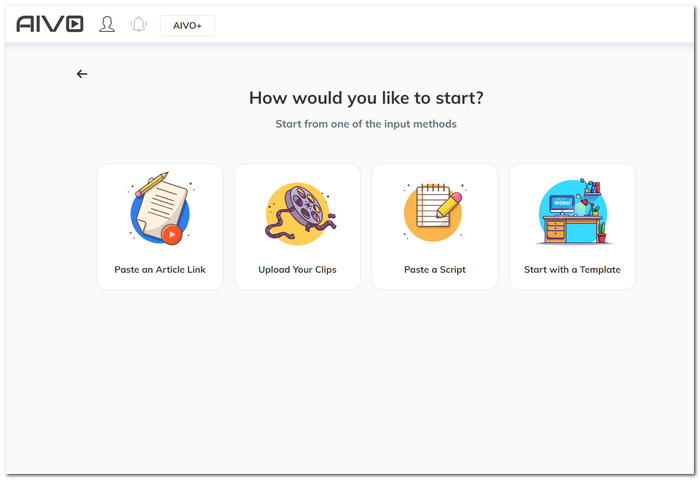
步驟二: 此工具會讓你選擇想用哪一種方式來產生影片。
步驟三: 在填入所有關於產生影片的必要資訊後,你會進入編輯階段,在這裡可以依照自己的喜好,編輯 AI 產生的影片。
步驟四: 當你對修改結果感到滿意時,點選 Preview & Export 來儲存你的影片。
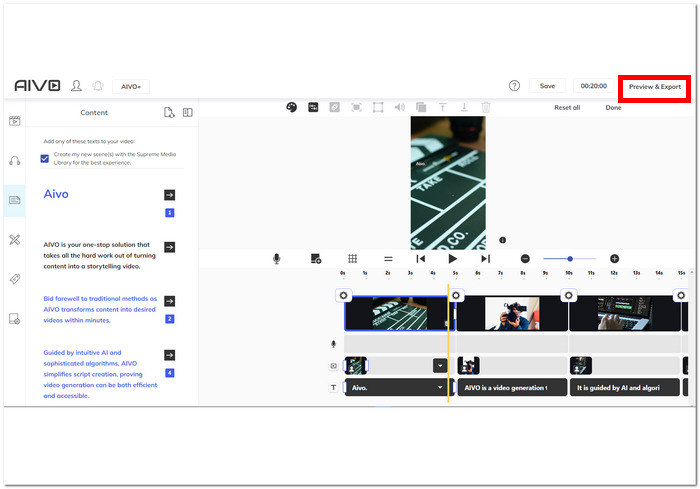
AIVO 可以在幾分鐘內將內容轉換為所需的視頻,從而告別傳統方法。在直覺的人工智慧和複雜演算法的指導下,AIVO 簡化了腳本創建,證明視訊生成既高效又易於存取。
第 4 部分:如何選擇最佳的線上影片製作工具
| 工具類 | 最適合 | 優點 | 缺點 |
| 影片內人工智慧 | 廣泛的模板。 專案演示。 簡單的介面。 | 多功能影片製作和編輯功能。 簡化的創意工作流程。 使用者介面設計具有直覺的功能。 | 隨著使用時間的推移,可能會出現延遲。 免費方案提供有限的功能。 缺乏其他人工智慧影片編輯器上的一些基本功能 |
| 畫布 | 提供模板進行客製化。 支援大量項目,而不僅僅是影片編輯。 易於導航的介面。 | 提供廣泛的免版稅庫。 支援跨平台工作。 強大且無憂的人工智慧整合。 公平定價。 | 免費版本有浮水印。 人工智慧並不像其他人那麼先進。 缺乏一些基本的影片編輯功能。 |
| 流明5 | 輕鬆創建影片。 文字或部落格轉影片功能。 人工智慧生成影片。 | 網路為基礎的人工智慧影片編輯器。 測試版功能。 免版稅媒體的精彩收藏。 自動功能。 | 配音仍在進行中。 沒有影像或聲音編輯器。 缺乏影片編輯的一些基本功能。 |
| 愛沃網 | 存取免版稅媒體。 人工智慧會自動處理給定的內容。 提供了編輯和預覽結果的優秀工具。 | 易於導航的介面。 視訊處理速度比其他人工智慧工具更快。 可存取所有網路平台。 不僅提供影片編輯器,還提供圖像、音樂等。 | 需要註冊。 價格點可能有點貴。 某些影片結果與給定內容不符。 |
第 5 部分. AI Video Maker Online 常見問題解答
AI如何自動產生影片?
人工智慧透過分析和理解視覺和聽覺元素自動產生影片。使用先進的演算法,它可以識別圖案、場景和物體,從而能夠無縫地編輯和排列內容。人工智慧驅動的視訊產生器利用機器學習來處理訊息,對過渡、效果和節奏做出決策,以創建有凝聚力且引人入勝的影片。
你們的AI視訊產生器工具如何提供語音?
我們的 AI 影片產生工具使用文字轉語音(text-to-speech)技術來提供配音。使用者輸入想要的腳本後,工具會將文字轉換成自然流暢的語音。先進的語音合成演算法與神經網路,讓 AI 能夠模擬人類的說話節奏、語氣與抑揚頓挫,為你的影片帶來高品質的旁白。如果你對產生出來的聲音不滿意,也可以將自己的音訊加入影片檔。
我需要下載任何軟體才能使用 Invideo AI 嗎?
您無需下載任何軟體即可使用 InVideo AI。他們的平台可以在線上訪問,這意味著您可以直接透過網頁瀏覽器建立和編輯影片。這消除了安裝和更新的需要,提供了無憂無慮的體驗,並允許您從任何設備上處理您的工藝品。
AI影片製作者可以製作哪些類型的影片?
人工智慧影片製作器可用於創建各種視頻,包括宣傳內容、教育視頻、社交媒體剪輯、培訓材料等。可能性是多種多樣的,具體取決於特定人工智慧影片製作者的功能。
人工智慧影片製作者製作的影片長度有限制嗎?
許多人工智慧影片製作者對可生成的影片長度有限制,通常基於訂閱計劃。用戶應檢查所選人工智慧影片製作者的具體指南和限制。
結論
線上 AI 影片製作工具(Online Video Maker AI)的時代,為影片創作帶來前所未有的便利性與可近性。無論你是新手還是專業創作者,這些工具都能讓你以極小的投入,製作出專業水準的影片。善用 AI 的力量,將你的影片內容提升到全新高度。影片創作的未來已然到來,而且它是智慧、高效且極具創造力的。
-
 製作字幕的最佳 5 個 AI 字幕產生器
 添加字幕的傳統方式需要花費大量的時間和工作。這篇評論將教您當今可以使用的五種最好的人工智慧字幕產生器。
-
 如何從文字產生 AI 影片 [初學者指南]
 想知道如何使用人工智慧從文字生成視頻,但您不知道從哪裡開始?我們抓到你了!本文將討論文字轉視頻人工智慧的方法。
-
 優化您的鏡頭的 5 款最佳 AI 影片編輯器
 認識影片編輯技術的巔峰——我們的頂級人工智慧影片編輯器。使用 AI 支援的工具編輯影片時,將創造力和效率無縫融合。
