


 視頻轉換大師
 屏幕錄影大師
 影片修復
影片修復
 安全下載
安全下載學習 3 種輕鬆為 iMovie 添加音樂的方法 [2024]
如果你是 iPhone 或 Mac 用戶,又喜歡剪輯影片,那你最常用的剪輯工具大概就是 iMovie。這款 App 以介面友善、具備基本剪輯功能聞名,讓人能輕鬆製作影片。不過,相較於其他影片剪輯工具,在 iMovie 中加入音樂會稍微麻煩一些,尤其是當你想加入個人風格時更是如此。基於這點,本文將教你在 Mac 和 iPhone 上,以最簡單的方式在 iMovie 中加入音樂。還在等什麼?我們開始吧!

第 1 部分。
在影片中添加音樂並不是什麼新鮮事。這實際上是一種將普通鏡頭轉變為引人入勝、令人難忘的經典技術。音樂可以營造氣氛、增強故事性,甚至喚起觀眾的特定情感。有了 iMovie,您就可以輕鬆獲得功能強大且用戶友好的工具來簡化此過程。
iMovie 是一款 Mac 和 iPhone 用戶常用的影片編輯軟體,因為它具有直覺的介面和基本的編輯功能。有了它,無論您是初學者還是經驗豐富的用戶,如果您想在 Mac 上為 iMovie 添加音樂,您都可以輕鬆做到!以下是幫助您為影片添加音樂的簡單指南:
步驟 1:首先,在你的 Mac 電腦上啟動 iMovie App。
步驟 2:接著,選擇建立新專案(Create New),然後點擊匯入媒體(Import Media)按鈕,匯入你想加入的音訊檔案。
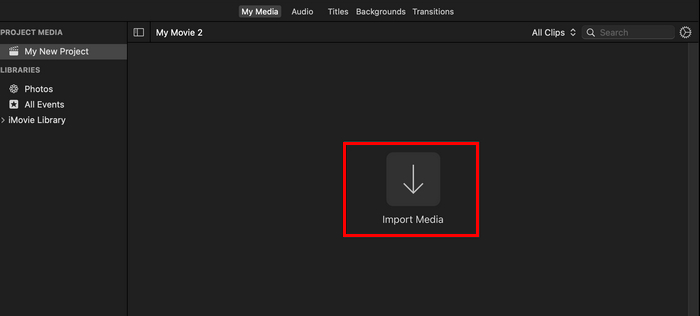
步驟 3:現在,點選你想加入的音訊檔案,然後點擊全部匯入(Import All)按鈕。之後,你會發現匯入的音樂檔已經出現在專案的我的媒體(My Media)分頁中。
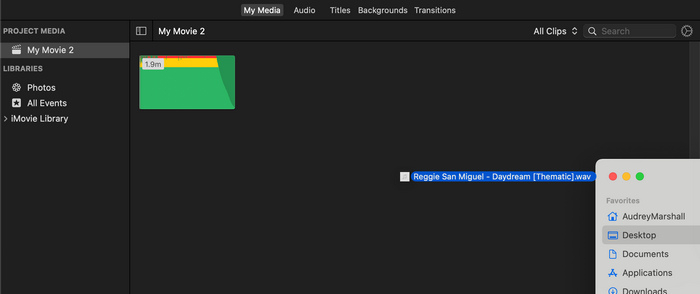
步驟 4:最後,打開 Finder 視窗,選取歌曲或媒體檔案,拖放到你的媒體分頁中,即可將它加入專案檔案裡。
為了輕鬆地將音樂新增至 Mac 上的 iMovie,請先將音訊檔案整理到資料夾中,然後再匯入它們。有了它,您就不必擔心尋找和管理您的音樂曲目,遵循這個簡單的提示可以節省您的時間並幫助您保持編輯過程的高效和專注。
第 2 部分。
iMovie 也可在 iPhone 上使用,它提供與 Mac 上的 iMovie 相同的功能。 iPhone 版 iMovie 保留了其用戶友好的介面和基本的行動編輯功能。因此,如果您想在 iPhone 上為 iMovie 添加音樂,請按照以下步驟操作:
步驟 1:在 iPhone 上開啟 iMovie App;如果尚未安裝,先到 App Store 下載並安裝。
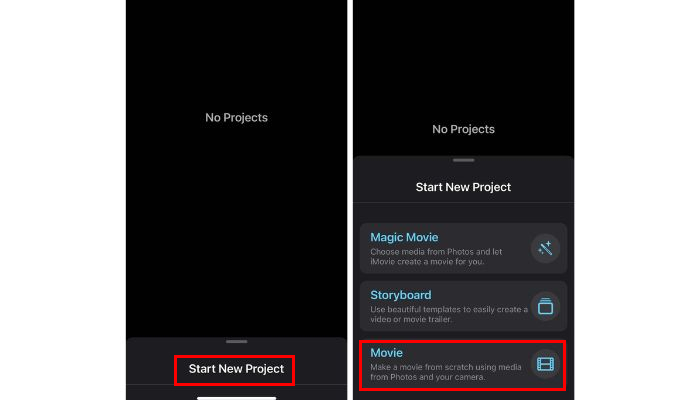
步驟 2:之後,點選開始新專案(Start New Project),並在選項中選擇影片(Movie)。
步驟 3:接著,選取你想剪輯的影片片段,然後點擊下方的製作影片(Create Movie)按鈕。
步驟 4:現在,要在 iPhone 的 iMovie 中加入音樂時,點選下方的齒輪(Gear)圖示,並在選項中選擇音訊(Audio)。在這裡你有三種選擇:原聲帶(Soundtracks)、我的音樂(My Music)和音效(Sound Effects),可用來為影片挑選音樂。
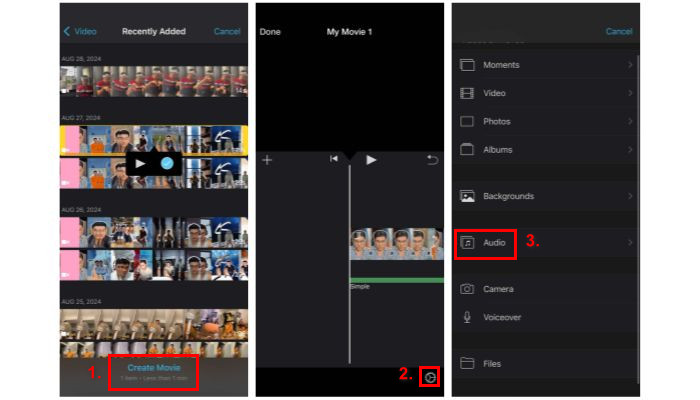
步驟 5:最後,在時間軸上,你現在可以看到音訊與影片一同顯示。當你對結果滿意時,點選完成(Done)按鈕即可。
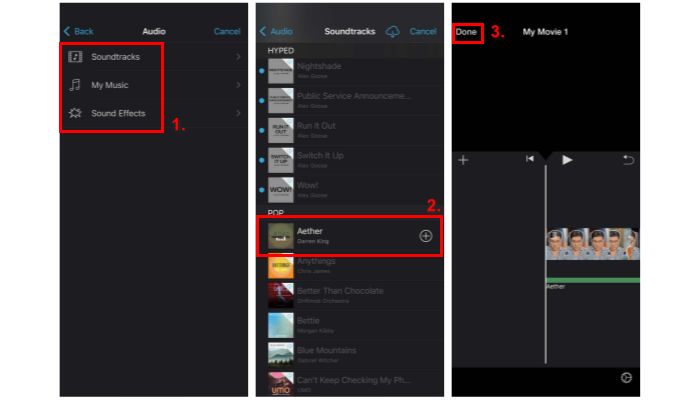
如果你想從自己的音樂庫中將音樂加入 iMovie,一定要先在開始製作 iMovie 專案之前,將音軌下載到裝置中。原因是:你無法輕易匯入內建原聲帶以外的音樂,所以必須先將音樂下載並儲存到檔案中。另外,你也可以點此閱讀如何在 iMovie 中加入文字。
第 3 部分。
如果你覺得在 iMovie 裡操作太複雜,其實還有其他更簡單、更高效的替代方案,其中之一就是 FVC 精選的 Video Converter Ultimate。這是一款功能完整的工具,遠不只是轉檔器,還具備許多功能,例如基本的影片與音訊剪輯。讓這款工具成為加入音樂到影片、取代 iMovie 的頂級選擇的原因,是它直覺且明瞭的流程,只需幾個步驟就能將音樂加入影片。現在,我們一起來學習如何用這個替代方法,達到與在 iMovie 中加入音樂相同的效果:
步驟 1:首先,你需要在電腦上下載並安裝 FVC 精選的 Video Converter Ultimate。
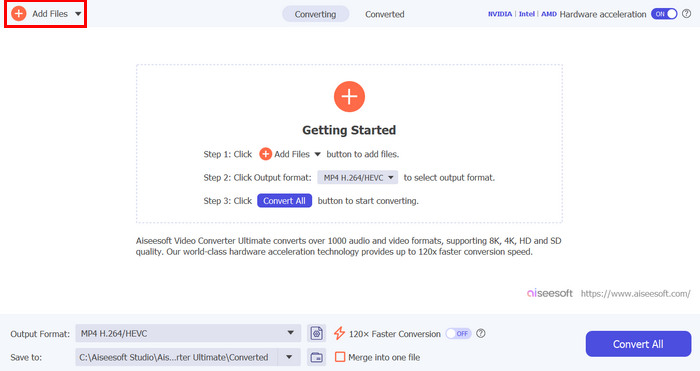
步驟 2:之後,點擊新增檔案(Add Files)按鈕,匯入你想加入音樂的影片檔案。
步驟 3:現在,在 MP4 格式下方點擊下拉按鈕,於選單中選擇新增音軌(Add Audio Track),並選取你想加入的音樂。最後,點擊全部轉換(Convert All)按鈕來儲存檔案。
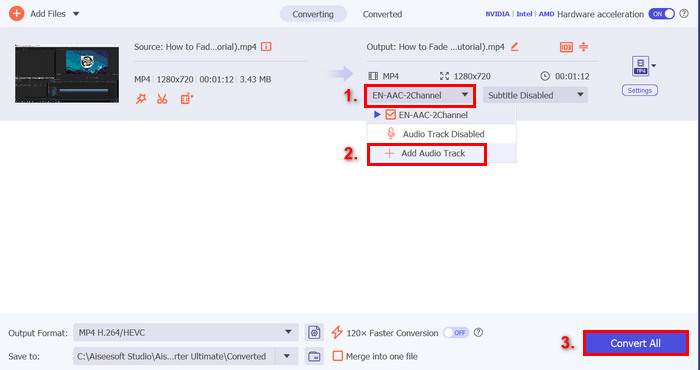
在您為影片添加音樂之前,它會要求您先編輯它還是稍後再編輯它。由於此工具具有內建編輯功能,因此在添加音樂後,您可以預覽並重新編輯音樂以與影片同步。這將確保您需要進行的任何調整都能快速完成,從而為您提供完美的結果,而無需重新編輯。
第 4 部分。
您可以免費在 iMovie 上加入音樂嗎?
是的。您可以免費為 iMovie 添加音樂,因為它是 Apple 為某些產品(例如 Mac 電腦、iPhone 和 iPad)設計的免費應用程式。不過,該應用程式僅適用於上述設備。
我可以將 Spotify 音樂加入 iMovie 嗎?
很可惜,不行。你不能直接將 Spotify 的音樂加入 iMovie,因為 Spotify 的音樂受數位版權管理(DRM)保護。這種保護機制會阻止 Spotify 曲目在 Spotify App 以外的地方被使用。不過,還是有方式可以使用特定的 Spotify 歌曲,例如用來製作鈴聲。要做到這一點,你必須從音樂商店購買並下載這首歌,或使用與 Spotify 相容的音樂轉換工具移除 DRM。
如何在 iMovie 上新增多首歌曲?
若要為 iMovie 新增多首歌曲,只需重複將音訊檔案匯入並拖曳到時間軸的過程即可。您需要做的第一件事是導入所有想要使用的音樂。請注意,它應該顯示在“我的媒體”選項卡上。之後,您可以輕鬆地將它們拖曳到時間線上,以便對它們進行相應的編輯。
結論
學會如何在 iMovie 中加入音樂,能大幅提升你影片的品質。只要按照本文精心整理的步驟操作,你就能輕鬆為影片加入音樂。無論你是新手還是有經驗的剪輯者,這些方法都能幫助你為 iMovie 專案打造理想的配樂。
-
 如何在 Mac 和 iPhone 上的 iMovie 剪輯中淡入淡出音樂
 您是否正在努力在 iMovie 中淡入淡出音訊?繼續閱讀,了解使用 Mac、iPhone 或替代軟體應用淡入淡出效果的最簡單方法。
-
 如何在 iMovie 中編輯音訊的終極指南:3 種最簡單的方法
 想知道如何增強你的音訊專案嗎?了解在 iMovie 中編輯音訊的 2 種方法,並找到 1 種可以幫助您有效編輯音訊的替代方法。
-
 如何在 Mac 上的 iMovie 中為視頻添加水印 [All Embracing]
 您想知道在 iMovie 中為視頻添加水印的秘密嗎?不要將茶灑在任何人身上,並通過閱讀本文來學習。
