


 視頻轉換大師
 屏幕錄影大師
 影片修復
影片修復
 安全下載
安全下載使用 Windows、Mac、線上和行動電話上的最佳工具編輯 MP3
MP3 代表 MPEG-1 Audio Layer III,是一種以壓縮格式儲存音樂的檔案類型。這種檔案比未壓縮的音樂檔小得多,因此更容易儲存和傳輸。隨著音樂創作愈來愈多,人們開始尋找簡單的方式來編輯 MP3,以讓它們聽起來更好。這是因為 MP3 有時甚至可以比原始未壓縮音樂更理想。問題在於,編輯軟體可能很昂貴,而且需要效能強大的電腦。幸運的是,本指南將示範如何使用最推薦的 MP3 編輯器,讓你能在所有使用的平台上編輯音樂。因此,不論你的需求是什麼,從這裡開始準沒錯!

第 1 部分:使用多合一 MP3 編輯器編輯 MP3 的最佳選擇
第一個可以編輯 MP3 檔的軟體,是精選的 Video Converter Ultimate。沒錯,它是一款媒體轉檔工具,不僅能處理影片,也能處理音訊檔。它讓你可以輕鬆將音量提高到兩倍或調低到像耳語般小聲。你也可以加快或放慢速度,而不需要鑽研複雜的技術設定。
最重要的是,它可以消除背景噪音,剪切不需要的部分,將文件分成幾個部分,甚至編輯錄音。此外,它提供了一個易於使用的介面,即使您是音訊編輯的初學者,該程式也可以讓您只需幾個步驟即可輕鬆完成所有這些操作。您也會喜歡它提供的先進技術,例如硬體加速、NVIDIA、Intel、AMD 以及您可以使用的 AI 驅動的編輯工具。
主要功能特色:
• 音訊轉換速度提高120 倍。
• 支援1000多種不同格式。
• 無縫分割、剪下和合併音訊檔案。
• 不受任何限制地編輯MP3 長度。
• 將音訊檔案壓縮至您想要的大小。
• 修改MP3 檔案的編碼器、取樣率、通道和位元速率。
如何使用 FVC 編輯音訊檔
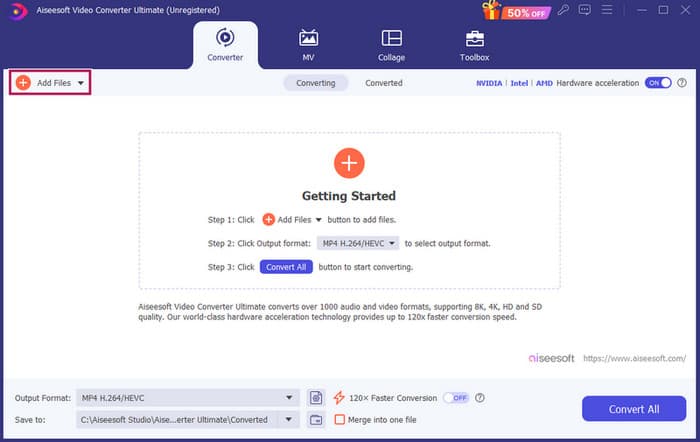
步驟 1.啟動軟體後,點擊「新增檔案」按鈕即可加入 MP3 檔案。或者,你也可以直接從檔案所在位置拖曳,並放進編輯軟體中。
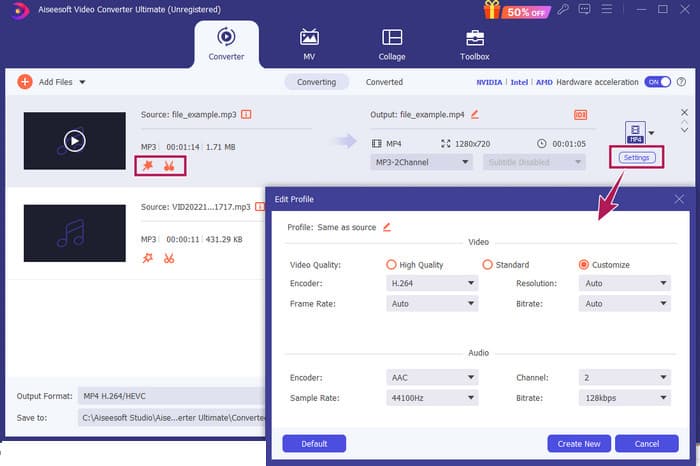
步驟 2.檔案載入後,點擊縮圖上的星形按鈕即可存取音量與延遲設定。剪刀按鈕則用來進入合併、分割與裁剪工具。當然,設定按鈕則讓你進入設定檔修改器。
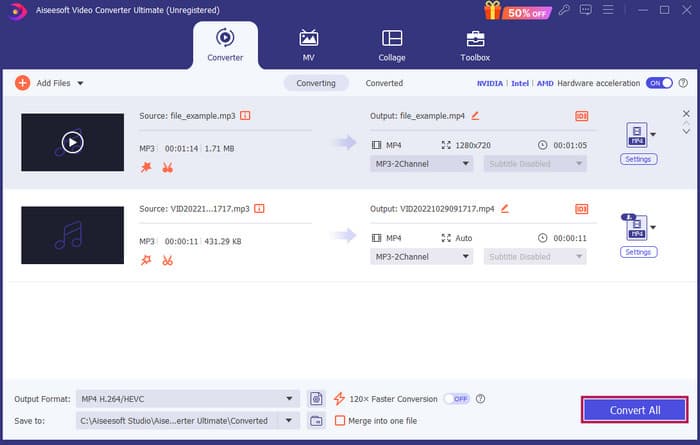
步驟 3.編輯完成後,你需要點擊全部轉換按鈕。這就是在 Windows 10 上使用 FVC 編輯 MP3 的方法。
結論:FVC Video Converter Ultimate 不只能作為提升或修改 MP3 的首選方案,也是極佳的轉檔工具。我們喜歡它的音訊編輯非常簡單又快速。儘管工具箱中大多數工具是給影片檔用的,但其中仍然包含功能強大的音訊編輯工具。因此,我們私心將它列為最適合初學者、有效且簡易的檔案編輯工具。
第 2 部分:在 Windows 上使用 Adobe Audition 編輯 MP3
Adobe Audition 是專業音訊編輯中相當知名的選擇之一,音樂人、播客製作者以及音效工程師都常使用。它以功能強大卻容易上手而聞名。此外,它具備許多功能,例如可同時錄製與編輯多條音軌、在製作時即時加入可立即聽見效果的特效,甚至還內建可在專案中使用的音效素材庫。你也可以把它視為舊款軟體 Cool Edit Pro 的精心升級版。此外,你可以編輯 MP3,並依個人喜好自訂介面配置,還能同時處理多達 40 條獨立音軌。它也提供混音台編輯工具,甚至有工具可將樂器音軌加入你的專案中。
主要功能特色:
• 只需點擊一下即可編輯一大堆音訊檔案。
• 加上酷炫的濾鏡和效果,讓您的音訊聽起來令人驚嘆。
• 組合不同的音軌以創造優美的聲音。
• 使用強大的工具修復和增強您的聲音。
如何使用 Adobe Audition 編輯音訊檔
步驟 1.開啟程式,透過「檔案」→「開啟」匯入 MP3 檔案。
步驟 2.若要編輯,你可以使用「波形編輯器」細修單一音軌;若是多軌音訊,則使用「多軌編輯器」。
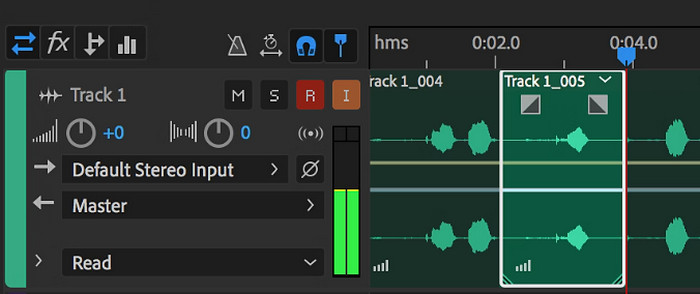
步驟 3.完成編輯後,可以再探索程式中的其他工具,例如各種效果。當你已完成所需作業後,即可儲存音訊專案。這就是在 Windows 上使用 Adobe Audition 編輯 MP3 的方法。
結論:毋庸置疑,Adobe Audition 是一款出色且經典的音訊編輯器,難怪許多剪輯師至今仍依賴它。不過,對於不想面對複雜操作的新手來說,Adobe Audition 可能不是最佳選擇。
第 3 部分:在 Mac 上使用 iTunes 編輯 MP3
iTunes 就像您的音樂管理器,可將您喜愛的所有歌曲整理在您的電腦上。將其想像為數字盒子,您可以輕鬆地按藝術家、專輯甚至流派對您的音樂收藏進行排序。它還可以讓您修復任何缺少的信息,例如歌曲名稱或藝術家姓名,以便您始終可以找到所需的內容。使用此媒體播放器斜線編輯器,您可以為不同的心情或活動建立自訂音軌或播放列表,例如鍛鍊組合或放鬆的播放清單。
最好的部分? iTunes 超級使用者友善。即使您不懂技術,您也可以輕鬆快速地將歌曲添加到您的資料庫中,整齊地組織它們,然後輕鬆播放它們。雖然它不能像其他程式一樣進行精美的編輯,但它是執行基本任務(例如修剪 MP3 文件開頭或結尾不需要的靜音)的絕佳選擇。我們將探索如何透過幾個簡單的步驟在 Mac 和 Windows 上編輯 MP3!
主要功能特色:
• 管理和建立音訊檔案的數位庫。
• 除了MP3 之外,它還支援多種音訊格式,包括WAV、AIFF、Apple Lossless 和AAC。
• 它允許編輯MP3 文件訊息,如藝術家、專輯、流派和發行年份。
如何使用 iTunes 編輯音訊檔
步驟 1.啟動程式並載入 MP3 檔案。前往檔案選單,選擇「新增檔案到資料庫」或類似選項,然後從裝置中選取你想要裁剪的 MP3 檔。
步驟 2.接著再次前往「檔案」並選擇「資料庫」,確認該 MP3 已列在其中。然後在檔案上按右鍵,選擇「顯示簡介」。
步驟 3.現在即可設定裁剪的起訖點。前往「顯示簡介」視窗,找到「選項」標籤,再找到「開始時間」與「停止時間」。設定你想保留片段的起始與結束時間。完成後,點擊「好」按鈕儲存變更。
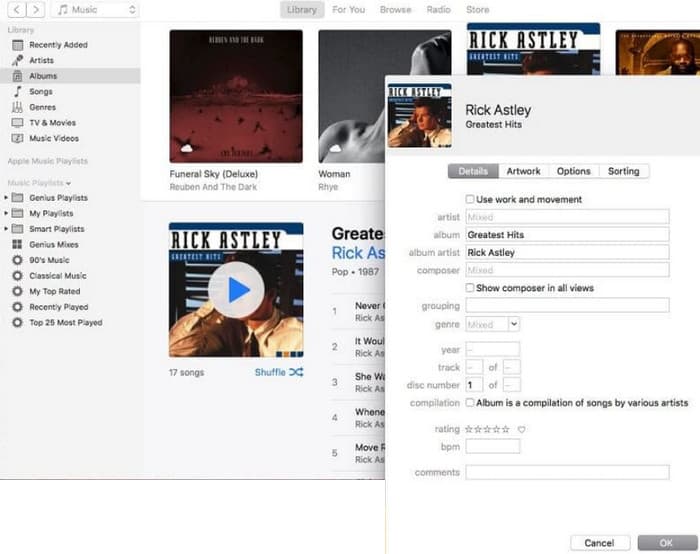
結論:iTunes 可以在需要時提供基本的 MP3 編輯與增強功能。然而,由於它並非專門針對 MP3 進行完整編輯的專業音訊編輯器,你可能會因為功能不足而感到失望。
第 4 部分:使用線上 MP3 編輯器編輯 MP3
Clideo 是一款頗具潛力的MP3 剪輯與編輯工具,適合想要使用線上音訊編輯器來裁剪 MP3 檔案的人。它是一個在任何裝置上都能使用的網頁工具,無需下載軟體。Clideo 讓你可以透過設定精確的開始與結束時間,或是直接拖曳畫面上的標記,剪出音訊中的特定部分。
此外,它支援各種文件類型,因此您幾乎可以編輯您擁有的任何音樂文件。最重要的是,Clideo 允許您添加淡入和淡出等效果,以便在剪輯的開頭和結尾處實現更平滑的聲音過渡。總體而言,Clideo 是一款用戶友好且多功能的工具,讓編輯音訊檔案變得輕而易舉。
主要功能特色:
• 輕鬆剪切音訊檔案中不需要的部分。
• 新增淡入和淡出效果。
• 支援多種音訊格式。
如何使用 Clideo 編輯音訊檔
步驟 1.進入 Clideo 官方網站後,前往其音訊剪輯工具頁面。
步驟 2.點擊「選擇檔案」按鈕上傳 MP3 檔。檔案匯入成功後,即可開始編輯。
步驟 3.將拖曳控制桿調整到你想要的範圍大小,然後點擊匯出以儲存變更。
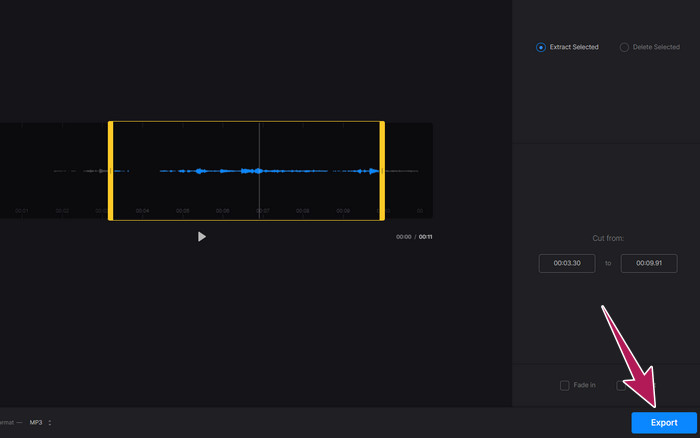
結論:Clideo 是一款線上工具,提供多種編輯 MP3 與其他檔案類型(包含影片)的功能。不過,你必須記得,像 Clideo 這樣的線上工具在安全性上可能較不穩定,比離線工具更容易受到威脅。
第 5 部分. 使用 iPhone/Android 上的行動應用程式編輯 MP3
最後一款我推薦的 MP3 編輯器,是一個可在 Android 與 iOS 上取得的 App,名稱為 WavePad。它具備許多功能,因此一開始看起來可能有點複雜。透過這款 App,你可以剪切與裁剪片段、改變人聲音高,甚至去除背景噪音。此外,它能在 iPhone 與 Android 上編輯 MP3,並提供大量免費的音效與音樂,可加入你的錄音中。它內建等化器,能幫助你將音訊調整到最理想的音色。除了 MP3 之外,WavePad 也支援多數常見的音訊檔案格式。
主要功能特色:
• 剪下、複製、貼上聲音以及添加效果。
• 支援多種音訊格式,如MP3、WAV 和AIFF。
• 具有不同的音質設定。
如何使用 WavePad 編輯音訊檔
步驟 1.啟動 App,點擊三條橫線圖示,然後在檔案分頁中選擇「從音訊匯入」。這將允許你上傳需要編輯的 MP3 檔案。
步驟 2.在螢幕上方工具區向右滑動,即可存取各種編輯工具。
步驟 3.完成上述操作後,你可以點擊「REC」按鈕,錄製你想從檔案中保留的部分。接著將其儲存並匯出到你的裝置中。
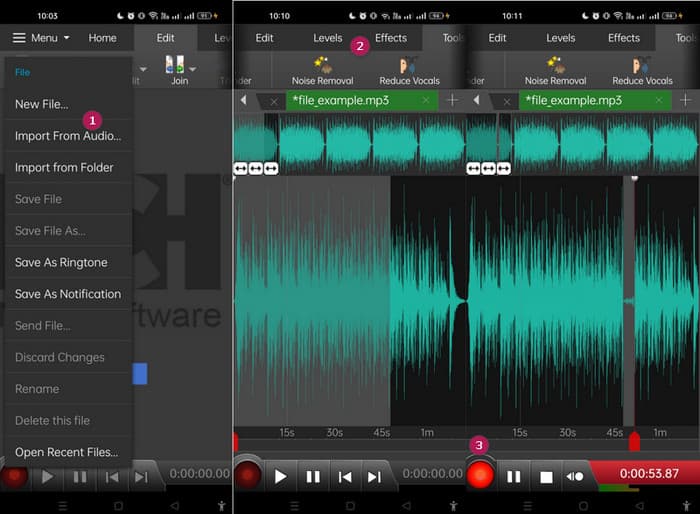
結論:WavePad 的免費版本已包含多數功能,但也有每月 $3 的付費方案,可移除廣告並解鎖全部功能,例如所有音效與以不同格式儲存檔案的能力。這將讓你能在 Android 或 iPhone 上,以更進階的方式編輯 MP3。
第 6 部分:有關編輯 MP3 的常見問題解答
我可以在 Apple Music 剪輯歌曲嗎?
不行。
微軟有音訊編輯器嗎?
有許多可用的音訊編輯器,例如用於編輯 MP3 的 Audacity,您可以從 Microsoft Store 下載。
如何在 Windows Media Player 中修剪 MP3 檔案?
很遺憾,Windows Media Player 本身並沒有內建修剪 MP3 檔案的編輯功能。
結論
至少現在你已經知道前所未有的最佳方式來編輯 MP3。透過我們上面推薦的頂級音訊編輯器,你一定能達到理想的音質!這些工具為各種平台提供完整解決方案,無論使用何種裝置或作業系統,都能享有彈性與便利。不論你偏好桌面程式、線上工具或行動 App,都可以輕鬆完成專業水準的編輯。從基本的裁剪與合併,到進階特效與音質強化,只要選對編輯器,就能高效改造你的 MP3 檔案。立即探索這些選項,開始將你的音軌精修到近乎完美吧。
-
 2024 年適用於 Windows、Mac、iOS 和 Android 的 10 佳 FLV 播放器
 FLV播放器可幫助您輕鬆地在Windows,Mac,Android,iOS設備上訪問FLV文件。查看可以立即下載的最佳FLV文件播放器。
-
 8個最佳MOV播放器以原始質量播放QuickTime MOV文件
 只需了解有關Windows和Mac均可使用的8種最佳MOV播放器的更多信息。您可以選擇所需的和合適的文件來播放原始質量的MOV文件。
-
 獲得最佳MP4播放器以高視覺質量播放MP4文件
 從10種最新的MP4視頻播放器軟件的建議中閱讀並獲取最佳MP4播放器。您可以在Windows和Mac上流暢播放MP4視頻文件而不會出現延遲。
