


 視頻轉換大師
 屏幕錄影大師
 影片修復
影片修復
 安全下載
安全下載前 5 個 WAV 音訊修剪器可精確剪切您的音訊文件
如今有許多軟體與線上工具可用來編輯 WAV 檔案,其中包括各種WAV 剪輯器工具。為了協助你挑選最合適的工具,我們根據工具的可取得性、在裁剪功能上的表現,以及作為音訊編輯器時的靈活度,評測了五款表現最好的軟體與線上工具。瀏覽以下列出的 WAV 裁剪工具,探索它們在裁剪 WAV 檔案時所提供的各種功能。

第 1 部分:5 個最佳 WAV 修剪器概述
| 軟體工具 | 操作系統 | 價錢 | 最適合 |
| FVC精選視訊轉換器旗艦版 | 窗戶 11/10/8/7 macOS X 10.12 或更高版本 | 免費計劃(可用) 每月許可證 ($14.50) 終身許可證 ($49.96) | 快速處理修剪功能,同時保持 WAV 檔案的原始音訊品質。 |
| 波形墊 | 窗戶 11/10/8/7 macOS 10.5 及更高版本 iOS 6.0以上版本 安卓2.3.3以上版本 | 免費版本(可用) 標準版($60) 大師版($99) | 進階修剪功能可自動刪除 WAV 檔案開頭和結尾的靜音區域或縮短靜音區域。 |
| 大膽 | 窗戶 11/10/8/7 macOS 13/12/和 OS X 10.9 Linux Ubuntu 22.04 | 免費使用 | 專業級 WAV 修剪工具,可同時處理多個 WAV 檔案或專案。 |
| 音頻微調器 | 基於網絡的工具 | 免費使用 | 即時節省 WAV 檔案修剪過程的時間。 |
| Adobe 試鏡 | Windows 11/10 macOS Big Sur v11.0 或更高版本 | 每月個人($22.99) | 符合現行影視音訊標準的音訊編輯。 |
第 2 部分. FVC-精選視訊轉換器旗艦版
FVC-picked Video Converter Ultimate 是一款以介面簡單、易於操作而知名的軟體工具,可免費下載到 Windows 和 macOS 裝置上。此軟體是功能完整的影音編輯工具,也能在你想縮短 WAV 檔案時,作為 WAV 音訊剪輯工具使用。這款多功能工具只要透過左右調整軌道列就能輕鬆剪裁 WAV 檔案,並可即時預覽你在匯出前所做的變更。以下列出此工具的一些最佳特色與限制,同時也提供完整指南,幫助你更順利地將它作為 WAV 裁剪器來使用。
最佳功能特色
• 使用者可以新增淡入淡出效果。
• 它允許使用者快速分割音訊剪輯和合併片段。
• 使用者可以設定開始和結束時間以精確切割WAV 檔案。
• 它提供音訊延遲和音量增強器等功能。
限制
• 它沒有任何其他進階功能,例如自動修剪靜音。
步驟 1:在桌上型電腦上安裝並啟動 WAV 裁剪軟體。在軟體介面中,點擊工具左上角紅色的 + 按鈕,載入你想要裁剪或剪掉的 WAV 檔案。
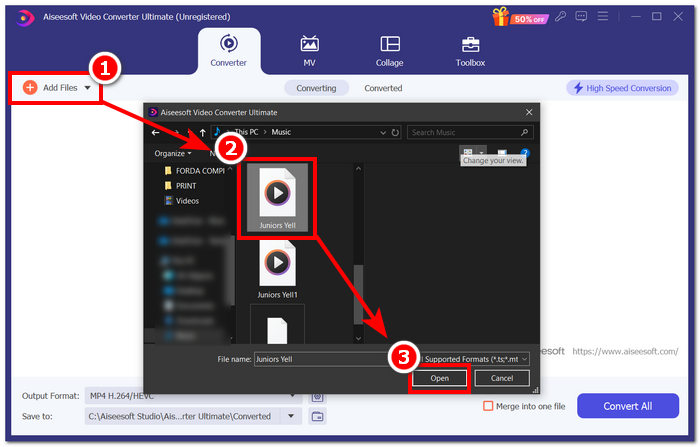
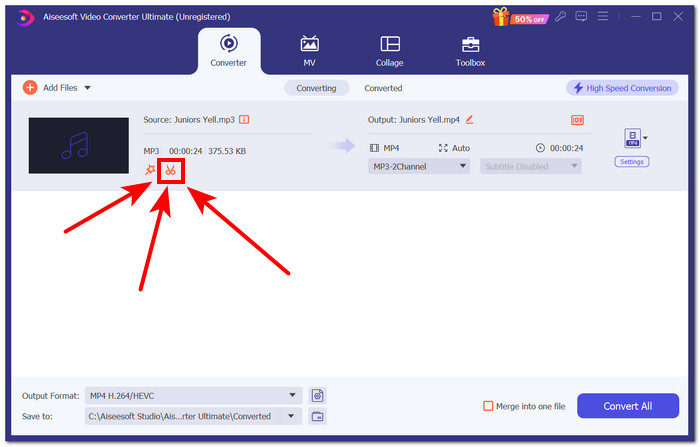
步驟 2:點擊上傳後的 WAV 檔案旁邊、圖示像剪刀的按鈕,以進入工具的裁剪/剪切功能。
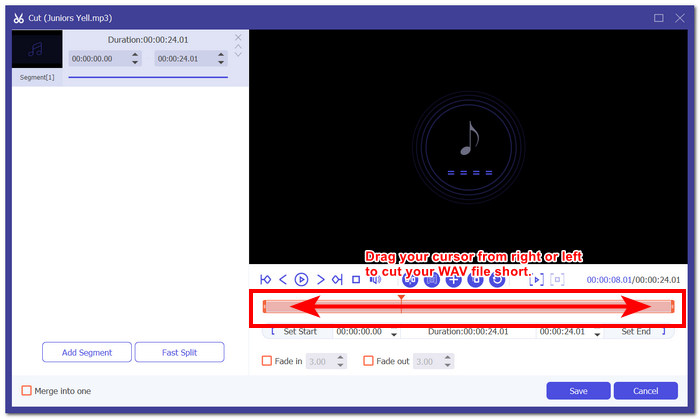
步驟 3:在 WAV 檔案的軌道區域中,拖曳軌道游標末端,由左向右調整,以縮短音訊檔並剪掉不需要的部分。
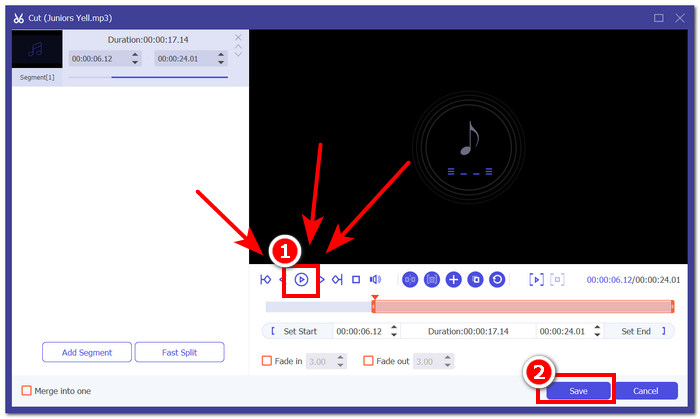
步驟 4:若要預覽你對 WAV 檔案所做的變更,請按下播放鍵,並在需要時再次調整軌道游標。當你對 WAV 檔案的裁剪結果感到滿意後,點擊儲存按鈕以繼續。
步驟 5:若要在不降低音質的情況下下載已裁剪好的 WAV 檔案,請點擊「全部轉換」按鈕,並將檔案儲存至你指定的下載資料夾。
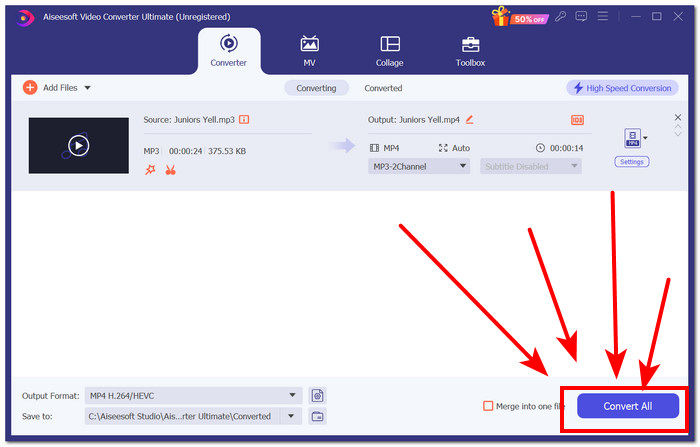
當我們使用 FVC 選擇的 Video Converter Ultimate 時,我們注意到,在匯出修剪後的 WAV 檔案時,在其付費版本中匯出多個批次要容易得多、更快。此外,它在剪切 WAV 檔案時的拖曳遊標功能使我們在剪切時能夠控制和精確。此外,用戶還可以設定精確的開始和結束時間並添加淡入和淡出。即時預覽還有助於確保我們正確刪除不需要的部分,而無需匯出音訊檔案。最後,與其他工具相比,該軟體工具可以更快地匯出 WAV 文件,而不會損失任何品質。
第 3 部分.WavePad 音訊編輯器
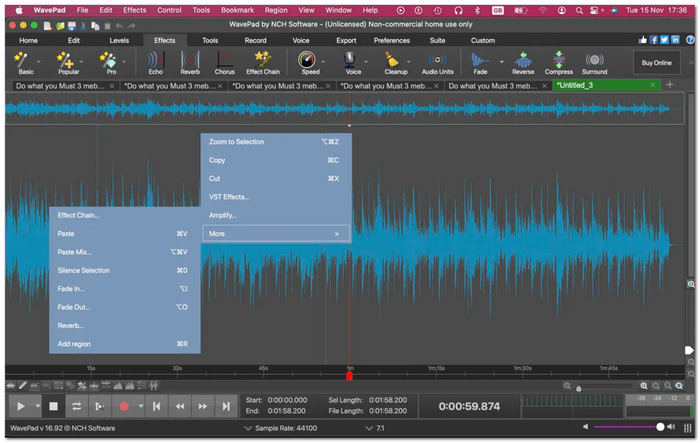
NHC 的 WavePad 是一款音訊編輯軟體,提供各種音訊編輯和效果功能,包括修剪功能。該軟體工具作為音訊編輯器脫穎而出,它提供了修剪 WAV 檔案的額外功能。這些額外的功能包括在 WAV 檔案的開頭和結尾處自動消除靜音,以及自動在 WAV 檔案中建立軟體認為需要刪除的剪輯。
最佳功能特色
• 自動刪除並縮短軌道中的靜音區域。
• 在WAV 檔案中進行更改時自動儲存功能。
• 它具有更大的工具集,包括音訊放大器、均衡器、音訊效果等。
• 外掛程式在編輯和修剪WAV 檔案時具有多種用途。
限制
• 過時的軟體介面。
• 不是新使用者友善的WAV 修剪工具。
• 應用某些效果需要時間,尤其是在應用其他修剪工具功能時。
WavePad 可能具有使用者在編輯或剪切 WAV 檔案時可能需要的所有功能,使其成為完美的工具。然而,其非常複雜且過時的軟體介面使得新手和臨時用戶很難導航。
第 4 部分:大膽
Audacity 是一款廣為人知的軟體工具,擅長音訊編輯,也可以用作 WAV 音訊檔案切割器。該免費軟體提供了許多付費軟體主要提供的功能和功能。此外,它還具有多軌視圖,允許使用者在查看波形的同時執行剪切功能,以準確剪切 WAV 檔案。
最佳功能特色
• 第三方音訊修剪和效果可透過DirectX 插件取得。
• 多軌WAV 修剪工具。
• 它有一個名為「I-beam」的指定按鈕,用於立即在WAV 檔案中建立剪切。
• 與其他軌道同步音訊編輯。
限制
• 軟體使用者介面的複雜性。
與 WavePad 相比,Audacity 在使用者介面友善性和整個軟體的可用性方面具有更大的優勢,因為它提供了更簡單、更直觀的外觀。此外,由於其多軌功能,Audacity 可以提供無縫流程,使其能夠處理多個音軌以同時修剪 WAV 檔案。
第 5 部分. 音訊修剪器
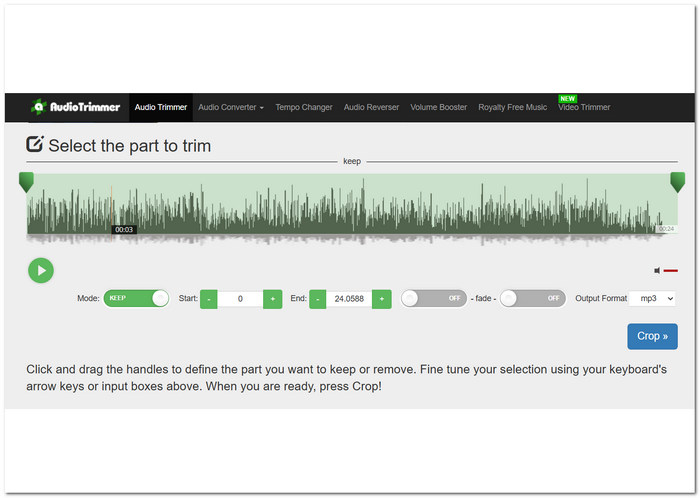
Audio Trimmer 是一款線上 WAV 修剪工具,任何使用者都可以跨多個裝置存取。這個新手友好的工具只需在其介面中單擊幾下即可輕鬆修剪 WAV 檔案。這個直接的 WAV 切割工具提供了一個影片教學來導航它。此外,它還可以創建可供使用的鈴聲。
最佳功能特色
• 切換按鈕保留或刪除部分WAV 檔案。
• 它能夠設定剪切WAV 檔案的開始和結束持續時間。
• 能夠將淡入淡出效果放入WAV 檔案中。
限制
• 音訊檔案僅限於MP3、WMA、AIFF、AC3、WAV 和AAC。
• 它沒有用於剪切WAV 檔案的額外進階功能。
• 過時的使用者介面。
Audio Trimmer 是一款操作簡單的 WAV 編輯器,使用者可以切換按鈕來選擇保留或刪除 WAV 檔案中被選取的部分。正因為這種簡潔的設計,使得這款工具成為本次評測中最省時的工具。
第 6 部分:Adobe 試鏡
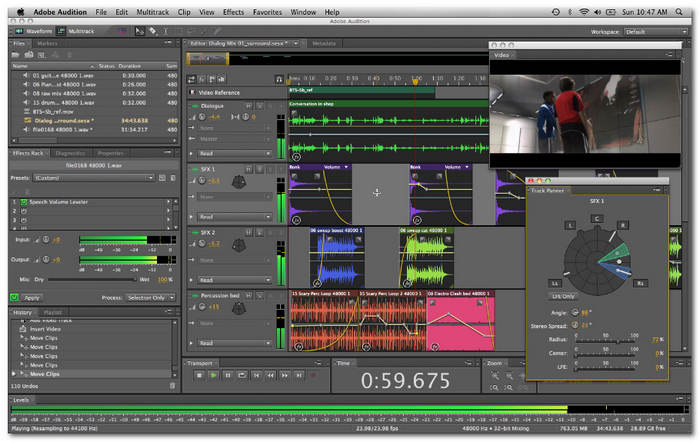
Adobe Audition 是一款專業級音訊編輯軟體,負責處理音訊錄製、混音和編輯等任務。對於修剪WAV文件,該軟體透過其波形編輯器顯示WAV文件軌道,從而可以更精確地修剪和編輯WAV文件。該軟體不是典型的 WAV 剪切軟體,因為它主要用作數位音訊工作站 (DAW),並且是一款主要用於音樂製作的一體式音訊創作套件。
最佳功能特色
• 在混音器頻道之間無縫剪切WAV 檔案。
• 它可以透過其剪切命令功能修剪WAV 檔案。
• 多軌允許輕鬆修剪WAV 檔案片段。
限制
• 定價相當昂貴。
• 缺乏一些音訊合成功能。
Adobe Auditions 擅長提供目前的音訊標準。該軟體用於企業和商業行業。它相對昂貴,並且執行修剪 WAV 檔案等任務是基本的。
第 7 部分. WAV 修剪器常見問題解答
可以在 Windows Media Player 中修剪 WAV 檔案嗎?
不,你無法在 Windows Media Player 中直接進行裁剪 WAV 檔案等工作。它的唯一用途是作為媒體播放程式,用來播放與欣賞你的視訊和音訊檔案。
WAV 是最高品質嗎?
是的,WAV 具有可用音訊格式中最高的品質。其主要特點是未壓縮並始終保持音訊檔案的原始品質。然而,WAV 檔案擁有的最高品質意味著與其他壓縮音訊格式相比具有更大的檔案大小。
剪切WAV檔案用什麼軟體?
FVC 精選的 Video Ultimate Converter 和 Audacity 等流行程式已成為剪切 WAV 檔案的多功能工具。
音訊修剪器安全嗎?
是的,只要來源可靠,通常可以安全使用。因此,使用音訊修剪器剪切或縮短 WAV 檔案是在安全保持其品質的同時減少檔案大小的一種方法。
我可以將修剪後的文件儲存為其他格式嗎?
是的,本次評論中列出的大多數 WAV 修剪軟體工具(例如 FVC 選擇的 Video Converter Ultimate)允許使用者以不同的格式保存修剪後的文件,例如 MP3、AAC 等。
結論
使用WAV 裁剪器可以讓我們進行精準的剪輯。不過,要在執行這類作業前找到可靠的軟體,往往會讓人感到不知從何下手。所幸,我們針對多款能有效裁剪或剪切 WAV 檔案的工具進行評測,清楚點出各工具的優點與限制。根據本次評測,我們建議一般 WAV 裁剪工作可優先考慮使用 FVC-picked Video Converter Ultimate 與 Audacity。
-
 什麼是元數據:了解元數據的基本信息
 什麼是元數據?這很重要嗎?元數據的組成部分是什麼?你有同樣的問題嗎?在本文中,您將了解有關元數據的基本信息。
-
 4 個最佳在線和離線元數據查看器 [2022 年更新]
 我可以檢查文件的元數據嗎?是的,您可以,在這篇文章的幫助下,我們將向您介紹您可以使用的不同元數據查看器。
-
 6 最受歡迎的選擇 Snapchat 上的 Snapchat 動畫 Snapchat 過濾器
 想知道在 Snapchat 視頻上添加過濾器的最佳方法嗎?好吧,您可以單擊它並了解可用於應用於 Snapchat 視頻的不同過濾器。
