


 視頻轉換大師
 屏幕錄影大師
 影片修復
影片修復
 安全下載
安全下載如何在Windows / Mac / Online上將M2TS轉換為iPad兼容格式
你能在 iPad 上直接播放 M2TS 嗎?很遺憾,答案是否定的。M2TS 與 iPad 不相容。如果你想在 iPad 上播放 M2TS,需要在 iPad 上安裝一款 M2TS 播放器 App,或者你也可以把 M2TS 轉換成 iPad 支援的格式。很明顯,本文選擇後者這種解決方案。繼續閱讀,了解如何把 M2TS 視訊格式轉換為適用於 iPad 的格式。

第1部分:如何在Windows和Mac上將M2TS轉換為iPad
iPad支持哪些格式?實際上,iPad接受H.264,MP4,M4V,MOV,MPEG-4和M-JPEG通用視頻格式。要將M2TS放在iPad上,首先需要將M2TS轉換為iPad視頻格式。
如何在Windows上免費將M2TS轉換為iPad
FVC Free M2TS Converter 是一款完全免費使用的 M2TS 轉 iPad 批次轉檔工具。你可以將多個 M2TS 檔案批次轉換為 iPad 格式,其速度比一般 M2TS 轉檔器快上 50 倍。因此,即使你需要大量將體積龐大的 M2TS 視訊檔轉成 iPad 格式也沒問題。這款免費的 M2TS 轉 iPad 轉檔器都能完美處理。
此外,你可以在進行 M2TS 轉 iPad 之前,合併 M2TS 檔案並加入主題。即時預覽視窗可以立刻顯示視訊效果。總之,你可以在 Windows 上一次完成 AVCHD M2TS 的編輯與轉換為 iPad 格式,而且完全免費。

免費M2TS轉換
113,456+下載- 將M2TS轉換為iPad H.264,MP4, 影片,MPEG-4和其他兼容格式。
- 批量轉換支持使速度提高50倍。
- 從所有高清便攜式攝錄機轉換為iPad時,保持高質量。
- M2TS到iPad的轉換器可與Windows 10/8/7計算機一起使用。
步驟 1:免費下載、安裝並啟動 FVC Free M2TS Converter。將 M2TS 檔案拖放到主介面中。

步驟 2:在底部展開輸出格式清單。若要在 Windows 上將 M2TS 轉換成 iPad,可以直接在Apple iPad分類中設定輸出格式。

步驟 3:點擊齒輪狀的設定圖示,以調整視訊編碼器、幀率等參數。最後,點擊轉換,將視訊從 M2TS 轉成 iPad 格式。
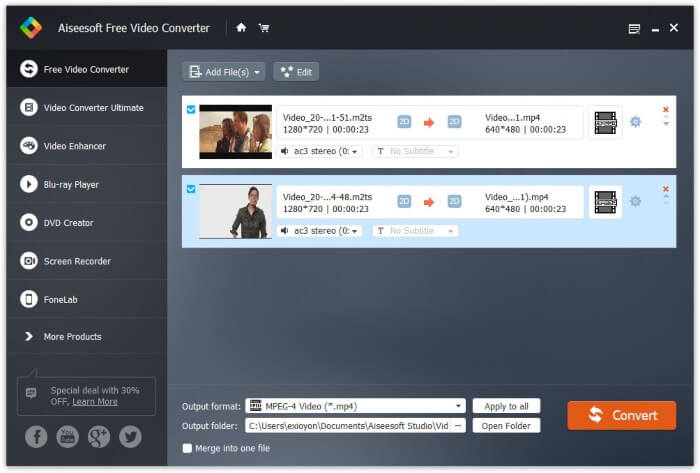
如何在Mac上免費將M2TS轉換為iPad
如果要在Mac上免費將M2TS視頻轉換為iPad,則VLC Media Player是您的不錯選擇。它是一個用於多平台的免費開源M2TS播放器和轉換器。
步驟 1:在 Mac 上開啟 VLC Media Player。於媒體 (Media)下拉選單中選擇轉換/儲存 (Convert/Save)。
步驟 2:點擊新增 (Add)匯入一個 M2TS 檔案。接著選取該檔案,點擊下方的開啟 (Open)以繼續。
步驟 3:在底部點擊轉換/儲存 (Convert/Save),進入下一個視窗。
步驟 4:在設定檔 (Profile)下拉選單中選擇 iPad 格式。你可以點擊旁邊的工具 (Tools)圖示來調整視訊設定。
步驟 5:點擊開始 (Start),透過 VLC 在 Mac 上將 M2TS 檔案轉成 iPad 格式。
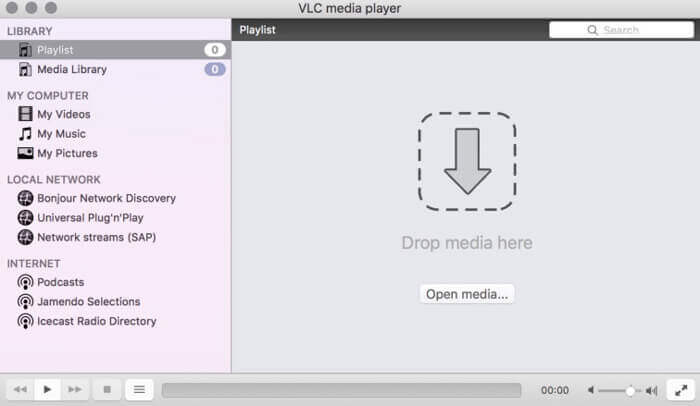
第2部分:如何將M2TS轉換為iPad在線
對於移動用戶,使用在線M2TS到iPad轉換器也是一個不錯的選擇。您可以免費將M2TS文件轉換為iPad,而無需下載,安裝或註冊。
步驟 1:開啟一個線上的 M2TS 轉 iPad 轉檔器,例如 FVC Free Online Video Converter。

步驟 2:點擊Add Files to Convert下載FVC 啟動器並安裝。

步驟 3:在電腦中找到要轉換的 M2TS 檔案,並記得選擇輸出格式。

步驟 4:點擊Start Converting,在線上免費將 M2TS 轉成 iPad 格式。
第3部分:將M2TS轉換為iPad的常見問題解答
突然間,iMovie的M2TS文件中沒有音頻怎麼辦?
Apple設備本身不支持M2TS。您需要將M2TS轉換為Mac格式才能解決此問題。
如何在iPhone和iPad上打開M2TS文件?
AVCHD M2TS與iOS設備不兼容。如果您堅持在iPad上播放M2TS視頻,則可以使用VLC Media Player應用獲取視頻播放。
iPad上有任何好的視頻播放器應用程序嗎?
在iPad中,您可以獲得比iPhone大的顯示屏。因此,視頻觀看體驗也會更好。推薦的視頻播放器包括PlayerXtreme Media Player,KMPlayer,VLC,AirPlayer等。您可以選擇任何一個來靈活地獲得視頻控件。
以上就是使用線上與離線工具將 M2TS 轉換為 iPad的全部方式。這些 M2TS 視訊轉檔器都可免費、安全地使用。無論你要將多少 M2TS 檔案轉成 iPad 相容格式,都可以在這裡獲得最快的轉換速度。
-
 如何在不降低質量的情況下將M2TS轉換為MP4
 要將視頻從高清攝像機轉換為普通的MP4?這是在Windows和Mac上將M2TS文件更改為MP4的4種簡單免費的方法。
-
 如何在不損失質量的情況下將M2TS轉換為MKV
 是否要在保持原始質量的同時將M2TS轉換為MKV?這篇文章向您展示了免費和在線方法無損地將M2TS更改為MKV。
-
 MTS和M2TS有什麼區別
 什麼是MTS或M2TS文件? M2TS和MTS有什麼區別?如何觀看攝像機錄製的MTS或M2TS文件?在這篇文章中找到所有答案。
