


 視頻轉換大師
 屏幕錄影大師
 影片修復
影片修復
 安全下載
安全下載立即將 MTS 轉換為 M4V 的非凡方法
想為你的裝置尋找一款高效的轉檔工具嗎?那麼,你可以先閱讀本文中的詳細資訊來獲得靈感。我們將示範在 Mac 和 Windows 上以各種方式將MTS 轉成 M4V。另外,你也會認識一款線上工具,可用來轉換更多檔案。

第 1 部分:MTS 和 M4V 之間的差異
要查看這兩種文件格式之間的差異,請參閱下表中的詳細信息。
| MTS | M4V | |
| 文件擴展名 | 高級視頻編碼高清 (AVCHD) 視頻文件的文件擴展名為 MTS。它具有 .mts 文件擴展名,包括使用特定品牌和型號(包括 JVC、索尼、佳能和三洋)錄製的高清 MPEG 視頻。它可以在許多軟件上打開並支持高達 1080i x 720p 的高清視頻。 | Apple Inc. 創建了 M4V 數字視頻容器格式。就結構而言,它與眾所周知的 MP4 相當,但 M4V 文件可能帶有 DRM。現在 iTunes Store 上視頻的主要視頻格式是 M4V,它可以將多個音頻和視頻數據復用在一起。 |
| 由開發 | 索尼/松下 | 蘋果公司。 |
| 相關項目 | VLC媒體播放器 Apple Final Cut Pro X Roxio Creator NXT Pro 7 | 媒體播放器經典 KMP播放器 VLC媒體播放器 縮放播放器 |
| MIME 類型 | 視頻/mp2t | 視頻/x-m4v |
第 2 部分:使用 Mac 將多個 MTS 轉換為 M4V 的優秀方法
如果您想使用 Mac 將 MTS 轉換為 M4V,您可以嘗試 FVC Video Converter Ultimate。這個離線工具可以立即轉換文件,因為它的轉換速度快了 30 倍。此外,該工具還提供批量轉換功能,可以一次轉換多種文件格式。此外,幾乎所有的視頻格式都可以在此應用程序中上傳,因為它支持多種文件格式,包括 MKV、MOV、MP4、FLV、AVI、SWF 等。您還可以編輯 MTS 視頻文件。如果您有多個 MTS 文件並希望它們合併,您可以依賴此工具,因為它提供了一個視頻合併工具。這樣,您可以將多個 MTS 視頻合併為一個片段。此外,如果您想調整 MTS 視頻的音量,您可以使用音量增強器工具。借助此離線應用程序,您可以輕鬆更改視頻的音量。您可以使用 Video Converter Ultimate 享受更多功能。
功能特色
◆ 可轉換100+視頻文件格式。
◆ 提供具有許多免費主題的音樂視頻製作器。
◆ 可以使用免費模板和過濾器創建拼貼畫。
◆ 它提供各種編輯工具,例如影片倍速調整器、壓縮工具與裁剪工具。
◆ 可以去除視頻中的水印。
按照以下基本步驟在 Mac 上使用 FVC Video Converter Ultimate 將 MTS 視頻文件轉換為 M4V 格式。
步驟 1: 在 Mac 上點擊下方的下載按鈕下載 FVC Video Converter Ultimate。然後啟動該應用程式。
步驟 2: 在介面中央點擊加號圖示,匯入你的 MTS 視訊檔。你也可以直接將檔案拖曳到框內。
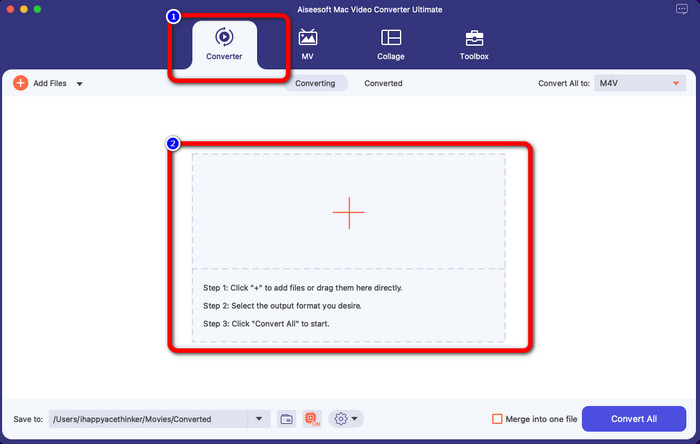
步驟 3: 接著,你會在介面右上角看到 全部轉換為的按鈕。點擊後即可查看格式選項,然後選擇 M4V 檔案格式。若要加入多個 MTS 檔案,請按介面左上角的「新增檔案」按鈕。
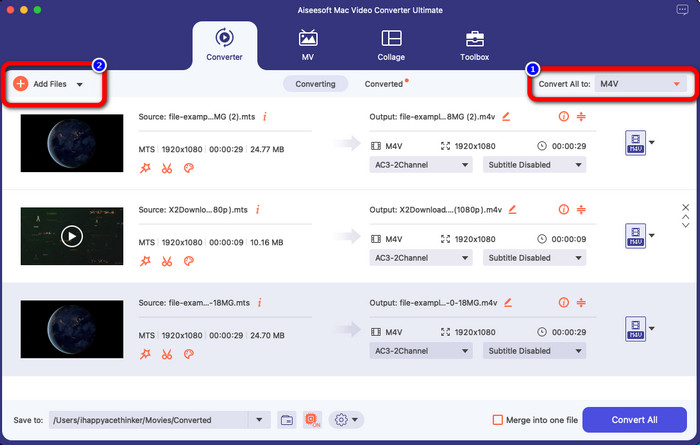
步驟 4: 將所有 MTS 檔案轉成 M4V 格式後,點擊全部轉換按鈕,並將最終輸出儲存到你想要的位置。
第 3 部分:如何在 Windows 上免費將多個 MTS 文件轉換為 M4V
在本部分中,你將了解如何在 Windows 上將多個 MTS 檔案合併轉成一個 M4V。要轉換 MTS 檔案,你可以使用 FVC Free TS Converter。它能以高出一般轉檔速度 10 倍的效率轉換影片檔,並支援批次轉檔,讓你一次處理多個檔案,不必一個一個慢慢轉,節省時間又不無聊。此外,它具備直覺式介面與基本操作流程,非常適合一般使用者。如果你想在 Windows 上使用 FVC Free TS Converter 將多個 MTS 檔案轉成 M4V,請依照下列簡單步驟操作。
功能特色
◆ 轉換視頻文件格式,如AVI、MOV、MPEG、MP4、DIVX、XVID等。
◆ 提供視頻增強器。
◆ 屏幕錄製功能。
◆ 可以播放任何藍光光盤。
◆ 提供批量轉換。
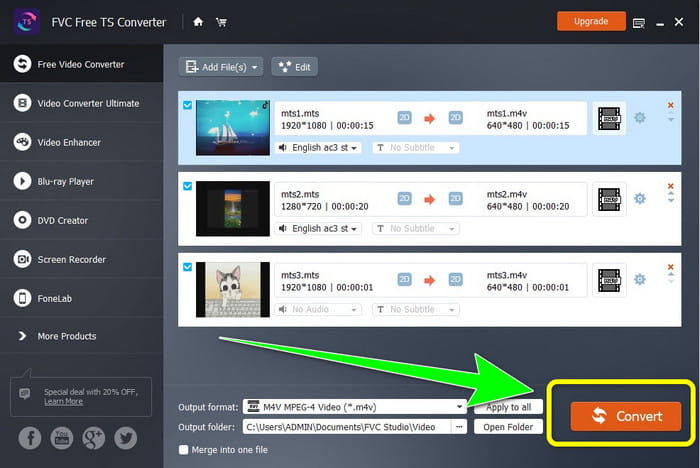
步驟 1: 在 Windows 上點擊下方下載按鈕取得 FVC Free TS Converter。安裝完成後啟動程式。
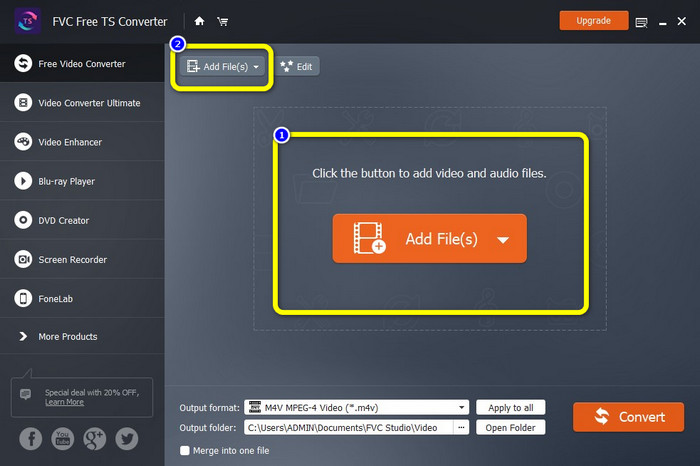
步驟 2: 啟動程式後,按下中央的新增檔案按鈕上傳 MTS 檔案。你也可以點擊介面上方的另一個新增檔案按鈕,加入更多想轉換的 MTS 檔案。
步驟 3: 點擊介面右側的格式選項,然後選擇 M4V 作為輸出格式。其餘 MTS 檔案也請依相同步驟設定。
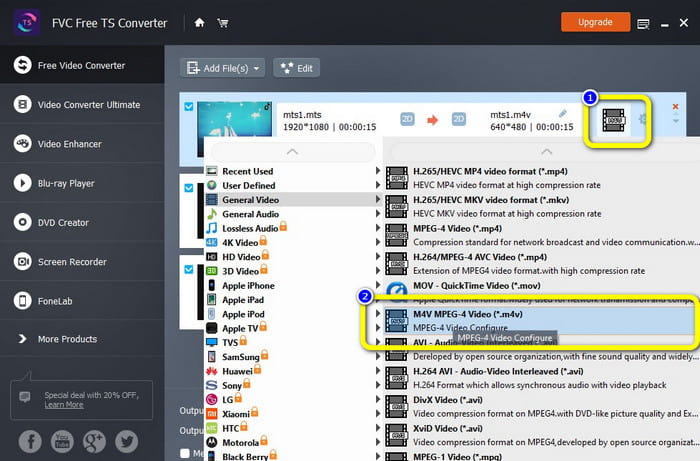
步驟 4: 點擊轉換按鈕,即可將多個 MTS 檔案轉成 M4V 格式。
第 4 部分:使用在線應用程序將 MTS 轉換為 M4V 的最佳方法
若要透過線上工具將 MTS 轉成 M4V,最適合使用的轉檔器就是 FVC Free Video Converter Online。在這個工具的協助下,你可以輕鬆將 MTS 檔轉為 M4V。整個轉換流程只需三個步驟。而且這款線上工具是 100% 免費使用的。因此,事不宜遲,就來把你的 MTS 轉成 M4V 檔案格式吧!請依照我們提供的步驟操作!
功能特色
◆ 轉換多個文件,如 MP4、FLV、WMA、MOV、MTS、M4V 等。
◆ 允許批量轉換。
◆ 可在Mac 和Windows 上訪問。
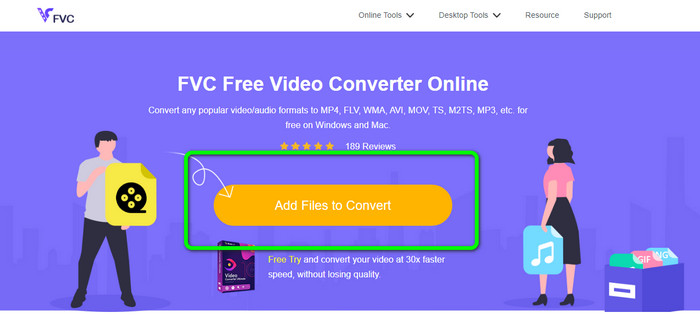
步驟 1: 造訪 FVC Free Video Converter Online 官網。然後點擊新增檔案進行轉換按鈕以上傳你的 MTS 影片。
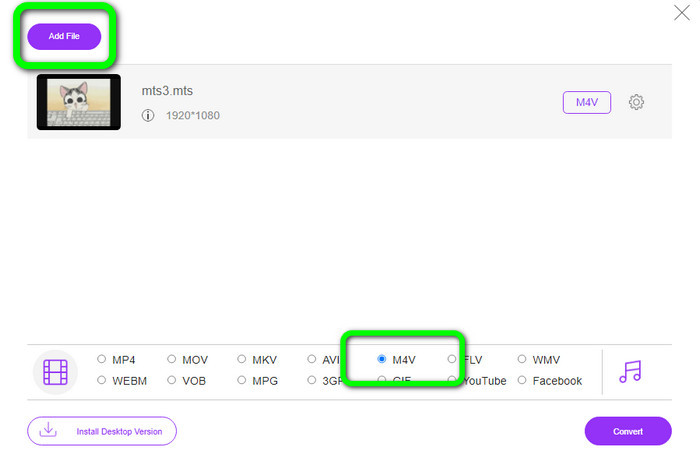
步驟 2: 接著在介面下方的格式選項中選擇 M4V 格式。你也可以點擊新增檔案按鈕,一次轉換多個檔案。
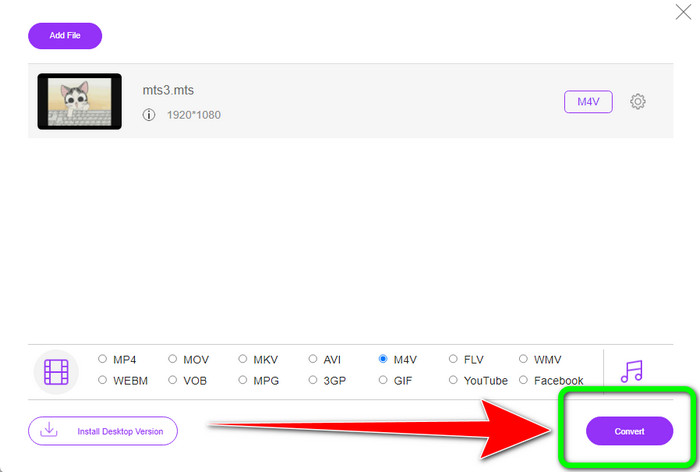
步驟 3: 選好想要的格式後,點擊轉換按鈕,將影片儲存為 M4V 檔案格式。
第 5 部分:有關將 MTS 轉換為 M4V 的常見問題解答
1. MTS格式好嗎?
是的。 MTS、高清 MPEG 和 H.264 傳輸流視頻格式支持 720p 和 1080i 高清視頻編解碼器。人們經常將 MTS 文件稱為 AVCHD,它由索尼和松下聯合創建,並於 2006 年以高質量格式發布。
2. 如何將 MTS 轉換為 MP4?
你可以使用以上提到的這些應用程式。這些轉檔工具在將 MTS 轉成 MP4及其他格式時,同樣十分實用且高效。
3. 為什麼要使用 M4V?
M4V 文件可以有軟字幕和 DRM 保護以阻止盜版並使消費者更難在設備之間分發文件。
結論
上述三款應用程式是你在各種裝置上可以使用的最佳轉檔工具。如果你是 Windows 使用者,可選擇 FVC Video Converter Ultimate;若你使用 Mac,則可以試試 FVC Free TS Converter;最後,如果你偏好線上工具,就可以使用 FVC Free Video Converter Online。這些轉檔器都能順暢地將 MTS 轉成 M4V。
-
 MTS VS M2TS – MTS和M2TS之間的區別
 什麼是 MTS 或 M2TS 文件? M2TS 和 MTS 有什麼區別?如何觀看攝像機錄製的 MTS 或 M2TS 文件?在這篇文章中找到所有答案
-
 您應該知道的Windows / Mac / Android / iOS最佳5 M4V播放器
 當您無法在 QuickTime Player 上播放 M4V 視頻時,您應該從這篇文章中了解更多適用於 Windows、Mac、Android 和 iOS 的 5 款優秀 M4V 播放器
-
 [已解決] 如何以原始質量將 MTS 轉換為 MKV
 您想知道如何免費將 MTS 轉換為 MKV 嗎?在本文中,我們列出了最好的免費 MTS 到 MKV 轉換器
