


 視頻轉換大師
 屏幕錄影大師
 影片修復
影片修復2 個推薦的轉換器,用於通過教程將 F4V 更改為 FLV
Adobe Flash Player 支援將 F4V 和 FLV 作為播放媒體的容器,用來從網路串流內容。雖然這兩種格式都是以 Adobe 為基礎,但在許多層面上仍有很大差異。舉例來說,FLV 中編碼的資料與 F4V 並不相同,因為 FLV 具有類似 SWF 的特性。此外,如果你想要將 F4V 轉檔為 FLV,並擁有像 SWF 那樣的編碼特性,那就繼續閱讀本文來了解更多資訊。

第 1 部分。將 F4V 轉換為 FLV 的最挑選轉換器的 2
第一選擇。 FVC Video Converter Ultimate
FVC Video Converter Ultimate 是強力推薦的 F4V 轉 FLV 轉檔器,你可以在 Windows 或 Mac 上下載使用。這款工具擁有你所能體驗到最快且最穩定的轉檔流程,已經滿足了上百萬使用者的需求。更進一步來說,格式轉換並不是此工具唯一的強項。你猜怎麼樣?你還可以在這裡進行剪輯影片、合併、增強音訊、裁切等多種編輯。如果你想擁有一款能滿足你各種需求的獨特轉檔器,那麼這款就是最佳選擇。以下是將 F4V 檔案在幾分鐘內轉成 FLV 格式的詳細步驟說明。
如何利用 FVC Video Converter Ultimate 將 F4V 轉換為 FLV:
步驟一。 按一下下載按鈕,將此軟體下載到你的電腦硬碟中。
步驟二。 點擊軟體將其開啟,在介面右上角按一下Add Files 以匯入檔案,選擇你想要轉換的 F4V 檔案後,再按一下Open。
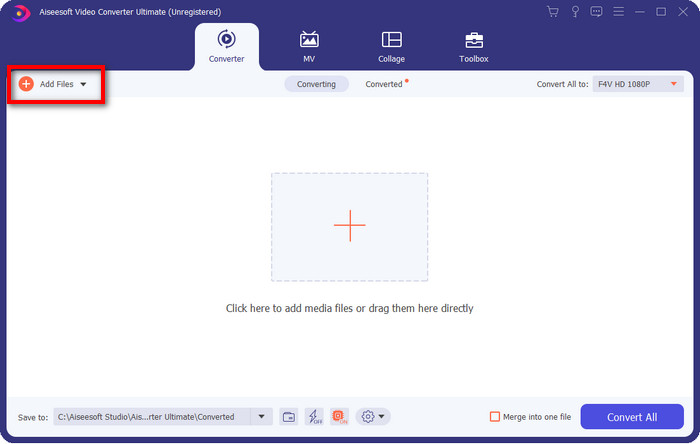
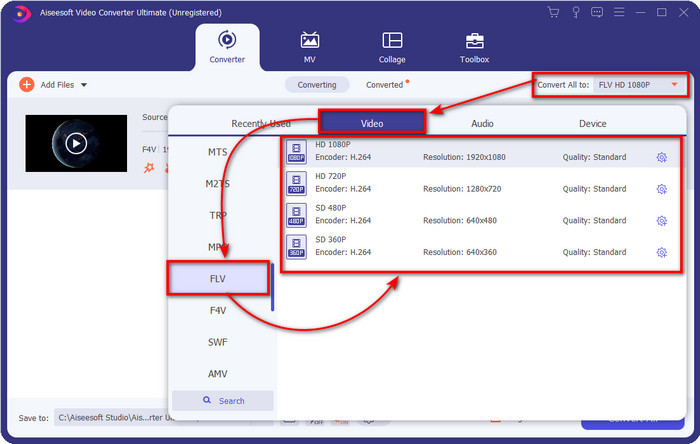
步驟三。 點擊Convert All to 按鈕,並將輸出格式變更為 FLV。
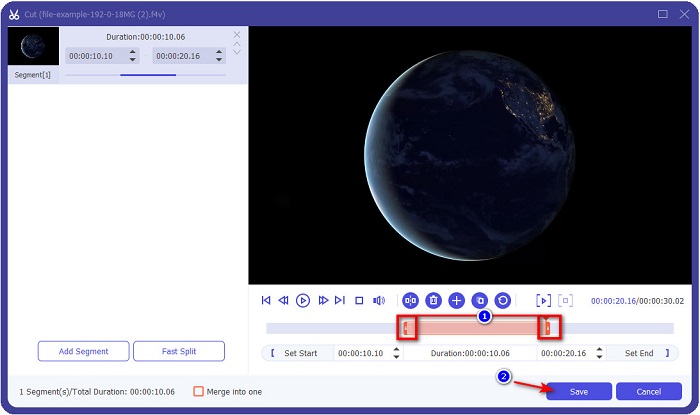
想讓影片變短嗎?如果是,請按一下scissors(剪刀)圖示。依照你想要保留的長度拖曳handlebar(控制桿),調整完成後按一下Save 以儲存變更。
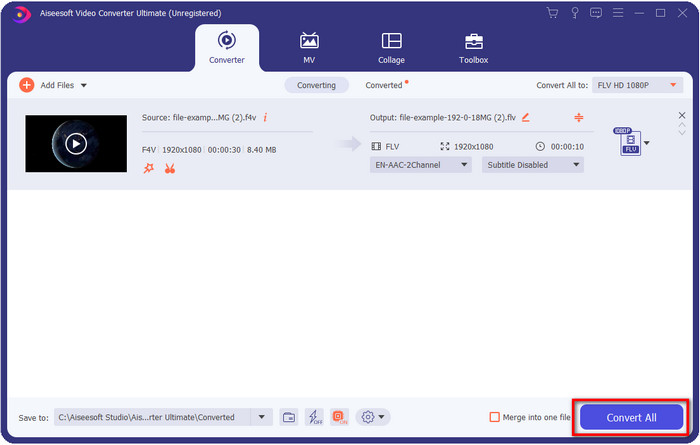
步驟四。 若要將 F4V 轉成 FLV,請按一下Convert All,轉檔程序便會立即開始。完成後,系統會自動開啟一個資料夾顯示你的檔案所在位置。
優點
- 它可以輕鬆地將多個 F4V 轉換為 FLV、AVI、MOV、MKV 和 200 多種格式。
- 此處提供硬件加速和快速轉換以加快轉換速度。
- 它適用於所有 Windows 和 macOS。
- Toolbox 下提供了出色的視頻編輯功能,可讓您的視頻看起來非凡。
缺點
- 需要購買後才能使用。
- 需要在桌面上下載轉換器。
第二選擇。 FVC 免費在線視頻轉換器
FVC Free Video Converter Online 能幫助你在網路上完成轉檔流程。這個工具可在所有瀏覽器上使用,線上將 F4V 轉換為 FLV 毫無限制。不過,它不支援批次轉檔。然而,你仍然可以透過這個線上轉檔器獲得你想要轉換的格式。想知道怎麼做嗎?那就按照以下步驟進行操作。
如何利用 FVC Free Video Converter Online 將 F4V 轉換為 FLV:
步驟一。 若要開啟這個網頁工具,你必須點擊此連結。
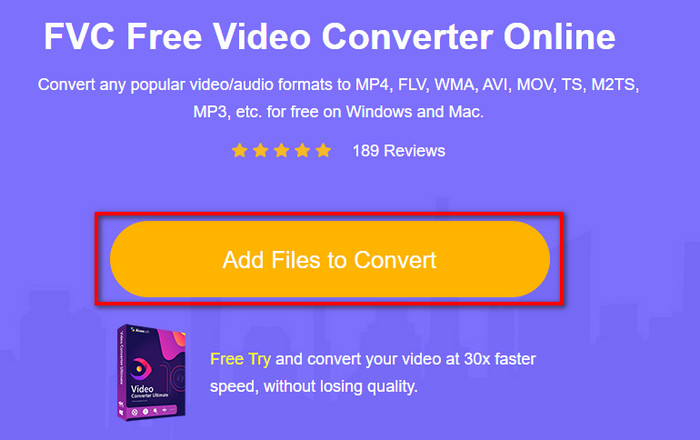
步驟二。 在網頁轉檔器的主畫面上,點擊Add Files to Convert 按鈕。在跳出的資料夾視窗中找到 F4V 檔案,然後按一下Open。
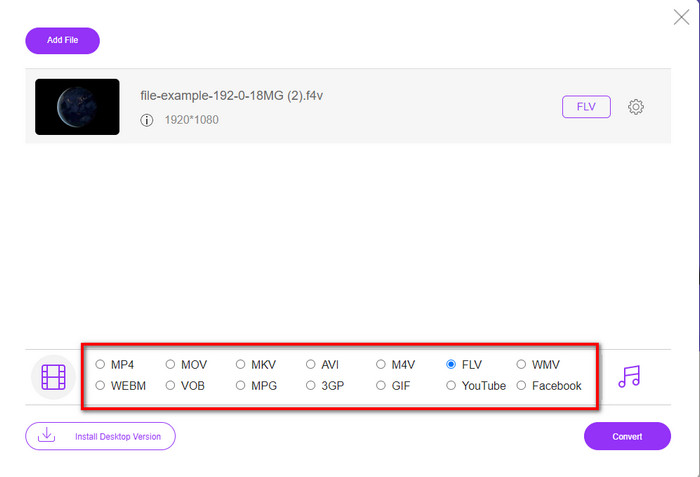
步驟三。 在底部有許多可選擇的格式,請點選FLV。
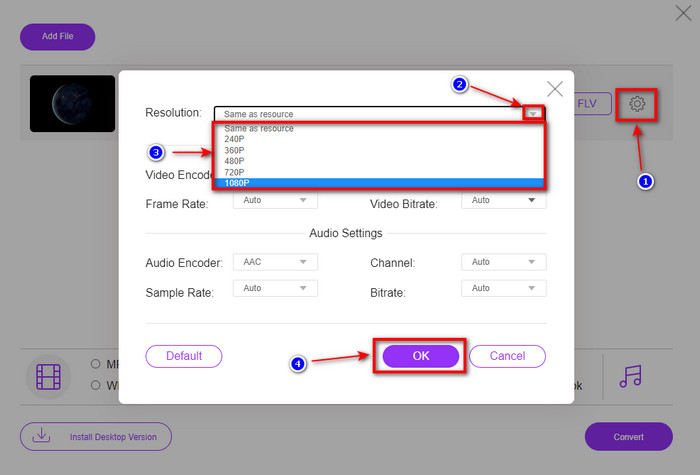
想變更影片解析度嗎?那就點擊cog(齒輪)圖示,按一下drop-down(下拉選單),然後選擇你想要的影片品質。
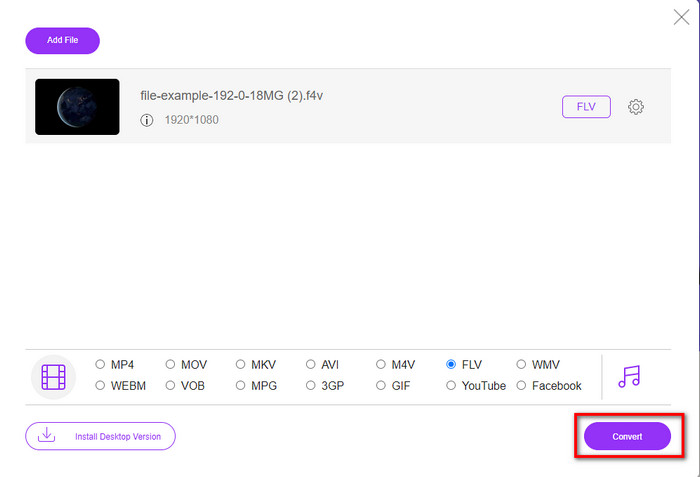
步驟四。 按一下Convert,開始將 F4V 轉換為 FLV。
優點
- 可在您擁有的所有網絡瀏覽器中使用。
- 免費且易於使用的在線轉換器。
- 無惡意軟件且主網站上無廣告。
缺點
- 互聯網連接是必須的。
- 它不支持像 FVC Video Converter Ultimate 這樣的視頻編輯功能。
第 2 部分。 F4V 與 FLV:哪種格式最好
正如開頭所說,這兩種格式是 Adobe 容器,您可以使用它們在 Web 上分發它們。但是現在,讓我們通過閱讀下面的詳細信息來比較兩種格式之間的差異。
F4V 格式是一種類似於 MP4 格式的 Quicktime 容器。它是一種 ISO 基本媒體文件格式,用於通過 Internet 流式傳輸視頻。另外,這種格式是FLV的升級版。儘管如此,對 FLV 上的視頻和音頻進行編碼仍然存在很多問題。此外,您無法像 FLV 那樣生成 HTML 網頁。
FLV 是結構與 SWF 幾乎相同的文件。這種格式在 Adobe Flash Player 和大多數 HTML 5 中得到更多支持。它支持視頻和音頻壓縮,如 Sorenson Spark 或 VP6 編解碼器。此外,如果您考慮在網絡上下載視頻,這種格式是最佳選擇。與 F4V 不同,如果您想在網頁上生成 HTML,這就是適合您的格式。
最好將 F4V 轉換為 FLV,因為您在 FLV 上獲得的好處在 F4V 上不可用。雖然說F4V是FLV的新版本,但FLV的獨特性在很多方面都是F4V無法複製的。
第 3 部分。 有關 F4V 到 FLV 轉換的常見問題解答
如何播放 F4V 視頻?
在強大的多媒體播放器協助下,你可以輕鬆完成播放,而其中最佳的範例便是Aiseesoft Blu-ray Player。請依照以下簡易步驟來播放 F4V 檔案。首先,在桌面上下載並啟動此軟體。接著按一下「Open File」將檔案匯入工具中。載入完成後,檔案就會自動開始播放。
哪個更好? F4V 還是 MOV?
這得視你想要達成的用途而定。舉例來說,F4V 非常適合在網路上發佈媒體檔案,同時維持畫質不失真。然而,如果你要在 Mac 上剪輯影片,那就應該選擇 MOV。因此,若你想在 Mac 上編輯 F4V 影片,就必須先了解如何將 F4V 轉換為 MOV。
F4V 是否包含高質量輸出?
F4V 文件可以包含 1080 或 720 視頻質量,但文件大小將保持最小。
結論
現在我們已經學會如何利用轉檔器將 F4V 轉成 FLV,是時候根據評價來挑選你可靠的轉檔工具了。如果你想體驗免費的線上轉檔流程,那就必須使用 FVC Free Video Converter Online。但這款網頁工具無法超越上面介紹的旗艦轉檔器。毋須多作介紹,我們更偏好使用FVC Video Converter Ultimate,因為它能更輕鬆且快速地完成轉檔工作。這款非凡的轉檔器憑藉其獨特功能,讓眾多使用者印象深刻。所以現在我們可以說,在這些工具的協助下,我們已離成功更近一步。
-
 4 個最新的在線和離線轉換器將 F4V 轉換為 AVI 格式
 Don'您不知道應該使用什麼轉換器將 F4V 轉換為 AVI 或任何其他視頻格式?然後閱讀本文,了解如何使用可用工具進行轉換。
-
 如何在不損失質量的情況下將 F4V 轉換為 MOV [已解決]
 如果您難以接受某些視頻格式,例如 F4V。閱讀本文以了解有關 F4V 和 MOV 視頻格式的更多信息,並了解如何使用不同方法將 F4V 轉換為 MOV。
-
 使用最簡單的離線和在線方法將 TRP 轉換為 FLV
 您想快速輕鬆地將您的 TRP 視頻文件轉換為 FLV 嗎?閱讀本文,為您提供最適合情況的最佳軟件和在線服務。
